🎬 Elevate your audio-visual game — don’t just watch, experience every detail!
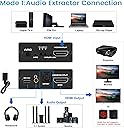
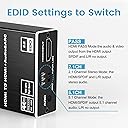
The NEWCARE HDMI ARC to Optical Audio Adapter is a compact, metal-encased audio extractor that supports 4K@60Hz Ultra HD video with HDR and 3D. It splits HDMI audio into high-quality Toslink SPDIF optical and 3.5mm stereo outputs, compatible with ARC-enabled TVs and a wide range of devices. With HDCP 2.2 support and three audio EDID modes, it delivers versatile, lossless sound for modern and legacy audio systems, making it an essential upgrade for seamless home entertainment integration.


| ASIN | B083DDGGZ4 |
| Best Sellers Rank | #49,736 in Electronics ( See Top 100 in Electronics ) #114 in Digital-Analog Converters #126 in Signal Converters |
| Brand | NEWCARE |
| Color | Metal black |
| Compatible Devices | PC |
| Connector Type | Auxiliary, HDMI |
| Current Rating | 350 Milliamps |
| Customer Reviews | 3.9 out of 5 stars 626 Reviews |
| Finish | Hdmi |
| Finish Type | Hdmi |
| Input Voltage | 5 Volts |
| Item Dimensions | 7.6 x 7.44 x 0.98 inches |
| Item Height | 0.98 inches |
| Item dimensions L x W x H | 7.6 x 7.44 x 0.98 inches |
| Manufacturer | NEWCARE |
| Model Number | 1911 |
| Nominal Power | 1.75 Watts |
| Number of Items | 1 |
| Number of Ports | 3 |
| Package Quantity | 1 |
| Power Plug Type | Type A - 2 pin (North American) |
| UPC | 754909809959 |
| Unit Count | 1 Count |
| Warranty Type | Limited |
C**K
Great product 👌
It works great for my older bose sound system i would recommend it if you have system fiber optic and a new TV without fiber optic output this works !!!!
C**M
Don't need to run 2 HDMI cables!
I have an old receiver which was quite high performance in its day. We have a fancy new large screen TV which is very "smart", but it is too far from our component stack to run optical cable. This little box allowed me to runa long HDMI from my screen with a very short optical cable from this box AND I can use that same HDMI cable to carry the signal from my BluRay player to my big screen! I thought I would need 2 cables, one to take the signal to the big screen and a separate ARC cable to take the sound from the TV to the speakers. I plugged all the cables in and it immediately worked! I am giving it 4 stars instead of 5 because I am glad I had a tiny optical cable available. The HDMI and optical connectors are too close together for most cables. My snazzy new 12 meter QVC HDMI cable has one of the slimmest connectors I have ever seen for HDMI, but still 2 out of my 3 optical cables would not fit. I don't have the brand or part number for the cable that works because I must have purchased it ten years ago. It has almost no jacket on the cable and very small ends (it's fiber, it doesn't need any shielding, I think the thick jackets on most optical cables are either to keep them from getting kinked or just to satisfy US consumers' misguided bias associating bulky size with high performance.) Also, the ARC on/off switch is not labelled! It just says on/off. I bought this box so I could stream movies using my smart TV so I always leave this switch in the ON position. It did work the first time I tried it. However, the next time I turned on my system, there was no sound from my TV. I tried turning the ARC switch off and back on, but that didn't help. Unplugging the HDMI from my BluRay player got things working so I was satisfied. Later, when I plugged the BluRay cable back in, things still worked fine. I played around for a while and concluded that it was this box that was getting confused, not my TV. If I turn on the BluRay player, the box will expect the signal to come from the BluRay's HDMI cable. I have to turn off my Receiver, and turn it back on to reset the box so it transmits the ARC signal from the TV. This solution may be somewhat unique to my configuration because my BluRay player is powered through an AC outlet on my receiver. When I turn off my receiver, the BluRay player is also powered down. However, when I turn on my receiver, the BluRay does not power up unless I manually turn it on. I also have HDMI-CEC turned on in both the BluRay player and the TV (Samsung AnyNet+). This box transmits CEC signals; I don't know if it responds to them. I looked at so many HDMI Audio Extractors and HDMI Switches with Audio Extractors, that I don' t know if it was mentioned in this specific unit, but I think that, by default, most of this type of unit will switch when a new source is detected. If I turn on the BluRay player it will switch from ARC to BluRay. However, when I turn off the BluRay player, the ARC still doesn't play. Also, I can turn the TV off and On, but still no sound. After using my BluRay player, I have to turn the Receiver off and on to coerce this little box to send the ARC signal from my TV to my surround system again. This is fine with me. I rarely use my BluRay player and turning off the receiver when I finish a movie is no hardship. PRO: -- It simply WORKS!! -- It is tiny! -- It has USB input so you don't even need to use the power brick. You can use any USB port nearby -- Using this box is way, way cheaper than purchasing an updated Receiver CON -- The HDMI and Optical connectors are VERY close together. Look for cables with the narrowest connectors available. -- My unit does not have ARC printed above the ON/OFF switch -- Before you invite a crowd over to watch a movie with your new set up, give yourself some time to learn how powering on components in different sequences will effect the path of signals through this box. I like to space out my A/V purchases. I use whichever component as newest for streaming and control. I just bought a new Large Screen TV so now I use it for streaming and control. In a few years when I replace my BluRay player, I will use my TV as just a big, dumb screen -- like a monitor. I will use my BluRay player for streaming and control. A few years after that I might replace my Receiver or maybe get the latest Chromecast or Roku or Firestick or whatever new technology becomes available. This way I always get to use the latest technology, but I don't have to throw everything out with every generation.
R**R
easy setup and small in size
Works great to get audio signal into my surround sound system on a Apple TV.
D**C
4K60 HDR works with Firestick and got my Dolby Digital optical back!
UPDATE -seems box is incapable of HDMI arc functions. Works great as HDMI pass through described below, but I was limited to passing audio to the single device attached to it. When I connected to the TV Arc output so I can pass audio from all devices connected direct to TV, the arc did not work with any settings to produce optical out. ARC works with my sound bar, but not this box. Arc on/off & switch settings for channels, nor setting PCM on the Tv worked. Returned to find one with working ARC support. Original review: Fantastic little metal box. My older Denon AVR will not read HDMI audio, so am reliant on optical. Unfortunately my TV only outputs PCM (2.1) on its optical, so was not getting full 5.1 sound on my AVR. Once I installed this guy, Dolby digital again shows on the AVR and I hear an INSTANT improvement in sound quality, and no loss of picture quality. Plugged Firestick directly into the box, and used the HDMI out to TV and optical to the AVR. 4K60 is also HDR working great. Also note with Netflix and HBO Max dolby digital+ on the optical port. Many of these converters have trouble with this as they cant handle Dolby digital+ on optical when set to 5.1 mode. -1 star for value: the supplied HDMI cable is technically working in 4K HDR, but is extremely cheap and has no markings. I tested but did not leave installed. Optical cable was fine and the inclusion of both and the power supply was a nice bonus. Was leaning toward a competing model by J-tecx, but too many complaints of defective units or early failure.
K**.
Terrible. Loud hissing. Returned.
Terrible product, I am returning it. Would give it Zero stars if I could. There is a loud hissing / white noise sound when music is idle or low. It does extract the audio and send the video just fine, but the hissing sound just makes it unbearable. This is especially bad if you are using it to play YouTube on a projector and extract sound to loud speakers for a party like I was doing. Don't waste your time and money here with this product. The problem definitely was the product, becuase I troubleshot it may ways and nothing got rid of the hiss. I finally just went to Best Buy the day of my party, and luckily bought a different one off the shelf, that worked flawlessly. Also for this product, the jacks are way too close together, which makes even plugging in your cables a ridiculous hassle if they are not slim.
T**R
Great product! Allowed me to reroute my broken optical out from TV.
At first I had lots of trouble with is product to be honest. I got in touch with NEWCARE customer service and they happily send a replacement and were overall very eager to help if there were any further issues. The issue in case anyone else's device does this too, this maybe the fix. So when the TV would turn on almost every time I would have to go and play with the wires and the sound output switch till it would eventually work and my external speaker would then work. When I got the new device that was sent it had the same issue, however after some trial and error I figured out the solution. You have to connect the audio adapter to the TV without using the HDMI on the audio adapter. This allows it to not be fixed to that device but to reroute the TVs sound to all devices. Then just use the other HDMI connections like normal. This seemed to mean that I could use all of the TVs smart features as well as my cable box and chromecast with my external speaker without needing to keep playing with the wires everytime. Hope this helps.
A**Y
Connected my new smart tv with my old sound system
I was disappointed to see my New Samsung Smart TV did not have a SPDIF port for my Yamaha 5.1 channel sound system to connect to. I'm not ready to buy a new sound system. The one I have puts out great sound. Fortunately, this converter seamlessly connected my sound system to the HDMI ARC port on the TV. It works great! Now I have surround sound again when watching movies on my new tv.
G**N
Works as advertised. Solved a Dish Hopper Audio Bug
Our Dish Hopper has a bug in the program. When we go to YouTube through Hopper, the TOSLINK optical audio goes dead but HDMI embedded audio continues to work. Reported to Dish engineering but who knows if they will ever fix it. In the meantime, this little HDMI audio de-embedder solved the problem. We looped the Hopper HDMI out through the Newcare HDMI 2.0b Audio Extractor and fed optical S/PDIF to our audio amplifier. Problem solved. The box is transparent with no side effects. Comes with 5 volt power pack, HDMI jumper, and TOSLINK cable. Highly recommend for those rare times when you really need to pull audio from HDMI. >> Review Followup After 3 Months of Use >> The audio extractor is still working but I discovered a flaw in it's programming. When fed from our Dish Hopper receiver, the audio channels are reversed. Specifically, left and right are swapped. If I moved the protocol slide switch to another position and back, the channels righted themselves. That is, for a while. After a few minutes, the channels were reversed again. The TOSLINK feeds a Yamaha amplifier/decoder. Now I suppose if this is the only source you have then you could simply swap the speakers. Or just ignore the problem as almost everything is center channel these days except for music. Since my return window has expired I replaced it with another brand and will put it on my oddities shelf. I informed seller of the problem and received a quick reply where they offered a refund even though the return window had passed. They also informed be that the product was now revised and suggested that I try the newest version. They provided a link to make that option easier. I understand that problems occur from time to time and appreciate when a seller will step up do their best to make things right. That is why I am giving them a 4 star review, 3 stars for the product and 6 stars for above and beyond good customer service,
Trustpilot
2 months ago
4 days ago