⚡ Elevate your legacy display game — because your monitor deserves the upgrade it’s been waiting for!
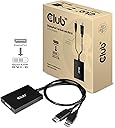
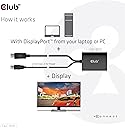
The Club 3D CAC-1010 is a USB-powered active adapter converting DisplayPort 1.2a signals to dual-link DVI-D, supporting resolutions up to 2560x1600 at 60Hz. Designed for professionals extending the life of their high-res DVI monitors, it delivers stable, lag-free digital video output with HDCP support (excluding certain Apple Cinema models). Its durable build and compact form factor make it an essential bridge between modern GPUs and older displays.
| ASIN | B07T16LLB8 |
| Best Sellers Rank | #305 in DVI-HDMI Adapters #22,057 in Computer Cables & Interconnects |
| Brand | Club 3D |
| Built-In Media | Adapter CAC-1010, Displayport to DVI-D dual link |
| Color | BLACK |
| Compatible Devices | Monitor, Projector |
| Connector Type | DVI |
| Current Rating | 2 A |
| Customer Reviews | 4.1 out of 5 stars 513 Reviews |
| Finish | Hdmi |
| Global Trade Identification Number | 00841615101559 |
| Input Voltage | 5 volts |
| Item Dimensions | 23.62 x 2.36 x 0.39 inches |
| Item Type Name | CAC-1010 |
| Item Weight | 3.8 ounces |
| Item dimensions L x W x H | 23.62 x 2.36 x 0.39 inches |
| Manufacturer | CLUB 3D |
| Mfr Part Number | CAC-1010 |
| Model Number | CAC-1010 |
| Nominal Power | 10 watts |
| Number of Items | 1 |
| Number of Ports | 1 |
| Package Quantity | 1 |
| Specific Uses For Product | PC, Monitor |
| UPC | 841615101559 |
| Unit Count | 1 Count |
| Warranty Description | 2 year manufacturer |
| Warranty Type | manufacturer warranty |
M**E
Works As Intended
I recently upgraded to a GPU with no DVI-D port. The problem is that my current monitor (Acer GN246HL) supports 144Hz only over DVI-D Dual Link. The HDMI input only supports 60Hz, there's no DisplayPort support, and the VGA... well, it's VGA. I was a bit skeptical at first, but decided to shell out about $40-$45 for this instead of about $300 for a new monitor. Worst case scenario, I'd return it. I'm happy to say that, after using it for a few days, it's working just fine. Everything looks and feels the way that it should. Two things to look out for, though: 1. Other reviewers on here and other sites claim these devices have some hiccups running at 144Hz. I DID experience that at first; when I changed the refresh rate from 60 to 144. However, once it seemed to adjust, everything has been pretty smooth, and I haven't noticed much tearing if at all since. 2. Since this is not only a converter, but requires power to convert (via USB), it'll take a bit longer for the monitor to recognize the signal; for instance, when booting up your PC. Another one was when I changed the refresh rate; instead of refreshing a few seconds after changing the the refresh rate, it took about 10 seconds for the monitor to refresh (I only had about 5 seconds to click "Keep Settings"). Other things of note would be that I find no added lag, so it's viable for gaming. The actual construction of the product itself is pretty solid (AKA doesn't feel cheap). The cable length should be sufficient for most users. I honestly was kind of expecting to just have it hanging out of my GPU, but it's long enough to allow you to either rest it atop your tower or tuck it away somewhere close by. With all that said, if you're trying to squeeze a bit more life out of an older monitor like I am, I highly recommend giving this a shot!
K**N
Worked with overclocked Korean DVI monitors
+ Works with Korean overclocked monitors I have a couple of 1440p overclocked monitors (only gone up to 96 hz). They have been consistently hard to use with newer GPUs since they are DVI-only. Basic adapters are single-link and don't work. But these powered dual link adapters work at the overclocked refresh rate. I'm supplying USB power thru a powered USB hub (power only ports). The only quirky thing is the adapters take a few seconds to come up after they receive power / video signal. During that time they cycle thru solid primary colors. The flash of white light sometimes startles me at night when it wakes up to update or backup. (For those unaware, there was a period of time where high quality factory second panels were sold to smaller manufacturers, commonly in Korea. These mfgs would pair the panels with cheap DVI controllers that more-or-less directly wired the signal to the panels. Which meant that you could just set a custom display resolution with higher refresh rate and it would just work up to a point. 96 hz was generally safe, but above that could work with some color calibration. They were also a bargain, price-wise. These kinds of monitors were commonly referred to as Korean overclocked monitors.)
G**N
1080p 120/144hz? YES! No flickering or graphical issues at all!
I needed this as my new graphics card doesn't have a DVI output, and my monitor is 120hz. Monitors are expensive, so this is the cheapest thing that will get it to operate at it's full potential. I've seen devices like this for $80+ on Amazon, so I was slightly skeptical that it would work. No flickering, pixelation, or any weird graphical effects :D It works, BUT it will not automatically be on the highest refresh rate when you plug it in, you need to turn the refresh rate up in Advanced Adapter Properties in Windows, and to be honest I don't think my monitor automatically was ever set to max refresh rate anyways, probably just the OS. As a person fine with 1080p, I am glad I can keep my electronics longer and of use. Buy with confidence.
D**S
Flicker every 2 seconds, causing the mouse to hang as well. UPDATED REVIEW!
UPDATE: I was able to get in touch with support, and they did email me firmware to make my unite a NON HDCP, and this device works 100% as promised. Would have been 5 stars all the way if not for the confusing information in their description that led me to order the wrong type in the first place, so had to knock off a star for that, but they did support the product very well. First of all, let me clear up the misleading information in the description. IF YOU HAVE A MONITOR THAT IS NON HDCP, ORDER THE HDCP OFF PRODUCT. That wasn't hard at all, but for some reason they went to great lengths to confuse a simple concept. The description just says for certain Apple Cinema monitors, order the HDCP OFF version. Since I don't have an Apple Cinema, I ordered the HDCP ON. I was able to get 2560x1600 on my Dome E4c, which is beyond what I expected, and the image was great, except for the flicker every 2 seconds, which causes the mouse to hang as well during the flicker. The manufacturer does have a forum, and someone did reply, although I don't think he actually works for the company. He told me I definitely should have ordered the HDCP OFF product, but he suggested that I email their support to get firmware to change mine to an HDCP OFF. However, when I asked how long I could expect to have to wait for a reply from "support" we went radio silent on me. Unfortunately, they don't seem to actually have support, as they have not replied. So I guess I'll be sending this back, even though if they actually had support personnel that can spare 5 minutes to send me firmware, that they really should have available on their web site, I could probably get this one working, and we would have a totally different review. Seems like a decent product, rendered useless due to badly written information, (the misspelling of the word monitor is a nice touch. Very professional) and total lack of any support whatsoever. If you feel lucky take a shot at it, just know that if there is an issue, you're on your own.
M**I
Almost works, but don't bother
UPDATE 6/27/23: Seems to get worse over time. Now it syncs up properly less than half of the time, requiring multiple reboots or cable reseatings to get the HDCP to sync up. I can't in good conscience recommend this product. It's a cheap substitute for a modern monitor and overpriced for what you get: an adapter that barely works most days, and adds black flickers when it does. For my older Acer GN246HL, it does what it needs to do: provide a dual link DVI signal for gaming at 144hz. Setup was simple enough and despite a slightly longer screen initialization time, it functions as it should for this purpose. The problems come with its other functionality. While on desktop, especially while watching video, there are occasional full screen blackouts that last maybe 1/4 second. Annoying and somewhat rare, but present nonetheless. The worst issue however is the HDCP. Despite buying the HDCP On version required to watch streaming video services, it works only about 80% of the time and is very finicky/flaky. In order to work at all, the monitor must be on and fully initialized before the computer is turned on, if this is reversed the HDCP will not sync up at all. Even when doing this correctly, it is possible for the HDCP to fail anyway, causing the whole screen to become fuzzy any time HDCP-enabled video is playing on screen. The only way to fix this in my case was to unplug the DVI cable from the adapter for a few seconds, then plug it back in, but I shouldn't have to climb behind my computer whenever this happens. I do have a spare HDMI cable I could switch to for HDCP video, but I shouldn't have to switch between inputs whenever I want to watch something, which is several times per day. What's really frustrating is that despite these issues, this might be the best quality product of its kind available for sale. All the other DP>DVI adapters review much worse, either not working at all or providing only Single Link compatibility, which is worthless for 144hz displays. It's disheartening that this is probably the best of limited options, despite being a buggy and inconsistent product. If I could have afforded to just buy a new 144hz monitor with DisplayPort, I would have done that instead of settling for this thing. I can only recommend it if you're in the same situation: needing an adapter for your older gaming display but without the funds to simply replace it with something newer. But if you have the cash, don't bother with this thing, you're better off with a new monitor instead.
J**E
2560x1600 Resolution
I bought this adapter for $43 because the cheap DP to DVI pass through adapters don't support DVI-D Dual Link mode. This adapter allowed my Radeon 5600XT video card to output 2560x1600 on my 30" Apple Cinema display which only has the DVI port. The only down side was that this adapter was in popular demand and I had to wait a little longer to get it restocked and shipped. It was well worth the wait. I just built a brand new gaming machine and was stuck with a 1280x800 resolution because I didn't know about DVI Dual Link mode. This $43 adapter was well worth the cost and is handling my gaming quite well. Easy plug-n-play without any problems. Much more cost effective than some of the other adapters priced at $100+.
B**S
Does what it says, just not super well...
Like most people who need this device, I am hooking up a newer video card (Radeon Pro WX 1400) with only DP output to an older display (DELL 3007WFP, 2560x1200) with only DL-DVI. It took a reboot for some reason to allow a resolution greater than 1280 x 800, but then I was able to get my screen working at full res. I will say that when the machine boots up (Precision 5820), the DELL logo is doubled and there are a lot of weird color artifacts all over. Once in Windows and the drivers are loaded it looks fine, except... anywhere on the screen where there are medium to dark colors, grays mostly, I see red pixels flickering everywhere (see screenshot). On predominantly light screens I do not see this. I am a developer and I prefer "dark mode" for my editors, so this is a big issue. The next issue is that the screen does not always come back after sleeping. It usually takes about 5 seconds for it to recover, but if it does not, then the screen will remain dark. Not as in stand-by dark, the screen is on and basically filled black. I can tell because these older monitors do not have a true "black" due to the light bleed through. Yes, I have tried three different drivers (DELL's most recent, and two different ones from AMD: WHQL and beta). Also, this screen works fine on the machine it was hooked up to before with direct DVI connection. In any case, it does usually work well enough, and other people may not care about the artifact issues. Me, on the other hand, will likely just bite the bullet and get a newer panel with DP connections and move on...
B**N
Functions at 1920x1080 144Hz
I recently got a new GPU and it didn't have a DVI port and my monitor (GN246HL) doesn't have a display port or an HDMI port that supports 144Hz. I had to either buy a new monitor or find an adapter that would support 144Hz. After a lot of looking online I found this one and based on other reviews it seemed like it would work so I took a chance. Set it up today and everything runs great at 144Hz, I have yet to see any sort of performance issues out of it. Highly recommend if you're in a situation similar to mine.
C**N
not doing the job for 144hz monitor
Doesn't work properly with my BENQ 2411 DVI 144hz monitor, every 10minutes it stops working correctly and I have to unplug/replug..... it's not strong enough for 144hz it seems
N**S
Perfect for Acer GN246HL to get 1080p 144hz; simple DVI to DP active adapter
Title says it all. Really wish that there were more photos of people showing their results, so I thought I would do my due diligence. To clarify, photo: 3. After: 120Hz/144Hz capability with Club 3D active adapter 2. Before: 60Hz with inactive DVI to Displayport adapter 1. USB connection and Dual-Link DVI connection to computer and Club 3D Adapter I am using the Acer GN246HL and have a RX 5700 XT, which does not have a Dual-Link DVI female connection. I had tried the StarTech Displayport Adapter (DisplayPort to DVI Video Adapter Converter) but it only gave me 60Hz. After doing more research I found out that you need an active adapter to successfully get 120Hz or 144Hz. I found that the other options for active display ports were quite expensive, so I decided to take a chance and get this one, which seems to be the cheapest active adapter on the market currently, and it works incredibly well. Simple installation, all it requires is a DVI connection and a USB connection. I tried both the USB 2.0 and the USB 3.0 port, and there is no difference in performance as far as I can see. No sign of any dead pixels or artifacts so far. TL;DR: Buy this if you have an Acer GN246HL (ACR02F9), you want 144hz 1080p, and your graphics card has no DVI port.
W**L
Great Product works as expected
Now I can have max resolution on the Apple Cinema display screen.
A**ー
144Hz
新しくPCを新調したら、PC側のHDMIがなくなり144Hzでなくなってしまった。 前ほど廃プレイしていないので、モニタ購入するのもな・・・と思い、ネットで紹介されていたこちらを購入しました。 半信半疑でしたが問題なく使えています。
K**N
worthless brick
Just doesn't work at all. Plugged into correct ports, turned off PC, restarted and nothing. Trying to return.
Trustpilot
5 days ago
1 week ago