🔗 Connect with confidence—where vintage tech meets modern speed!
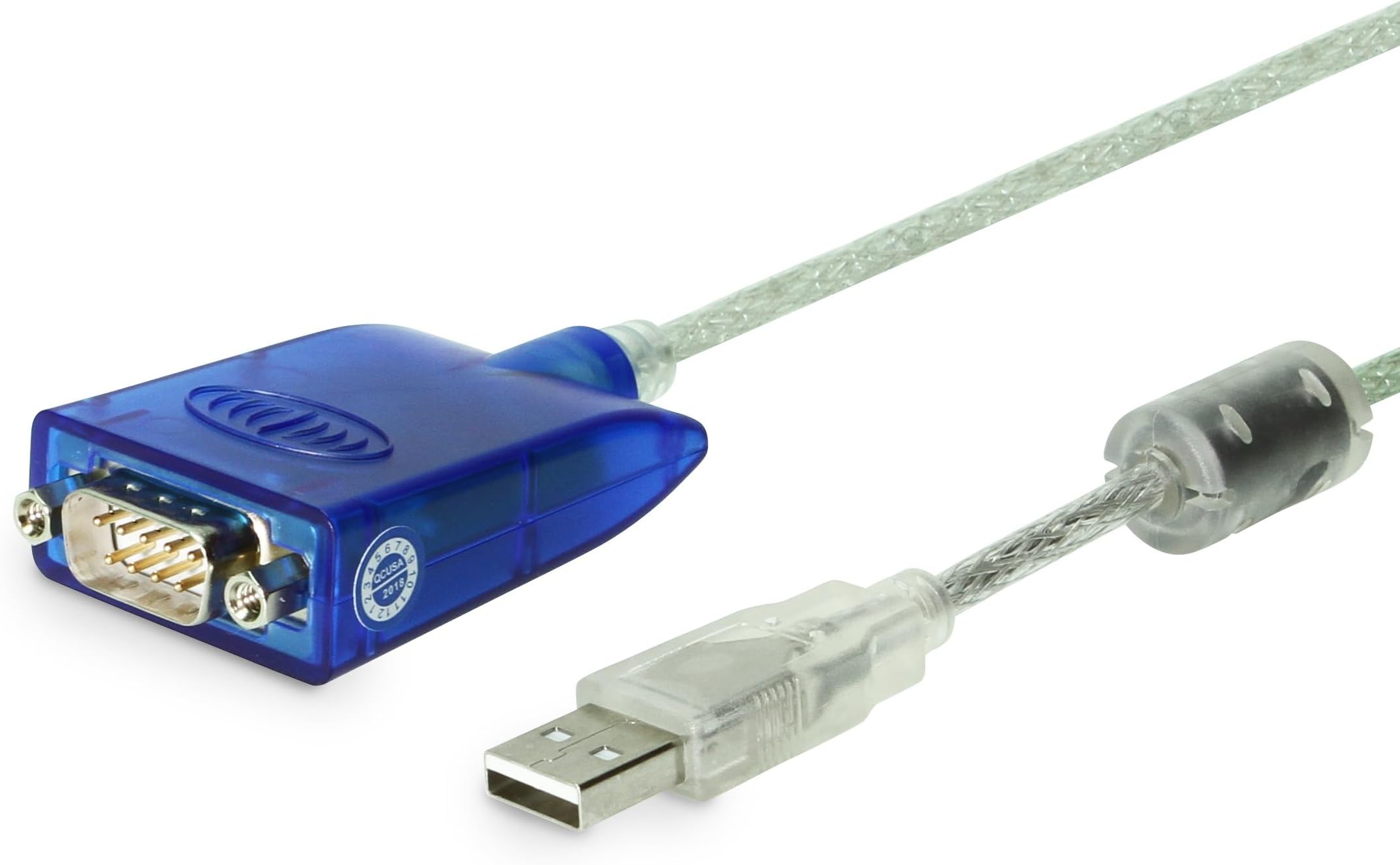
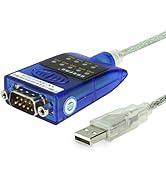
The Gearmo 36-inch FTDI USB to Serial Cable is a high-performance, 3-foot blue USB Type-A to RS-232 DB9 male cable featuring LED indicators for power and data transmission. Powered by advanced FTDI chipsets, it supports ultra-fast 921.6 Mbps data transfer and is compatible across Windows, macOS, and Linux platforms. Designed and engineered in the USA, this cable ensures reliable, professional-grade connectivity for legacy serial devices in demanding environments.


| Brand | Gearmo |
| Connector Type | USB Type A |
| Cable Type | Serial DB9 Male w/ Hex Nuts, USB Type-A |
| Compatible Devices | Devices with RS-232 DB9 female serial ports such as printers, modems, CNS machines, PLCs, radios, etc. |
| Special Feature | Data Transfer, LED Indicators for Power, TX, & RX, Linux Support, Windows 11 Support, macOS Support |
| Recommended Uses For Product | Connecting serial devices to modern computers, applicable in settings ranging from general office use to commercial and industrial applications |
| Color | Blue |
| Connector Gender | Male-to-Female |
| Data Transfer Rate | 921.6 Megabits Per Second |
| Shape | Round |
| Number of Pins | 9 |
| Unit Count | 1.0 Count |
| Item Weight | 0.07 Kilograms |
| Model Name | USA-FTDI-A36 |
| Indoor/Outdoor Usage | Indoor |
| Number of Items | 1 |
| Customer Package Type | Rigid Box or Sealed Anti-Static Bag |
| Maximum Voltage | 5.7 Volts (DC) |
| Outer Material | Plastic |
| Manufacturer | GearMo® |
| UPC | 729440626006 |
| Global Trade Identification Number | 00729440626006 |
| Item model number | USA-FTDI-A36 |
| Item Weight | 2.39 ounces |
| ASIN | B004WL7MIQ |
| Is Discontinued By Manufacturer | No |
| Date First Available | April 14, 2011 |
J**L
Great Serial to USB adaptor that works on Win 7 & Mac
I bought this Serial to USB adapter after trying a couple of others, such as Cables to Go brands. Despite stating their cables work, I could not get them to no matter what I tried, even with the most current drivers, under Windows 7 Ultimate 64 Bit and Mac OS Lion. However, I am happy to report and can confirm this item does work just fine under both Windows 7 64bit and Mac OS Lion. I have successfully installed and tested it in both. For Windows 7, there is no need to install any drivers, as it will be detected automatically and the drivers downloaded for it. For Mac Lion, you will need to install the included drivers or go to the web site for FTDI and download them. Under Lion, it is listed under the USB devices list and in Windows you will see the new drivers under Serial and USB.Bottom line is this works as stated just fine in the most current versions of Mac Lion and Windows 7 64bit so I am quite pleased and would highly recommend to others.
T**E
Works great!
Works great!
F**X
These FTDI Chipset USB to DB9 Virtual Comport Cables Work Great with Windows 7 (64-Bit)!
I needed these to connect to my Rigblaster M8 Digital Interface and my Yaesu FT-1000MP Mark V HF Amateur (Ham) Radio Transceiver to use for doing digital modes such as PSK31, MFSK16, Feld-Hell also known as Hellschreiber, and other numerous digital modes. I used the Prolific cables and drivers with Windows XP and Vista with no problems, but they would not work with Windows 7 Home Premium (64 bit). My PC would either freeze up after a few seconds when running MixW or Ham Radio Deluxe or Digital Master 780 which is built into Ham Radio Deluxe and sometimes would give me the blue screen of death crashing the PC. As soon as I plugged these in (I had to buy 2, one for the Rigblaster's CAT port and one for the Yaesu HF radio's CAT port) Windows 7(64 bit) automatically found and installed the FTDI drivers without having to use the driver disk included with the cable and all is working great now! I'm very happy with them and am back on all the digital modes. About the only thing I didn't like about them is the cable could stand to be about 1 foot longer. I use them on a Dell 17R (N7010) laptop and can sit it pretty close to the radio, but if I were using them on a desktop PC I don't think they would have reached without a little bit longer cable than the one provided here unless I had the CPU sitting on the same table as the radio. They would probably not be long enough if you have to sit your computer in the floor beneath the table the radio sits on. Amazon has longer ones available although they also cost more. I also had to purchase a DB9 female to DB9 female adaptor to adapt the one on the HDMI cable to work on the Yaesu FT-1000MP Mark V radio due to Yaesu being the odd man out and them installing a "male" CAT port on their radio although every other amateur radio manufacturer has a female CAT port on their radios. I had to also purchase a DB9 female to DB25 male adapter to use on the old West Mountain Radio Rigblaster M8. The newer digital interfaces currently available have USB ports installed and USB ports on most newer model HF radios as well. Also, you can now buy interfaces that have their own built-in soundcards which reduces the need for audio cables to run between PC and interface altogether.
R**K
Works well
Has its own driver too. No problems
Z**R
It communicates both ways.
Currently the company I work for uses XP for the OS and will be upgrading to Win 7 by the end of this year. After reading reviews and knowing the application/hardware that I will be using it with, I wanted a unit that would be Win 7 compatible. So this review is on XP and when I can get the laptop switched to Win 7 I will add to the review.Installation of the drivers was very easy. Connect the hardware and let the system detect it. Chose the option to manually find location, go to the CD drive and choose the correct folder and then click next.Communication works and it has an LED to let you know it is working. I am connecting into part of an alarm system and am currently using TelNet to communicate and program the APU. I see know data loss or delay and there were no problems getting the two to communicate using this USB to RS-232 adapter.
M**Z
Works fine, but poor mechanical connection
This cable works fine with my Mac, but I had a problem with the mechanical connection. There are no screws on the connector. This assumes mounting screws are on the mating connector. This didn't work for my radio connection so exchanged this cable for one that included the mounting screws.
T**.
Plug and Play with Megasquirt
I use this USB to serial adapter to connect my Microsoft Surface Pro tablet to my car's Megasquirt DIY engine management system to tune it. It works out of the box, not settings changes, no dropped connections. I find this direct connection to be much more reliable than a Bluetooth serial adapter, especially when flashing firmware - something you really need a reliable connection for.It does not have thumbscrews to screw it into the serial port on a device, instead it has threaded nuts that you can screw a cable into. Pair this up with a regular DB9 cable for a more secure connection. In the car this is required to keep it from falling out when going over bumps.
F**D
Awesome Serial Adapter!
This is one of those rare AWESOME Serial Adapters! First off, it is an FTDI chipset, which is one of (if not) the best and most compatible chipsets available! The next awesome part is the TX/RX/Power LEDs! Sometimes, it really helps to see if you have a sending or receiving issue, and this one lets you see when you have power, and the TC/RX LEDs flicker as data transfers through them! (they are off by default, flash "on" in the same way your hard drive LED blinks when it is being used)Mine came with all the LEDs available and installed. Although, I did not see labels for them and could not tell where they were until I plugged it in. But it works great! Definitely a great find and a quality product!
Trustpilot
3 weeks ago
1 week ago