


Buy anything from 5,000+ international stores. One checkout price. No surprise fees. Join 2M+ shoppers on Desertcart.
Desertcart purchases this item on your behalf and handles shipping, customs, and support to Japan.
๐ Triple your productivity, not your clutter!
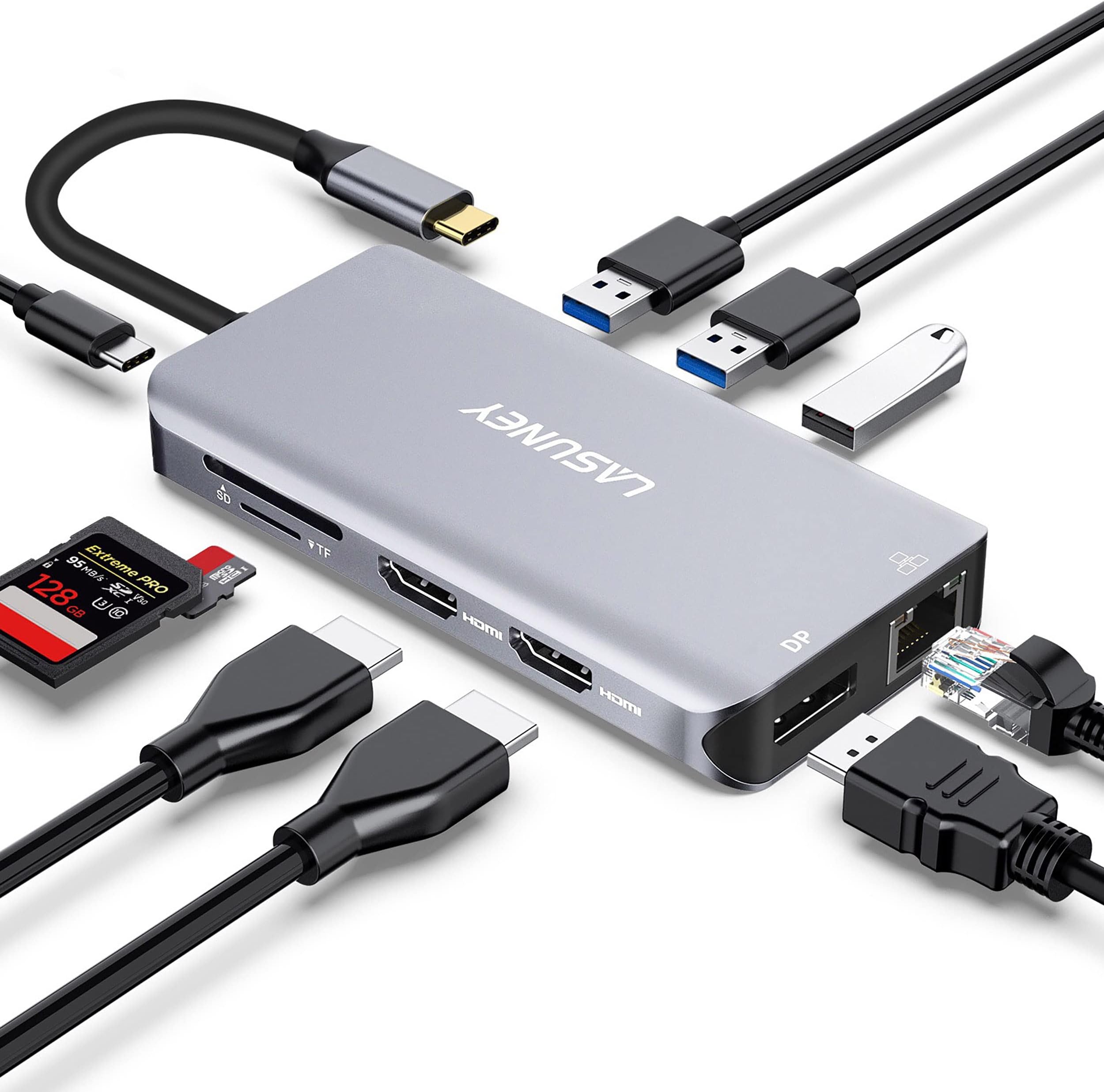
The Lasuney 10-in-1 USB Type-C Hub is a premium multiport docking station designed for professionals seeking ultimate connectivity. It supports triple 4K displays (Windows only), 87W power delivery, ultra-fast USB 3.0 data transfer, and reliable gigabit Ethernet. Encased in sleek aircraft-grade aluminum, itโs compatible with most USB-C laptops, making it the perfect all-in-one solution to elevate your workspace and stay ahead in a fast-paced digital world.


| ASIN | B082KMKQQX |
| Best Sellers Rank | #30,717 in Electronics ( See Top 100 in Electronics ) #460 in Laptop Docking Stations |
| Brand | LASUNEY |
| Color | Grey |
| Compatible Devices | Dell Latitude(3500/5290...) and more, HP Spectre(13/X360-13T...) and more, Lenovo Yoga(370/720/730...) and more, MacBook/Pro(2016-2021๏ผand more, MacBookAir/Mac Mini(2018-2020๏ผand more Compatible Devices Dell Latitude(3500/5290...) and more, HP Spectre(13/X360-13T...) and more, Lenovo Yoga(370/720/730...) and more, MacBook/Pro(2016-2021๏ผand more, MacBookAir/Mac Mini(2018-2020๏ผand more See more |
| Customer Reviews | 4.1 out of 5 stars 2,189 Reviews |
| Hardware Interface | Thunderbolt , USB Type C |
| Item Dimensions L x W x H | 4.3"L x 2.2"W x 0.6"H |
| Manufacturer | LASUNEY |
| Mfr Part Number | 10 in 1 |
| Number of Ports | 10 |
| Product Dimensions | 4.3"L x 2.2"W x 0.6"H |
| Total Number of HDMI Ports | 2 |
| Total USB Ports | 3 |
| Total Usb Ports | 3 |
| UPC | 884710651819 764653171530 |
| Wattage | 100 watts |
A**W
USB-C Hub that actually works simply!
I needed USB-C peripherals for my 2016 15" Macbook Pro since all it has are USB-C ports, and my windows PC died on me. I wanted to keep my Plex server temporarily running using my laptop as my home machine. Mainly I needed USB 3.0 ports for speedy connection to my external drives, reliable Ethernet for a solid connection, ports for my monitors, and while not necessary, power delivery sounded convenient. I was very distrustful of USB-C hubs because I hear of their shoddy quality, unreliability, etc all around so I never really expected all the ports to work from the get-go. I'm happy to report this hub felt very durable and hefty -- even though its probably just another Chinese carbon copy, it seems well built. I tested all the ports: - connected 3 USB 3.0 devices and successfully streamed 4k movies to my Plex server. - tested Ethernet port vs. my wifi mainly for stability but also speed. I pay for 300/300 fiber but as you can see my 5GHz wireless was at 208/320. I plugged into Ethernet with my fingers crossed and the speedtest immediately shot to 358/365 (i guess 360/360 is what they're actually feeding me lol) and it had almost no fluctuations as you can see from the curve. - I used my Macbook's 87W charger to plug into the hub, and can just dock my laptop at my desk by plugging in the USB-C into the laptop and it automatically connects everything. Power seemed to stay charged even while doing most tasks, but I wasn't super extensive on power draw testing. - I didn't actually get to test monitors on HDMI or DisplayPort because it turns out I was using DVI-D and the monitor was too much hassle anyways for my temporary solution right now. I've tested for about a week now and it's all still working!
J**.
Works for my purposes
I've had this dongle for about two weeks and have put it through several testing scenarios before writing this review. I am using this with a new Dell XPS 13 7390. The good news is that it's very well built, but is still relatively compact for the # of ports it has. I tested it at work and was able to get dual HDMI 1080p monitors working briefly. After disconnecting and reconnecting in between meetings, however, I lost one of the monitors and was never able to get both going again. It worked great driving a single monitor, though. That was disappointing so I'm relegating this for use at home where I have a single monitor (a Dell 1440p monitor) that this adapter drives well over Displayport. All of the other connections work fine. I did have an issue with a power surge through the USB when plugging in a portable hard drive, which is more of a fault of the computer not having enough bus power to drive all the peripherals that were connected (which also included a bus powered audio interface). To solve this, I plugged the power adapter for the laptop in through the PD slot on the dongle, which then provided it's own bus-power to all attached peripherals without having to draw from the laptop. This is nice because it allows my audio interface to remain powered on even when disconnecting the laptop from the dongle (if the interface powers off there is an audible pop on the speakers). Last thing I'll mention is that when I used Dell's original 45W power adapter through the PD slot, my laptop warned me it was charging slowly so I do not think the dongle is passing 100% power through to the laptop (even before connecting USB peripherals). That was solved by using a higher wattage power adapter (60W) and that warning went away. I hope this review was helpful in terms of how I am using this device!
K**Y
Handy USB-C Hub to Connect My Chromebook and Phone to TV and Ethernet
I got a new HP Chromebook, which doesn't come with HDMI or Ethernet ports. This USB-C hub allows me to connect my Chromebook via HDMI to my TV (and its bigger screen and speakers) and via Ethernet directly to my cable modem (for faster, more reliable Internet, especially for streaming). The pass-through charging works great for my Chromebook. I also use the hub to connect my Samsung Galaxy 8 to HDMI and Ethernet. One issue is that when the hub is connected to a phone charger (even fast-charging), the pass-through charging is excruciating slow. The phone's power drains faster than it charges. However, I can work around this issue by putting the phone on a wireless charger or connecting a laptop charger to the hub. When my Chromebook is connected to the hub and then via HDMI to my Samsung TV, the sound doesn't transmit. (My research indicates that could be an issue in the HDMI handshake between the Chromebook and the TV.) I work around that by connecting the Chromebook's headphone jack via auxiliary cable to an external speaker. Bluetooth doesn't work.
J**E
Works as Intended, but DP doesn't work
It works exactly as intended, but displayport doesn't show anything when connected with another HDMI. I had to get another HDMI cable. For some reason, 2 HDMI works. I also tried single displayport and that works just fine. It's just when it's one displayport and one HDMI. Haven't tried all 3 ports simultaneously though. Other than that, it's great to have a hub with PD and the number of ports are great and convenient. Update: I bought two of these and for some reason, the PD stopped working. Reached out to the seller and it's impossible to get a resolution from them. They ask a few questions and after I answer them, they always reply with... more questions. For some reason, it's impossible for them to believe their product is faulty and they keep asking what I'm doing when PD isn't working, and I don't even know how to respond to that when it's only a two step process to do PD... plug and plug. regardless, the other ports work most of the time so I'll hang on to it, but I would not buy this again because of the seller.
M**N
Perfect for My Remote Working Needs
This is a solid product. I mainly purchased it because I started working remotely from home and was looking for a small, easily portable hub with a Display Port (DP) for my HP monitor that also had the right mix of typical ports that would work well with my Surface Go. With this product I was able to enhance the functionality of my Surface Go from a small laptop with a 10" screen to a desktop with a widescreen and spacious keyboard. I did notice that my keyboard and mouse would freeze sometimes after inactivity and running my laptop just on the battery, however this was rectified as noted by the company by simply plugging the hub into a power source. Perhaps a USB type power cord could be included in future models? Despite this, overall this is a great product and would recommend it because of it's functionality, compactness, and design. Speaking of design, I found the packaging that it came in appealing as well.
J**N
Rocks for Samsung DEX.
I purchased this for Samsung DEX on my Galaxy S10 plus. The unit has an extra USB C for power to flow through. Connected it to a 55" tv, and it started DEX right up. It's like mini computer, that uses your phone. With this device, I can connect a wired mouse and keyboard (don't have Bluetooth or wireless), connect to a TV/monitor, power my phone, portable hard drive, and use memore cards/Ethernet. It makes for a fantastic start to a work station at home where I just plug my phone into it through the attached USB cable. There are some caveats to know about though. DEX, right now doesn't support multiple monitors and goes to a resution of 1080p. If those are deal breakers, then you may not be interested. The quality of the device appears too notch, and longevity is currently an unknown. As an aside note, I also used this device to mirror my phone without DEX and was able to game without any noticable lag. I imagine a wired or Bluetooth controller would make it even better. Just make sure your in landscape mode, as it will literally mirror whatever is shown with large black bars on the sides. Recommend.the product for Samsung phones and tablets that support DEX.
S**U
100 Mbps isn't gibabit Ethernet...
Nov 11, 2020 Actually the poor monitor performance returned, but I gave up and just lived with extra HDMI cables. Then, tonight, noticed the Ethernet is operating at 100 Mbps, not 1000, even though only Cat 6 cable used, with a gigabit switch. Move the cable to the laptop itself, and, wait for it: 1000 Mbps. I'm done with this brand. Lasuney sucks. ----------- All work now. Was very unhappy that the unit extremely poorly with 1080p monitor (even editing text was problematic). Seller assured me it was a defective unit and shipped a replacement free of charge. Replacement unit works completely for my scenario. USB peripherals plus DisplayPort 1080p monitor all working correctly off a single USB-C port off of work computer, as it should. Five stars; the product works, and service earned it. * * * Can't retest personal PC; that MSI laptop's fan dying. But if it works for the work laptop, should be no reason why it won't work for it, once the fan is replaced. * * * Old title: Low performance w/ 1080p external monitor. Not for monitor--works for Ethernet, keyboard and such. Tested with two different PC laptops (MSI, Dell), using HDMI and DisplayPort. Both computer complain about "Display Connection Might be Limited" or such. Just one 1080p monitor; nothing stressful on the hub. Trying to play a game that normally locks solidly to 60 FPS on the gaming laptop when the external monitor goes through this was a torture. Think I was getting 15 FPS? No problem once switched back to the normal DP connection. Even editing code on external monitor connected to this junk was problematic. That said, it does let me switch Ethernet keyboard between the two computer more easily, so It's not completely useless.
C**C
Worked Great, Until it Didn't. Very short return/exchange window
This little hub worked great for about 1 month. After that, it began having infrequent issues: Sudden power loss, monitors would flip off and then come back on a moment later HDMI connections would not work until the unit was completely powered off (removed pass-through power and disconnected from usb-c port on laptop) and then powered on again. Occasional data connectivity issues (possibly low-power) to USB wireless dongle for wireless headphones The unit failed on me this morning. When locating the order, I noticed the return window closed less than 30 days after purchase. The unit is cheap enough that dealing with a few issues here and there isn't a big deal. Just be mindful of the short return window, if you're "lucky" enough to have said issues. Personally, I will be replacing this with a USB-C hub from another vendor.
A**G
Excellent USB-C Hub for my Zephyrus G14!
I purchased the 2021 Zephyrus G14 recently, but I knew that I would need to purchase a separate USB-C hub to connect my monitor and my devices to it. This is one of the few well-equipped hubs on the market which has a DisplayPort connection, and thankfully, everything works swimmingly. There were no drivers that needed to be installed; everything just works when plugged in.
Trustpilot
1 day ago
2 weeks ago