Buy anything from 5,000+ international stores. One checkout price. No surprise fees. Join 2M+ shoppers on Desertcart.
Desertcart purchases this item on your behalf and handles shipping, customs, and support to Japan.
🚀 Elevate Your MacBook Experience!
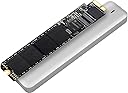
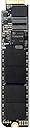
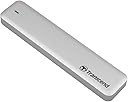
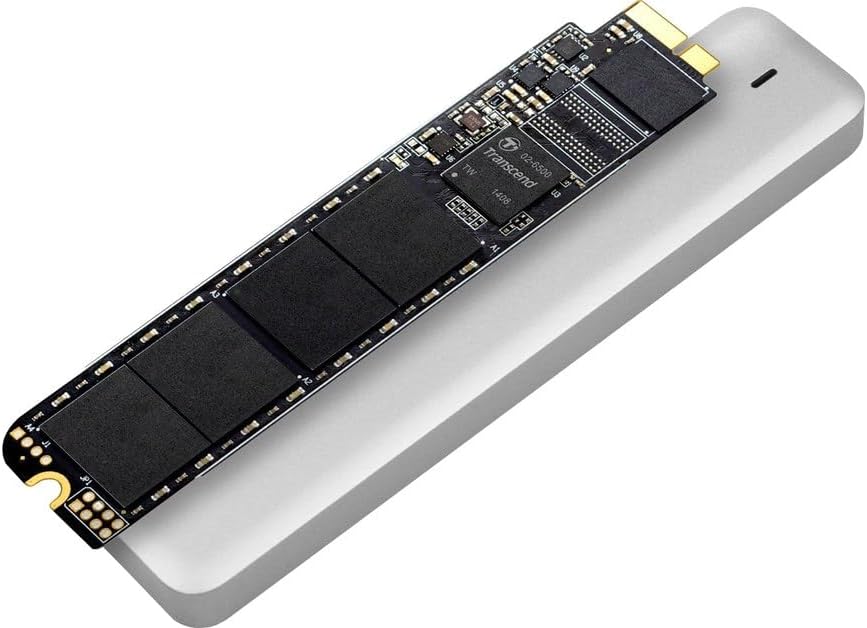
The Transcend 240GB JetDrive 500 is a high-performance SSD upgrade kit designed specifically for select MacBook Air models (Late 2010 - Mid 2011). Featuring a next-generation SATA III 6Gb/s interface, this drive ensures rapid data access and transfer speeds. The kit includes everything you need for a hassle-free installation, along with the JetDrive Toolbox for monitoring your SSD's health. With an operating temperature range of 0 to 70 degrees Celsius, this upgrade is built for reliability and efficiency.


| ASIN | B00JKCHNQS |
| Additional Features | Portable |
| Best Sellers Rank | #4,094 in Internal Solid State Drives |
| Brand | Transcend |
| Built-In Media | Full unit |
| Cache Memory Installed Size | 256 |
| Color | Black |
| Compatible Devices | External enclosure is fully compatible with SuperSpeed USB 3.0 & Hi-Speed USB 2.0 |
| Connectivity Technology | SATA, USB |
| Customer Reviews | 4.4 out of 5 stars 1,034 Reviews |
| Digital Storage Capacity | 240 GB |
| Form Factor | Portable |
| Global Trade Identification Number | 00760557828303, 04139052267911 |
| Hard Disk Description | Solid State Drive |
| Hard Disk Form Factor | 2.5 Inches |
| Hard Disk Interface | USB 1.1 |
| Hard-Drive Size | 240 GB |
| Hardware Connectivity | SATA 6.0 Gb/s |
| Hardware Platform | Mac |
| Installation Type | External Hard Drive |
| Item Part Number | TS240GJDM500 |
| Item Weight | 2.08 ounces |
| Manufacturer | Tristan Pub |
| Media Speed | 460 Megabytes Per Second |
| Mfr Part Number | TS240GJDM500 |
| Model Name | JetDrive 500 |
| Model Number | TS240GJDM500 |
| Number of Items | 1 |
| Read Speed | 495 Megabytes Per Second |
| Special Feature | Portable |
| Specific Uses For Product | Personal |
| UPC | 014444857373 012304674351 760557828303 |
| Warranty Description | Five-year Limited Warranty |
U**7
Now my MacBook Air is more useful
My 2011 MacBook Air only has 64GB SSD. I had to be very careful in saving files and installing Apps, it had been a pain to use. I don't want to buy another macbook because it is just too expensive. Very pleased to find this one. Put it on, so far so good, hope it last. I will follow-up if I have any problem with it. The package provides everything you need to replace the SSD, including the right screwdrivers to open up Macbook Air, and instructions. Make sure you restore (duplicate) the original SSD to this one before put it on, it is in the instruction sheet. The installation is very straight forward, most people can do it, You may watch this Youtube video to see how to replace SSD:[...] Prop: Provide the enclosure so that you can utilize the replaced SSD as external drive, comes with the screwdrivers, and instructions. Cons: The instruction sheet is very small, it is hard to read. The SSD seems a little slower in boot up compared to the Apple original. Note: If you had upgraded your MBA to OS X Yosemite, don't press "Option" key, as instructed in the instruction sheet from the drive, to arise disk utility for restoring SSD. Instead, you need to press "Command" and "R" keys to arise, then you may follow the steps in the instruction sheet to restore SSD before put it on. It took me a while to figure out. Three months follow-up: It had been in my MBA for 3 month, with roughly 1~4 hr /day use, on and off, I had used up 100GB space. No issue at all, my MBA is as fast as when it was new. Definitely recommend to anyone! I still keep my old SSD just in case. But with the provided enclosure, it can be turned into a 64GB USB 3.0 external drive. (Update: May 2016), still working like a champ! Never had problem! Use my Mac everyday. (Update: Aug 2017), after 2 and a half year, it is still working like a champ. Not a single issue at all. Great quality product! (Update: Aug 2018), after 3 and a half year, it is still working like a champ. Not a single issue at all. Great quality product! Too bad for Apple that I don't need to replace my MacBook Air w/ this SSD update!
J**G
New life: Can my MacBook Air really be 3-1/2 years old?
I just finished installing this drive a couple hours ago in my mid-2011 MacBook Air 11". It upgraded by measly 128GB to 960GB and has dramatically increased the speed of the computer as well. It's like breathing new life into a 3-1/2 year old computer. Installation was brain-dead simple. I watched the Transcend video on YouTube before hand, and then again while I was doing the work. I was really impressed with how easy the entire process was, especially because I know how hard it is on a PC. Between Apple's good recovery software (used for copying the drives) and Transcend's end-to-end thinking, I don't know why anyone couldn't do it themselves. (Okay, you do need eyesight and finger dexterity to handle the super tiny screws, but other than that...) Before I bought, i used Transcend's charts for figuring out exactly which generation of MacBook Air I had, and for determining which of their models would work well in it. That was simple, and then i ordered the drive. I loved that the product came with a case for putting the old SSD into so it will have a new life as an external hard disk, but once I began the process, I realized how useful it was in just the upgrade process. It took 5 minutes to get the new drive attached externally to the Mac, and start Apple's recovery process to clone the existing drive onto the new Transcend SSD. My existing drive had been encrypted with FileVault. I had read there were concerns about FileVault and needing to manually disable it and unencrypt the drive before upgrading, however, that was not the case. (Perhaps it was with earlier versions of OS X, but with 10.10 Yosemite, it was not necessary.) I simply entered my admin password and the recovery tools unlocked the drive and allowed me to clone it. It took 1 hour 47 minutes to clone the drive (I had 100GB filled on the 128GB drive). When that was done, it took 15 leisurely minutes to remove the new drive from the external housing, remove the old SSD from the Mac, and swap them. (I took an extra 10 minutes to use compressed air to blow out the insides of my Mac and a q-tip with alcohol to clean the air vents, and around the edges. The results were a PC interior that looked brand new.) After booting the Mac for the first time with the new SSD, it took almost 60 seconds to get to the Apple logo boot screen. That must have been a first-time thing, because all further reboots were lighting fast--much faster than with the old SSD. I then started the FileVault encryption processes again, and that took about an hour to re-encrypt the new drive. I was so excited, i kept up the cleaning process and wiped the keyboard, outside and screen down. The Mac looks brand new now. And it runs like a charm. How is it possible that I love my 3.5 year old computer so much? I only wish I had done this a year sooner.
J**A
Wow ... amazing storage and sooo easy to install!
Note that I just finished installing this SSD, so my review can only cover the ease of installation and not the longevity of the product -- that said, if any issues arise in the future, I will update my review. Now, for what is so fantastic about this ... I ordered the JetDrive 500 960GB SSD for my MacBook Air 4,2 (mid-2011) ... there is some conflicting info about whether or not the 960GB works for the MacBook Air, but it does ... go to the Transcend website and/or email them directly if you have any questions. Basically, I now have a new computer for a fraction of the cost of replacing my MacBook Air, with quadruple the storage it had and double the max storage available on any new MacBook Air! I am over the moon - no more shuffling files from my computer to an external hard drive and backing up multiple hard drives and worrying if I'm approaching my max limit (yet again) ... I have nearly a terabyte of internal storage! How amazing is that?! The INSTALLATION was pretty darn easy ... I agree w/ others' assessment that the quick install guide included w/ the drive is useless (and a waste of paper), but the online video is spot on ... it seems too easy to believe, but when you finish installing, you will be a believer! The most laborious and time-consuming aspect is cloning the existing drive. Like some other people, I wound up having to install the free 30-day trial version of Carbon Copy Cloner b/c the built-in Mac disk utility wasn't up to the task (if you have a corrupt file, it will arrest the cloning process rather than skip the file and continue cloning uncorrupted files - this is pretty infuriating if it doesn't encounter the corruption until 2 hours into the clone ... CCC will skip the corrupt files and tell you what they are and continue cloning your drive). This, however, has absolutely nothing to do w/ Transcend. So once you get the drive cloned, on to opening up the MacBook Air and swapping out the SSDs ... OMG so EASY! Just like the video! I also used some canned air to blow out some of the accumulated dust inside the case, swapped out the drives, slapped the back on, booted up and VOILA! My computer and all my files were there and lightning fast! One caveat, a few passwords and keys needed to be re-entered ... so far, I only needed to sign back into Dropbox and I had to re-enter my Office for Mac product key, so make sure you have those things handy, if need be. I also did a backup before embarking on this whole process, just in case. BUT HONESTLY, BOTTOM LINE - I HAVE A "NEW" COMPUTER!!!!!!!!! I am so excited!!!! Thank you, Transcend!!!!!!!!!
A**N
Easy upgrade dramatically increases capacity and speed on 2011 MacBook Air
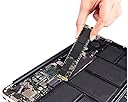
This upgrade has transformed my 2011 MacBook Air 13". I made the mistake of buying my MacBook Air with the 120GB SSD. It quickly filled up with photos and music and after 3 years I was in serious trouble. I was initially afraid to try this upgrade -- intimidated by Apple's statements that the Air couldn't be upgraded and frightened by the tiny screws on the Air's base plate. My local computer repair place said they could do the upgrade for $ 100 if I purchased the drive myself. I researched the Transcend drive and the competing OWC. I read reviews on Amazon and on several forums. I also watched YouTube videos on how to do the upgrades. Upgrading is much easier than I thought it would be. Transcend's videos and brief instructions are excellent. First, it was easy to install the Transcend SSD in the enclosure provided. Formatting and copying contents from my Mac to the Transcend SSD using OS X Disk Utility is as easy as anything else on a Mac. It did take over an hour. Second, removing my old drive and installing the Transcend with the screw drivers they included was really simple. Unscrew the base plate. Disconnect the battery. Remove one screw on the drive. Install the new drive. Screw it down. Connect the battery. Put the base plate back on. The only thing I had to stress about through the whole process was potentially dropping Apple's sesame-seed sized screws -- which didn't happen. Third, my Mac booted up normally -- no worries. I downloaded and installed the Transcend utility to activate drive trim. I noticed that Apps and Files load much faster -- especially ones that access lots of disk like iTunes. I have 4 times as much drive capacity as I had before and my Mac runs much faster. I put my old drive into the Transcend enclosure and erased it after taking a week or after making sure the Transcend worked. Now I have a spare 120GB SSD drive that I use to backup photos & documents. It's smaller than an external HDD, bigger than a USB thumb drive, but pretty useful.
M**E
Exceptional product that gives your old computer a new lease on life
When I bought my MacBook Air in 2011, I purchased the 128GB SSD SKU as I didn't have a whole lot of music, documents or videos and didn't feel I'd need the space. Fast-forward through college and 2 iPhones with full camera rolls, and suddenly that hard drive space was gone. The result? My computer, once one of the zippiest laptops you could buy, got really slow. Purchasing the Transcend 240 GB JetDrive SSD, then, was kind of a no-brainer. The product itself is actually really easy to install. Transcend includes all the tools you need to remove the pentalobe screws from the back casing of the MBA (actually the most difficult part of this process since it's so easy to strip the screws) as well as instructions for removing the drive and tightening it back on. I'm not handy in the slightest, but replacing the JetDrive took approximately 30 minutes for me to do from beginning to end. The best part is that Transcend also included a case that allows you to store your old SSD as an external HDD - absolutely brilliant! That kind of attention is pretty priceless! The one criticism I have is that I do notice the read/write speeds are slightly slower than what I had on the MBA when it was performing at its peak - but bear in mind that this is also considering the computer is now entering its seventh year of ownership under a very different OS than it was purchased with, so it's difficult for me to really evaluate that speed change. It's held up very well for me without any disk errors. Very happy with this purchase.
S**E
Good to go...
I wish the price for this SSD is lower or comparable to the 2.5 SSD of equal capacity. But at the same time, I'm thankful to Transcend for producing a quality SSD for the 2011 Macbook Air. I've read too many negative reviews from their only competition. I decided to go with Transcend because of the positive reviews online and the ease of installation with clear instructions complete with video. They didn't disappoint me. The installation instruction was straightforward and everything went smoothly. The hardest part was waiting for the clone/restore to finish. It took 4 hours to clone a 256 GB drive via my 2011 Macbook Air's USB 2.0 port. I actually bought a Kanex KTU20 thunderbolt to USB3 adapter but I thought I ran into a problem. My MBA wouldn't recognize the Transcend external drive. I later realized that I had to plug in the external drive to the USB 3 port on the adapter before plugging in the thunderbolt connector to the MBA. By the time I realized what I did wrong, it was already too late because the clone/restore already started. Anyway, after the cloning process was finished, I swapped out the original SSD with the new one. The screws securing the bottom of the MBA are really tiny so I used a little bit of blue loctite to make sure they stay put. They actually had blue loctite on them when I took them out. Once everything was in place, my MBA fired right up just as it always did before. Everything was the same except the SSD capacity has doubled. So far, so good. I haven't encountered any problems with the new SSD. The old one fit right into the external enclosure. One reviewer complained about the external enclosure's screws not going in smoothly. The screws on mine went in without any problems. The only thing I need to do is to open it up again and add some padding around the original Toshiba SSD. There's a little bit of space in between the upper half oft the enclosure that causes it to rattle inside a bit. Other than that, I'm happy with the Transcend JetDrive 500 480 GB SSD and would be happy to recommend it to anyone looking to extend the life of their Macbook Air.
O**.
Great kit, good price, easy and effective
The packaging is tight and includes everything that you need and then some. The enclosure for the SSD is solid and very Apple'esque and the included sleeve for the drive is a good quality. Including the tools to perform the task is top notch. The drive was configured and installed within an hour (took time to copy the data from the old drive). System response time is great and everything seems to be working as expected. A few things worth noting: 1. The kit does not include the JetDrive Toolbox software so you will have to download it after the install. The file is small and the tools seem pretty useful (but are not required). 2. The included instructions are a little thin. I highly recommend watching the installation video posted on Transcend's site. 3. While the drive seems very snappy, it does seem to take a little longer to boot from a shutdown state. This could just be my imagination as I never timed the old drive. Once booted, though, she seems to fly. 4. Be sure to check the specs of your Mac to make sure that you can use the drive. Transcend include links to check the information on their site and it is certainly worth the time to verify prior to ordering. Even though I have only had the drive installed for less than an hour, I am very impressed with the overall kit, the ease of the installation and the performance. If you are in need of some extra storage for your Mac, I don't think that you will get more bang for your buck than this.
F**A
Product does not work as advertised.
A complete waste of time! I purchased this SSD upgrade for my MacBookAir mid2011 model; as suggested by manufacturer. I spent close to two weeks trying to replace my existing HD with this new one. I went through all the tutorial demos on Transcend website and contacted their customer service; all resulting in total failure. Here is the scope: Once I try to restore into the new hard drive, the restore utility errors out (after about half an hour) with Input/Output Error message. Per technical support, re-examined all cables and made sure both existing drive and the new one is mounted. No success. Next Technical Support suggested that my existing hard drive is corrupt and I should rebuild everything from fresh. my disk utility did not find any sign of corruption but I gave the the benefit of doubt. Replaced the old hard drive with new one and attempted to reinstall the OS. after OS was downloaded onto the new drive, right off the bat, I got the error message that installation can not start because a recovery system can't be created. The system prompted me to restart and try again. But each attempt resulted in failure. Technical support no longer responded even when I asked to send me RMA information so I can send the product back. Thanks to Amazon, the product is being returned so they can deal with Transcend. This product does not deserve any star. I guess the one star goes to their nice packaging!
N**Y
It is working good. Pros 1)The quality of product is beyond my ...
Bought this as a replacement for Mac Book Air 13". It is working good. Pros 1)The quality of product is beyond my expectations. 2)Comes with a pair of screw drivers, so that you can do the switching yourself 3)Can also be used as an external drive also
M**.
Excelente producto que cumple las expectativas
El producto llega perfectamente empaquetado en un sólido estuche y con todo lo necesario para realizar el cambio, que resulta muy sencillo y rápido. La velocidad de acceso a datos y de escritura es óptima. Altamente recomendado para aquellos que necesiten ampliar la capacidad disco de su Mac. He multiplicado por 4 la de mi MacBook Air. El precio resulta un tanto elevado aunque merece la pena por el servicio que ofrece.
A**O
Buen servicio
La rapidez y que el producto fue lo que solicité
F**I
Promesse tenue
J'avais besoin de place, sur ce plan le Transcend Jetdrive a répondu à mes attentes. La mise en place du SSD est facile, il faut juste prévoir du temps pour faire migrer les données, cette version du Macbook Air restant en USB 2. A l'usage, le SSD est plus rapide que l'ancien ( version Samsung quand même). J'ai multiplié par 4 la capacité, autant dire que je ne manque pas de place. En termes d'autonomie, je n'ai pas noté de changement important, et je n'ai eu aucun bug ni incompatibilité avec les applications. Ne reste plus qu'à espérer que le trim géré par un logiciel Transcend soit encore activable avec Os X 10.10, car maintenant je ne vois plus la nécessiter de remplacer ce portable.
暢**俺
問題ないです。
11インチでも問題なく、認識して利用できています。 交換した時に、パソコン内部の埃にびっくりでした。
Trustpilot
2 weeks ago
3 weeks ago