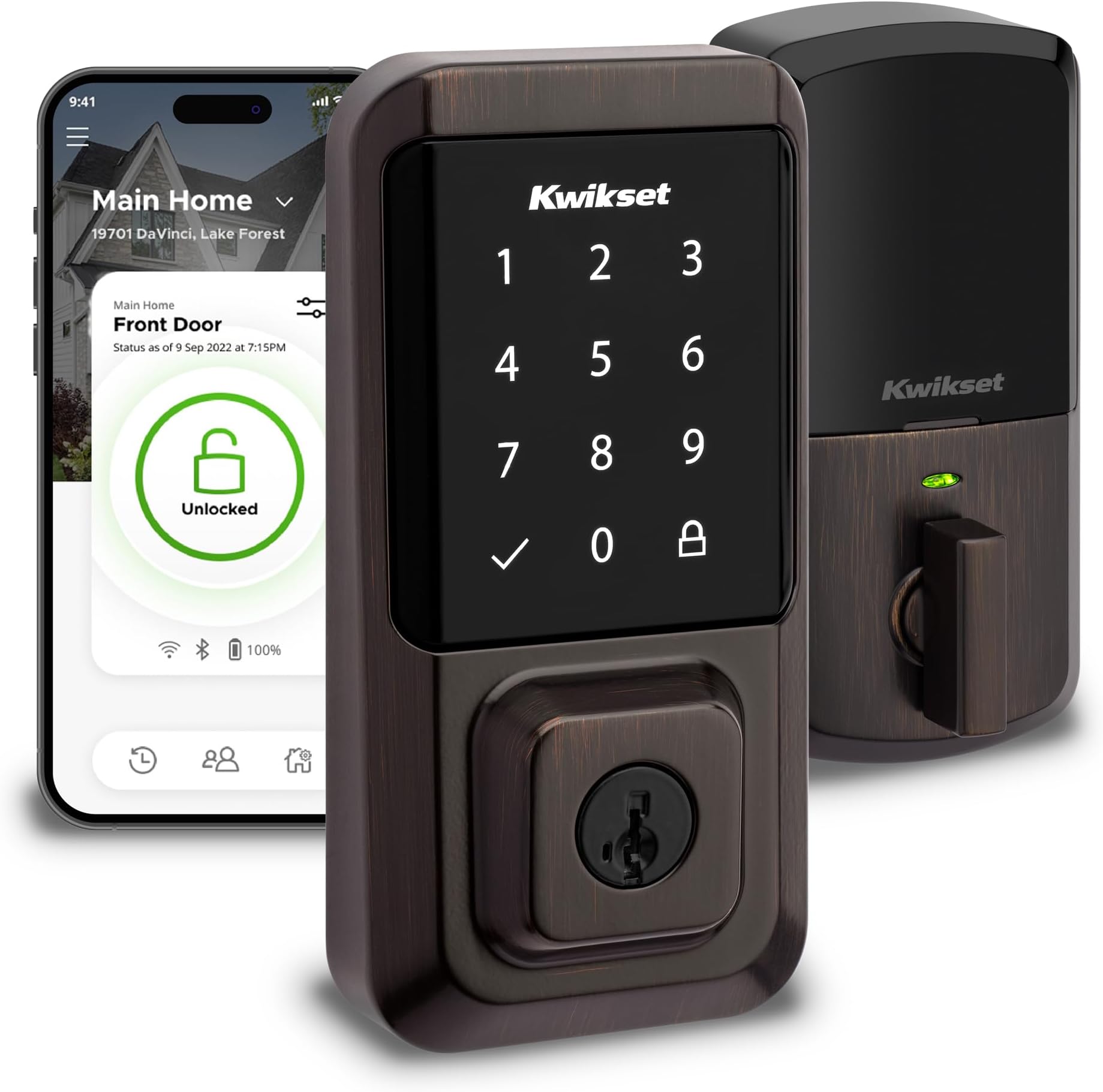
🔐 Unlock the future of home security with Kwikset Halo — where smart meets stylish.
The Kwikset Halo Wi-Fi Smart Lock is a Grade AAA certified, keyless touchscreen deadbolt featuring built-in Wi-Fi for remote app control without a hub. It supports up to 250 unique access codes, integrates with Alexa and Google Home, and offers real-time intrusion alerts and auto-lock functionality. Finished in elegant Venetian Bronze, it installs easily with just a screwdriver and comes backed by a lifetime mechanical and finish warranty.
| Brand | Kwikset |
| Special Feature | Auto-Lock, One-Touch Lock, Passcode Unlock, Touchscreen, Weather Resistant |
| Lock Type | Keypad |
| Item dimensions L x W x H | 3.99 x 4.24 x 9.74 inches |
| Material | Bronze |
| Recommended Uses For Product | Security |
| Style | Smart Lock |
| Color | Venetian Bronze |
| Number of Pieces | 1 |
| Finish Type | Polished |
| Included Components | Exterior Deadbolt, Interior Deadbolt, Latch, Strike, Mounting Plate, 2 Kwikset Keys, SmartKey Learn Tool, Installation Hardware, Installation Guide, Batteries |
| Controller Type | Amazon Alexa, Google Assistant, Vera |
| Shape | Rectangular |
| Item Weight | 1 Pounds |
| Control Method | Voice |
| Connectivity Protocol | Wi-Fi |
| UPC | 883351681964 |
| Model Name | Halo Wi-Fi Smart Lock, Keyless Entry Front Door Touchscreen Deadbolt, App Control, |
| Global Trade Identification Number | 00883351681964 |
| Manufacturer | Kwikset |
| Part Number | 99390-002 |
| Item Weight | 1 pounds |
| Product Dimensions | 3.99 x 4.24 x 9.74 inches |
| Item model number | 99390-002 |
| Batteries | 4 AA batteries required. (included) |
| Finish | Polished |
| Pattern | Lock |
| Item Package Quantity | 1 |
| Special Features | Auto-Lock, One-Touch Lock, Passcode Unlock, Touchscreen, Weather Resistant |
| Batteries Included? | Yes |
| Batteries Required? | Yes |
| Battery Cell Type | Alkaline |
| Warranty Description | Lifetime Mechanical-Finish, 1 Year Electronics |
R**A
Very simple as long as you follow instructions
The media could not be loaded. I don't understand how people are having issues with these. I'm a licensed electrician that performs work on electronics like these constantly. Instructions are very clear and simple to follow. Anybody would be able to install this, yes, even if you have absolutely no experience with door locks. Make sure that once you are done, or before you even start, you download the app and follow the on-screen instructions. I've always bought Kwikset door locks for the simple fact that not only they have a wide variety of products, they're the only ones I've found that you're able to change the barrel to YOUR existing key, as long as it's the same size key. Therefore no locksmith needed, nor having different keys for every single door of your house. The process to re-key the lock literally takes less than a minute. The Kwikset app has options for different pass codes for everyone in the family, has options to automatically lock the door after determined time. You can also add to Google assistant, or Alexa device to lock and unlock code (voice has either have to be saved for certain person, or you'll need to set up a code to unlock the door with voice assistant, I chose neither and don't care for the option of unlocking the door with voice assistant, just locking is good enough for me). Really great design, easy to install, extremely easy to use, and numerous options to work it, my favorite is that I can unlock it from anywhere in the world as long as I have internet available, which is huge since I have people that come and go to the house, best part is you can set temporary codes for each person as well, and you will have a log of who unlocked the door, so if something happens you know who the last person was to unlock that door. I would give it 6 stars if I could, the only downfall for me (which is really not a problem) is that it doesn't have fingerprints built-in, would have been nice to have that option, but not a big deal at all since the lock works phenomenally well. Thanks for all the great products, Kwikset.
M**7
Great product, very short battery life
This is great product that works flawlessly. If you follow directions, you’ll have success. One issue - very short battery life - had to replace the batteries after only two months.
J**C
STAY AWAY!
Physical installation of the lock went fine, then everything went downhill.Just a quick fyi for people that are concerned over privacy. You have to make an account with kwikset in order to use any features of the lock besides the physical key. In order to do that you must download an app to your phone, they then ask for your name, email, phone number, and the GPS coords of your home...The real problems with this lock arose after making my account and trying to get the lock set up in the phone app. The lock pairs via bluetooth for the initial setup to get it connected to your wifi. As soon as that was done a message popped up forcing a firmware update. That took about 10 mins. After the firmware update I lost most communication with the lock. It prompted me to add an access code to the lock to enable the keypad. I typed one in but it couldnt be added because "the lock was outside bluetooth range or unpowered". I noticed that the battery meter for the lock was now at %0, which was at %100 a few mins earlier. I hit the big lock/unlock button in the app and waited... 2 minutes later the lock actuated and locked the door. That was the only time it actually (kinda) worked. I tried changing various settings in the lock such as the sound and led settings, but nothing would happen. I decided reset my phone, and the lock itself and that got some communication from the lock. I could now change the led and sound settings but thats about it. I Still couldnt lock or unlock from the app and couldnt add an access code to use the keypad. I messed around with it for 45 mins and got nowhere. Last ditch effort to get it working, a factory reset and start all over. This resulted in not being able to get past the first step and connecting to it via bluetooth. I reset everything AGAIN and now can connect with bluetooth! But also right back to a %0 battery meter and not being able to change any settings in the lock... I give up. I now had a $250 wifi touchpad door lock that I could only open with a key...
T**D
Voice command unlocking ability
I have never changed door handles or deadbolts before, but this was very straightforward. All that is needed is a Phillips screwdriver. The instructions are well written, and the illustrations are clear and helpful. The hardest part about this was getting the lock to pair with my phone. If you have a wifi repeater put it as close to the lock as possible. After MANY failed attempts, I moved my repeater to within 4 feet of the lock, and it paired on the first attempt. I then put the repeater back in its usual spot, and 5he lock continues to work well. The app is intuitive, and easy to use. I connected it to Google home, and Alexa, and now i can use voice commands to lock or unlock, as well as check the status(locked or unlocked). The lock can be set to lock at a specific time. The best part is being able to unlock my door while on my way home, so I can bring in groceries without fumbling to open the lock. There is a geofencing capability, which unlocks the lock upon your return, which is really awesome. But due to the area I live in, it wasn't reliable. So i just use voice commands to unlock it while still in my car. I have been using it for two weeks now, and the battery is at 90%, which seems reasonable, due to all my experiments with it.
Trustpilot
3 days ago
1 month ago