Desertcart purchases this item on your behalf and handles shipping, customs, and support to Japan.
🔌 Unlock flawless 4K connectivity—because your setup deserves zero compromises.
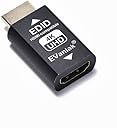
The EVanlak HDMI EDID Emulator Passthrough 3rd Generation is a premium aluminum adapter designed to eliminate EDID handshake issues, ensuring seamless compatibility with Mac Thunderbolt devices, AV receivers, video splitters, and more. Supporting resolutions from 1080p up to 4K UHD at 60Hz, it delivers plug-and-play simplicity without the need for manual configuration or drivers. Ideal for professionals and gamers alike, it guarantees stable, high-quality video output across diverse hardware setups.


| ASIN | B07YMTMMH5 |
| Best Sellers Rank | #8,449 in Electronics ( See Top 100 in Electronics ) #1,346 in Home Cinema Cables |
| Brand | EVanlak |
| Color | HDMI EDID 4K-1P |
| Compatible Devices | PC |
| Connector Type | HDMI |
| Current Rating | 3 A |
| Customer Reviews | 4.1 out of 5 stars 1,243 Reviews |
| Finish | Aluminum |
| Input Voltage | 3.3 volts |
| Item Dimensions | 1.6 x 0.8 x 0.5 inches |
| Item dimensions L x W x H | 1.6 x 0.8 x 0.5 inches |
| Manufacturer | Evanlak |
| Mfr Part Number | E4K-1PC |
| Model Number | E4K-1PC |
| Number of Items | 1 |
| Number of Ports | 1 |
| Package Quantity | 1 |
| Power Plug Type | No Plug |
| Specific Uses For Product | TV |
| UPC | 752498099607 |
| Unit Count | 1 Count |
| Warranty Type | Limited |
G**V
Solved Frustrating HDMI Handshake Issues
I was having frustrating HDMI eARC handshake issues between my Home theater Processor and Sony Master Series OLED and this EDID solved my issue. Now I have a perfect 100% handshake and can control my processor's volume and other features using my Sony remote! There is no degredation in sound or picture. My display is professionally calibrated and recognizes all content including Dolby Vision, HDR, and all Audio Codecs.
K**R
Fixed EDID issues with the mClassic and my monitor.
I purchased this EDID emulator in hopes of fixing compatibility problems between the Marseille mClassic and my ViewSonic monitor, and it set them straight. A little background: the Marseille mClassic is a video scaler with post-processing effects for older to modern consoles, and it works rather well. However, Marseille chose to make the device as simple to use as possible, with no user configuration whatsoever. It's strictly plug and play, with the mClassic reading your display device's EDID table to configure and choose its output resolution. Well, I learned from this 'hands off' approach to configuration that not all TV and monitor EDID tables are created equally: my ViewSonic XG3220 monitor, while supporting basically any and every resolution up to 4K, doesn't have a proper EDID table to save its life. So the result was strange and limited functionality of the mClassic, with resolution outputs of 3820x1080 and poor handling of the aspect ratio of the resulting video. However, this little device cleared all of that right up. I connected it in-line to my monitor from the mClassic, and now the device is pumping out a standard 1920x1080p signal that the monitor likes just fine (even from the Retro mode/blue light operation, which was where I had most of the problems before). I'm still not getting the 1440p output the mClassic claims it's capable of handling, in spite of the fact that this EDID emulator supports 1440p in its table and my monitor is able to support that resolution, but I suspect that's the fault of Marseille's little device and not with this EDID emulator. So if you're having similar issues like I described with your mClassic, pick up this adapter and you'll be good to go!
J**N
CRT lifesaver
For the past week, I’ve been trying to hook up this old CRT television to my computer after purchasing a digital to analog signal converter, my computer still was not recognizing the converter as an actual display after purchasing this adapter, it was literally plug-in play immediately my CRT flickered to life!
W**N
Doesn't work with my monitor and ps5
I bought this because I've read the edid devices can make the ps5 render in 4k and downscale for us with 1440p monitors, as using 1080p on a 1440p monitor doesn't look very good and Sony doesn't support 1440p for some reason,even if though most "4k" is upscaled from 1440 on 4k tvs. Anyways no matter what I do I get a black screen. I've followed all the directions in the product video and pictures, and tried searching through customer questions to find a solution but no matter what I get a blank screen. Using the hdmi cord that shipped with ps5. Frustrated with Sony more than anything.
R**G
Good but comes apart easily
I have about 6 of these and they all work. I use them for my headless stream machines i connect into remotely or where i need to have an EDID and lock on the screen so if i reset my computer or capture device the game monitor doesn't flicker during handshake. That's important if your streaming an event. My other use is in a headless computer where if i need them to plug in a confidence monitor to the machine they just plug the monitor into this and it doesn't re-negotiate or do any funky screen changes since this is just a pass through. The biggest problem is the metal housing slides off. 100% of them have done that to me. but we just slide them back on or tape them but that's my only complaint.
F**T
Worked at 720p with my son's Nintendo Switch dock to display on our 27" Apple Cinema Display
Worked with my son's Nintendo Switch dock to display on our 27" Apple Cinema Display as well as my 2010 27" iMac in Target Display Mode. For whatever reason the Switch dock refused to display anything on either monitor, but worked fine with every other TV in the house. The only options on the Switch dock are Automatic and 480p when connected to these monitors and neither display anything. Using the 4K version of this device, the switch dock sees the options for 720p and 1080p. Unfortunately the 1080p doesn't work, but the 720p setting works perfectly. No idea why these monitors don't accept 1080p with this device, but Apple is quirky. An HDMI splitter will likely also work, but this is alot simpler since it doesn't require and extra power cord.
D**0
Can now reliably connect "game mode" 4k@120hz but no HDR.
This product solved my HDMI handshake issues between my Samsung TV and PS5. At times my TV would not recognize the PS5 as powered on. In cases where I turned on the PS5 without powering on the TV, the PS5 would hang with the pulsing blue light, power itself off, and next boot post a software issue. Those problems stopped.
J**Z
Working better than expected
Not sure why some people are experiencing issues with the passthrough functionality which is working as described, I have not notice any drops in resolution either on the contrary and it offers a long range of resolutions low and hight to adjust to, very flexible, I was skeptical after reading some of the reviews and only order 1 to test and now I can be happier, great value, quality and ease of use just plug-and-play.
L**A
Nâ
O produto não funciona caso você queira usar eles para adaptar a entrada HDMI em um KVM, simplesmente mão funciona
R**N
SI TIENES DUDAS PREGUNTA.
que funciona.es ideal.SI TIENES DUDAS PREGUNTA.
G**N
120FPS on PS5
El dispositivo funciona desactivando HDCP primero. No tuve ningún problema. En mi caso mi monitor es un ASUS VG27AQ y aunque es 1440p puede recibir señal 4K. Para el play con el adaptador no tiene ningún problema en correr juegos a 120fps. Ya probé con Dirt5 y Rainbow Six. Sí baja la resolución pero es lo que debe de hacer, no es por limitante del adaptador ni porque tu display no sea HDMI 2.1. Simplemente es lo más que puede hacer el Play5. Aunque en el menú del Play siempre diga 4K, los juegos con high frame rate la cambian cuando ya estas dentro del juego. Eso sí... también se puede jugarlos a 4K y 60FPS.
B**N
MERCI ! J’ai pu régler mon problème lié à une Sonos Beam
Ce petit adapteur m’a sorti d’une situation impossible. J’ai acheté récemment une Sony Bravia x90j. Sont branchés dessus une Sonos Beam gen1 via HDMI ARC, un ordinateur Mac, une box tv orange et une PS5. Pour une raison encore un peu mystérieuse la télé après allumage ne recevait pas le signal HDMI du Mac. La seule chose à faire était de retirer et rebrancher le port HDMI (du Mac donc). Et bien grâce a cet adaptateur entre le Mac et la TV tout est réglé. Et en bonus j’ai le support du 120hz en 1080p. Je me suis vraiment pris la tête sur le problème et j’ai tout testé. Du câble HDMI hors de prix en passant par tout les réglages possibles et autres adaptateurs. Et c’est vraiment la seule solution fiable et 100% compatible que j’ai pu trouvé. L’autre solution consistait passer par la sortie fibre audio vers HDMI vers sonos. Mais auquel cas il faut passer la télécommande en IR pour que ça fonctionne avec Sonos, et en IR la télécommande ne marche plus avec la box orange… bref mon problème était peut être spécifique à mes appareils combinés mais l’adapteur m’a sauvé et peut être qu’il vous sauvera aussi …
T**H
Perfekt.
Löst perfekt das Handshake-Problem meines KVM Switches !
Trustpilot
1 week ago
4 days ago