

🎯 Command your multi-PC empire with IOGEAR’s powerhouse switch!
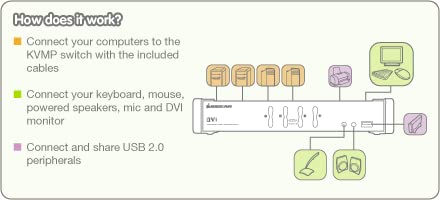
The IOGEAR 4-Port DVI KVMP Switch (GCS1104) empowers professionals to seamlessly control up to four USB DVI-enabled computers using a single keyboard, mouse, and monitor. Supporting resolutions up to 1920x1200 at 60Hz, it features independent hotkey switching for KVM, USB peripherals, and 2.1 audio with mic. Designed for plug-and-play ease with all cables included, its robust build and stackable design ensure a clutter-free, durable workstation. Compatible across Windows, Linux, Mac, and Sun systems, it’s backed by a 3-year warranty and lifetime technical support—perfect for the multitasking millennial manager who demands efficiency and reliability.


| ASIN | B002RCTNKW |
| Actuator Type | Push Button |
| Best Sellers Rank | #248 in KVM Switches |
| Brand | IOGEAR |
| Circuit Type | 4-way |
| Color | Black |
| Connectivity Protocol | Usb |
| Connector Type | Plug In |
| Contact Material | Copper |
| Contact Type | Normally Closed |
| Control Method | Push Button |
| Control Type | multi-computer control |
| Current Rating | 15 Amps |
| Customer Reviews | 4.1 4.1 out of 5 stars (326) |
| Date First Available | October 2, 2009 |
| International Protection Rating | IP00 |
| Is Discontinued By Manufacturer | No |
| Item Weight | 2.1 pounds |
| Item dimensions L x W x H | 13 x 8.5 x 4 inches |
| Item model number | GCS1104 |
| Language | English |
| Lower Temperature Rating | 32 Degrees Fahrenheit |
| Manufacturer | IOGEAR |
| National Stock Number | 7025-01-623-5055 |
| Number of Items | 1 |
| Number of Positions | 4 |
| Operating Voltage | 120 Volts |
| Operation Mode | manual |
| Product Dimensions | 13 x 8.5 x 4 inches |
| Specification Met | UL |
| Terminal | Physical |
| UPC | 898029640488 782386502834 763615872041 656229513991 172302707830 635145509844 617407451160 999992518276 809385660072 088021288966 191120077949 071030518520 178604676263 001910311170 787226713258 132018258132 807030489627 777787371301 012300476058 230494833093 069060096880 168141485862 881317504326 809186265094 851905132613 |
| Unit Count | 1.0 Count |
| Upper Temperature Rating | 100 Degrees Fahrenheit |
| Wattage | 4.8 watts |
P**N
Excellent switch... Worked very well for me!
The IOGEAR KVMP switch has been an excellent switch for me. I previously purchased a KVM switch for a few dollars more that was smaller and not as feature rich. I wasn't able to get it functioning properly, so I returned it and then purchased the IOGEAR KVMP switch from Amazon. When I first connected it, it wouldn't recognize my keyboard or mouse. I called technical support and was quickly connected to a man who was a bit brusque at first, but became more friendly as we spoke. Tip: Don't use a speakerphone when calling technical support. When he heard my equipment and setup, he expressed confidence that we would get everything working fine. He was right! One of the key things about this switch (and perhaps any switch) is that you need to have the drivers loaded on each computer for every device connected directly to the KVMP switch. So, for example, in my case, I needed to connect the keyboard and mouse directly to each computer's USB port first, let the drivers load, THEN connect the keyboard and mouse to the IOGEAR KVMP. At that point, the switch recognized the keyboard and mouse and everything worked well. While on the phone, the technical support representative gave me a quick tutorial on setting up hot keys to bounce between computers. He set things up so I just press Ctrl-Ctrl-Enter and it flips me from one computer to the other. I also use another hot key combination. While on my work laptop, I can't stream music. I can only do this from my home PC. So he impressed me to study the user's manual, which I did. I leaned very simple function keys combinations that enable me to tell the switch to port audio from my home PC to the speakers while I'm using my work laptop in the docking station. It works great! This a feature I absolutely love! I highly recommend this switch to others. It may take a little work to get everything configured for your setup, but once it's setup properly, it works well. IOGEAR's customer support is also a nice bonus! The switch is feature rich with hot key possibilities. Unlike other switches, the IOGEAR KVMP switch is very solidly built. I found other switches at this price tend to be very plasticy and light, causing the switch to flop around under the weight of the connected cables. Not this switch. It is very solid and sits flat on my desk, even with a mountain of cables connected. If you want to stack multiple IOGEAR switches, no problem. The feet on one fit into recesses on the top of another. Very nice feature. Highly recommended from one customer who is very happy with this device!
J**R
Working Exactly as I'd Hoped
With a bit of trepidation (I've never used a KVM switch before), I ordered IOGEAR's 4-port switch. That's a fair chunk of money to plunk down without any real idea if the device will really work as advertised or not. After a brief moment of panic when the keyboard and mouse refused to work at all, I finally realized the USB connector wasn't plugged in solidly. Tada! Beautifully functional! My primary development machine is running 64-bit Windows 7, and the other machine is a basic Mac-mini, which I'm planning to use to port my software project. My keyboard and mouse are both run of the mill USB devices (Windows natural keyboard and generic wired mouse), and I'm using a single Asus monitor (max resolution 1920 x 1080). If you're using a single standard-resolution HD monitor, you're probably fine, but if you've got a more exotic setup, be sure to do your research before purchasing, as this particular switch apparently can't handle ultra high resolutions or refresh rates. Also, it seems like lots of reported problems with wireless keyboard and mice, so I'd recommend again doing some research if you have those types of devices. Hot-key switching from the keyboard seems to work great. I can switch back and forth between the two computers with just a few keystrokes, which is fortunate, since I've had to push the switch itself pretty far back on my desktop and behind the monitor for lack of space. No noticeable problems with mouse, keyboard, or audio at all. The device itself is large, heavy, and is beautifully constructed, feeling more like a commercial than consumer device. It sits solidly on the desktop, even with all those heavy cables connected. The cable bundles themselves feel robust and well designed, even with small caps on the audio plugs in case you aren't using them (you don't want exposed audio cables touching bare metal). They're nicely organized into a single bundle per computer, so things don't turn into even more of a spaghetti-like mess than can be helped. Obviously, I haven't been using the device for long (just a day), so we'll see how it holds up over time. I suspect, though, like most electronic devices with few moving parts, unless you get supremely unlucky, it will work silently and reliably for quite some time to come. I'm thrilled with how well this switch is working and how easy it was to set up.
A**7
No need to update firmware. Unit works as it should.
G**.
The IOGEAR 4-Port DVI KVMP Switch with Cables works great. It automatically switches to any new computer which becomes active on another ports. This also includes the ability to switch audio/microphone. The DVI connector is DVI-D only and does not support DVI-A, so you cannot use connect older computers with VGA using a VGA to DVI apapter unless you have VGA converter to Digital DVI device (expensive). If all you have is DVI-D video computers, it works fantastic. Having all the necessary cables coming with the product is a real plus (as other competing products usually do not include cables). I am very happy with this purchase and would recommend this product to other people looking for a good KVM. [Used this product for 8 Months, so far no issues at all.]
G**2
Works exactly as the 4 port version. My only issue is that the keyboard and mouse ports are on the front of the device for no good reason. The 4 port has a shared USB on the front, and this is more useful, but no deal breaker.
J**N
A quality, well built product that is easy to set-up at a very reasonable price. This is my 2nd 4-port KVM, it replaces a much lighter, cheaply built Logitech KVM that just died one day. I am hoping the much better build quality of this IOGear KVM will last for many years to come.
J**.
This KVM worked well.
Trustpilot
1 week ago
3 weeks ago