Desertcart purchases this item on your behalf and handles shipping, customs, and support to Japan.
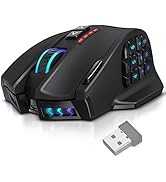
🔥 Dominate Every Click with Pro-Level Precision and Customization 🎯
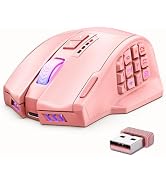
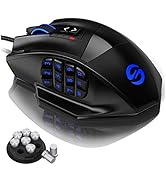
The UtechSmart Venus Pro Wireless Gaming Mouse is a high-performance MMO mouse featuring 16 programmable buttons, a custom PixArt PMW3335 optical sensor with up to 16000 DPI, and ultra-responsive 2.4 GHz wireless connectivity with a 10-meter range. Designed ergonomically with sweat-resistant coating and thumb wings, it offers up to 70 hours of battery life on a single charge, making it perfect for professional gamers and power users seeking precision, comfort, and customization.


| ASIN | B07XP4K152 |
| Additional Features | Ergonomic Design, LED Lights, Lightweight, Portable, Programmable, Buttons, Rechargeable, Wireless |
| Antenna Location | Programmable Buttons for pro gaming ,office, degisn |
| Battery Average Life | 70 hours |
| Best Sellers Rank | #556 in Video Games ( See Top 100 in Video Games ) #38 in PC Gaming Mice |
| Brand | UtechSmart |
| Button Quantity | 18 |
| Color | Classic black |
| Compatible Devices | Personal Computer, Tablet |
| Connectivity Technology | Bluetooth |
| Customer Reviews | 4.4 out of 5 stars 23,939 Reviews |
| Embellishment Feature | LED |
| Enclosure Material | Plastic |
| Finish | Textured |
| Hand Orientation | Right |
| Hardware Platform | PC/Mac |
| Item Dimensions L x W | 4.6"L x 3"W |
| Item Type Name | wireless gaming mouse |
| Item Weight | 126 g |
| Manufacturer | UtechSmart |
| Mfr Part Number | VENUSPro2833 |
| Minimum Required Operating System Version | Windows 98 SE |
| Model Name | WIRELESS VENUSPRO GAMING MOUSE |
| Model Number | US-D16000-WGM |
| Mouse Maximum Sensitivity | 16000 dots_per_inch |
| Movement Detection | Optical |
| Movement Detection Technology | Optical |
| Number of Batteries | 1 Lithium Polymer batteries required. (included) |
| Number of Buttons | 18 |
| Operating System | Windows 98SE/ME/2000/XP/Vista/Win7-11 |
| Power Source | Battery Powered |
| Range | 10.0 meters |
| Special Feature | Ergonomic Design, LED Lights, Lightweight, Portable, Programmable, Buttons, Rechargeable, Wireless |
| Style Name | Wireless Venus pro |
| Theme | RGB |
| UPC | 850004875230 |
| Unit Count | 1 Count |
| Warranty Description | Friendly customer service with 12-Month refund & replacement warranty. |
G**R
Good Mouse. Worth more. Bought to replace my Razer Trinitys.
Update: Nov 12, 2025 I have been using this mouse (now I have two and another brand but similar, Not Razers) for two years and I have no complaints. The office one that I use everyday (no games, just office clicking) have survived so far. Occasionally I have noticed that some of the programmed functions does not work. When this happens I open up the driver/program and resave. This seems to get the mouse back in line. - None of the buttons are bouncing so I am happy. - I have gotten used to the Program buttons so it is better. - I still have some problem with the mouse buttons 5 and 8 as described on the orig review. - Thumb rest still can be a bit higher so my thumbs is resting on the bottom row of buttons. Overall still a good mouse and if I need to replace this I would buy the same. Original Review: Oct 2023 I have several Razer Trinity wired Mice. They are on all my computers. I do not play games bit I like to program the buttons to do may of the repetitive clicking like copy, paste, cut and so on. All of the Razers, the left button/clicking started to bounce and I slowly replaced with cheaper mice from my used drawer. Razers are not cheap. When the mouse from my main computer started to bounce, I decided to buy a new programmable mouse. (I prefer wired although a bit clutter but I loose the dongles all the time and do not want them anymore, be it Logi, Razer, Utech or 3-D connection. I have so many and all take up a slot.) I read all the reviews that had more than 10 reviews, haha, and found this with 4.5 review with 5% 1 rating. I bought one to test it out before I buy more for the other computers. I am very happy with my buy. The shipping from Amz is always been fast but the mouse was works well. I use the 12X side buttons on Razer (why would you include 3 side to increase the price and they are cluttered in the drawer) so I duplicated the button assignment. They work well and due to my experience with the other mouse it was easy to reassign all the buttons. There was a bit of nomenclature difference so just a little stumble but ok. The mouse worked similar to Razer and will buy more after few more days. With Razer I have to download a large software to have the mouse working but with Utech (wired) the directory size is 11.6 Mb Vs 948Mb for Razer. (Geez, Give me a break!) I was surprised to find that just a driver was able to do this. I attached the screenshot for FYI. Now I have not used it much, only 1 day, so I will update as time goes. I did have an event when I clicked one of the buttons, it went to "Show Desktop" which is one of the buttons programmed. This could be that I am not used to the mouse. I will see if this happens or if other buttons misbehave. Too early to tell. This is for the Utech people or others on my thoughts: - The USB connector is long compared to Razer so it sticks out. I think being shorter does not detract from the function so should be shorter. - The cord is much thicker and stiffer so I was a bit disappointed. This also should be able to be smaller and softer. - The "Fire" button next to the left click is nice extra and works as an "enter / double click" but for me it would be much better if it was about 1/4 inch or 6 mm closer to my finger so it can be clicked easier. I honestly do not think it will interfere with left clicking - The clicking pressure is a bit more that Razer but I am sure I will get used to it. - I like the "Thumb rest" but would be better if it was raised about 3 mm the thumb is already closer to the buttons. The buttons have some pressure resistance so this would not be a issue with accidental clicking. I put a silicone foam pad to raise it and have more comfort. - The slant on the right side of the mouse can be more vertical so I can pick up the mouse with my thumb and 3rd finger in case you want to. This would not interfere with molding the case. I put another foam pad to aid in comfort and friction but due to curvature, pad is lifting off. - There is a "tactile rise" on the 5th and the 8th button but I would have preferred it a bit higher. Although it is there, I could not feel it much. They did put some thought into it so this is good. Razer does not have it so even after years of use I sometime look down. So far this is it. I like to add some follow up after more use.
C**N
Quality Mouse, Never heard of UtechSmart
I have never heard of UtechSmart, but I needed a new mouse and wanted an MMO-mouse. The cost of the mouse is what I saw first, so figured even if it was a bad mouse, it would not break the bank and I could try again. Well, I was completely surprised by what I received after I bought the mouse. This thing is quality and feels great. The texture on the mouse is like a soft rubberized super-fine grit "sand paper". It feels absolutely wonderful to my fingers and hand, my favorite mouse texture to-date. The mouse comes with several small 2.4 gram weights in a simple and sleek container, and I found my comfortable weight. They are easy to install with a simple twist open/lock opening on the bottom of the mouse. The mouse wheel has a nice soft "bump" feeling. When I scroll quickly, it is barely noticeable, but when I slow down it is easily felt. I like this kind of mouse wheel action, I find the heavy bump/clicks of other mouse wheels distracting at quick scroll movements. The Wing and shelf on the left and right side respectively are fantastic. I had a Cyborg RAT 7 years ago, and while that mouse had its issues, the thing I absolutely loved about it was the wings on the left and right of the mouse to keep my thump and ring/pinky finger off the mouse pad/desk. The only thing I wish this mouse had was a wing on the right to keep my pinky off the mouse pad/desk instead of that shelf that only fits my ring finger. However, compared to other mice on the market, this is leaps and bounds better for my fingers than anything else I have found. Words cannot describe how annoying it is to have your fingers drag across your mouse pad or desk until you have had a mouse that prevents that completely and then you go back to a mouse that does have it. You notice it, all the time. I love this things thumb wing and finger shelf. The main two buttons on the mouse have a nice "click" and are responsive. I do not have any issues with miss-clicks, but can easily click when I need. It is a comfortable level of pressure to activate the switch, and I have not had any issues with activating it when I did not mean to. The side buttons are easily reachable with my thumb, and the pattern they are set at, the 1-3 and 4-6 dip inward towards each other so there is a little "valley" along the bottom of 1-3 and the top of 4-6. This is repeated with the 7-9 and 10-12 keys. The bottom of the 5 and top of the 8 also have a small bump on them, like the F and J key of a keyboard to further help identify where your thumb is. It is easy to "feel" where you are, and the individual buttons along the valley, making them extremely easy to activate the correct button without ever looking away from your screen or having to shift your grip on the mouse. The last button, the small "fire button" as they identify it in the product images, is easily reach by your index finger. I use this for my "Oh crap" button in MMOs or similar. It is positioned in a way that I do not accidentally activate it with my mouse grip, but can be activated by simply rolling my index finger slightly and applying a bit of pressure. The software is easy to use, though the GUI is a bit "meh", which is not enough of an issue to take a star off. The interface is easy enough to navigate, set DPI marks for the DPI quick-change button on the mouse. You can change the lighting of the mouse using a color palette or a color "wheel" or by hex code. Brightness is controlled through an Off/Low/Med/High set of check boxes. Wished for changes: I wish it had a wing, or extended "finger shelf" on the right like it does on the left to keep my pinky off the mouse pad/desk. I really dig this mouse and have recommend it highly to my gamer friends, I know two of them have actually picked one up and they love it as well. If you are in the market for an MMO mouse, I cannot recommend this one more highly.
J**N
Best Mouse I've ever used! Insanely Durable, Never had double click/drag issues even after 8 years
Correction to this review - the original mouse I purchased of this 9 years ago was the best I ever used and in the 8 years never once had a double click/drag and drop problem or anything. But I've just purchased 2 of these over the last 4 months and after a couple of months the first mouse started getting the ole drag and drop issue (it's the most annoying mouse problem to have, I would rather a mouse malfunction or stop working all together). I purchased a second one and after a month it's getting the drag and drop issue as well. That's unacceptable. So this is no longer that awesome product that it used to be, so I'm switching the stars from 5 to 3, which is probably too generous, but it still has some residual from the initial one I purchased 9 years ago. I'll leave my original review below, but it's crazy because it's doing all the things I hailed this mouse for not doing. The Razer mouses at least took a year before they'd start giving me such problems. I'm going to purchase the other well reviewed Redragon mouse to replace this and hopefully I can have a good mouse again. Best Mouse I've ever used. I've been without it for the last 8 months and have been settling with a Razer BallSack for the time being.... while a pretty decent mouse this Utech mouse blows it away. In the over 8 years I had the mouse I never ran into any double clicking, folder dragging problems that commonly happen with the Razer mice after duration of use. And the only reason the Utech went bad on me is it had a pretty hard drop on the ground (it wasn't a fit of rage or anything, but It caught on something and it catapulted into the ground. I'm surprised it's taken me until now to get it back... since it's such a cost friendly mouse as well, yet it feels, looks, operates like a beast. Update - likely not the manufacturers fault (unless it's a common echo of being a problem), but this second mouse I received was missing the cover that goes over the light sensor. Didn't initially pose an issue, but now it is and I need another one. So do I go back to the tried and true (except for this time, but I'm pretty sure it was damaged and repackaged somewhere in the supply chain, which is a peeve of my mine in Amazon reviews when a reviewer trashes a product when a seller sent them a used one when it was supposed to be new, etc which in most cases is a seller review issue not a product issue, unless it's their product, but I digress) or do I get risky and choose another well reviewed one... almost everytime I get cute and get something else reviewed as good or better (across the board it could be packing tape) it's almost always a step back, so we'll see. But in the meantime going back to the Razer Basilik mouse on hand (currently for $40, which is overpriced), is such a noticeable step down from this mouse in every way.
J**N
Takes some getting used to
The 3 start review is less about this actual product's implementation, and more about the concept. Bought this for use with World of Warcraft with the intention of binding spells to numeric buttons. Honestly, it didn't work for me. The keypad buttons are small, and the only option is to be pressing them with your thumb which is too big to reliably target the small buttons. That is assuming you are able to (quickly) find the right button by feel in the first place, which I could not. IMHO, if you are looking for an MMO mouse, just find a good 5-6 button mouse with large easily targetable buttons, and use them in combo with shift, ctrl, alt modifiers to get all the bindings you need. For me, this ends up being more logical as you can group related spells by modifier key. That gives you 15-18 spell bindings on the mouse which is enough. Apart from the keypad, this is a 6-button mouse (left, right, middle, 2x DPI, "fire"). I didn't realize at first that the "DPI" buttons could be re-bound with keyboard (not mouse) bindings just as the keypad buttons. I think calling them DPI buttons was a little but of a marketing mistake since I can't imagine anyone reserving these adjusting the DPI. Unfortunately the DPI buttons aren't great buttons. You need to lift your hand off the mouse to press them. The keypad buttons on this mouse are essentially a numeric keyboard keypad. This is annoying since it can conflict with other key bindings. E.g., if you wanted keyboard key "1" and mouse button key "1" to be different things (you can fix this by changing the mouse button's binding to include a modifier though, see below). I found the software palatable, contrary to other complaints I read. It allows you to pretty easily re-bind all of the buttons. Want the left button to be right click? Sure why not. My one complaint is that the numeric buttons can only be bound to keyboard keys plus modifiers. I wanted to say bind mouse button "1" to be shift+left click. You cannot do that. The default setting is to bind the numeric buttons to keyboard keys for keys 1-9. 10-12 are bound to some other odd keys (can't recall now). WoW didn't like me trying to bind anything to buttons 10-12, so you'll have to rebind them with a modifier like button 10 = key shift+key 0. The software is not a "driver" per-se. That's good, because who wants some poorly written driver running in the background doing who knows what. The software only exists to program which key / mouse events are sent when different physical mouse buttons are pressed. Once programming is done, the mouse is just a regular keyboard / mouse as far as your OS is concerned. This may be obvious to some people but I didn't know how it was going to work prior to looking into it. No complaints about the hardware quality itself. Seems reasonable for the price paid. The left / right click pressure is a little lighter than I was used to so I found myself mis-clicking but I'm sure this is something to which I'd adjust. As I said above, the placement of the "DPI" buttons is such that they aren't optimal for actual gameplay. EDIT after 3 weeks: in time I'm getting adept at finding the buttons. Definitely takes some getting used to. Some advice: don't try to bind all of your spells day 1. Start with the most common, and build up as you get more comfortable.
K**I
Literally the best mouse I've ever owned. Lasted four years and still in perfect shape.
I bought this mouse four years ago, seeking a cheap replacement for a Razer MMO mouse that had failed. It's July 2025 now, and I bought it in July 2021. It's the best, most versatile mouse I've ever owned! Normally you get what you pay for, but I'm here to tell you, this inexpensive mouse easily outperforms $120+ mice, and outlasts them, too. The picture in this review was taken today. As you can see, it's still in great shape. Durability: I have used this mouse almost every single day since I bought it, for both work and gaming, and it's been absolutely bulletproof. Keep in mind that bought this mouse FOUR YEARS AGO, and it still works just as well as the day I took it out of the box. It's the single most reliable computer peripheral I've ever owned. Customizability: It comes with an easy to use companion app to program what the buttons do, and every button is customizable in a variety of different ways. Plus, you can save multiple button configurations to the NVRAM on the mouse so that if you don't want to run the app, you can close it during gaming sessions. The colors and brightness are also fully customizable as well. It does NOT have have customizable weights, but for me it has just the right amount of heft. (I dislike lightweight mice anyhow, to me they feel really cheap and I find them harder to control, but that's just a personal preference.) DPI control: Also customizable through the app, you can choose the sensitivity of each DPI setting. There are five levels, all displayed on the mouse LEDs, showing 0-4 lights to show what level you are on. Not only are these settings customizable, but you can have different sensitivity levels per profile. To be honest I don't use this feature much, except in FPS games when I want to lower sensitivity to line up a snipe or something, but it's neat to have. Wireless / Wired: I love that it works both wired or wireless. It changes on the fly in under a second so if you forget to plug it in for a week and the battery happens to give out in the middle of a gaming session, just plug the USB in and it's back up and running instantly. Plus, there's no noticeable input lag in either mode. Size / Comfort: It fits my hand perfectly, but I think it might be a little large for someone with very small hands, so keep that in mind. It's got a very wide feel to the grip, with a little shelf for your left thumb to sit on, and a gentle groove for your ring finger to rest in which ends up feeling like a weird hybrid of a claw grip and a palm grip. (Claw, because of the way the mouse has a groove for all your fingers, and palm, because it's wide and easily controllable by moving your whole hand palm grip style, versus using your fingertips. The mouse fits your hand like a glove to a certain extent, because it's not flat, it's contoured for each of your fingers and even the gap between the third knucke of your forefinger and middle finger. Other considerations: The thumb buttons require a little bit (but not too much) force to actuate, so I haven't ever pushed one by mistake. The extra button that sits just to the left of the left click button is also fully customizable and that's a really fantastic feature to have, because it gives you four items you can click with your fingers, and twelve different items you can click with your thumb, for a total of sixteen functions. I've also gotten a mouse that looks almost exactly this one that's from RedDragon, so my guess is that this hardware might be made by a third party and the licensed to multiple companies. The RedDragon mouse only lasted me a year, though, while this one is in for the long haul. Long story short, if you need a mouse with a lot of thumb buttons, get this one. Not only is it less expensive than competing high-end MMO-style mice from Razer, Corsair, SteelSeries, and Logitech (I've bought 'em all!), it's better, too.
P**D
Couldn’t be better
Amazing gaming mouse. High polling, lots of customization, and the side buttons are good. Best drag clicking and very controllable double clicking. Love the rgb. Not super light but it’s good enough. Scroll wheel is awesome! Highly recommend, worth $50 and has so many keybind opportunities.
J**H
Gaming Mouse Perfection
Update: I have purchased 3 of these gaming mice since 2004 and given away 2 of them as gifts. I still use my original gaming mouse 6-1/2 years later. I am now about to purchase 2 more. This time, however, I am buying the wireless version for portability. UtechSmart hit it out of the park with this thing! I bought my Venus MMO Gaming Mouse in December of 2014 and it has lasted me more than 5 years. This thing is built like a tank. None of the buttons have ever shown signs of wearing out, and the mouse's RGB lighting has never failed. The sensor on the bottom of the mouse is still working just fine too. UtechSmart offers an 18 mo. Warranty from the date of purchase. If the company is dedicated to making a product this well, you won't need to worry about using it. Since 2014, I have purchased two more, one was given away as a gift, the other one has been waiting patiently in my closet to be unboxed and plugged in. This gaming mouse is anything but small and it fits perfectly in the palm of my hand. It has twelve buttons on the left side, perfectly positioned for your using your thumb. On top, next to the left mouse button is a small, bar-style button that protrudes just a bit from the top. It is extremely handy for cycling through in-game maps. The mapping software from UtechSmart makes the entire mouse completely unique as almost every button can be remapped and the list of options for each one is extensive. While this is a Gaming Mouse, the functionality of this thing in other programs is fantastic. On YouTube, the side buttons can be used to jump forward or backward in a video. Remapping the buttons for use in MS Office or Open Office programs allows for much faster productivity. The same goes for CAD programs and the like. Beyond the twelve side buttons and the top one next to the left-click are 2 buttons in the center of the mouse just behind the scrolling wheel... BTW, the wheel itself can be clicked like a regular button as well. The two buttons behind the wheel on the top of the mouse control the DPI Setting. I have never had to mess with this sensitivity setting but I can think of a few instances where it might come in handy. On the bottom of the mouse is a tiny, recessed button that changes the RGB color of the mouse depending on your taste or desire for everything in your setup to match. Even better yet, the included mapping software has a custom color palette included in it. Download and/or install (from the included flash drive) the UtechSmart Venus MMO Gaming Mouse Management Software. Go into the Color option and make the mouse glow in whatever color you desire. There are so many things to point out about this mouse that I know I am going to miss a few of them... This is a weighted mouse, designed for smoother control. The weight of the mouse can be adjusted by removing the weight pod underneath and either adding or removing the small weights that are included. Beyond the buttons, I have to mention the finger placement on this mouse was thought out in detail. This is a very comfortable tool to use for long periods of time. There is a platform on the left side for your thumb to rest on. Featured on the right side of the mouse is a small indent for your third (ring) finger to rest comfortably. While your pinky rests next to the mouse body on the surface of the mousepad. Unfortunately, I cannot compare this to any other gaming mouse. it is the only one I have used for the last 6+ years.
S**S
Best mouse I've found, and recommended, but has its issues
Update: Mouse is still working just as well 1.5 years later, with all the same annoying quirks as well. Probably the biggest annoyance with it is that it gives zero indication that the battery is running low, so you'll be busy moving it around while working, browsing the web, or gaming, and it will suddenly just stop working. This is extremely annoying at a minimum and potentially very problematic if it happens at the wrong time, e.g. when gaming, and is just poor design. This is one of many reasons I prefer swappable AA/AAA batteries, but either way, a battery-powered device *needs* to provide the user with some warning when it's getting low. And I'd say it probably only lasts a week or two between charges, and feels like it's lasting less time than it used to, so the *non-replaceable* battery is likely already degrading. This is the same reason I can't/won't replace my keyboard that I'd like to replace, because I refuse to get one with a built-in battery, which they almost all do now. =============== ORIGINAL REVIEW =============== TL;DR - Excellent mouse, far superior to the Redragon M811 PRO, highly recommended and best I've found. Would be 4-stars except for poor/cheap USB charging design which requires charging from a computer, NOT a regular charger, and is almost certainly the reason for *numerous* reviews stating their mouse won't charge. I bought this and the Redragon M811 PRO together as they are very similar and I wanted to try both to see which I preferred. I was looking for a replacement to my Logitech G602 which has cheap, crappy buttons (two of them have the same exact issue where the side buttons don't click well; Logitech quality is not good IMO). The main and most obvious differences in these mice are the side button layout and the shape and finish, both of which will be personal preference. I do somewhat like the side buttons on the M811, due to having the back/forward buttons separate and larger, but that also means two fewer buttons for other things, and so ultimately I find I prefer the Venus Pro. That said, both mice have the same issue with the smaller buttons, which is that there's nothing distinguishing them, like the raised bars on the F/J keys, so you have to feel your way around to know where you are. It's not terrible by any means, but there really should be some tactile differentiation between some of the buttons (technically there is, as the 5 and 8 buttons have bars on them, but they're so subtle they may as well not even be there). As for the finish, I personally prefer the rougher, grippier surface of the Venus Pro over the smooth, glossy surface of the M811. I find the Venus to be easier to grip and to just feel more secure in-hand. I also slightly prefer the shape/ergonomics of it, which I find fits my hand a bit better and also results in my accidentally right-clicking less, which I do much more with this mouse (could also be a difference in the pressure required to activate the top buttons) when using it off the mouse pad, e.g. on the chair arm. I initially used the Venus, then switched to the M811 for quite a while, and it just never quite felt as good, and when I finally switched back to the Venus, it instantly felt better. But the biggest reason I prefer the Venus, and why I got fed up with the M811 and quit using it completely, is that the range on that one is terrible, while the Venus does much better. With the dongles plugged into a hub on the underside of my desk, both mice would work fine on the mousepad directly over it, but if I used them on my closed laptop (on the lid) sitting next to the mousepad, the Venus would work just fine and the M811 would have trouble. This is with the receiver a mere 14-18" away. And with the receivers plugged into the computer sitting just a few feet away (and plugged into the IO port, which is facing me and the mouse, and with no case to interfere, as the "computer" is currently set up as a test bench/open air system), the M811 was struggling immensely, to the point it was barely usable. The Venus, conversely, has almost no issues. One thing I like about this mouse (the M811 may be the same, but I didn't get around to testing it) is that the button configuration is stored in the mouse, so once configured on one computer, they will work the way you set them to on any other. One minor issue I've found with the Venus is that the scroll wheel (which sadly doesn't have tilt-clicking functionality, something I find to be uncommon which is very unfortunate) slides a bit from side-to-side, and I'll sometimes find that when I'm scrolling, it feels a bit gritty/stiff, and I have to slide it over to get that to go away. I'm not talking about the detents, as it has the "clicky" scrolling (another unfortunate missing feature is the inability to switch to smooth scrolling to make it easier to scroll very quickly), but rather a grittiness on top of that. The biggest issue, though, is with the charging. The reason I went so long using the other mouse wasn't just to give it a fair shake, but because I switched when this mouse died, and I couldn't get it to charge. I ended up contacting support after I tried two separate chargers and cables, and they suggested I charge it with the supplied cable plugged into a computer (to their credit, they responded quickly and assured me they would refund my money if it didn't work). I lost track of the cable, but I tried another one, this time plugged into the computer, whereas both my previous attempts were using regular chargers, and it worked. What this tells me is that they've designed the charging circuitry out of spec, and it requires signal/voltage on additional pins that isn't there with standard chargers. Considering the whole point of USB is to be *universal*, and that USB-C particularly is supposed to standardize the mess of chargers and cables, I find it extremely frustrating when companies cheap out and create products that *appear to be* standardized but in fact are not, and therefore require specific chargers or charging scenarios, all to save a few cents. This is the second USB-C device I've bought, thinking I could just charge it with any USB-C charger, that I've run into this issue with (and both are from Chinese companies). Furthermore, there are a LOT of negative reviews for this mouse saying the same thing, that it won't charge. How many people are wasting time and money on this, returning the mouse and/or buying a different one, leaving negative reviews, all for something as stupid as this, because the company not only didn't follow USB specifications but clearly aren't paying attention to reviews to see the issue and at least make it clearer to consumers what's going on (though, ideally, they should just *fix* the issue). So the Venus Pro is by no means perfect, but between it and the M811, there's just no contest, and it's the only mouse I've found that has the feature I want, particularly the multiple side buttons, and isn't plagued with bad reviews. If they would just fix the charging issue (I personally prefer peripherals, including mice, that use AAs so I can use rechargeables that I can swap out and instantly be back at full power, without having to deal with cords at all, but it seems they're moving away from that unfortunately) this would be a 4-star mouse. Adding tilt and smooth-scrolling functionality to the wheel, and improving the wheel so it doesn't shift side-to-side resulting in the grittiness when scrolling, as well as improving the side buttons with some sort of (better) tactile way of telling the buttons apart, it would easily be 5-stars.
A**R
ブラウジングが爆速になる「当たり」の多ボタンマウス
【総評】 普段使いは非常に快適です。 以前Redragonの同型機で初期不良を引いたため、少し割高でしたが評価の良いこちらを購入。 結果、右クリックもサイドボタンも正常で「当たり」を引けました。 【設定・マクロ】 ブラウジング特化の設定にしています。 画像のように、クリック後にウィンドウを閉じるマクロや、秒間3回の連打マクロも作成可能です。 ただし、設定ソフトは少し不安定で、マクロ作成中に止まることがありました。 また、Windowsキーを割り当てると表示が「ÿ」と化けるバグ(画像参照)もありますが、動作自体は問題ありません。 【その他】 替えのソールが付属しているのが地味に嬉しいポイント。 チャタリング発生時の分解清掃用に大切に保管しておきます。 設定さえ済んでしまえば、マットな質感と多ボタンの利便性で手放せない一台になります。
D**G
Exceeded expectations!
Bought this mouse as I recently got into MMORPGs and it was recommended by a friend. Seemed more value for money as compared to other gaming mice with similar functions. Am very happy with the product as it came in good condition and setup was fairly straightforward. Shape is ergonomical and my hand can rest comfortably on it. The surface was rougher than I expected, but over time I grew to appreciate that it provides my hand with a better grip especially with the humid weather. Setting up of macro keys took a while to figure out but not a big issue. Overall a great product and I'll be hard pressed to find a better product for the price.
J**N
Fantastic
Extremely high quality mouse for it's price. I'll be choosing this over most large brands now.
C**S
Impressive!
Blown away by this mouse! its extremely comfy to use, from the rubber texture down to the ergonomic design, Its therapeutic to use its that nice... at its price point its an incredible buy!, its contenders are close to and over double the price of this! is there a difference in quality? well ive used these high priced contenders and the answer is yes but its marginal and most certainly not 2x better quality!... this is the first item I have purchased from UtechSmart.. and im always a bit wary of buying from new outfits especially budget ones!. but im VERY impressed, the software is fast and does the job, its very simple to use and your up and running in seconds, windows picked the mouse up instantly and used windows drivers with no issue until i installed the utech software... its wonderfully packaged and come with a set of spare feet which i was very pleased to see... the side buttons are grate usual use in the OS also, ive set some of the side buttons to things like copy/paste and show desktop, which is awesome to have at your fingertips, the lower (rear most) buttons are a little harder to get at but you get used to it with time and the nack ive found is to use the tip of your thumb for the front buttons and the joint in your thumb for the rear most buttons... all buttons have a satisfying click to them and you know you have pressed that button, the mouse wheel is nice with a rubber tread running the center of the wheel, it feels substantial and well built, i hear lot of complaints that it doesn't have a left/right clickable wheel but ive never used this feature on any of my other mice that had this feature, i find it cumbersome to use TBH and it irritates me that 2 buttons have been wasted here, so i don't miss this at all, in fact im pleased its not a feature here.. i honestly have nothing bad to say about this mouse, its very.. very nice! if i was to be hyper picky it would be that it has a braided cable which i find heavy and more hassle than there worth IMO, but that's more a industry thing ATM.. braided cables seem to be the in thing for some odd reason but each to there own i guess...... i will and with this... if i was Logitech i would be worried! very worried... because no longer will they be able to sell there overpriced products that are only of average quality.. i will be watching Utech for future products... impressed..... very impressed
B**.
Ottimo!!!!!!!
Mouse del tutto competitivo rispetto alla concorrenza e superiore come prezzo, meno della metà del suo equivalente Logitech e i materiali non sono da meno! Parte opaca della superficie piuttosto ruvida, forse unico fattore che non da il classico feeling da mouse mediocre, credo sia stato fatto apposta per garantire un migliore grip anche in fasi concitate del gioco, mentre per uso normale per qualcuno potrebbe essere un po' fastidioso, per altri l'opposto, per me... credo che "liscerò" il problema con un uso massiccio del mouse in questione, dato che ho già creato al volo 3 profili e non credo che mi basteranno, a tal punto risulta molto comoda la possibilità di esportare ed importare file di configurazione con inclusi i profili utente, per un totale di profili praticamente infinito, o quasi. Tasti laterali adatti per dita fini, ed io non le ho, ma sono riuscito cmq ad abituarmici in fretta, attenzione alla sensazione iniziale di non essere in grado di premerli con precisione, in realtà sono grossi abbastanza da poterli selezionare individualmente, serve solo un po' di allenamento, a me è bastata mezz'ora. Programmazione TOTALE di TUTTI i tasti, e qui è stato fatto un ottimo lavoro col programma dei driver, andate sul sito loro e scaricatevi l'installazione, vi ritroverete un utile programma nella tray o sul desktop (a vostra scelta), ci sono altre immagini di altri utenti qui in giro, quindi non starò a ripostare le stesse cose, le luci sono forse l'unica pecca, dato che la zona illuminata in realtà non è un led, ma una "finestra" translucida, dalla quale però si evincono le forme indistinte dei led sotto, specialmente dal logo, rotellina centrale ok, feeling basilare senza grosse cose, design della rotellina simpatico, i tasti laterali, che si illuminao anche essi, pare ricevano solo luce indiretta dai led principali, infatti risultano essere un po' sottotono, cmq si notano ugualmente sia al buio, che in condizioni di luce non eccessive. led di regolazione della risoluzione sempre rossi, e questo è interessante, stacca dal sistema di illuminazione, io che adoro gli estetismi dell'ultra-tecnologico adoro questa cosa. Verdetto? Compratelo!!!
Trustpilot
2 weeks ago
3 weeks ago