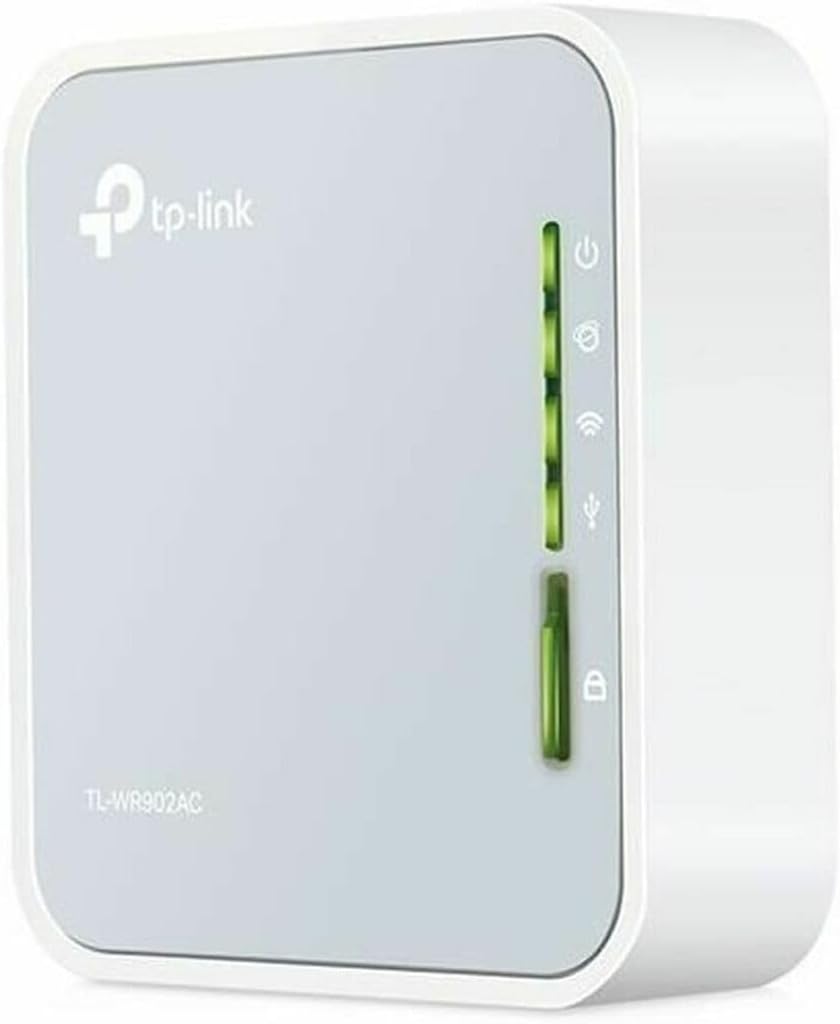
🌍 Stay connected everywhere — your pocket-sized WiFi powerhouse!
The TP-Link AC750 Wireless Portable Nano Travel Router (TL-WR902AC) is a compact, lightweight device offering dual-band AC750 WiFi with multiple operational modes including router, bridge, extender, access point, and client. Designed for travel and flexible power options, this renewed model delivers reliable, high-speed connectivity for HD streaming and seamless networking on the go.
| ASIN | B07V2R7W11 |
| Best Sellers Rank | #77,350 in Electronics ( See Top 100 in Electronics ) #555 in Computer Routers |
| Customer Reviews | 3.9 3.9 out of 5 stars (407) |
| Date First Available | August 8, 2019 |
| Is Discontinued By Manufacturer | No |
| Item Weight | 7 ounces |
| Item model number | TL-WR902AC-cr |
| Manufacturer | TP-LINK USA |
| Product Dimensions | 2.64 x 0.87 x 2.91 inches |
J**N
Great as a WiFi Client
I have a desktop with a PCIe WiFi card that used to work well. Since moving the parts into a new PC case, my connection has been very unstable with high latency spikes. It seems that the new case has enough metal that it acts as a bit of a faraday cage for wireless antennas that are up against it. This router is being used as a bridge for the PC. The TP-Link is connected in client mode to the home's main router over WiFi, and then the PC is connected to the TP-Link via ethernet. I chose this one based on reviews and the compact size. Setup took minutes, as this operation mode is one of the modes available for quick setup in the UI. It has been very reliable, even across a large house and through a couple walls. Would recommend, at least for this sort of use.
J**O
Works better than what is shown in the specs
Works great better than I thought, using as a WiFi bridge for my auto 4 channel dash cam with wifi that was only good for about 30 feet from the auto was able to get 200 foot range with this unit.
H**O
Don’t buy refurbished item!
The item I received, had a virus installed and started infecting my laptop the moment I started testing the function and WiFi connection. I shut down immediately, luckily the infection stopped, this was a refurbished unit. The Amazon refurbishment team dropped the ball, it should have been factory reset to wipe any setup previously done. This obviously was an phishing process done by someone on purpose. Don’t buy a refurbished item, especially tech / router products.
G**R
Not that easy to set up
I bought this to use as a range extender (or so I thought) because my new Android tablet had a hard time picking up the WiFi signal from my router when I'm out on my back deck enjoying the weather and a fine cigar. When I set it up that way I found that I had to turn off security on the WiFi router to get the AC750 to connect to the TP Link server and do the set up. That was pretty clearly unacceptable and I spent a couple of very frustrating hours trying to figure that out. I was about to give up and return the unit and look for something else. It seems that as an extender it works fine as long as it's connected by Ethernet cable. Which clearly wouldn't work for me aside from the security issue. I eventually clicked on Amazon tech support and started a chat with an actual person, not a chat bot. She was very eager to help, but like tech support just about everywhere wanted me to start from scratch. That wasn't helpful and she provided a link to a PDF of the manual. That too wasn't helpful and while we were chatting I looked at the instructions that came with the unit. From the manual it looked like what I really needed to do was set it up as a Hot Spot not an extender. That worked, although I needed to reset and set it up a couple of times to get it to work properly. I'll suggest that I was the one confused by the terminology. Once I got it set up properly it worked fine for what I needed. I was able to connect my laptop to connect as well as my phone and then the tablet. They all connect fine and coverage is good. It has solved my issue. Getting to the TP Link server is still a bit of a PITA, but hopefully I won't have to do that very often if at all. A couple of notes about the unit itself. I bought a refurbished unit and it was complete except there was no card as others have noted in their reviews. I found that the default password that is printed on the unit itself has already pretty much worn off. Fortunately, when I connected to the TP Link server it had the default password is there and I copied it down in case I have to do a reset and start all over again. I expect that losing the password is effectively going to brick the unit. I changed those to a unique password, so the only reason I expect I'll need the default is for a reset. That's the only physical issue I found, but the included USB and Ethernet cables are way too short for just about any application. Not a big deal because I have plenty of both in the computer cable junk box. Overall I'm happy I bought this as it works and it's not very obtrusive.
M**H
Buy One for Travel You will Be Glad You Did!
I bought this to travel, it allows you to set up one connection to a network when traveling, and then connect as many devices to it whether you are in a hotel or on a cruise ship. It securely protects your network activity and provides you privacy on public networks away from your home and also allows you to have to connect only one device. In our case we paid for internet for two devices on our cruise, one for me and one for my husband, but we used this device in our room to connect to, so the ship only saw one connection and then we could connect our phones, tablets and my laptop to this device and not have to constantly be logging in and out of devices in our room so only two devices were connected at the same time. $30 well spent, we are old, and all that connecting and disconnecting/reconnecting is confusing to people our age, plus the security provided of being shielded from prying eyes on public WI-FI while traveling in this day and age is worthwhile too
J**R
TP link is a solid router I travel with.
Huge fan of TP link, they have an app that will teather the routers of just set up. I prefer to use the IP address. I plugged it in and the internet worked with default settings, I went back to make it specific to my needs.
H**E
returning it
The device itself seems OK and so far is working well. So, why only one star: 1) NO DOCUMENTATION AT ALL 2) It supports only the older firmware so you can't follow instructions to set it up 3) I had tp-link call me using the link here, and while the rep was very pleasant, he was USELESS 4) tp-link said that they would have a suoervisor call me back within the hour. Was FOUR hours, so I was gone Never got it to work reliably. Returned it
A**E
Im Client Modus in Betrieb. Läuft seit 2 Monaten ohne Probleme im 2,4 GHz WLAN an einer Fritzbox. Ich habe einen TL-WR902AC v4 erhalten. Ich habe vor dem Einsatz einen Firmware-Update auf TL-WR902AC(EU)_V4_240903 gemacht.
M**H
It's a 150 Mbps product instead of 300 Mbps.
A**W
Als billiger verteiler läuft der sehr gut 1000mbit brauch man ja nicht überall. 2,4ghz und 5Ghz Wlan läuft stabil.
Trustpilot
2 months ago
1 month ago