


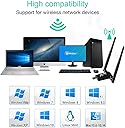


Newest Wifi Dongle USB Wireless adapter AC1200 Mbps USB WIFI Adapter Wireless Network for PC/Desktop/Laptop/Tablet 2.4G/5G 5dBi Dual Antenna Support Windows 10/8 .1/7/ Vista/XP, Mac OS, Linux2.6X
Product ID: 159306954
1. This wireless adapter does not increase the speed of the original router, it only transmits the WLAN signal 2. The wireless adapter with a maximum speed of up to 867 Mbps will only work if you connect to the 5 G band. Otherwise it will run at 2.4G maximum at 300Mbps. Normally, your PC's network speed can't up to the wifi adapter's speed as it depends on many factors, Such as the network size,router, barriers, laptop or PC 's internal memory... 3. Please plug the Wi-Fi adapter into the USB ports behind the computer host when using it on a desktop. Try connecting to a USB3.0 port to ensure adequate power to the adapter 4. Please switch off the integrated WLAN if you use it with a laptop (if your laptop has the integrated WLAN) 5. Connect the adapter directly to the computer's USB port instead of connecting to an external hub. This device complies with part 15 of the FCC Rules . Operation is subject to the following two conditions This device may not cause harmful interference This device must accept any interference received and including interference that may cause undesired operation. MaxDigi AC1200 Dual Band WiFi Adapter allows you to get speedy next generation Wi-Fi connections, by connecting it to the USB 3.0 (backward compatible with USB2.0/1.1) interface of your PC, you can establish up to 867Mbps connection on 5GHz radio or 300Mbps connection on 2.4GHz radio. This Wifi adapter supports Windows XP/7/8/8.1/10; Mac OSX 10.6-10.14 Linux kernel 2.6.24-4.15 and Android 1.6-2.3,4.0-8.x Ultra-fast 1200 (867+300) Mbps wireless speed with 802.11ac Dual Band connections for lag-free HD video streaming and gaming SuperSpeed USB 3.0 Easy wireless security encryption at a push of the WPS button Equipped with a USB docking for flexible deployment IEEE 802.11ac/a/n/g/b High speed USB3.0 interface 802.11ac: up to 867Mbps 802.11n: up to 300Mbps 802.11g: 54/48/36/24/18/12/9/6Mbps auto fallback 802.11b: 11/5.5/2/1Mbps auto fallback 2.4-2.4835GHz; 5.150-5.825GHz 1 ~ 14 channels 2.4G and 5G Antenna 2.4G: 17dbm± 2dbm; 5G: 14dbm ± 2dbm 802.11ac: MU-MIMO 802.11a: 5G OFDM 802.11n: MIMO-OFDM/CCK/DSSS 802.11g: CCK/DSSS/OFDM 802.11b: CCK/DSSS 64/128-bit WEP Encryption, WPA, WPS Link/Active Windows XP / Win 7 / Vista / Win 8 / Win 10 MacOS:10.6~10.14 Linux: (kernel 2.6.18 ~ 4.15) Android 1.6 ~ 2.3, 4.0 ~ 7.0 0℃to 50℃, 20% ~ 85%RH -10℃to 65℃, 10% ~ 90%RH USB3.0's maximum transmission bandwidth is up to 5.0Gbps (500MB/s),it ensures Wi-Fi adapter maximum throughput performance and more stable internet connection. Backwards compatible with USB 2.0 and 1.1 devices. The cooling hole at back can also ensure the normal operation of the equipment and prevent signal problems caused by excessive temperature. Not only a wifi receiver, it can also be AP hots pot. Convert the wired network into a wireless signal output; using the simple AP mode setting to use the network card as an AP route, which is convenient for users to share the Internet through multiple wireless network cards. In terms of wireless security, it supports WPA/WPA2/WEP/802.1X/WMM encryption, allowing you to quickly implement wireless encryption and secure wireless networks MaxDigi wifi stick with two antennas which is built in 2 power amplifiers will cover 100 meters indoor(Depending on the environment) and upgrade the receive and transmit capability of dual-band WiFi signals, effectively avoid wireless interference and network congestion. .


| Are Batteries Included | No |
| Asin | B07YBFTY1L |
| Brand | MAXDIGI |
| Colour | Black |
| Customer Reviews | 4.1 4.1 out of 5 stars (88) 4.1 out of 5 stars |
| Date First Available | 23 Sept. 2019 |
| Guaranteed Software Updates Until | unknown |
| Item Weight | 70 g |
| Manufacturer Reference | AC1200-WIFI-DUAL-ANTENA |
| Operating System | 8 . 1,Mac Os,Vista,Windows 10 |
| Package Dimensions | 15 x 9.3 x 2.2 cm; 70 g |
User
Great dongle
I feel as if this WiFi dongle is not given just reviews, I came in to this expecting a pretty bad dongle just for the time being, but no, it looks high quality, Aston as I plugged it in I clicked the driver and installed the WiFi driver and boom it worked, and since I came from a small non antenna 600mb one I was amused to find I had a hell of a lot of WiFi networks to join, since the antennas allow for a further away connection, making it great if you are upstairs like I am, the connection is great and very stable when downloading or playing games.Overall I really recommend this dongle as it’s cheap for the quality and exceeded my expectations and also was delivered extremely fast.
User
Good device
Just plugged and played does what you need it to do
User
Decent signal
Good signal on gaming machine some way from router.
User
Fantastic product and company!
Great product! Very fast delivery! Highly recommended.
User
Waste of money, time and effort.
I wanted to update an old TP-Link adaptor with something faster and stabler, hoping to use the 5 GHz band to eliminate background interference when I'm trying to upload artwork. After 2 weeks of scouring the net for drivers and expert recommendations for settings, fiddling with my PC, finding the best placement etc, well I wish I hadn't bothered.1. It says it's USB 3, but when plugged into a USB 3 port, still continually complains that it'd be much faster if I plugged it into a USB 3 port...?2. There are no drivers for this thing that work on Windows 10, not even the ones included in Windows- as recommended in one of the other reviews.3. 2.4 GHz sort of works, but the signal gets slower/more unstable over an hour or so until you disable/enable it again.4. On 5 GHz, some of the things which will cause a BSOD or freeze the PC include:Changing any of the settings or moving the antennae without disabling the adaptor first.Doing an internet speed test at OoklaRunning InSSider to check the signal strengthWatching half an hour of Eastenders on BBC IPlayer5. However careful you are, however strong and stable the link with your router is, it *will* overheat and shut down regularly.When I bought it, there was a review saying "This adaptor blew up my PC!". The review has disappeared, but on balance I think I believe it now.
User
Actually great hardware, poor drivers, overheating
1. The dongle itself is great. Stable connection at both 2.4 and 5ghz AC. easily gets 100mbps (my wifi limit being 110) and keeps a rock solid ping (for online games) even from 2 floors away from the router. Amazing range and stability with it.Now for the bad part.2. The drivers it comes with (and those from Realtek) are not compatible with windows 10 and 8 (havent tested 7). 5GHZ AC won't work with them even if you force it from the device manager properties, the dongle tries to connect then disconnects completely. 2.4GHZ /n works but its slow.To get it working to its full potential, do not install the Realtek drivers (either from the disk or the website). Plug it in > Device manager > Drivers > Update driver > Select from a list available in my computer.You will have 2 options Generic Microsoft and Generic Realtek. Choose Realtek. No need to reboot. (You might have to repeat the process if it crashes upon trying to connect to a network, after that its permanently working).Worth the money even with figuring out how to get it to work. (there is no info about a fix online, its a long forgotten chipset so if my solution does not work for you... good luck.)Edit: The dongle overheats when running on 5Ghz AC. Downloading or uploading at high speeds (80-100mpbs) for more than 2 minutes will get it to shut off and disconnect. Another star down for the product unfortunately.Still works great for online games which is the main reason I have it.
User
Constantly disconnecting.
This was meant to upgrade my old wifi dongle but instead I have had to reuse the old one. Software is a bit irratic at times and had to be constantly reinstalled. Once signal held was holding faster speeds than my old one but with the constant disconnects forced me to stop using it.
User
Works
It does the job. Plug in and go
User
Not good
It's bad quality but it's obvious because it's price
User
tutto ok
Fà tutto quello per cui è pubblicizzato
User
perfecto
buena ganancia de señal respecto a la antena interna del portátil la cual me daba problemas al estar la habitación donde hacen los deberes alejada del router
User
Pour connexion à hotspot wifi
Acheté pour connecter un PC fixe Windows 10 à mon smartphone dont je partage la connexion 4G en wifi ac. Aucun soucis une fois le driver installé. A voir avec le temps, quand la distance avec le smartphone sera plus grande, et quand j'essaierai sous linux
User
Use less unrecommended
Use less unrecommended I bought this 6 months before one month only works properly after always disconnected every 20 to 30 mins getting hot 🔥 very high, unplugged and after 10 to 15 mins plugged then only working. Today fully dead 😭 not working
Trustpilot
2 months ago
1 week ago