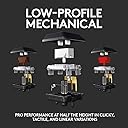
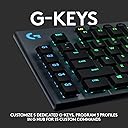
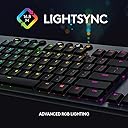
โจ๏ธ Elevate your desk game with the sleekest, smartest mechanical keyboard on the block!
The Logitech G815 LIGHTSYNC RGB is a premium ultra-thin mechanical gaming keyboard featuring low-profile GL linear switches with 1.5mm actuation for fast, smooth keystrokes. It offers full per-key RGB customization via LIGHTSYNC technology, 5 programmable G-keys for macros, dedicated media controls with a precision volume wheel, and a USB 2.0 passthrough port. Built with aircraft-grade aluminum alloy, it delivers a durable yet elegant design. Dual wireless connectivity (Bluetooth and Lightspeed) allows seamless switching between devices, making it ideal for professionals and gamers seeking high performance and style.


| ASIN | B07P2JDLBN |
| Additional Features | Logitech G LIGHTSYNC RGB, dedicated G-keys, low-profile GL mechanical switches |
| Antenna Location | Gaming |
| Best Sellers Rank | #3,394 in Video Games ( See Top 100 in Video Games ) #287 in PC Gaming Keyboards |
| Brand | Logitech G |
| Built-In Media | USB Cable |
| Button Quantity | 104 |
| Color | Black |
| Compatible Devices | Gaming Console |
| Compatible Operating System Family | MacOS, Windows |
| Connectivity Technology | USB |
| Customer Reviews | 4.4 out of 5 stars 787 Reviews |
| Enclosure Material | Aluminum |
| Global Trade Identification Number | 00097855150806 |
| Hand Orientation | Ambidextrous |
| Item Dimensions L x W x H | 18.7"L x 5.91"W x 0.87"H |
| Item Type Name | Keyboard |
| Keyboard Backlighting Color Support | RGB |
| Keyboard Description | Gaming |
| Keyboard Layout | QWERTY |
| Manufacturer | Logitech |
| Mfr Part Number | 920-009177 |
| Model Name | G815 RGB Mechanical Gaming Keyboard (Linear) - Amazon |
| Model Number | 920-009177 |
| Number of Keys | 104 |
| Number of Sections | 11 |
| Power Source | Corded Electric |
| Recommended Uses For Product | Gaming |
| Special Feature | Logitech G LIGHTSYNC RGB, dedicated G-keys, low-profile GL mechanical switches |
| Style Name | G815 |
| Switch Type | Linear |
| Theme | Gaming |
| Total USB 2.0 Ports | 1 |
| UPC | 097855150806 |
| Unit Count | 1.0 Count |
| Warranty Description | 2 Year Limited Hardware Warranty |
T**.
Awesome, with some downsides
This is my first ever mechanical keyboard I have spent significant money on. With that said Pros: - Lightweight, yet keyboard feet keep it from sliding across the desk. Speaking of, the feet are very nice, and get a solid angle for typing - Switches: Logitech switches are very nice (I got Linear switch model). Switches are a bit louder than I had anticipated, but are smooth, no issues of debouncing or misinputs (you can tell when key is pressed or not, never misstype again!). The removal of misinputs or misstyping is super nice for software development; things like VIM commands and REGEX can get all messed up by one extra character you didnt see. - Keystroke press force: Force to press key down is firm, but is solid, and gives tactile feedback on press. - LEDS: Lights have tons of cool features, and Logitech G Suite opens up light controller to your desire. Would love to see Logitech add an API for lighting controller. Would be super cool! - Accessory buttons: Macro keys are not inconvenient, I have seen many comments about hitting G5 in attempt to hit control. This has happened 1 time, but I mean 1 time in a week of typing really isnt that bad. There are 15 macro keys (5 * 3 profiles), and scripts can be written to run from any macro which is super cool (Say you wanted a key to open ETrade or Robinhood, you can do that). Volume knob is extremely big, easy to get to, without accidentally pressing it above the numpad. Very high quality metallic volume knob. Profile buttons, quick macro button, gamer mode, brightness, and media control buttons all very nice with conditioned rubber tops for premium feel. Cons: - Accessory buttons: Actual switching element of ACCESSORY BUTTONS (NOT KEYBOARD KEYS) is a little iffy. Does not give nice responsive press, which can be gotten from buttons as cheap as 0.10$, kind of a bummer. - Caps / Num Lock / Profile button LEDS: Non customizable white LED. Not ugly, but doesnt go with the theme. Same with the Profile Buttons, except they're yellow, not white. - BIGGEST CON: No backlight on the symbols. These are extremely important for software development, doing things like: Python comments, Perl/Bash scripting, C/C++ programming, anything with high dependency on symbol input, is fairly annoying to do at night with this keyboard. Obviously you can remember which symbol is associated with each number (The numbers are lit), but this is a pain in the arse, and for 170$ it shouldn't be a problem. Overall, that's my opinion on the keyboard. Its not bad by any means, but I can see why some people are let down. Build quality is superb, packaging is a bit lacking (I can see how people might need RND), appeal is as nice as pictures, and actual keyboard functionality gets 8/10. Changing profile LEDS and caps/num lock LEDS to be RGB, and inclusion of backlit symbols give this keyboard a 10/10. Cumulative Rating: 8.8/10.
A**N
Elevate Your Gaming: Logitech G815 Delivers Cutting-Edge Performance and Style
The Logitech G815 LIGHTSYNC RGB Mechanical Gaming Keyboard is a marvel of modern gaming technology, combining aesthetics, functionality, and cutting-edge performance into a sleek, low-profile design. As an avid gamer, I've had the pleasure of experiencing firsthand the difference this keyboard makes in both gameplay and overall desktop setup aesthetics. Featuring the GL Linear key switch, the G815 offers a smooth and precise keystroke, perfect for fast-paced gaming where every millisecond counts. The low-profile keys not only contribute to the keyboard's sleek appearance but also provide a comfortable typing experience, reducing finger fatigue during long gaming sessions or typing marathons. The customization options are practically endless. With LIGHTSYNC RGB, you can personalize your setup with vibrant lighting effects across approximately 16.8 million colors, easily syncable with other Logitech G gear for a cohesive and immersive setup. The addition of 5 programmable G-keys further enhances the gaming experience, allowing for quick and easy access to complex commands and macros, giving you the edge in competitive play. The keyboard also boasts convenient USB passthrough, simplifying cable management and allowing for easy connection of other devices. Dedicated media controls add another layer of functionality, enabling quick adjustments to volume or playback without interrupting your game. Despite its many strengths, the G815 is not without its minor drawbacks. The premium features and build quality come with a premium price tag, which may be a consideration for some. Additionally, while the low-profile design is generally a plus, those accustomed to traditional mechanical keyboards may need time to adjust to the different key feel. In summary, the Logitech G815 LIGHTSYNC RGB Mechanical Gaming Keyboard stands out in the crowded market of gaming peripherals. Its blend of style, performance, and customization options make it a top choice for gamers looking to upgrade their setup. Whether you're deep into the latest AAA title or grinding through competitive matches, the G815 is sure to enhance your gaming experience. A solid four stars for this stellar keyboard.
C**.
Amazing keyboard with bad (optional) software
The keyboard itself is great. The keys feel nice to type with, and the linear model that I got is so much quieter than the other versions. The keys are responsive and snappy. The only gripes I have are minor, but they're worth pointing out anyway. I wish it could get a little brighter. And the letters on the keys can be hard to see when no lights are on at all, though they're never really off to begin with. Though, at the same time, the Num Lock and Caps Lock indicators are too bright. Still not really a big issue though. It has a number pad, which is a big plus. Two little kickstands prop it up a little, but it's not too much of a height difference. G Hub is a terrible software, and it's mind-boggling how buggy it still is even after all these years. Sometimes it'll only open after a new install. So I would recommend saving your color and lighting layouts locally on the device so you never have to deal with G Hub again. But if you have no issues with the software (unlike me and many others) then this too can be considered a nonissue. Overall still an incredible keyboard. It had better be, for that price.
J**T
Fantastic quality and features, surprising problems
This review is specifically for the G815 which is a total redesign from the G810. I know the price is a big issue for a lot of people but if you are reading this you have the money and are trying to decide if it's worth it. The KB is the single part of the computer you will touch the most. More than any mouse, touchpad or trackball. So a meaningful change there will have a real impact on your experience with your computer. I found this keyboard fantastic -- but with some troubling issues. Well worth my money but is it worth it to you? Read on. So, things I like: - Super thin but heavy enough not to move around at all. Stable as a rock. - Fast. Like really, noticeably faster. My typing speed instantly increased. - Butter smooth linear keystrokes, no muss, no fuss, no click. - Metal body looks and feels pro, top quality. It should for the price. - A bit of space between the keys means less fat fingering. - Really, super programmable per key. For example I have just the logo to do a lighting effect while the other keys are static. - The G HUB program that sets up the lights and macros was intuitive enough I figured out how to use it just tinkering with it. I was able to do a lot of interesting configuration on my KB. - I set up my keys with colors to denote function. So most keys are white but my F keys are yellow, my G keys are orange, my Windows and audio keys are blue, my caps, num, scrlk, pause, prtsc keys are green, etc. Makes for at a glance and peripheral identification and less hitting the wrong key. - A small lighted bar on the spacebar. Nice touch. - Stout cord and rubber protector. Braided cover. Built to last. Handsome IMO. YMMV - Audio controls are simple and responsive. - Separate programmable/macro keys (G keys). Sure, they could have built another function into the F keys but having them separate means one touch activation. When gaming simple is best. The biggest argument I see against separate G keys is a larger KB footprint. But not here. My old Azio KB without those measures about 18ยผ" (46cm) across while this one is about 18ยฝ" (47cm) so ยผ" (1cm) difference. My standard HP keyboard for work is 18" (just under 46cm) across so the difference even there is minimal. Unless you are upgrading from a KB with no number pad this just isn't an issue. They accomplish this by having a much narrower bezel between the edge of the keys and the edge of the KB. Clever design. - I thought I would miss the built in wrist rest but I don't. With this much thinner KB it just isn't needed. And that change means a smaller footprint front to back. Under 6" (14cm). Things I found odd: - Needs TWO USB plugs. One with a KB symbol, the other with a USB symbol. Why 2? Power requirements? Not a big deal but it's weird. [EDIT: The extra plug is to make the USB port on the top of the KB is a passthrough. But it's USB 2.0 and a KB is not a lot of traffic so why they thought a passthrough was needed I don't know. Still weird.] - The USB passthrough is next to the cord on the top edge of the KB, not on the side as expected. - No scroll lock light. It has a scrlk KEY but no indicator light. Not that most of us use that but if you ever turned it on by accident you would have a heck of a time figuring it out. - There is no audio passthrough. I don't care but you might. - The keys use the new style of being raised up off the keyboard so there is empty space under them. It looks kinda cool but I worry I will catch the corner of an edge key and pop it off. IDK if that would break it or just pop off the top. I would rather not find out. Stuff I don't like: - The symbols !@#$%^&*()_+ etc are just printed on the keys; they do NOT illuminate. So on the 1 key only the 1 lights up, NOT the ! And they are printed in a medium gray, not white, so they really don't stand out. In low light --- like for gaming -- they are completely invisible. This is the only thing I truly HATE about this keyboard. I'm sure someone will point out that I should be able to type without looking but then why illuminate the keys at all? And esp with symbols their placement changes from KB to KB. Any way you look at it, this is a big FAIL. - The letters and numbers on the keys are small. They could have easily been 25% larger without looking oversized and still with plenty of room for the symbols And they should have. They are very clear so even my old eyes can make them out but bigger would have been better. - I have yet to figure out how to use the 3 memory keys. I've tried a number of things and nothing has worked yet. The manual, being for the G810 which did not have those keys, is no help. I have found no YouTube vids on how to do it. I'll figure it out but this is a problem. - Speaking of the manual, the closest I could find was the G810 manual and this is a complete redesign so not much help there. - The web site was weird and buggy and had no idea what a G815 is. It said something about being in transition so maybe that's it. But wow, just wow. - The caps lock and num lock lights are white, rather bright, and not adjustable. I will have to put a tinted plastic cover over them. Also, reading the printed text next to them to see which is caps and which is num is impossible. Litreally black on black. I can figure it out but that's obnoxious. Maybe I'll paint over that in white. - The brightest level is just about right for me, but I like lower light. It has dimmer levels but nothing brighter. Not sure why they went with such subdued light, especially since this is a USB plug in, not wireless, so no battery issues. If I had a fancy PC build on display with this KB doing a light show I would want it much brighter. The problems are mostly things that should have been caught by releasing a few prototypes to a handful of gamers. Overall it's a fantastic keyboard with some surprising issues for a premium priced KB. I don't regret the purchase but normally with this many issues I might give it just 3 stars. Still, it's already by far my all time favorite KB so I'll go with 4. And hey, Logitech, if you're reading this, if you need someone to tell you this stuff in the future I would be happy to do so. Because whoever is doing it now is not catching these things.
J**H
Love the keyboard!
I'm an old-time gamer and have had a ton of different keyboards over the years. I have come to love this linear keyboard over the old Cherry-MX I used to use. It's quieter, shorter keystroke, but you still get a mechanical feedback without annoying the entire room. Keyboard functions great and the software for it seems to work well. Also integrates well with the new Win11 dynamic lighting. I use this with a PowerPlay and a G502 Lightspeed mouse - the entire combo works very well together and shares the same drivers. Would highly recommend.
C**Y
Cheaply made lettering wears off quick. 2 month plus 9 month picture update.
A good and fun keyboard, but after less than 2 months of use, the lettering is already wearing off. As expensive as this keyboard is, that feels very cheap. Actual use is nice, but that wear issue is very off-putting on a keyboard that markets itself as visually interesting. 9 month update: even more keys are going. Less than one year after spending 100+ on this keyboard, I'm going to replace it. That's just poor product construction.
M**K
Really nice keyboard!
At first, I was skeptical since I had seen reviews that were not that great. I decided to order anyway. It is expensive, but if you're willing to spend the money, this is definitely a great choice. Previously I've had the G915. The G815 (this keyboard) and the G915 look the exact same, but this one isn't wireless. That is not an issue for me but may be a dealbreaker for some! I got the linear version, which I am very pleased with. It has a satisfying sound, the keys are slightly heavy but overall feels very nice. The keys aren't too loud, which I think is really great. It's easy to customize the colors, all you need to do is download the Logitech GHub application and you're all good! The setup was simple, I only had to plug in the keyboard and it was all ready to go. It feels great for gaming and typing overall! If you're looking for a silent and linear, customizable RGB keyboard, then this should be great for you! :)
M**A
Superb Board
This is an amazing board to use. I will NOT remove points for the crap that is G-Hub that you have to use to get the most out of this, but that part is total crap. This board has low-profile keys, but they are responsive and silent. The backlighting is vivid and (once you figure out/get G-HUB to work) combinations and macros work smoothly. Media controls are on-board and out of the way with minimal layout taken up. The weight of the board is good so it stays in place during use. The feet only provide a very small amount of lift, so that could be an issue for some that need a larger angle of elevation. It is quality, from the frame to the keys and is a joy to use over long periods of gaming or work. If you can get past the software, its killer. If you don't care about macros, RGB or changing keymaps, this is a no-brainer, but you probably wouldn't be looking at this board if you didn't care about those things.
Trustpilot
2 months ago
2 days ago