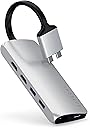
🚀 Double your screens, not your clutter — the ultimate MacBook sidekick!
The Satechi Type-C Dual Multimedia Adapter is a premium USB-C hub designed specifically for M1 and M2 Pro/Max MacBooks, enabling dual 4K 60Hz HDMI output, 60W power delivery charging, gigabit Ethernet, USB 3.0 ports, and micro/SD card readers in a sleek aluminum chassis. It offers a plug-and-play experience that transforms your MacBook into a powerhouse workstation without the hassle of multiple adapters.


| ASIN | B07RD8CG3W |
| Best Sellers Rank | #1,010 in USB Hubs |
| Brand | Satechi |
| Color | Silver |
| Customer Reviews | 4.2 4.2 out of 5 stars (718) |
| Date First Available | May 3, 2019 |
| Is Discontinued By Manufacturer | No |
| Item Dimensions LxWxH | 4.92 x 1.97 x 0.59 inches |
| Item Weight | 3.42 ounces |
| Item model number | ST-TCDMMAS |
| Manufacturer | Satechi |
| Operating System | macOS |
| Product Dimensions | 4.92 x 1.97 x 0.59 inches |
K**B
Works as advertised for macbook pro 2019 with 2 external independent monitors
Works great, can do 4k on two external monitors (independent) not that screen mirroring garbage others advertise. I have been using for 2 weeks, and the only problem I have is after reboot ethernet does not come back on - have to remove and reinsert cable into laptop.
C**N
High quality replacement for dock
I can't rave enough about this adapter! It solved an issue I had at work where I could just not get the DisplayLink software to work with my "universal" dock and 2019 16in MBP no matter what. DisplayLink and StarTech suck, just get this adapter instead. There is absolutely no software that this Satechi needs to run, just plug it in and it will connect up to two monitors instantly. Much better than a $300 dock that doesn't even work! It's so simple to set it up, it's almost like Apple made it themselves (and the material is a lot like a Macbook too. Wouldn't surprise me if the material was the same aluminum). It has every port that you need and even includes an ethernet port if needed so it's like a smaller version of a dock. Two HDMI ports, two USB-A ports, SD card reader, USB-C PD port. Sounds like it can be used as a dock to me. It will take two USB-C ports but you get one back and it has to be this way because you cannot currently run two monitors from a single HDMI port due to macOS software limitations. I wish everything were USB-C by now but alas, this is the world we live in. Only thing that I think can be improved is the layout of the adapter. Due to the layout of my desk and the direction of the HDMI ports (they are upside down when the adapter is right side facing up), I have to flip the adapter upside down. The main base isn't even either: the bottom is flat while the top of the base is curved so when I flip it upside down, it no longer lays flat on the table. The cable connecting the base and the USB-C ports to connect to my MBP are rather long and inflexible too. The base does get a little hot to the touch while outputting to two monitors but it's not burning hot and is actually a relief during these cold winter months to my hands. Minor inconveniences compared to the rest of the benefits. If you're shopping around for an adapter that is guaranteed to be able to output to two displays, you can stop your search and get this device!
D**K
Works for 2 x HDMI Monitors + Apple MBP
Current Laptop: 2017 MacBook Pro Operating System: macOS Catalina (v.10.15.2) Monitors: 2 x DELL P2417H Cables: 2 x HDMI Review based on ownership of the device for 1 day. This Satechi hub requires both USB-C ports on one side of a MacBook Pro (I believe it needs to do this to reliably utilize two external monitors), which leaves two available ports on the other side. The hub itself has a USB-C port, which I use for the power cable. The only thought I would take into consideration is the current integrity of the ports on the MBP itself as with repeated use, the ports tend to lose their "grip." I believe this is an inherent concern with USB-C's current form factor? If the computer is being moved around while connected or, in my case, set up on a stand-up desk configuration, the additional movement may slightly dislodge one or both of the paired male USB-C inputs from the hub... which inevitably will lose connection to the monitor(s). As expected, securing them back in resolves the issue. Not a huge problem but something to consider if one or both of your female ports have lost their physical integrity. Overall, very pleased with this purchase, the Satechi Type-C Dual Multimedia Adapter has an aesthetically pleasing design in a small, yet solid form factor. The cable is reinforced with rubber, which gives it some maneuverability while maintaining rigidity (i.e. the bend radius is more comparable to a thick HDMI cable) . I've only used the 2 HDMI and 1 USB-C ports on the hub and they all functioning correctly. I was wary of Satechi because they were a new-ish company (from my perspective) but I was recently recommended this brand by a representative at a Microcenter in Denver, CO and having used this USB-C Hub as well as their similarly designed number pad (the slim bluetooth 18-key pad), I'm growing fond of their products.
V**E
This thing gets HOT!
Legit, this thing gets hot. I wouldn't recommend it for mobile use or if there is a risk of damaging the surface it sits on. Second, the pigtail is too short. The perfect use case for this is a dual display setup with a MacBook Pro on a Rain Design mStand, however, it's awkward AF for the cables to exit through the port on the back of the stand like this. It works, but if the cable was 50-75mm longer it would be better. Third, throw me a bone: GIVE ME MORE USB-C. I don't know why these people think I just want more USB-A ports, because there literally are ZERO docks like that just give me HDMI and more USB-C. Fortunately I have the MacBook Pro that has two T3 ports on the right side too, so I can use those for T3 and USB-C connections, BUT WTF JUST GIVE ME MORE USB-C PORTS! Hell, this thing could be ONLY USB-C ports, and with the right cables it would work just as well! All of that being said, it provides dual HDMI, power in, gigabit ethernet and two USB-A ports to feed the hubs built into both displays. With my dual 1440P HDMI setup, and my MBP, it fits the bill.
K**H
Great device in theory - too bad it does not work
The idea is great - instead of having multiple dongles hanging off your laptop, you can do everything with just one dongle. Its too bad that the HDMI output at least is very flaky. First time I plugged in my two external monitors, only one of them got a signal. After tweaking the connector a few times, I got it to send a signal to both monitors. However, the connection is not that great and if I move the laptop even a little, the connection comes loose again and one or both monitors lose signal. Even if I don't move the laptop but put it to sleep and wake it up the next day, I sometimes lose signal to one of the monitors. Its just not worth the hassle to fiddle with it a few times every day to get it to work as it should normally.
J**S
Practical !
just what I needed
F**Z
Magnifico accesorio. Ideal para el home office, conectando micrófono externo, web cámara y dos monitores a un equipo MacBook Pro m1+. El dispositivo no se calienta y resultó excelente apoyo para el uso diario.
R**.
Definitely one of the more premium feeling type c docks out there. I honestly have nothing to complain about, it has all the ports I would realistically use. The only gripe i can see OTHER PEOPLE having with it is that the cable from the macbook to the actual dock is quite rigid so you may not be able to tuck it anywhere. Personally I took this to my advantage and made a makeshift slide-in dock on my shelf.
A**O
Funcionalidad ★★★★★ Calidad ★★★★★ Diseño ★★★★☆ Precio ★★★★★ Adaptador esencial para cualquier persona que tenga una MacBook Pro. Cuenta con todos los puertos multimedia para tu portátil, eliminando la necesidad de comprar otros adaptadores. Sobresale el puerto que permite conexiones 4K a 60Hz. La estética es perfecta y va con el color del aluminio de la MacBook; la única queja es la rigidez del cable. El precio es el que debe ser; recordar que el adaptador de Apple se vende a 79 € y solo te incluye tres puertos.
L**K
J'ai acheté ce produit avec pour objectif principal de connecter 2 moniteurs externes à mon Macbook Pro afin d'obtenir un bureau étendu sur 3 écrans: moniteur1 - écran Macbook - moniteur2. Cela fonctionne parfaitement. Bien sûr le prix de ce hub est assez élevé; mais croyez-moi sur parole: fuyez tout hub qui serait moins cher. En ce qui me concerne, j'ai acheté 2 hubs dans les 30€ chacun mais ils ne fonctionne vraiment pas bien. Certains périphériques USB sont reconnus 1 fois sur 2. L'un de ces 2 avait 1 seule sortie HDMI; l'autre 1 HDMI et 1 VGA, mais malheureusement l'image de sortie était la même sur les 2 sorties (donc impossible de réaliser mon setup). J'ai aussi acheté un hub qui coûtait dans les 70€ - c'était pire: faux contacts, etc... Celui-ci est juste FANTASTIQUE. Tout fonctionne immédiatement; aucun soucis. Le bureau s'étant bien sur les 3 écrans. Les périphériques USB sont systématiquement reconnus. Donc: un peu cher, mais un plaisir à utiliser; ça change la vie ! Au lieu de dépenser inutilement 30€*2 + 70€ = 130€ ; j'aurais mieux fait d'acheter celui-ci dès le départ.
え**ん
MacBook Pro M1で使用。 有線のLANも速い。 ただしM1でのマルチモニターは一つのみ対応。 本体から出てるUSB-C端子のケーブルが太くて扱いにくい。
Trustpilot
4 days ago
2 weeks ago