


🎉 Elevate Your Game with Style and Comfort!
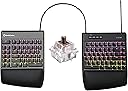
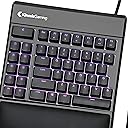
The KINESIS GAMING Freestyle Edge RGB Split Mechanical USB Keyboard features an ergonomic split design, Cherry MX Brown switches, and customizable RGB lighting, making it the perfect choice for gamers and professionals alike. With 95 fully programmable keys and plug-and-play compatibility across multiple platforms, this keyboard is designed for maximum performance and comfort.

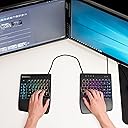


| ASIN | B07SW1S3YZ |
| Antenna Location | Gaming |
| Best Sellers Rank | #37,351 in Video Games ( See Top 100 in Video Games ) #1,803 in PC Gaming Keyboards |
| Brand | KINESIS |
| Built-In Media | Detachable Cushioned Wrist Rest |
| Button Quantity | 9 |
| Color | RGB MX Brown |
| Compatible Devices | PC, Laptop, Game Console |
| Compatible Operating System Family | ChromeOS, Linux, MacOS, Windows |
| Connectivity Technology | USB |
| Customer Reviews | 4.5 out of 5 stars 678 Reviews |
| Enclosure Material | Plastic, Rubber |
| Global Trade Identification Number | 00607998897515 |
| Hand Orientation | Ambidextrous |
| Item Dimensions L x W x H | 15.5"L x 10.3"W x 1.3"H |
| Item Type Name | split mechanical keyboard |
| Item Weight | 2.8 Pounds |
| Keyboard Backlighting Color Support | RGB |
| Keyboard Description | Gaming |
| Keyboard Layout | QWERTY |
| Manufacturer | Kinesis Gaming |
| Mfr Part Number | KB975-BRN |
| Model Name | Freestyle Edge RGB |
| Model Number | KB975-BRN |
| Number of Keys | 95 |
| Number of Sections | 2 |
| Power Source | Corded Electric |
| Recommended Uses For Product | Gaming |
| Series Number | 975 |
| Style Name | Keyboard |
| Switch Type | Cherry MX Brown |
| Theme | gaming |
| UPC | 607998897515 |
| Warranty Description | 2 Years from Date of Purchase |
R**S
Absolutely Fantastic! Wow!
"On-the-fly" macro-recording, key-swapping, and multiple profiles are fantastic! This keyboard sets the bar for all other keyboards (and peripherals). Special "off-keyboard" buttons enable profile-switching (windows/mac mode), macro-recording (frequent text, low-security passwords, app-and-o.s.-independent ad-hoc actions), and keyswapping (swap windows-key/alt-key ... swap quote-markers, replace an infrequently used key with something more convenient... remap some awkward "reload/grenade" gaming key with something closer). All of them are: "Macro => Z => 1234 => Macro" (record a Z macro). To remove: "Macro => Z => Macro" (no macro)... Same with remap: "remap/z/x" => remapped. "remap/z/z" (z-to-z => no-remap). Quick guide is printed on back/bottom of the keyboard, so you can recover if you mess something up. Major point is that _all_ of these actions are _trivial_ to perform "in-place" ... it's literally uncomplicated and quick to make a macro or something in any app, for any purpose, and go to town with it. Configuration is stored via onboard USB-style memory (ie: Special+F7 => your USB keyboard is now also a USB-Drive), and `./settings/macros.txt` is inspectable, backable-uppable, transferrible, etc. It really allows an incredible and flexible ease of configuration, customization, etc. Updates are basically `cp update.zip => USB-Keyboard` and reboot it. Wow! I wish all devices (eg: fancy mice) used this same mechanism for configuration inspection and updates. ...and then on top of it all, it's a mechanical, split, semi-ergonomic keyboard with crazy glowy LED lighting. Wow! The most fun one I've found is like a heatmap of what recent key's you've pressed... "abcdefg => only those keys are lit up, and they slowly fade out." Truly a cool hacker-typer-feeling. Wow! Potential negatives or cautions are: with great power comes great responsibility. Be careful because you can get yourself into a messed-up state that you'll have to scratch your head a bit to recover from (ie: Macro "a" => "bbbb" means it's tricky to type an "a" anymore unless you can figure out which key has the macro and you _might_ lose other macro's that you'd recorded until you can figure out how to inspect / repair / remove them). If you record a macro, it plays back as an unstoppable force... the letters will spew out whether you want them to or not. Overall, even though it's somewhat expensive, it's an incredible value, and incredibly thoughtful device that I'm incredibly happy with after only a few days with it. Definitely going to be bragging about this one and advocating other people to buy it, it's really like a "Keyboard 2.0" and will make you re-think what a keyboard should be!
D**S
Great for typing & general computer work, helped me bounce back from a broken wrist
As someone who uses a keyboard all day for work, I kinda new in the back of my mind that I should really look at getting a more ergonomic set-up and invest in my long term health. However, it took a badly broken wrist for me to make it a priority, as I was struggling to go back to using my old, non-ergonomic keyboard. The Kinesis keyboard is expensive, but its turned out to be a great investment. When I ordered it, I figured it would probably take me a few weeks, maybe months, to get used to the split layout, but that the state of my wrist meant it was a good time to take the hit and relearn, as I'd reap the rewards in the years to come. In actuality, the transition was seamless. After about 5 minutes of test typing, I felt confident I could use the keyboard and achieve the same (or maybe better) speeds that I had done before my accident. The wrist strain after prolonged use is nil, and the ability move each keypad independently means I can get a setup that's just right for me. The split design means I can also easily take the keyboard with me when traveling for work. I went with the MX brown switches, which have given me the desired balance between audible feedback whilst not being too loud (important when I'm doing a lot of typing on video calls etc). My only gripe is that the top left corner of the right wrist support started coming away within days (the vinyl covering is not well attached to the base). I tried gluing it back on, but to no avail. For such an expensive keyboard, you'd expect better. Other than that, I do miss having a number pad, but not quite enough to purchase one separately. I also purchased the optional lift kit at the same time, but I haven't used it, as I prefer a flat setup. So, I'd suggest trying the keyboard first and maybe testing different inclines using some blocks etc to see if you like the incline before spending extra on the lift kit.
A**E
Best consumer keyboard I ever expect to encounter
I've worked in IT and software dev my whole life so I've been gradually refining what's important to me. Up until recently, the Microsoft Sculpt Ergonomic keyboard has been my go-to, but the unreliable membrane keys and 2 year shelf life made me search for more. I can't use a non-split or rotated keyboard without serious strain in my wrists and arms. I also need a properly positioned wrist rest and optimally have adjustable tenting. With the tenting accessory, this checks all the "need" boxes. The RGB is beautiful, subtle, configurable, and easily turned off at a button press. The cable between the halves is properly cable managed and extendable for your needs (even if the very nice braided wire is a bit thicker than my preference). The sound and feel of the switches is incredible. There are macro buttons and remapping and profiles and more that I haven't even scratched the surface on. The only things I wish this had (which are HUGE asks) are are rotary encoder for things like volume, thumb clusters / layers like a QMK firmware, and low profile switches. But when it comes down to it, I'm obligated to build my own custom keyboard at that point (which I'm working on). Just some comparisons, it sounds and feels like a DasKeyboard (which I can't use because they don't split, but I love them otherwise). It's as comfortable to type on for my weird ergo membrane keyboards. The Cloud 9 Gaming keyboard just like this that has built-in tenting and a rotary encoder sounded hollow and resonated springs and vibration if you brushed up against keys, like nails on a chalk board - this one sounds like an actual high-quality keyboard. I've tried to type on an Ergodox EZ but without properly angled wrist rests angled with the tenting, it caused more strain than helped with ergonomics (again, building something custom to fit me better but still). In any case, I could stop my keyboard journey here and be completely happy. Thanks for making such a great keyboard I can pick up at a store like this, Kinesis!
R**E
A superb keyboard and not just for gamers!
I've been using ergo keyboards for years. I thought I'd finally treat myself to something better than what I'm used to. This is a superb keyboard. I got the brown switches and their feel and sound is perfect for me. Great tactile feedback and the right amount of clicky sound. The keyboard feels solid and well built. And I love being in charge of the keyboard(s) placement. I am not a gamer, just a nerd who types a lot with code and words. This keyboard is very, very good at that stuff out of the box. And, it's customizable. (Sad trombone noise) That's the good news and the bad news. This is a programmable keyboard--but the docs, examples, and general help on programming it are woefully inadequate. After several hours of messing around I have it doing a lot of what I want it to do--and I am pretty sure it can do other things I want to do. (for example, I have the caps lock key mapped to the keyboard's FN key--so that pressing caps lock and 'j' is the left key, 'l' is right, 'k' is down and 'i' is up. It's awesome and you can do all kinds of stuff like that. So, keyboard A+++. Docs, go back to school. You fail. Bottom-line: be prepared to spend more time than you should need to to to get this keyboard configured the way you want it. That said, also be prepared for a superb typing experience when you do get it configured the way you want it. With better docs, this would be a five-star keyboard. UPDATE after 7 months: Having lived with this keyboard for seven months I have come to realize that it is worth every penny of its $200 or so. Do I wish it cost less, yes. My fingers spend about 90% of their time on these keys at least seven hours a day--with no ergo issues (and I have very old fingers). This is a forever keyboard. My beef with the keyboard remapping docs remain. They contain virtually no examples and this keyboard can do so much. Search "kinesis" on GitHub for good ideas and examples. One more thing, I grew up with the arrow keys on the number pad on the right of the keyboard. I thought I could train my fingers to use my Kinesis's remapped arrow keys. I couldn't (my hand just wouldn't stop wondering over to the right for the arrow keys). I solved that problem with the $11 MOFII Wired Number Pad Numeric Keypad (see pic). Kinesis sells one for 3x that much, but the MOFII works great for me and has posed zero issues alongside the Kinesis.
C**Z
Improved gaming and reduced strain
I had tendinitis due to being a software engineer and gamer. I bought this keyboard and the Freestyle 2 for mac and both have been amazing with respect to relief from repetitive strain. Having said that, this keyboard, in particular, is amazing. Why is it amazing? I've actually improved in FPS games significantly. Not having to strain makes my reaction times quicker. The keyboard has a premium feel when typing and has great response time. The wrist rests are comfortable and the RGB lighting is really nice to look at. I like that you can rotate the left side of the keyboard a bit when gaming, it makes it easier to reach all the keys you want to use without straining. I recommend buying the elevation stands that are sold separately for even less strain. Pros: Premium feel Fast response times Reduces strain Great ergonomics Cons: High price Some of the keys are sometimes hard to reach when gaming You have to buy the elevation stands that are sold separately to really benefit from the intended ergonomics and reduced strain. Update Jan 1, 2020: The S key broke off the keyboard. I don't use this keyboard for anything other than gaming, and I don't game that much for it to explain how it broke. I really liked this keyboard too, so it's a big disappointment. I've reached out to Kinesis support since it's only been 3 months to see if the warranty will cover the fix. Once I have an update on that I'll post it here.
L**R
Rock solid keyboard, perfect ergonomics
Use it for hours everyday, love the split layout. Wife thinks it’s a little clicky/loud, but I chose the medium click level. I’d likely do less clicky next time.
T**K
One of the best typing keyboards out there for software engineers alike
I will admit my shame, and I own 4 of these keyboards. Two of them are the previous edition, and the others are the RGB model (Cherry MX Brown and Cherry MX Blue). I used to be a software engineer and now working as an engineering manager. I thought I would type a lot back then until I became a manager. When you are a software engineer, you think more and type less, but being a manager is all about typing when you create user stories, documentation, email, answering questions, finding out solutions, etc. Now, I type even more, and I appreciate an ergonomic keyboard like this. I have used many keyboards out there in the market, partly because of my passion for keyboards. As the keyboards are the only physical object you interact with within your daily software development life, it becomes something you enjoy with. I even had my company buy one for me for the office as I was using my Kinesis Edge keyboard there. I explained all this background so that you can see where I am coming from for my review. I don't care much about gaming, and interestingly enough, this keyboard is mostly advertised as a gaming keyboard. It is more than a gaming keyboard. It is a typist, software developers, engineering managers, and all sorts of occupations' keyboard that involves a high amount of typing. I used to have mild anxiety about the mistakes I was doing while typing since it was more than reasonable and was affecting my work. It is frustrating when you cannot translate your thoughts into code while you are in the flow because of the mistakes and backspaces you have to do while doing it. Once I got used to using this keyboard, the number of errors considerably reduced partly because of the clear separation of my left and right hands. They no longer run into each other. It also trains my brain to use both my hands as effectively as possible. Previously, it was my right hand doing all the traveling over the keyboard, whereas my left hand was just scanning a few keys. It is the case anymore. The other significant benefit is the posture it puts you in. You can adjust both parts as comfortably as possible. You can want to tilt your one keyboard as it is more suitable for your posture, go ahead and do it. You just have to experiment with this keyboard to appreciate the benefit of it genuinely. I can explain all the small benefits that add up to major ones, but I believe it is self-evident even by merely looking at the keyboard. Using the RGB keyboard has two significant benefits for me than the old version: 1. I could not distinguish the key prints due to blue light due to my eyes condition. It was honestly a horrible choice for the backlight color. The simplest and most effective option would be white color, but I think it is too simple of a color for gamers. 2. When you tilt the keyboard, I realized it becomes partially harder to see the letters on the keyboard. What I do is to color the keys that I use quite regularly, such as print screens, etc. with different colors to find them when I need them quickly. This has been working quite well for me. TBH, coloring each key with different colors for quickly seeing them, is the only benefit I appreciate in RGB keyboards. I don't care about the lighting effects, especially in the professional office environment. I used to hear some metallic echo sound in the previous edition of this keyboard, but it seems they have fixed that problem in this newer RGB model, or my ears simply stopped hearing them. Either way, I am okay. The other significant design change with this keyboard is the new palm cushion. I admit that the previous model was horrible, and I stopped using them entirely after the weird feeling and texture it has that I started realizing. I had been waiting for the new palm support since the time I saw it on Twitter and ordered two of them for my older keyboards, and it was a lot better than the previous generation. The major drawback of this keyboard is its price. It is not reasonably priced, I believe, but almost all of the premium keyboards are not reasonably priced these days. The good thing is that though you buy these keyboards once and use them for years without any deterioration in their quality. So, they are mostly long-time investments, but they make it so appealing, you sometimes cannot resist upgrading to their newer versions when they come out. Regardless, this is my review of this keyboard, and I hope it helps.
D**B
Split keyboard necessary for next level development.
As a developer, or someone who uses a computer a great deal, you may go through the efficiency transition of removing the wasted time moving your right hand between the keyboard and the mouse and for 98% of your work, removing your dependency on the mouse in order to maximize your effectiveness. Using editors like vim, browser plugins like vimium, and being effective with the command line or short cut keys, it is possible to work far more efficiently without your hands leaving the keyboard. I mean a lot more effectively than using the mouse. I want to cry now when pair programming and watching someone slowly interact with their system moving at 1/4 impulse power. The side effect of this significant improvement in productivity is that your hands are locked together and if you are a full sized adult (I am 6'4"), keeping your hands next to each other for long durations of typing adds stress to your shoulders and upper back. A split keyboard like this puts the distance between your hands back to the far more physically comfortable distance between your hands as you would with your left hand on the keyboard and your right hand on the mouse. Further, Because this keyboard lacks the 10 key-pad and the section of keys that normally sit between your right hand's home position and the mouse, transitions to and from the mouse are still quicker when necessary. But alas, there are still issues. Power users of applications like vim will find the need to use the escape key or other key combinations and if you look at the location of the escape key on this keyboard, it is too far to reach to not hit an efficiency bottleneck. Also, the button for simulating the right click is missing here. BUT, with this specific keyboard these are not an issues. This keyboard is a smart keyboard and retains its key mapping and programming on board. Additionally it allows full control over the coloring of the keys. What does this mean to you? Well, in my case I mapped the cap locks key to the escape key and moved the caps lock key just left of its old position. I added the common buttons and combinations like locking the computer and the missing "right click context menu button" to the quick access buttons. Now here is where the back light color control comes in. While this is a "cool" feature for gamers to watch their keyboard breath, you can also use this as memory retention model for your individual key mappings. Mine show me which keys map to escape and which items I have remapped so I can easily recall what I did in the past. My keyboard is hooked up to a KVM switch. You might be thinking that you could just remap your keys inside of your OS. Retaining the key mappings on the keyboard is far better as the key mapping is maintained by the keyboard. So once programmed, it works the same everywhere on every computer I connect this to through the KVM. I even carry this keyboard between computers on the weekend so I can have the same efficiency on my home computer when doing projects. The MX brown switches are reported to provide a faster typing experience. I can't comment on that more than telling you that since getting this keyboard my typing speed has improved by 20 wpm. But that might also be due to focusing on typing speed after getting this keyboard. If you are learning how to be more effective with your computer by keeping your hands on the keyboard, I strongly suggest you consider this keyboard or a similar one. The next level up keyboard, which looked interesting had the brackets in a weird position and some reviews complained about an inability to consistently hit the brackets after using the keyboard for some time. You also keep your ability to use a standard keyboard with this one. That is except for the escape key not being where your caps lock key is ;).
C**Z
FALLAS DE LA NADA
No se si solo sea a mi, pero después de unos meses de tenerlo, dejó de prender el led del teclado. hable a garantía y me dicen que tenía que enviarlo para poder hacerlo válido, la verdad no lo envíe porque me salé al mismo costo como si comprara otro nuevo... después de falla estaba ahora en ciertas teclas pero el led ya prendía, y ahora nuevamente fallan las teclas y el led no prende
D**E
Totally AWESOME keyboard for ANYONE. You don't need a disability to benefit from this keyboard!
I love this keyboard. I have tried many gaming keyboards and not been able to work out how to use them, except for the Redragon keyboard, and even then, I could not work out their software and so could only make one profile on it. With this keyboard, the software is so easy to use that even I can do it. I can easily make many profiles with it. I also love that it allows me to create macros of up to 300 characters, while most other gaming keyboards have a much stricter limit. This allows me to easily paste long passages of text. One thing that would make it better would be if it automatically lit up the assigned key when making on the fly macros in the colour red, for example. It could be programmed so that over a 10 second period, if the user presses the key again it toggles back to being its original colour and then back to being red again if pressed again until the 10 seconds elapses. And same for when a macro is programmed in the software. Also, to be a full gaming keyboard it would be good if it had hall effect for rapid trigger, rapid snappy, actuation adjustments etc, but then again, that would reduce the quality of the keyboard for typing and a lot of people would use this keyboard both for typing and general use. The key at the upper furthermost left is another Fn key. The escape key should have been placed here instead in standard size, and this would have allowed one more macro key to the immediate right of it. The key that is currently escape could then be the brightness key and the current brightness key could have been another macro key, to make a total of 10 macro keys. I don't even have any problem that requires this type of keyboard but I bought the tenting kit, since there were so many youtube videos saying there is no point getting it without it. I think this keyboard is a justifiable purchase, even if you don't need an ergonomic keyboard, especially if you don't like the idea of bloatware, such as Razer synapse etc on your pc. I could not even work out how to use the Wooting keyboard when I tried and it is supposed to be one of the easiest. Also if you put both halves together and don't tent, it is basically the same as a standard keyboard any way. But I found it is not hard to get used to typing on it at 5 degrees and apart, although admittedly, I don't type quite as fast this way. Another advantage is that I can easily just use the left half, with the remapping function to have the mouse close to me for gaming. This is the only gaming keyboard on the market that I am aware of where I can press a dedicated key on the keyboard to make an on the fly macro, and then press another dedicated key on the keyboard to change the profile on the fly. I tested this out when I first got it by creating a simple text macro for the first macro key, I then change the profile and created a different text macro for the first macro key. When I change profiles and press the macro key, a different macro is displayed, depending on what profile I am in. Every other gaming keyboard I am aware of requires software to do this. It would be even better, if it was like Redragon where the user could create on the fly rgb effects. Another key could be added to the programming group of keys to do this and the caps key, for example could then go a certain colour and the arrow keys could be used to cycle through all the basic colours: red, yellow, orange, light blue, dark blue, green, purple, white and no color. The user then presses keys on the keyboard and they turn the designated colour. When the rgb programming key is pressed again the changes are locked in to the current profile. This would negate the need to use the software at all. But as I previously said, the software is very easy to use anyway. And the software also has lots of other options, such as repeating the macro over and over again, toggling it on and off etc. I am very pleased with the service from Spring Xu LLC in delivery this keyboard and the tenting kit to me.
Y**V
Excellent, buy it with the risers
I have issues with my nerve pinching in my left spatula. Using a split keyboard with a lift kit removes this pinching. This keyboard is excellent in terms of build quality, key switches and caps and the ability to customize the keys with the app. Highly recommended.
S**N
Ergonomische Gamertastatur mit US-Layout
Layout: US Amerikanisch (ANSI) Kurz: Wählbare Switches, Layout- und Macro-Anpassungen ohne Software, Anti-Ghosting Allgemein: Es handelt sich hierbei um eine konzeptionelle Weiterentwicklung der Kinesis FreeStyle Reihe, für Gamer aufbereitet. Verglichen mit anderen Tastaturen fällt sofort auf, dass die Tastatur zweigeteilt ist. Dadurch lassen sich diverse ergonomische oder anwendungsspezifische Konstellationen realisieren. Lift-Kit: Ich würde empfehlen, das Lift-KIT dazu zu bestellen, um die Seiten mittig aufzustellen und nach außen du lehnen. Dadurch liegen die Handgelenke natürlicher. Leider muss es schon genau das passende Lift-Kit sein. Entgegen der naheliegenden Kaufvorschläge hier auf Amazon passt das VIP Kit für die FreeStyle2 nicht auf diese Tastatur, obwohl sie sehr ähnlich aussehen. Auf der Seite des Herstellers sind Reseller angegeben, die das Lift-Kit auch nach/aus Deutschland liefern. Tasten: Die Switches sind je nach Auswahl verbaut und insgesamt haptisch deutlich ansprechender als zumindest die der FreeStyle2. Für Spieler interessant ist die Anti-Ghosting-Funktion, deren Fehlen bei der FreeStyle2 noch zu Problemen geführt hat. Diese Funktion sorgt dafür, dass man deutlich mehr (alle?) Tasten gleichzeitig drücken kann, ohne dass Tastenanschläge "verloren" gehen. Programmierbarkeit: Remapping und Macros können zu jeder Zeit ohne jede Software angepasst werden. Die Tastatur hat entsprechende Tasten. Die Tastatur unterstützt drei Profile, zwischen denen man mit einem Tastendruck wechseln kann, und 6 weitere, die eine Tastenkombination erfordern. Anpassung der LED-Beleuchtung erfordert allerdings das Herunterladen einer entsprechenden Software vom Hersteller. Unterschiede zur FreeStyle 2: Die Tastatur ist sehr ähnlich aber nicht identisch. Die Escape-Taste wurde in die F-Tasten-Zeile reintegriert (wie bei anderen Tastaturen), was bedeutet, dass alle F-Tasten eins nach rechts gerutscht sind. Die große Taste oben links (die ursprünglich Escape war) ist jetzt von sich aus funktionsfrei und frei belegbar. Man kann sie auch weiterhin als Escape verwenden. Die Reihenfolge der Print-, Pause- und Del-Tasten wurden getauscht, die Del-Taste ist jetzt so groß wie alle anderen Tasten auch. Die LED-Beleuchtung ist natürlich auch neu. Fazit: Die wahrscheinlich beste Tastatur, die ich je gekauft habe. Ergonomisch, für Spieler und Vieltipper geeignet. Der Preis ist allerdings Kinesis-typisch recht gehoben.
G**.
Ergonomics and gaming combined in a quality product
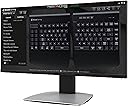
Ergonomics/Comfort: The wrist rests are divine. And the split is very comfortable - much better for my wrists. It also makes gaming more comfortable too, because I can move the right half aside and put the mouse there. Learning curve: I had never used an ergonomic keyboard before this one, so I was pleased to discover that it is easy to get the hang of. I am not much of a touch-typer, but I got used to the split very quickly. Software: SmartSet is a great piece of software. It is very easy to use. It could look a little more fancy, but it looks fairly good. The software is pretty powerful in terms of what it can do. My one wish would be the ability to assign any key to shift/toggle profile. But all-round very good software. RGB: Lovely. Nice and smooth. Plenty bright. Verdict: It's a high price, but I would say it's worth it if you are any of the following - feeling pain/discomfort from typing - using your home office most weekdays - have computer-heavy hobbies If you are in the US and you are looking for the last keyboard you will ever buy, then either get the Dygma Raise, or the Moonlander if you have big hands, or the Dygma Defy when it comes out. If you are outside the US or are just beginning your ergonomic journey, then this is a smashing device.
Trustpilot
5 days ago
3 weeks ago