Desertcart purchases this item on your behalf and handles shipping, customs, and support to Japan.
🚀 Power through your day with speed, style, and stamina!
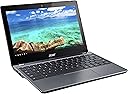
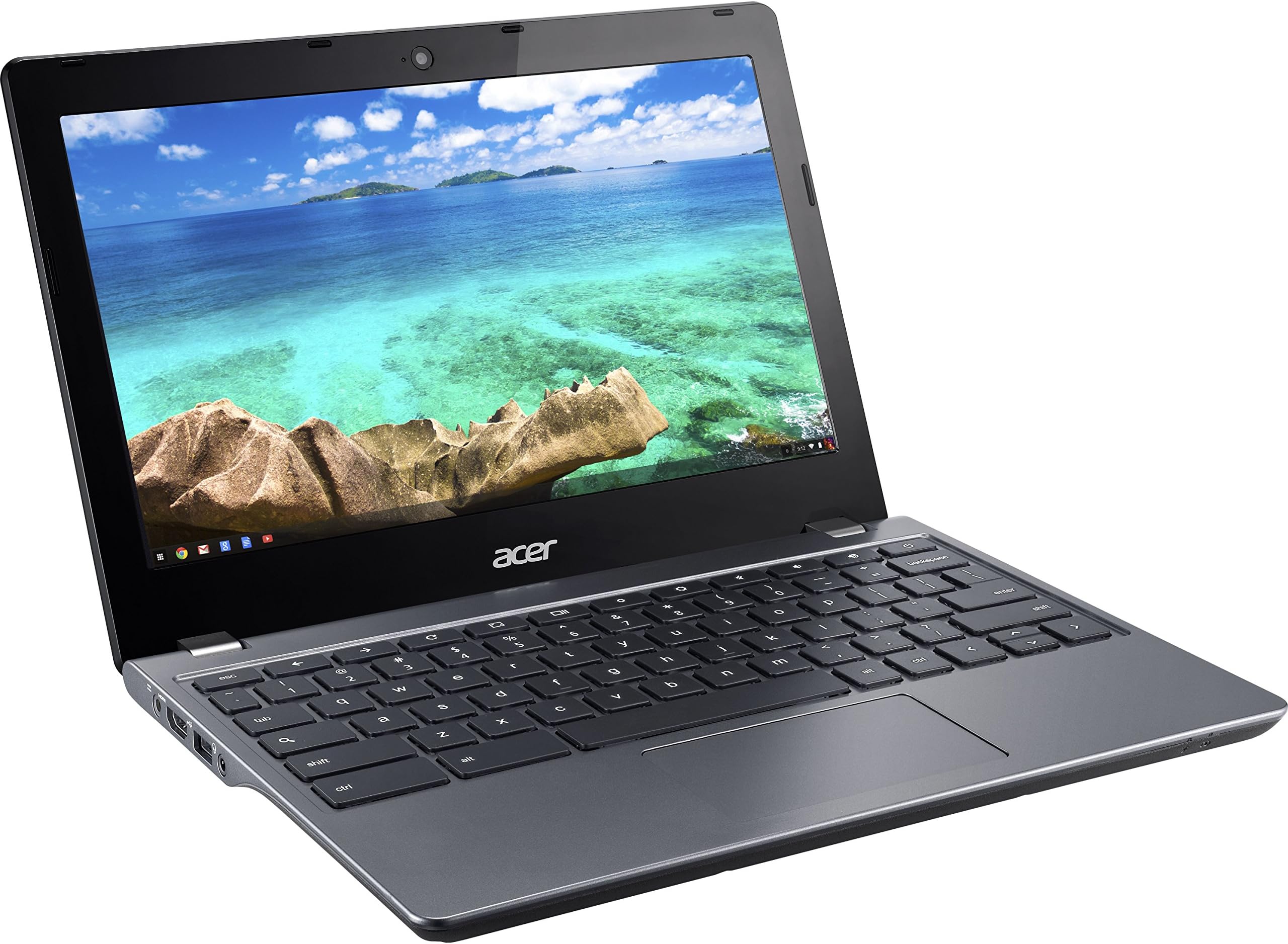
The Acer Chromebook 11 C740-C4PE is a durable, ultra-portable laptop featuring a fast 7-second boot time, 9-hour battery life, and a responsive 4GB RAM with 16GB SSD storage. Its reinforced design and compact 11.6-inch HD display make it ideal for professionals and students seeking reliable, on-the-go productivity powered by Chrome OS.
| ASIN | B00SQG3MQE |
| Audio Output Type | Headphones |
| Audio features | Standard audio features for headphone usage |
| Automatic Backup Software Included | Chrome OS |
| Battery Average Life Standby | 9 hours |
| Battery Cell Type | Lithium Polymer |
| Battery Life | 9 hours |
| Best Sellers Rank | #75,202 in Computers & Accessories ( See Top 100 in Computers & Accessories ) #13,251 in Traditional Laptop Computers |
| Brand | Acer |
| Built-In Media | 3-cell battery, AC Adapter, Chromebook |
| CPU Codename | Broadwell |
| CPU Model | Celeron 3205U |
| CPU Model Generation | Haswell |
| CPU Model Number | Celeron 3205U |
| CPU Model Speed Maximum | 1.5 GHz |
| Cache Memory Installed Size | 2 |
| Chipset Type | Intel 9 Series Chipset |
| Color | Gray |
| Compatible Devices | USB mice, keyboards, storage devices, Bluetooth-enabled devices, external displays with adapter |
| Connectivity Technology | Bluetooth |
| Control Method | Touch |
| Customer Reviews | 3.8 out of 5 stars 252 Reviews |
| Display Resolution Maximum | 1366x768 pixels |
| Display Technology | LED |
| Display Type | LED |
| Form Factor | Other |
| Graphics Coprocessor | HD Graphics |
| Graphics Description | Integrated |
| Graphics Ram Type | Shared |
| Hard Disk Description | SSD |
| Hard Disk Interface | Serial ATA |
| Hard Disk Rotational Speed | 1 rpm |
| Hardware Interface | Solid State Drive |
| Human-Interface Input | Touch Pad |
| Item Dimensions L x W x Thickness | 11.3"L x 8"W x 0.8"Th |
| Item Type Name | Acer 11.6" Chromebook C740-C4PE - Intel Celeron 1.5 GHz - 4 GB RAM - 16 GB SSD - Intel HD Graphics - Gray |
| Item Weight | 3.1 pounds |
| Keyboard Description | Chiclet |
| Keyboard Layout | QWERTY |
| LAN Port Bandwidth | 1000 Mbps |
| Lithium-Battery Energy Content | 3920 watt-hours |
| Manufacturer | Acer |
| Maximum Display Brightness | 250 nit |
| Microphone Form Factor | Integrated microphone |
| Model Name | Chromebook |
| Model Number | NX.EF2AA.002 |
| Model Year | 2014 |
| Native Resolution | 1366 x 768 pixels |
| Notebook Pointing Device Description | Touch Screen |
| Number Of Cells | 3 |
| Number of Ports | 1 |
| Operating System | Chrome OS |
| Optical Storage Device | No optical drive |
| Other Special Features of the Product | HD Graphics |
| Power Device | AC adapter |
| Processor Brand | Intel |
| Processor Count | 2 |
| Processor Series | Celeron 3205U |
| Processor Speed | 1.5 GHz |
| RAM Memory Installed | 4 GB |
| RAM Memory Slot Total Count | 1 |
| RAM Memory Technology | DDR3L SDRAM |
| RAM Type | DDR3 SDRAM |
| Ram Memory Installed Size | 4 GB |
| Ram Memory Maximum Size | 4 GB |
| Resolution | 1366 x 768 pixels |
| Screen Finish | smooth, glossy |
| Screen Size | 11.6 inches |
| Specific Uses For Product | personal |
| Supported Monitor Maximum Quantity | 1 |
| Total Number of HDMI Ports | 1 |
| Total Usb Ports | 2 |
| Touch Screen Type | Capacitive |
| Touchpad Feature | true |
| UPC | 887899773891 |
| Unit Count | 1 Count |
| Video Output | USB-C |
| Video Processor | Intel |
| Warranty Type | Limited |
| Wireless Compability | 802.11abg |
| Wireless Technology | Bluetooth, Wi-Fi |
J**S
A fantastic secondary computer
I'm going to explain this with a metaphor that might not work well for everyone, but bear with me. I'll also be talking more about Chromebooks in general, with details about this specific device further down, just as advance warning. Chromebooks in general - and this one, being the one I've used - are like bicycles. Fast, zippy, simple means to get around town, run simple errands, and meet up socially. There are a lot of people who can get by with just a bicycle, if that's all they need, and a lot of people who will want a car - or a pickup, or van, or SUV - instead. There are also a lot of us who can really use both. I have the good fortune to have a PC that does all of the heavy lifting I could need it to. It takes care of all the Adobe software for video, photo, and sound editing, and any computer games I care to play work just fine on it. ...but there are a lot of use cases in which a big desktop PC isn't very helpful. Coffee shops, classrooms, study sessions or work outside of your home. And there are lot of people - myself included - who don't actually need all that power outside of the home. I don't need to edit video on the road, and I don't need a lot of hard drive space or graphics-heavy programs either. Owning this is like having a bicycle as well as a car. It's fast, it's zippy, it's light. It doesn't have a limitless battery, but I rarely spend more than 7-9 hours away from outlets during which time I'd need to be using a computer. ...and among affordable Chromebooks, the C740 is pretty spectacular, with a few key things to know to see if it fits your preferences. The screen is nice but not stellar, with acceptable but still fairly narrow viewing angles. Text is crisp and photos look decent, which is really all I need, but there are Chromebooks with 1080p screens if that's something you need. 1366 x 768 on an 11'' screen looks good to me, but I won't be arguing that it's great for everyone. The keyboard is a wonderful chiclet-style keyboard with great feel and a nice layout, even though I occasionally wish that the up and down arrows could have been squeezed in at full size, and the lack of a dedicated caps lock key might conceivably bother you. I'm at my fastest typing speed on chiclet keyboards, and the first thing I did upon starting this one up was check an online typing test, where I matched my usual speed of 80 WPM. It's not so much that the keyboard makes things faster, it just doesn't get in the way of rapid typing - but preferences do differ, so look for what you know! I am a particular fan of the 11'' form factor for a laptop. I love the small size and low weight, and my small hands are quite happy with the C740. I found through looking at various devices that 4GB of RAM is what you really want in a Chromebook, and, coupled with a good extension to kill or pause unused tabs, I have yet to have any problems with too many open tabs - and I am a fiend for having far too many open at any given time (24 right as I write this (it is a Problem)). The trackpad is perfectly serviceable and has good options for speed to match your preferences. It's decently sized and comfortable to use. I love the available ports, and loading up a USB thumb drive or hard drive with music or movies, depending on what you like, is a perfectly fine way to carry music around. Something I wish I had known is that the SD card slot is not very deep, so at least half of any card you slip in is going to be sticking out - needless to say, carrying it around with an SD card in is a recipe for disaster. I can see some potential for previewing photos from a point-and-shoot camera on here, but otherwise I'm not so sure that the SD card reader is all that helpful. Still! Who knows what others might need? Battery life is, as I mentioned, more than adequate. Best of all, the device starts up in a flash and is always zippy and responsive. For a portable device, as a student or worker or anyone getting stuff done on the go, it's simply heavenly not to have to wait long for your computer to wake up, turn on, or restart. You can get right to business immediately. ...and, naturally, nearly everything positive about the computer is expressed through ChromeOS, which is something you either already know you want, by looking at reviews, or something that you ought to learn more about, if you're looking through laptops in general. I don't think I could get by with the Acer 11 C740 as my only computer, but as a supplement to my PC, it is the nicest thing I've ever owned. I've made due with a hand-me-down Macbook from 2006 before, a Nexus 7, a Dell Inspiron, an HP Pavilion tablet, and, far back, a mostly nonfunctional Sony Vaio from 2003 or so. Short of a Macbook Air I briefly had time with, this Chromebook has given me the best portable computing experience I've ever had, and I absolutely recommend it to anyone for whom a Chromebook matches their desired use case.
M**C
The best 11" chromebook available now.
This is a very nice device. A refinement of the c720. Almost exactly the same except that the keyboard is a bit more stiff (which I like) and the processor is a bit faster and more energy efficient. If you wan't a high performance chromebook you need a 4GB RAM version with this processor or an i3. The bay trail and rocketchip CPU based ones have half the performance. Which is still fast because chrome OS is fast, but this machine is darn near instantaneous. The only two issues here are the use of an TN screen rather than IPS, and that the SD card slot is shallow so cards stick out far. Chrome OS is very usable these days. The Web experience is very good, much better than on an IOS device and much safer than on a Mac OS or Windows machine. In most cases faster than even a good MacBook Pro.
J**L
Seriously, I love this machine!!!
Seriously, I love this machine!!! Fantastic performance especially given the low price (my primary reason for purchasing this particular Chromebook). Very thin, which makes it convenient to take pretty much everywhere. Battery life is awesome. Perfect size for what it's used it for (browsing the web on the couch etc, watching videos from youtube or netflix, working on google spreadsheets etc). I also can't speak highly enough of ChromeOS. The joy of having a laptop that keeps itself updated, doesn't get viruses/malware and is literally maintenance free (aside from occasionally having to plug into power to charge the aforementioned battery) keeps my life simple. I know that every time I open the screen on this guy, it will instantly boot up and be ready to go... No "windows is restarting for updates, 30% complete... check back in 10 minutes", no viruses, no slowness from 3rd party apps that have accumulated over the years needless consuming resources. Just open and go! Pros: *Excellent* performance, esp given low price Great build quality Dead silent Loud speakers Awesome battery life Good low light sensitivity on the webcam USB 3.0 flash drives support SD card reader HDMI out Cons: Power adapter connection seems like it could be fragile if someone tripped on the cord while plugged in Wouldn't mind if the screen was a little larger / better image quality (i've been spoiled by the Retina Display on a mac book pro).
M**N
10 month wonder
It worked great for 10 months then quit working. I was not able to recover the OS with reinstall.
J**K
Big thumbs up!
Love this Chromebook! Big upgrade over my old Samsung 300 Series. Got this refurbished and everything is still working as new. Looked new when arrived. Much faster than my old Chromebook and very good battery life. I can have next to me at work all day long and still have 3 hours left at the end of the day. I could probably go a full day without recharge. Build quality is very good. Feels very solid. Not as light as my old Samsung but not noticeably heavier in actual use. I'll take the more solid feel over super light weight anytime. Keyboard is nice and comfortable even with my XL sized hands. I have found that sometimes if I get too far to the left on the track pad to click that I have to hit with more force than towards the center. No biggie. Scrolls nice. I don't think the screen quality is that bad unless you have next to an IPS. I use mine outside often and prefer the matte screen over a glossy IPS. Viewing angles are pretty decent and colors true. Good power and efficiency in a small yet very capable machine.. what more could you ask for?? Overall big thumbs up!
D**N
YES! worth the investment
I've had this device for nearly a month now. Absolutely love it! The updated processor outperforms the C720 by enough to merit a purchase for this one instead. From my selected seller, This was an education unit. For those interested in either device, education vs consumer, the education model does not have any lack in performance. Physically the device is quite solid, similarly to how a dell feels inside, but is contrasted to the plastic-y shell. My only grip with its appearance. The track pad is a very smooth plastic that takes a little bit of time to get used too. I mention this for those familiar with the setting in windows known as "precision" or for older versions, "accelerated" mouse control. On the mac this would be a setting that cannot be changed, as far as i've known. It seems this is a chrome OS feature and not as a result of the track pad. As some may have read, the tap to click feature does require a bit more pressure than a standard setup. Such as a macbooks trackpad. The screens colors are acceptable, and definitely usable. Viewing angles vertically however are quite varying. Horizontally theres a little bit more flexibility. SSD from what i've read online is replace/upgradable. The ram is not. The screws are also NOT covered with warranty stickers. I think this is a education specific version of the c740 All in all i'm extremely excited to be using this device, and love the chrome os experience! PS: be sure to understand what the Chrome OS has to offer. compared to Windows, Mac etc. Recommended
J**N
Two Stars
It just seemed cheap compared to what I am used to…..Macbook
I**Z
Great performance with a barely adequate screen
It's chief virtues are its low price, excellent performance, excellent battery life, good keyboard, and solid body. I paid a bit more $210 for a refurbished one and am certainly getting my money's worth. There are some serious disadvantages. The most important one is the screen which has a narrow viewing angle and barely adequate contrast. If I want to read something long, I switch to my ipad. The hard drive is very small so you can't store a lot on it. That is OK if you use it as an internet only tool. Working with a Chrome only machine definitely limits what you can do. It isn't real easy, for example, to save files into Dropbox or OneDrive directly from my mailbox. I had originally intended to write documents, and that works, but editing tools (Google's Documents and Microsoft's Word Online) have very limited capabilities. Luck for me, I can usually remote into my Windows computer and perform advanced operations that way.
D**.
Good buy
Works great
D**L
réponds bien à mes besoins
Satisfait de mon achat.
Trustpilot
5 days ago
1 month ago