Buy anything from 5,000+ international stores. One checkout price. No surprise fees. Join 2M+ shoppers on Desertcart.
Desertcart purchases this item on your behalf and handles shipping, customs, and support to Japan.
🖥️ Unlock your multi-monitor potential—because one screen is never enough!
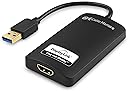
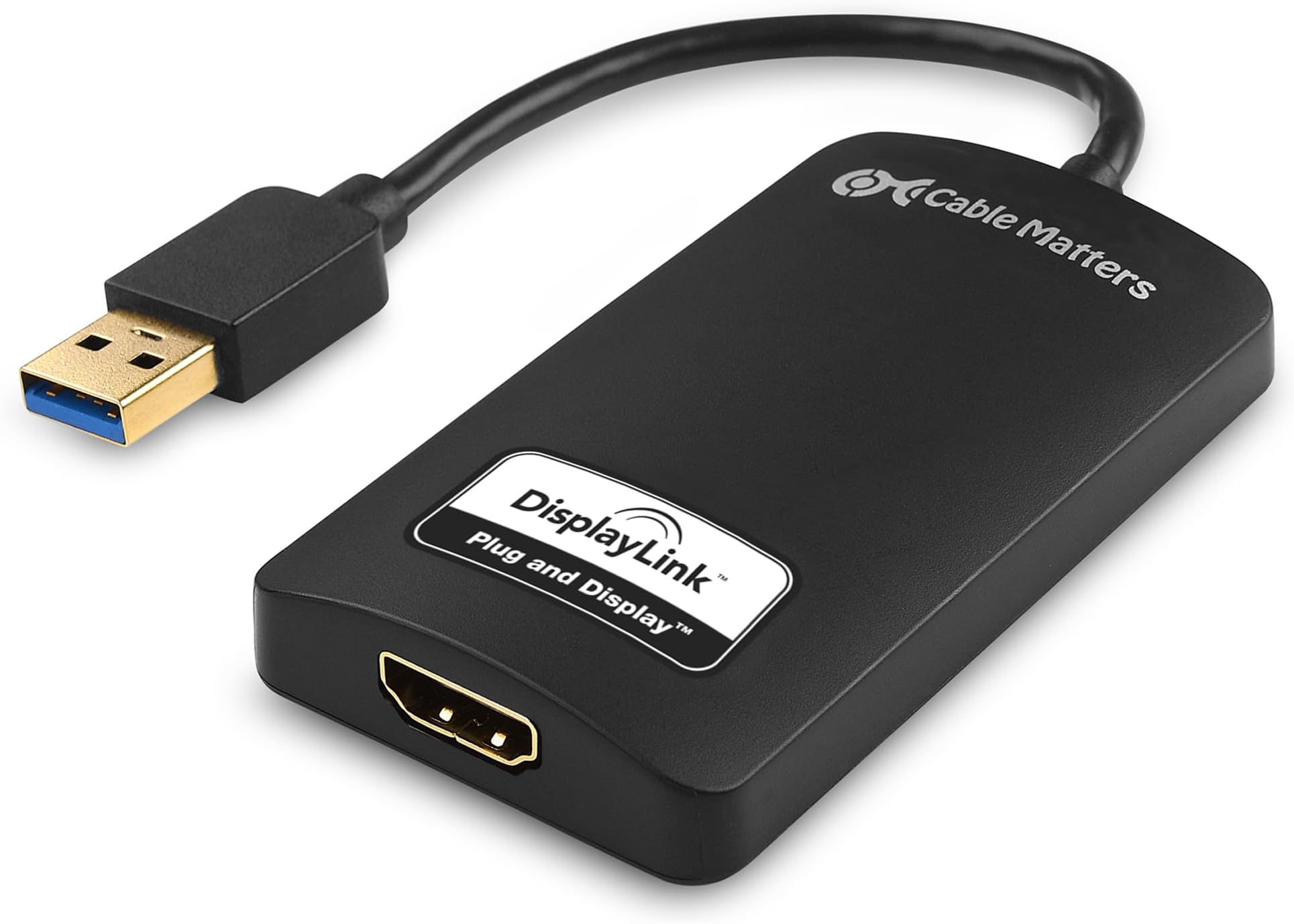
The DisplayLink USB to HDMI adapter leverages SuperSpeed USB 3.0 bandwidth (up to 5 Gbps) to connect your computer to HDTVs, monitors, or projectors with resolutions up to 2560x1440. It functions as an external USB graphics card, enabling additional displays when other ports are occupied. Portable and bus-powered, it supports Windows OS and includes an HDMI to DVI adapter for flexible connectivity. Ideal for professionals needing expanded screen real estate on the go, it comes with active driver support and a 1-year warranty.


| ASIN | B00BPEV1XK |
| Best Sellers Rank | #109 in DVI-HDMI Adapters |
| Brand | Cable Matters |
| Color | Black |
| Compatible Devices | Monitor |
| Connector Type | DVI, HDMI |
| Customer Reviews | 4.3 out of 5 stars 3,310 Reviews |
| Finish | Hdmi,Projector |
| Input Voltage | 5 Volts (DC) |
| Item Dimensions | 8.66 x 6.14 x 0.55 inches |
| Item Weight | 0.11 Kilograms |
| Item dimensions L x W x H | 8.66 x 6.14 x 0.55 inches |
| Manufacturer | Cable Matters |
| Mfr Part Number | 103046USB3BLACK |
| Model Number | 103046-BLACK-AU |
| Number of Items | 1 |
| Number of Ports | 1 |
| Package Quantity | 1 |
| Power Plug Type | No Plug |
| Smart Home Compatibility | Not Smart Home Compatible |
| Specific Uses For Product | Monitor,Projector |
| UPC | 738435983260 |
| Unit Count | 1.0 Count |
| Warranty Type | Limited |
S**E
Works, with minor bugs
I'm using a MacBook Air (13-inch, Mid 2012) running OSX 10.10 Yosemite, which only has one thunderbolt port for video out. I write code professionally, and wanted to have 2 monitors and my laptop screen to do so. I don't need it to be low-lag, or have super high framerates, but I do need high resolution so I can display lots of text. This adapter does that (at 1920x1080 at 60 FPS as claimed), but not perfectly. Firstly, you have to download/install drivers from their site, plugging in the adapter without them does nothing. This isn't a problem for someone like me, but may confuse new users, especially people who are used to Macs, since most Mac hardware is plug-and-play with no custom driver installs. On the plus side, the drivers were updated last week, which means they're being actively worked on, so the bugs I'm about to mention may be resolved later on with new drivers. On to the bugs: If you want to do triple-monitors on a Macbook Air, you'll need to plug in this adapter AFTER you plug in the thunderbolt adapter, or the drivers freak out, use 100% CPU, and your framerate becomes terrible with visible tearing and artifacting. Fortunately, when waking up from sleep this doesn't become an issue, and it takes 2 seconds to unplug/replug if you do it wrong. Other than that, by far the biggest bug is that Mission Control (which I use constantly to switch windows) does not get along with the adapter. When it's plugged in, Mission Control causes the screen to freeze for 3-5 seconds before showing you the overview, though this can be significantly cut down if you run defaults write com.apple.dock expose-animation-duration -float 0 in a terminal. This removes the animation at the start and end of Mission Control, though, which makes finding windows slightly harder, but makes mission control launch in a sane amount of time. Also, if you want to use the adapter-connected monitor as your main monitor, the menubar loses transparency and can lose all its text, though it is still functional. Additionally, some applications (specifically Intellij Idea) don't like it when you use the adapter-connected monitor as your main, though they will run fine and display fine on that monitor if it's set up as a secondary. There is also the minor issue of antialiasing not working in Mission Control, meaning text looks weird in the overview. Also, 10.10's new transparency stuff is glitchy and causes some weird colorations and small black/white squares sometimes, but you can disable it to remove this effect. [EDIT:] I have discovered that disabling transparency significantly improves performance of apps on the connected monitor. The setting is under System Preferences->Accessibility->Display->Reduce Transparency. Lastly, though it does claim to be 60FPS (and looks like it actually is) there is a slight lag (maybe 3 or 4 frames) on the picture. For work, this is not an issue, but if you're wanting to use it for gaming (especially with a single game spanning two monitors), it would be very noticeable and problematic. The adapter gets warm while in use, which leads me to believe that there's some sort of processing going on, which is probably causing the lag, so this may not be something the driver updates could fix.
C**.
Device Failed after 5-months of purchase - Update: Warranty Replacement
The device functioned adequately for the five months that I own it—until it simple died. It all occurred after upgrading to the new 2.5 driver and my system failed to recognized the device. So, I downgraded to the prior version and system would still not recognize it, or connect to the device. I updated my OS and it still wouldn't work. It now overheats whenever I connect it to my computer and it just doesn't work. I am debating whether or not it would be worth the hassle of contacting the manufacturer. For, I believe the first thing they would suggest would be to upgrade the driver. LOL. And the developer of the driver (note that Cable Matters and the driver developer are separate entities) would refer me to the hardware manufacturer. The device would work as an additional monitor on my computer system. I would have no other problems with it other than the very small lag which wasn't a huge problem and some applications not displaying properly but it wasn't a big problem. The device was able to play videos and dvd's smoothly enough. It appears that the hardware is not up to par. Update: I contacted Cable Matters and I was very pleased to see an immediate response and was told that since my device was under the 1-year warranty they would promptly send me a replacement after I shipped my bad adapter. I was very satisfied with their customer responsiveness and tech support as well. I am currently using the replacement adapter from Cable Matters, and thus far it works very well. Perhaps, the original adapter I got was simply a bad unit which understandably happens. The new device they sent me has been working very well for the last couple of days. I have no complains about how its working. However, given that the original failed after 5-months of usage, I will have to write another updated review later on, perhaps after using the device for 5 or 6-months.
M**N
Currently the only USB3 to HDMI device worth your money - at least for Mac users.
The first one of these I ordered was Dead On Arrival. I sent it back and ordered a replacement. The replacement works... and it's such a well done product I'm giving it 5 stars in spite of the first unit being DOA. It's one of three USB to HDMI devices I evaluated; one was by Etekcity ( http://www.amazon.com/gp/product/B00F8OPKLW ) and it gave a decent picture but I couldn't get the sound to go through its HDMI output. Second best was by StarTech.com ( http://www.amazon.com/gp/product/B00612ZPQA ) and it handled the sound alright but the video in the Startech would shear every few seconds; it could not handle the bandwidth. Useful as a screen addition for programming or spreadsheets but useless for full screen video viewing. But when I plugged this device into a USB3 port on my Mac Pro Late 2013 (the black cylinder Mac Pro) I not only got a shear-free picture on the HD projector in the home theater, I also got what looks like 5.1 output through HDMI even though I actually don't have more than two speakers (see below). In the Mac's Audio Midi Setup app (the Icon looks like a little piano keyboard) I can choose "USB3 to HDMI" - a choice I didn't see from any of the competing devices. And when I selected it I was shown six (!) volume sliders for all the 5.1 channels. And sound flows from the Mac, through this device, through HDMI cable, gets converted to optical SPDIF by a Monoprice box and goes to the home theater optically and gets decoded into hum-free perfect sound there. After 8 months of messing with it my AV setup is finally doing what I want it to do. This part was the missing piece. Four sources (Two Mac pros of different vintages, one PS/3 and an HDMI cable to the home theater that I can plug into a laptop using this beauty: http://www.amazon.com/gp/product/B00DOZHL82 ) go into a http://www.amazon.com/Monoprice-105557-Toslink-Digital-Coaxial/dp/B003L14WB8 and its output goes to my Epson projector as HDMI. But the sound is tapped from the selected HDMI and goes over an optical fiber to the theater where it is decoded by http://www.amazon.com/Digital-Optical-Analog-Converter-Adapter/dp/B005DIRI6I into powered speakers. Using the tiny infrared remote control for the Monoprice box I can select any of my four sources; sound is chosen along with it. Mute button works on all four channels. And I have reason to believe that if I had a 5.1 sound system I could make that work also.
S**O
Works very well, but complex: you need to understand this unit well
I got this to allow a Macbook Air to use two external monitors based on various network recommendations. It works: I am typing now on one screen while watching fullscreen youtube on the other, which is attached to the cable matters box. There have been numerous reports of performance issues, but I suspect that is with the USB 2.0 units, which have dramatically less bandwidth than the USB 3.0 units (480mps for 2.0 vs. 5gps for 3.0). Note that since the unit is designed to be backwards compatible with USB 2.0, plugging the unit into a USB 2.0 only port on your computer can easily (and silently) cause the unit to perform at this much lower speed. The box installed rapidly on my Macbook air. Because the Macbook air does not have a CD/DVD rom, I had to go to the cable matters site and download the driver, but it was up and running right after that (the 2.4 driver). Now for the lowlight: Connected to a 1920x1080 monitor, the resolution dropped down to a much lower resolution of 1600x1200. Since I am using two external displays side by side, this was especially bad. The Mac didn't seem to know what the resolution of the target monitor was. I fixed this, after doing an internet search, by downloading a utility called "RDM" or Retina Display Menu. This program sits on the task bar and allows you to change to the full resolution of the monitor. From this I conclude that the cable matters box is not passing the resolution information provided by the monitor (plug and play) to the Mac. This may be a driver issue or a fundamental hardware issue, I don't know. To sum up, the cable matters box is not just a dumb cable to a display. It is more like an external graphics card connected to the computer by USB. Thus it needs the same kind of care you would put into a graphics card, namely, proper drivers and a high speed connection. I think that with USB 3.0 it finally has the horsepower to make this work. In the case of the I/O limited Macbook air, it appears to be the only way to connect two external monitors reasonably to the computer (the other way being to get a thunderbolt native display $$$).
J**N
Works with MacBook Pro mid-2012 and Mojave 10.14
I bought this to be able to run 2 identical Dell external monitors and it does the job. Also allows the internal MacBook Pro display to be on and extended to it - so 3 displays total. I am running this adapter and another HDMI cable via a Microsoft DisplayPort to HDMI adapter. Initially I had this adapter plugged into the display when doing the software driver install, which I did via the download from the DisplayLink website. I couldn't get it to work, even after doing some searching and going into the Privacy settings to allow this software. I restarted, unplugged, replugged, etc and no luck. I then uninstalled the software and reinstalled it. When going back in the Privacy settings menu I realized the display was working. Not sure what I did / didn't do, but another review suggests installing the drivers / software with the display uplugged. Give that a shot. The bottom line is... this adapter works on a mid-2012 MacBook Pro with the initial Mojave 10.14 release. I have this device plugged into one USB port directly on the MacBook, and am using the Amazon Basics 4 port USB 3 hub plugged into the other port on the Mac for my Logitech wireless mouse and wired Gigabyte keyboard. Everything is working great / seamless and I still have 2 USB 3 ports left on the USB hub for hooking up an external drive, etc. +++++++ Update from less than a day of using this setup... This Cable Matters / DisplayLink adapter plugged directly into MBP, another monitor plugged into MBP via a Microsoft Displayport adapter... I was using the Amazon Basics USB 3.0 4 Port hub (bought today) and plugged into my mid-2012 MBP via the second USB 3.0 port on the MBP. I began experiencing stuttering with a Logitech bluetooth mouse with the Logitech Bluetooth Receiver plugged into the Amazon Basics 4 port USB 3.0 hub. I have a spare Dell hardwire mouse so I decided to see whether using that as a mouse (hardwired) fixed the mouse issue. I now have the Dell hardwired mouse plugged directly into the MBP with the external Dell monitor and this Cable Matters DisplayLink adapter plugged into the Amazon Basics 3.0 Hub adapter. That seems to have fixed the mouse stuttering issue... the external Dell monitor with this Cable Matters DisplayLink adapter still works fine and the mouse issues are now gone since I switched to a hardwired mouse.
T**Y
Mac Displaylink drivers cause "jerky" display with no known solution per Displaylink
My system: Macbook 13-inch, Late 2009 Processor 2.26 GHz Intel Core 2 Duo Memory 8 GB 1067 MHz DDR3 Software OS X 10.9.1 (13B42) Purchased: 2 - Cable Matters SuperSpeed USB 3.0/2.0 to HDMI/DVI Adapter for Windows and Mac up to 2048x1152/1920x1200 in Black These adapters are probably good. They are controlled by the Displaylink driver program(s) that are shipped on physical disk by Cable Matters. When the drivers are installed the adapters: 1. sometimes cause the displays to not refresh or "paint" the entire display at the correct rate. The result is the same as if the processor were busy with other tasks and only intermittently sending output signals to the monitors. A check of the activity monitor or running "top" from Terminal command line reveals that this is not the case. 2. sometimes one or both of the display monitors is just blank I chose the Cable Matters adapters BECAUSE they use the Displaylink drivers. I was already using an earlier driver version to drive a single Acer plus a 24-in Samsung TV via the Mac Mini-DisplayPort to HDMI adapter. The previsou DisplayLInk software versions were Displaylink Mac 1.8 Alpha 1 Release installed May 18, 2012 and DisplayLink-OSX-1.5 installed July 21, 2010. The single display driven by DisplayLink behaved flawlessly. I decided to stop using the Samsung and got an Acer 24-LED. Since I started a new consulting job, I needed to have the display adapters be easily portable and plugged into a single USB 4 port bus. The Cable Matters adapters accomplished this. The 1.8 Alpha 1 Release of the driver would not drive the Cable Matters adapters, so I installed the version shipped with the adapters. Big mistake. It cost me an entire 1/2 day of productive time to try to make this set up work. The DisplayLink driven display would always malfunction. I finally found the following article posted by DisplayLInk after reading posts in various places by users experiencing the same problems. Notice that DisplayLInk says, "do not currently have a resolution". What?!! I understand when developing complex systems that sometimes the solution is not in a shippable state because the application doesn't deliver the intended solution. But that is the key! If the product is not in a shippable state, why then DisplayLink do you continue to ship something containing known faults??!!!! Ok, in your various posts you lay the blame at the feet of Apple not working or cooperating with third party software vendors. Ok, I get that. It's Apple's fault. Your solution doesn't work! Stop shipping and costing users combined hundreds or thousands of hours of wasted productivity! The drivers you admit that have the fault are still able to be downloaded from your site! Wake up and stop shipping until you solve the problem. If you can't solve the problem, move on to a different business segment and solve something else. But do not ship software with known faults. Bad. Bad. Bad. That is all. [...] The following text is copied from the article: "The following issues have been found on OS X 10.9 and do not currently have a resolution - Second DisplayLink display connected may be blank. - Setting rotation on one display rotates a different screen. - Some applications can show severe flickering on DisplayLink screens. Examples of applications that show this issue are Safari, QuickTime and the App store. - Some applications can show corruption and/or missing contents while updating windows contents. Examples are Maps, iBooks and the Dock. - Display arrangement is not kept when using 2 or more DisplayLink displays. - All screens black and unusable after unplugging a DisplayLink screen. This is caused by Apple's Window server crashing. This can be recovered by replugging the DisplayLink device. - On the Retina Macbook Pro, changing the layout to mirror logs the user out. Again this is caused by Apple's Window server crashing. - Apple menu icon misplaced on DisplayLink screens"
J**R
USB 3.0 to HDMI works really well!
Review of Cable Matters SuperSpeed USB 3.0 to HDMI Adapter (USB 3 to HDMI Adapter) for Windows Up to 1440P Black This adapter device works quite well! For anyone who is doing officer oriented work, or other computer tasks that don't require GPU intensive horsepower, this USB 3.0 to HDMI works really well. The creators and sellers of this device are very up front about its limitations. This isn't designed for use with gaming software. However, if your first display can handle gaming, just use that display while showing non-GPU intensive windows on the second monitor and on the laptop native monitor. I have this adapter attached downstream to a USB HUB in a Dell 2515 that is in turn attached to a Dell laptop. This setup enables a Dell laptop to run two (2) 2560x1440 displays, one with direct output HDMI and the other using this adapter, which is attached to the USB hub in the first Dell 2515 display. I have even tested this adapter by running a 1080p movie full screen on the second display. When doing so, it is noticeable that the "Windows Driver Foundation - user mode driver" (wudfhost.exe) subsystem is using about 15% CPU, but otherwise, the adapter is able to pump pixels from USB 3.0 to HDMI and into the monitor flawlessly. When performing basic computer tasks, the - Windows Driver Foundation - user mode driver" (wudfhost.exe) - appears in task manager using about 3% CPU, which seems excellent resource usage. -- With this device it is possible to rig up a laptop for "desktop" style usage with two 2560x1440 monitors, in addition to the laptop's own display. With the amazing nature of USB 3.0 it is also then possible to run a USB keyboard and mouse, along with numerous USB 3.0 hard drives, an external USB to gigabit ethernet adapt, and so on, all connected to the laptop. It is pretty astonishing that computer horsepower has reached this sort of threshold, where multiple displays, hard drivers, and other devices using USB 3.0 can run from a laptop while barely taxing the system's CPU or other resources. -- This purchase was well worth the approximate $45.00 price!
M**Y
Plug and play, works without special drivers, smooth for workstation activity on Win10 PC
Plug and play, works, immediately was able to add another monitor to my windows PC. No drivers needed to download or anything. I just plugged it in and Windows 10 was able to see it as a USB to HDMI and installed it. A few minutes later it was working as a monitor and behaved as expected. Refresh capability is good, it's smooth to use for typical workstation activity and video is fine. I'm not sure it's something you would assume you could play games on, but it's plenty good for typical workstation PC use. I use it for real time graphing of audio RTA and its great.
S**A
Easy to install, easy to use. Solved my Lovefilm problem
My problem was streaming Lovefilm Instant Movies from a Sony BDP-S185 Blu-Ray player to our telly. We have a super fast TalkTalk fibre broadband connection giving about 35.27 mp/s but still films buffered. Sony help desk weren't helpful. Lovefilm hung up on me. TalkTalk couldn't find anything wrong. So, my only course of action was to use a redundant Lenovo laptop which lacked a HDMI output. So, took the plunge and ordered a Cable Matters Premium USB 2.0 to HDMI Audio Video 1080P Adapter for Windows and Macbook from Cable Matters through Amazon. The small device and software arrived promptly and within 15 minutes the easy-to-install software was loaded, and the small magic white box connected via an HDMI cable to the telly (an LG something-or-other). The software effectively adds another monitor (the telly) to your laptop and offers size adjustment along with resolution control. Picture quality is superb... lip sync perfect, and now we seldom see the wretched buffering twirly thingy. All-in-all, a great bit of kit.
F**O
Funziona sempre bene
Ce l'ho da una vita e funziona benissimo, senza problemi su Mac e PC (lo alterno spesso tra uno e l'altro). Su mac con sistemi operativi vecchi c'è stato un periodo in cui non andava con Sierra, risolto con il successivo e funzionava con il precedente. Sui nuovi va perfettamente. Richiede installazione veloce di un driver sia su PC che su Mac, per trovare la versione più nuova basta cercare DisplayLink su internet (è uno standard di un consorzio, tipo USB o Bluetooth o Wifi, per dire, quindi il driver è solido, ben testato e aggiornato)
O**I
Funktioniert. So solls sein.
Der Adapter kommt bei mir an einem 2 Jahre alten Windows10-Laptop zum Einsatz. Auf dem Laptop laufen KEINE Spiele sondern er wird als DAW (Digital Audio Workstation) zur semiprofessionellen Produktion elektronischer Musik eingesetzt, und zwar sowohl mobil, um schnell Ideen zu konservieren, als auch dann daheim im Homestudio, um die Ideen dann in anspruchsvolle Kompositionen zu verwandeln. In so einem virtuellen Musikstudio kann man gar nicht genug Bildschirme haben :-) (Sequenzer, Mischpult, diverse Editoren, die Instrumente und Effekte, alles will man gleichzeitig im Blick haben). Bisher hatte ich den internen Monitor und einen weiteren externen Monitor in Betrieb, und damit 2x Full HD Auflösung. Damit hatte die GPU eine maximale Last von unter 3%. Das liegt aber halt auch daran, dass solche Programme wie z.B. auch Officeprogramme keine besonderen Ansprüche an die Grafikleistung des Rechners stellen. Mein Laptop besitzt keine dedizierte Grafikkarte sondern verwendet einfach der integrierte Grafikchip des Core I7 Prozessors (9th Gen), was bei dieser Art Anwendung bereits mehr als genug Grafikpower bietet. Obwohl mein Laptop sowohl einen HDMI- als auch einen VGA Anschluss hat war es mir aber leider nie möglich, das interne Display zusammen mit 2 externen Monitoren gleichzeitig zu betreiben. Es gingen immer nur maximal 2 Monitore gleichzeitig, nie alle drei, egal in welcher Konstellation. Nun zur Inbetriebnahme des SuperSpeed USB HDMI Adapter: Adapter auspacken und mit einem HDMI-Kabel mit dem Monitor verbinden. Treiber aus dem Internet runterladen (Adresse steht in der mitgelieferten Beschreibung) und installieren. Danach den Rechner neu starten (!!!) Nach Neustart den Adapter mit einem freien USB 3.0 Anschluss verbinden. Windows 10 erkennt den zusätzlichen Monitor sofort und stellt auch direkt die richtige Auflösung ein. Jetzt nur noch mit den Windows Bordmitteln einstellen, ob Mirroring oder erweiterter Desktop gewünscht wird, (bei mir natürlich erweiterter Desktop) Monitore in Windows Einstellungen korrekt platzieren und fertig. Die gesamte Inbetriebnahme des Adapters hat problemlos funktioniert. Auch der laufende Betrieb ist bisher einwandfrei. Es gibt trotz der zusätzlichen Last am USB Port auch keinerlei Störungen im Audiobereich. Ich habe jetzt 3x Full HD und damit ist der Blick in mein virtuelles Studio vom Blick in ein echtes Studio praktisch nicht zu unterscheiden. Es gibt kein Flimmern, keine Grafikprobleme, nichts. Der Monitor am Adapter liefert ein genauso gutes Bild wie der Monitor, der am internen HDMI-Port hängt. So soll es sein! Die GPU-Last ist allerdings deutlich angestiegen. Sie liegt jetzt bei maximal 8%. Da sie weiterhin im einstelligen Bereich liegt bedeutet das aber auch, dass ich mit der Bilddarstellung meines Studios niemals Probleme bekommen werde, da ist noch sehr viel Luft nach oben. Von der reinen GPU-Last könnte ich mir vorstellen, dass da locker noch 3-4 weitere Bildschirme, ebenfalls mit Full HD Auflösung laufen könnten, nur leider hat mein Laptop nicht so viele USB 3 Anschlüsse. USB 3 ist für diesen Adapter aber Voraussetzung, damit Auflösungen von mehr als 800x600 Bildpunkten erreicht werden können. Natürlich ist es nicht nur eine Frage der GPU-Leistungsfähigkeit, auch USB 3 kommt irgendwann an seine Grenzen. Ich denke daher nicht, dass anspruchsvolle 3D Spiele mit eine Framerate von über 30 in Full HD mit dieser Grafiklösung über USB möglich sind. Vielleicht schafft man damit gerade noch, einen HD-Film in voller Auflösung zu gucken. Mir egal... Für reine Officeanwendungen oder eben meine DAW ist dieser Adapter eine perfekte Lösung und tut genau das, was er soll. Ich mag es, wenn Technik einfach nur funktioniert wie versprochen (das ist heute leider nicht mehr selbstverständlich), und gebe deshalb hier gerne die vollen 5 Sterne. Dabei bleibt es auch, wenn der Adapter über die Zeit gesehen eine gewisse Ausdauer zeigt (nicht nach ein paar Monaten den Geist aufgibt).
R**D
TRES BON PRODUIT
Super produit, installation facile. Fonctionne parfaitement avec mon MAC sous W10. La qualité du produit est au rendez-vous. N'a jamais bogué.
J**N
Works perfectly for second external monitor M1 Mac
Easy to download the displaylink software. After that, everything was plug-and-play. Bought it to be able to use 2 external monitors for my M1 macbook pro. So far no lag or other weird behaviour from the displaylink monitor.
Trustpilot
2 days ago
3 days ago