Desertcart purchases this item on your behalf and handles shipping, customs, and support to Japan.
๐ Upgrade your home network game with Actiontecโs triple-power modem router!
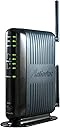
The Actiontec GT784WN is a versatile 3-in-1 ADSL 2/2+ modem, 4-port Ethernet switch, and 300 Mbps Wireless-N router designed for major DSL providers. It offers easy setup with auto-detection of service settings, robust WPA2 security, and parental controls. Tested for reliable performance and backward compatibility, it delivers stable internet speeds up to 24 Mbps downstream, ideal for professional millennials seeking hassle-free, secure, and fast home or small office networking.


| ASIN | B004NBZ98K |
| Antenna Location | Security |
| Antenna Type | Retractable |
| Best Sellers Rank | #25,312 in Computers & Accessories ( See Top 100 in Computers & Accessories ) #36 in Modem Router Combos |
| Brand | Actiontec |
| Built-In Media | Actiontec 300 Mbps Wireless-N Adsl Modem Router, High-Grade Firewall, Parental Controls, Variety Of Protections And Encryptions |
| Color | Black |
| Compatible Devices | Personal Computer |
| Connectivity Protocol | Wi-Fi (802.11n, 802.11b, 802.11g), Ethernet |
| Connectivity Technology | WiFi^Wired |
| Control Method | Remote |
| Controller Type | Switch |
| Coverage | Standard home/small office coverage |
| Customer Reviews | 3.8 out of 5 stars 3,369 Reviews |
| Data Transfer Rate | 300 megabytes_per_second |
| Frequency | 5 GHz |
| Frequency Band Class | Dual-Band |
| Global Trade Identification Number | 00789286807885 |
| Item Weight | 1.6 pounds |
| LAN Port Bandwidth | 10/100 megabits_per_second |
| Manufacturer | Actiontec |
| Maximum Upstream Data Transfer Rate | 1 megabits_per_second |
| Mfr Part Number | GT784WN-01 |
| Model Name | GT784WN-01 |
| Model Number | GT784WN-01 |
| Number of Antennas | 2 |
| Number of Items | 1 |
| Number of Ports | 4 |
| Operating System | Mac |
| Other Special Features of the Product | WPS |
| Router Firewall Security Level | high |
| Router Network Type | Wired with Wireless |
| Security Protocol | WPA2-PSK, WPA2-Enterprise |
| Special Feature | WPS |
| UPC | 789286807915 789286807885 |
| Voltage | 12 volts |
| Warranty Description | 1 year parts and labor |
| Wi-Fi Generation | Wi-Fi 4 |
| Wireless Communication Standard | 802.11n |
| Wireless Compability | 802.11n |
T**Y
Great product and improvement from my previous DSL modem. Purchase this for constant reliable online service.
NO PROBLEMS or WORRIES. I love this product due to the increase in speed from my service and no problems of any kind! I was using a speed stream modem from my Windstream Provider and paid $50 from the phone company. BIG MISTAKE!!! My previous modem slowed to a crawl and was just about to melt due to the heat produced from the design of the product and shutting down all the time and trying to reboot. I had it replaced two months before from again the phone company with no charge but same previous problems. The SpeedStream modem is just crap that was provided as a main hookup for DSL from Windstream. It was providing about 0.6 Mbps and hotter than a sidewalk in Summer around 2 O'clock after two weeks of use. It really was a fire hazard. I paid about the same and gained an increase in speed and wireless capability with the ACTIONTEC 300 and a quality product. This Actiontec is so far very cool to the touch and still keeps the speed up without any air conditioned room it is in with Sunlight coming into the window and provides 100% max service of 1.25 Mbps from my Provider for what I pay. The signal received is still not anywhere testing the limits of what it can do of 300 Mbps. I love it!!! It is one of the best investments for the internet at my home I could have received. IT WAS EASY TO SET UP and USE!!!! Provider was one of the listed vendors and I clicked on selections and I let it do it's thing. I was up and running and receiving signal from my provider in 3 minutes out of the box. I was usually doing this faster than the normal person because I know what to look for and click on without taking a long decision. You should be able to do the same for what they state in about 5 minutes time on average for installing. If you are looking for a quality product this is it. EASY TO USE!!! LOW COST!!! AGAIN A Great QUALITY PRODUCT!!! Nothing so far to dislike about the ACTIONTEC 300. INSTRUCTIONS Provided for those that need them!!!! I would give it more than 5 stars if I could. REALLY GREAT PRODUCT!!!! I wanted to purchase another to send to my Mother-in-law in Ecuador because I want my wife staying in contact with her and she having wireless all over the first and second floor for when we visit again. ON ANOTHER NOTE::::::: IF YOU DISLIKE MOTHER-IN-LAWS OR hate any of the IN-LAWS ----- AVOID purchase of an ACTIONTEC 300. THIS PRODUCT DOES THE JOB and then some more!!! OTHERWISE BUY A SPEEDSTREAM DSL MODEM FOR HER IF YOU DESPISE HER!!!! DOWNGRADE HER SO YOU WILL NOT HEAR FROM HER AGAIN!!! I hope that this help you! Do not mention to your wife where you got the info to buy a SpeedStream modem. I will tell your wife I do not know anything nor you of what you are taking about!
S**Y
> Connecting Samsung devices to AT&T DSL
IN SHORT > Connection to ATT DSL was effortless and simple. I just made all the physical connections, went to the setup website and followed the Wizard. > Using my previous network name and password, my wired (Ethernet-connected) and wireless computers could connect to each other and the internet with no additional steps. CONNECTING TO SAMSUNG PHONE AND TABLET > However, initially, my Samsung phone and Samsung tablet could not connect. > It turns out that the Samsung phone and tablet do not support WEP security (which I had always used before), so I had to use WPA-WPA2 security, and the Actiontek customer service told me that I had to use define a new network name since I was using a different security protocol, so I just added "1" to the old name. Of course that meant that I had to go through the connection wizards of all my devices and specify the new network name, security type, and security key. > So, if you are simply replacing an old router which died, and do not need to change any of the settings, use your old network name and security key, and all of your devices should connect as before. If you have to make changes to the settings, use a different (new) network name and security key. CONNECTING TO SAMSUNG TV > My Samsung TV inexplicably reported "network interference" and "contact your internet provider" when I tried to connect to Netflix. That was nonsense since I could connect to the internet on all my many other devices. > Netflix customer service shrugged me off, claiming that it wasn't their problem and told me to contact AT&T customer service. But when I insisted that my internet connection on all other devices was fine, and that my problem was ONLY connecting to Netflix, then Netflix customer service reluctantly told me to change the DNS setting from "automatic" to "8.8.8.8", and walked me through it. That solved the problem. > Based on the internet sites devoted to the problem, connecting a Samsung TV to Netflix via non-Uverse AT&T DSL appears to be a very common problem. Some websites blame the problem on AT&T (claiming that non-Uverse DSL service is a low priority), some blame Netflix, and some blame Samsung. The default on the Samsung TV is "automatic", but that doesn't seem to work consistently, and the error message "Network Interference" isn't helpful, so I'd place a big chunk of blame with Samsung. I can only imagine the hassles trying to connect a more obscure brand of TV to a smaller service provider. But then, in the past I've had episodes of "Network Interference" for as long as a week (when I have NOT changed any equipment or settings), and AT&T claims that there is no problem with my phone line. I figure those episodes must be AT&T's fault---probably caused by AT&T unintentionally changing DSL characteristics while fiddling with their Uverse service. > AT&T (or at least Bell South) does have the ability to modify individual phone lines to be "fast and noisy" to "clean but slow". Apparently streaming (e.g., Netflix) requires a cleaner signal than simpler voice or data transmission. Point being, that whoever is the cause of the problem, your service provider may be able to optimize your service (at no cost to you) for streaming. > So why not change to Uverse? As it happens, my neighbor has Uverse (via an actual physical telephone line) and his router is only 40' away on a straight line through a nice big window. So, we connect to his router (with his permission) when we have connection problems when we are without internet service---and the Uverse service was awful---dropping out for several minutes at least once an hour on average, and VOP (which we sometimes have to use for secure business conference calls) was unintelligible. EVALUATION > The connection problems I had were with my devices' peculiar requirements--not with the Actiontek modem/router. > I was considering investing about $75 in a new modem and $175 in a new router. For $60, the Actiontek router seems to do everything I need, including streaming HD movies flawlessly, and the Actiontek customer service was great. > Click on โStoneyโ just below the product title to see my other reviews, or leave a comment to ask a question.
S**7
This is junk, don't buy it
Final update: The problem was this router. The new Verizon router has been up and running for 24 hours with no issue. I ended up at least somehow getting free 2 day shipping on the new one which makes it about same price as this one, which is junk. Update 20190921: It is dropping the internet and has to be re-booted multiple times per day. I have now run a test with it, trying it in multiple phone jacks first and then I tried plugging it directly in to my outdoor phone box jack, leaving it sitting inside my garage. It still drops the internet. DSL light stays on, Internet light goes solid on, and it is down. It can go for hours at times, but will go down without warning. I have to turn it off/on to get it back. So from my test, it is not my house wiring, it does the same thing outside my house also. I have ordered a modem/router directly from Verizon now, so we will see if it works or does the same thing. If they both do it, then it is Verizon and not either of the routers. If you don't know how to hook up the wires to a DSL router/modem then read the first part of the instructions. After that if you already have DSL with an ISP (like Verizon, etc) then toss the book and do not follow their set up instructions. It is basically plug and play after that. I have Verizon DSL already. All I had to do was open up my laptop wirelessly (no need for that yellow ethernet cable they sent). All I had to do was enter the new Network name (SSID) on the back of this router, and key/passphrase when I clicked to connect my laptop to the internet. Because of the mis-leading instructions I ended up going round and round with Verizon trying to get help and finally got a tech on the phone fairly quickly (amazing) who was able to help me. Once I realized the instructions were bad, based on what he told me, it was a breeze. You do not need to ask Verizon for your DSL userid and password as their set up screens show you -- don't even type in that ip address at all. I am giving it four stars for now because of the awful set up instructions that came with it. By the way this is the exact same Actiontec router that Verizon would send you, but they charge $59.99 for it and it takes longer to get. The Verizon tech confirmed to me that it is the correct model for their DSL.
E**Z
would be 5 star except...
Previously using a Verizon Westell Versalink 237w which I absolutely loved, never had any issues, was very reliable. Will keep as backup. I found myself wondering about wireless N capabilities (faster wifi transfer speed) since almost everything in my house now seems to have wireless N...and having Verizon DSL, this modem/router looked to be what I needed. The reviews looked good so I bought it. First thing about this modem/router is pretty much plug and play (at least for me and having Verizon). No problems there! 5 star for ease of use. Seems to have latest firmware. Then come the little frustrating hiccups. For some odd reason when I tried to set up my WEP security (yes I know easy to break etc but in my neck of woods only hand full of people live close by) Anyways, for some reason it would not allow me to use alpha characters (A-Z) and an annoying pop up would show telling me "only alpha a-z and numeric keys could be used". Even an option to check mark the box from not showing this message again...but ever ytime I would push an alpha key the message would still pop up! Talking to the service tech overseas, who had no clue only reading from his playbook, I gave up and just asked him to pass on to his firmware team that this must be some type of bug. So using while using WEP, my security key was only numerical digits (1-10). Which was great until for some odd reason my families iPhone 4's and an iPad 2 would not connect anymore. Been using WEP for a while now on previous router with EVERY device no issue! Possibly the iphone/iPad 2 does not like only numeric values only for code?? I dunno. So I opted to use WPA/WPA2. This worked great for everything even my iPhone/iPad, although in certain devices I had to tinker with using WPA vs WPA 2 in the device setting...guess they are picky. Anyways, the only device I cannot get to connect is my wife's Nintendo 3DS XL?! (if anyone has gotten theirs to work please let me know!) I have tried WPA and WPA2 and no luck...yes, I reset/unplugged the Actiontec etc. Still no connection. So to sum it all up, while Ive only had this modem/router for one day...WEP has now become useless to me, WPA/WPA 2 is good when you find the right combo in your wireless device. Connection seems to be very strong and reliable. Cons: WEP bug Tech support is terrible, almost as bad as Verizon. No user manual! ...only "start up guide" Pros: Worked right away with my Verizon DSL without having to do anything. Items in my house: Dell PC wireless N Dishnetwork Hopper Nexus 7 iPhone 4 (x3) iPad 2 Gateway netbook WDTV Live wireless N adapter Roku player Panasonic TV wireless N adapter Nook reader Nintendo 3DS XL - only device that I can't connect to network. have not tested for wireless N speed in my house, but will try some 1080p movie streaming another time.
C**S
Good Modem with One STUPID Caveat
If you don't care about DHCP Reservation, 5 stars. If you NEED that feature, 0 stars and look elsewhere; and if you'd like it but it isn't required, 3 stars (and you can set it to lease the IPs for 1 year max) PROS: This modem is easy to setup b/c it detects your ISP settings for you. You can literally be surfing within 3 minutes of pulling it from the box with no experience required whatsoever. Good for those non-geeks who just want to be on their way. Small footprint, using very little real estate on the desk. Minimalistic LEDs. (no extraneous flashing lights that serve no practical purpose like some modems have) One of the last 'legacy speed' ADSL modem/routers still left, and at an affordable price. (Most are twice the price, accommodating ultra-fast and more expensive FiOS DSL services.) CONS: No DHCP Reservation, which floors me. This is such a simple firmware/software feature, and a basic one. Why in the HECK would Actiontec make a modem without this feature? It actually comes up as available if you Google DHCP Reservation and this model, but the screenshots in the links show a menu not available with the current firmware/sftw version... I considered reverting to an OLDER firmware version to see if it was available before. But to avoid the hassle, I just set the DHCP lease time to 365 days... the highest number it would accept. So as I turn on devices, they will be assigned a local IP that the modem will stick with for 1 year. Then it will reassign them... and stick with the new assignments for another year. Normally I would not take off 2 stars for one con, but it's such a basic feature, it's ridiculous (granted non-geeks won't care). It literally would cost them nothing to include it. And if it were more important to me than it is, I would take off more stars. Some people require this for very practical reasons, like port forwarding, etc., but I just prefer all my local devices having a set IP. So it's not a deal breaker with the 1-year optional setting, but it's annoying considering it's so stupid it isn't part of the feature list, available in virtually every modem today. But again, for non-geeks looking for a modem to get online that they don't have to configure, this one could be a good choice. We'll see how long it lasts. If it poops out earlier than it should, I will update this review. All in all I'm satisfied enough that it serves the purpose, but also highly annoyed that a standard feature is unavailable.When I go to replace it, I will choose another brand with DHCP reservation. As a side note, I noticed it picked "multimode" instead of G.DMT, which my ISP requires, but MM worked better than G.DMT, which I manually changed it to, to see. Supposedly if set to G.DMT the modem doesn't have to run through all the protocols looking for the compatible mode each time, but in this case, leaving it in multimode made it surf faster than G.DMT.
P**O
Great replacement for AT&T DSL (not U-Verse) customers...good performance, excellent automated installation.
Let's get the summary statement out of the way so not to burden you with all the details that you may, or may not, want to read. If you are a copper lined AT&T DSL customer that have not switched over to U-Verse yet, then this modem is a wonderfully economic and full featured modem/router/WIFI AP replacement for your AT&T DSL hardware. It works very well and from what I can tell so far, it's pretty stable. So, not the details... I have been an AT&T DSL customer for 13+ years. My neighborhood has not be upgraded to fiber yet, nor has it been upgraded to AT&T's U-Verse DSL infrastructure yet. My setup still uses a PPPoE protocol, necessitating an AT&T DSL login and supplied password (not to be confused with the password that you set up for your Email client and/or your AT&T profile homepage login). If you are still on this type of AT&T DSL, then this Actiontec model will work wonderfully as an aftermarket replacement. If you are on the newer U-Verse structure then you will be in for some struggles as they use a streetside wireless system to authenticate your DSL account, detecting your modem's MAC address as opposed to using a PPPoE authentication. So be forewarned. I have used a slew of different AT&T endorsed hardware in the last several years, including a few different Westell units (4100, 4100B, and others), an Efficient Networks Speedstream 52xx, and a 2Wire 2701...just to name a few. All have been hit and miss with the Speedstream model working the best. If your OEM AT&T modem goes bad now, contacting AT&T will just have them telling you to buy one of their approved replacement modems from their store. It will likely be from a choice of the 2Wire 2701 (awful modem/gateway-short life, bad power supply), a couple of rebadged Westell units no with Netgear branding, and a cheapie Motorola badged junk. Prices are from $75-$125. Don't try to get a free replacement of out them...if you are able to convince them to send you one, you will be charged a modem lease fee of $7-$8/month for having it. And most of them are junk. Actually, most any modern day available consumer level modems in the market now are pretty much disposable these days. Planned obsolescence is the name of the game in today's consumer electronics world. So aside from the AT&T provided junk that is offered, I have also had an Asus RT-N66U router/gateway and a D-Link DGL4100 that have also gone bad (both being what was classified as an enthusiast level hardware) in the past 5 years. The Asus lasted 1.5 years and currently being sent back for RMA repair. Moving forward, the last winter storm that ripped through the Midwest last week contributed to the not so surprising failure of my 2Wire modem/gateway. The unit is very sensitive to voltage fluctuations and the few flickers that we had in our electricity must have fried the poor thing, despite being plugged into a 2-tier surge protection setup. I had a couple of Westell 4100s that I used to pacify my connection until I could find a suitable replacement. After looking around for different possibilities, I kept returning back to the Actiontec unit. This unit was assessed as a low cost, low risk, relatively decent reviewed option. It is a tidy package of full bore ADSL+ modem, 4 port switch for wired Ethernet, and WIFI a/b/g/N wireless gateway (like the crap 2Wire that I just had). After reading some of the reviews, it appeared that the unit is very DSL provider friendly. This unit is actually a OEM unit that is used by Verizon DSL service in some markets. After receiving the unit, I quickly had it installed and running in less that 10 mins. The installation routine quickly assessed and preconfigured for my AT&T DSL provider. All that was required from the user level was to provide the AT&T DSL login and password information and any adjustments that you want to make for your WIFI, such as encryption protocols, choice of SSID password (they generate one by default, but you can change it...as well as the name of your wifi point). After that, you're authenticated, online, and all that's left is you determining how you want your physical connections routed to the switch. Speed tests were stable and at par with my 6Mbps package. Latency was good and where it needed to be. Wifi performance was good...not as good as my 3 antenna 2.4/5.0ghz Asus RT-N66U, but good nonetheless. Worth noting is that this wireless gateway only uses the 2.4ghz band. Any 2.4ghz hardware that you have in the house (like cordless phones) will/may interfere with wifi performance. I suggest that in your setup routine of the modem, that you select one of the available wifi channels as opposed to the default "auto detect" setting. Stability is good...so far. After you get all your settings the way that you want to, you should reboot the modem. The modem will reboot itself every so many days when it needs to flush it's memory utilization. This is typical and not a need for concern. It's just it's own autonomous way of purging when it get's too bloated. You can mount this modem either vertically (with the supplied, but flimsy, foot base) or horizontally. You cannot mount this modem on a wall as there are no provisions to do so. The browser powered setup page (192.168.0.1 default) is wonderful. It's use of very easy to read graphical GUI style mapping is easy to interpret and understand, even for the non-techie. The setup is very robust, ranging from basic configurations to advanced configurations, including firewall setup, DMZ, port forwarding, IP blocking, etc. It's mostly all there. Firmware was the most current out of the box and can be easily upgraded/flashed through it's setup page...although there has not been any updates listed on their site since 2011. I have several sources feeding into the modem. So far, heat does not appear to be an issue, however, I have not taken any steps to datalog any log term thermal ranges as I always have a USB cooling fan blowing on the modem all the time. This is something that I have done for many, many years now by habit. Modems tend to get hot, especially ones that have a heavy load put on them. An external cooling solution is always a good idea to ensure that your modem does not exceed it's thermal ceilings. There you have it...my nickel review. Take it for what it's worth. You'll see bad reviews and good reviews. Even the best units and models out there are not without rotten apples. I am fortunate enough where I am able to write a positive review and experience for the unit that I received. The packaging was very sound and you will get all the accessories that you need to have this installed very fast and easily. Again, my strongest word of advice to make for a smooth install is that have your AT&T DSL login and password ready before you start installing it. If you do NOT know this information, you can call up AT&T and they will provide it for you, assuming that you clear all their security questions. My only gripe(s) about this modem? -1 silent star for it's shortcomings. *5.0ghz dual band offering would have been nice. *Provisions for wall mounting would be nice. *A more robust/secure mounting foot for vertical placement. Small gripes among large number of PROs. For all that you do get, it's priced very appropriately, if not very well. 5 official review stars for it's total value and it's ability to deliver on it's advertised promises.
D**D
2701HG-B killer!!!
Long story short . . . I bought a new Sony "3D" BR DVD Player but could not (reliably) connect to many of the streaming video movie providers (like Netflix, Crackle) even Video Unlimited hosted by Sony via this DVD player. That is, until I replaced my AT&T DSL subscriber provided 2Wire 2701HG-B modem wireless router gateway spec'd to the "G" standard. I had decent ISP service using that unit for several years, as an AT&T DSL "Elite" subscriber, but it was less than stellar when I introduced my new Sony DVD player on my home network. HD movies frequently dropped out while streaming, and some streaming movie sites would not even connect at all, even by "hard wired" Ethernet cable connection (vs. wirelessly) to my 2Wire Gateway. Needless to say, this was VERY frustrating. Although the prior reviews here are overwhelmingly positive, I remained somewhat skeptical when I purchased this Actiontec GT784WN, to try out as a replacement the AT&T provided 2Wire 2701HG-B. I thought to myself, "wireless N has to be better than G", and I was right! Duhh!!! Many other reviewers here have rightfully pinged (no pun intended) on this product because of difficulties during the installation procedure. Actually, this is the fault of AT&T not Actiontec! AT&T has no incentive to support additional 3rd parties in the DSL Gateway business. Sadly, AT&T customers are still being sold the 2Wire "G" spec Gateway, which should be considered obsolete by today's standards of wireless home networking! To make sure I was fully prepared to install a seemingly "unsupported" Actiontec Gateway on an AT&T DSL network, I read all the aforementioned reviews and read the FAQ on the Actiontec website for this product. I am glad I did as their is a lot of useful additional information on their website. Nevertheless, many AT&T customers switching to this product are apparently having problems connecting to their phone company's DSL network. With AT&T DSL this is mostly because of a rather confusing password protection scheme imposed on all modems (even made by 2Wire). I must admit this alone could be quite troublesome for many people lacking technical networking skills. I was able to avoid this problem, fortunately, because I had the foresight to write down the "correct" login user ID and password at the time of my original DSL Gateway installation. But, just to be sure, BEFORE I disconnected my old 2Wire unit, I hooked up my laptop directly to one of its Ethernet ports and used my browser to interrogate its configuration to find out the "network" password. Somewhat surprisingly, it still matched what I had written down several years ago, so at this point, I was fairly certain installing the Actiontec would be piece of cake. Thankfully, it most certainly was to my great satisfaction. Here's a nice tip, . . . this Actiontec Gateway allow setting its (new) network name, referred to as an "ESSID" and security encrytion password to whatever you wish so long as its still in prescribed format for such thing in the world of home networking. Thus, I decided to continue using the same network name "2WIRE###" previous set as the default by my old Gateway. I kept the same encryption (64 bit WEP) passkey - ten digits - also, and therefore was able to keep the same password in my Actiontec Gateway. Now all my home network access devices (1-Desktop PC, 1-Laptop PC, 2-BR DVD Players, iPhone and Apple TV), all continue to connect to the Internet using WiFi, without any wireless reconfiguring necessary whatsoever. VERY NICE!!! So, there is a very happy ending to this story, and just in time for Christmas to boot. Actiontec's 300 Mbps ADSL Modem Wireless "N" Router Gateway absolutely ROCKS and worth every penny! The data rate I am getting now to all my wireless devices at best is reasonably close to full line speed (6Mbps downloading on AT&T Internet Elite). With Actiontec's dual external antenna, the WiFi range throughout my 2 story, 4 bedroom home is quite good as well. I still get about 4.5Mbps, during peak utilization times on the AT&T DSL network, good enough to stream all HD movies quite reliably. Also, the latency seems much improved using this product to connect to the Internet. I typically see 25ms. I now have uninterrupted (100% reliable) streaming video capabilities, to my new DVD player, so I can watch hollywood movies on my also just purchased Vizio 42" 3D LCD HDTV (also very positively reviewed on Amazon.com as well). I like to watch movies at home, far less expensive and convenience than going to the theater. And now, I watch a wide variety of good quality movies, including those in FULL HD 1080P format, some in 3D, without wasting money on expensive Blu-Ray DVDs! With the addition of my Actiontec DSL Gateway, and a good quality (yet increasingly more affordable) 1080p LCD HDTV, together with my existing high speed DSL ISP, I now have a multitude of Internet streaming video-on-demand movie sources to choose from. Many do not require paid subscriptions (e.g. CRACKLE). The typical VOD movie rental is only 5 bucks or less. VuDu is my favorite because it has a built-in "network test" to make sure your Internet bandwidth is sufficient to stream full 1080p movies. With my new Sony DVD inputting to my Vizio HDTV via HDMI, even "standard" definition movies (480p) look fantastic; perhaps due to the "upscaling" capability of most DVD player currently available. CONCLUSION: Investing in this Actiontec product was well worth the price!
W**D
Generally, a poor choice
I would have wanted to give this a one star review, but the product does do what it supposed to do on a basic level. Beyond that, there are huge problems. Configuring with AT&T was initially fairly easy, but not totally smooth. The process configures the modem portion to ATT, then sends you out to the AT&T site to register your account. After that is complete, it was supposed to replace the default username and password with the ones you selected. It didn't. This had to be done manually, after the process was complete. A quick conversation with the CSR indicated that this was a common problem: the configuration script just doesn't work as advertised. For the record, your username is your complete AT&T email address (including the @att.net). The connection was fairly stable once established. I didn't see any drops while I had it running. The wireless was also decent (albeit somewhat short range) and I didn't see any issues with connections dropping. I will also say that this the WiFi Protected Setup (WPS) push button connection was the easiest and smoothest I've seen. In Windows 7 at least, select the correct connection, and click connect. The WPS button will flash red. Push the button, it turns blue and (poof!) the connection is established. Now for the bad. The router comes with the firewall OFF by default! WTH! I've not seen that in any router I've bought looked at. Actiontech says that they use packet inspection to block unsolicited traffic. A scan at ShieldsUp at GRC showed several ports, including some very common ones, as being wide open. Most others were closed, but not stealth. This is very, very bad. A decent modern router would show stealthed ports for all unsolicited packets (in other words, no response at all). Placing the firewall at high didn't seem to do much either. Even worse, the traffic that it allows and turns away what it shouldn't. I have an AT&T microcell that requires several ports be open. I tried opening ports, and even placing the device in the DMZ. Apparently neither worked correctly. I've never seen a DMZ that isn't: it seems to be no different than being inside. If you have a AT&T Microcell, or plan to buy one, do NOT buy this or any other Actiontech product: they are not compatible. This is apparently a known issue that Actiontech has no interest in addressing or fixing. Overall, I cannot really recommend this router to nearly anyone. I'd like to say it is good for somebody only looking for a simple router with no features. However, with the significant security issues, I can't even do that. Even though it is somewhat more difficult, but a separate DSL modem and a good router from your manufacturer of choice (Linksys/Cisco, D-Link, Belkin, whatever). You will be happier Good: Somewhat easy to configure. Stable connection, good WiFi. Great WPS implementation. Bad: Not terribly cheap. Firewall off by default. Ugly: Does not stealth ports. Unpredictable performance with atypical ports. DMZ doesn't work.
A**R
Great Buy at a good price.
A**N
Quick and easy setup. Quality product
Real ease of use. Set up my home network with multiple WiFi routers. Great product and works perfectly. Highly recommend.
S**S
Works as Expected
I've had this for over 3 months now and I've been giving it enough testing time based on other reviews that it broke down within months. So to start off let me say that it's been holding up pretty well. I bought it for value considering that it's a wi-fi router and DSL modem in one. I'm using it at my short-term rental place and it made complete sense price-wise. It was easy to install with just the set of instructions that came with the package My purpose was to use it with my TechSavvy DSL line. It works fine when the DSL line works but it's a bit of a hassle with troubleshooting because Techsavvy support isn't too familiar with this modem. The wi-fi router seems pretty strong for my apartment which is about 600 sq ft. We have a good strong signal everywhere. TechSavvy lets you rent their own modems and they claim that their DSL speeds may be compromised with incorrect modems but I haven't experienced any extraordinarily slow speeds. I'm holding off on the 5th star to see if this modem will last over a year.
K**Y
Catalog deacriptions do not include enough back end information.
Online catalog did not specify that the product does not work with VDSL.
T**G
Does not work with internet speed above 24 mbps
Very disappointed that it does not clearly specify that it does not work if your internet speed is above 24 mpbs as I was told by technical support upon encountering difficulties setting it up.
Trustpilot
1 day ago
5 days ago