Desertcart purchases this item on your behalf and handles shipping, customs, and support to Japan.
🎯 Power up your HTPC like a pro—no compromises, just seamless IR control!
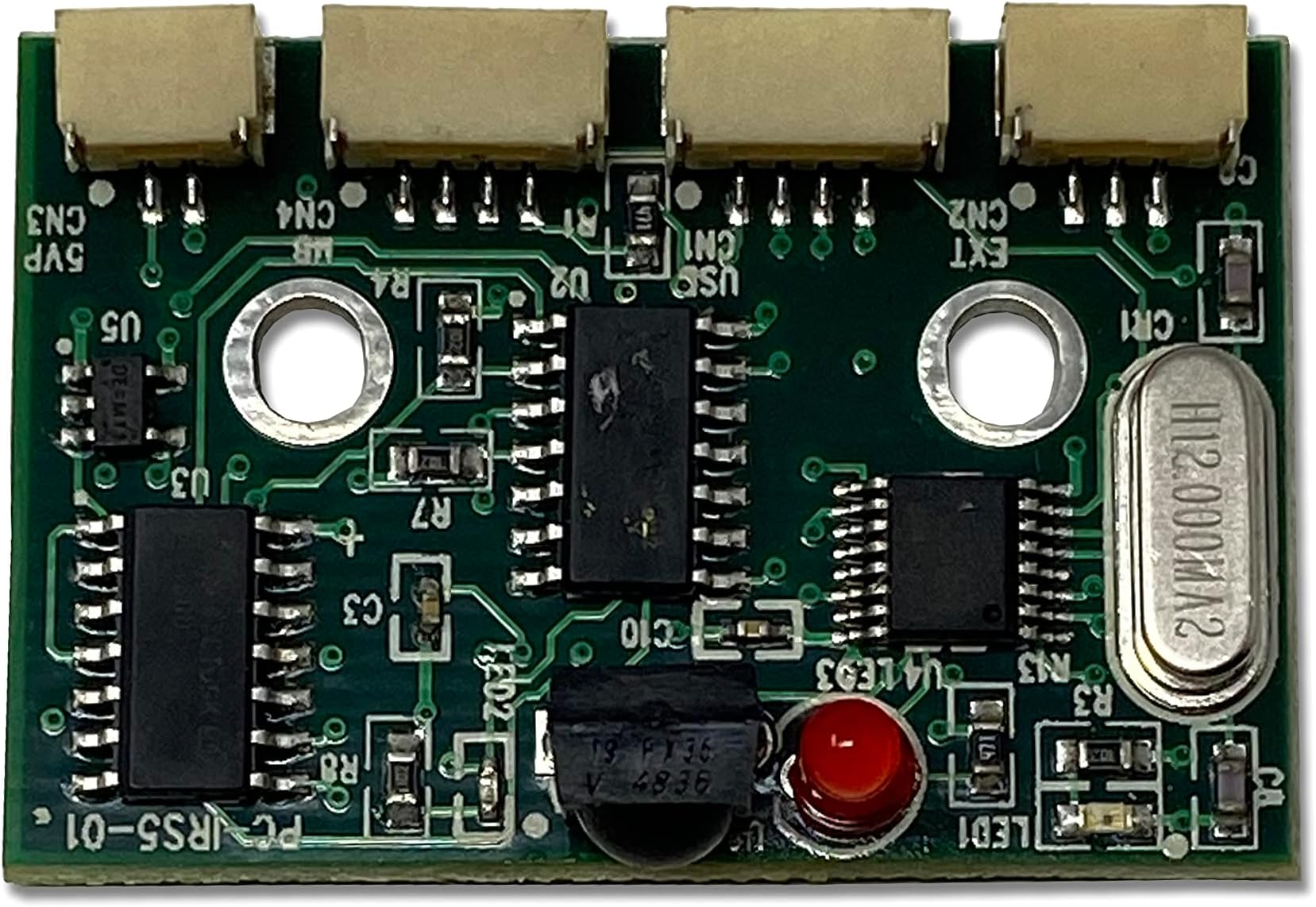
The Inteset PC-IRS5-01 Internal IR Receiver empowers any Windows or Linux HTPC to wake from a complete off state (S5) using standard IR remotes. Compatible with most motherboards without special BIOS or drivers, it supports popular media center software including Kodi and Windows Media Center. The kit includes a compact IR receiver, custom Y-cable for power header integration, and an external IR extender for flexible mounting. Installation is straightforward with detailed video guides, delivering a true consumer electronics remote control experience for your home theater PC.
| ASIN | B00VH02IZ2 |
| Audio Output Type | Speakers |
| Best Sellers Rank | #137 in Remote Control Extenders #443 in Computer Motherboards |
| Brand | Inteset |
| Compatible Devices | Home Theater |
| Connectivity Technology | USB |
| Connector Type | USB |
| Control Method | Remote |
| Controller Type | Remote Control |
| Customer Reviews | 4.1 out of 5 stars 40 Reviews |
| Format | Multiple Formats |
| Item Weight | 4.5 Ounces |
| Manufacturer | Inteset Technologies |
| Mfr Part Number | PC-IRS5-01E |
| Model Number | PC-IRS5-01E |
| Number of Channels | 6 |
| Other Special Features of the Product | Wake from S5 |
| Output Power | 5 Watts |
| Output Wattage | 5 Watts |
| Special Feature | Wake from S5 |
| Supported Internet Services | Google TV |
| Surround Sound Channel Configuration | 5.1 |
| UPC | 791102616670 |
| Wireless Technology | IR |
A**R
I am VERY pleased with this purchase
I'm not sure what 'Sheerness' means but I gave you 5 stars anyway. I got this item earlier this week and it has been working great. I am very happy with it. I have an HTPC that often times MUST be turned off and unplugged (SW Florida storms bring lightning). The HTPC is in a closet in the other room so when I have to turn it back on I have to go into the office and hit the power button. I really just wanted to be able to sit down and use a remote like a more "normal" viewing experience. The IR receiver arrived well packaged in a nice little box and everything was in individual zip lock baggies. There isn't much documentation in the box but the manufacturer has a couple of very informative videos on YouTube. The videos give step by step instructions on how to install and where to plug the plugs on the motherboard. I recommend that you go the website of your motherboard's manufacturer and download the setup/instruction manual for your MB so that you will have pin-out diagrams. The pin-outs are printed on the motherboard but [for me] they can be hard to read. My HTPC case is just a generic case. Even though I didn't buy it with the intent to mount an IR receiver I was still able to find an out of the way place to mount the IR receiver board. I used the included receiver extender kit and passed the receiver through the wall and mounted it to the under side of my flat screen TV. The IR receiver has a Y cable that offers 'pass through' so that you will still be able to use the power button on your PC/HTPC. Now all I do is sit in my recliner, grab my Inteset universal remote and hit the power button then watch as the computer boots up from a completely off (S5) state (not sleep or hibernate). My HTPC takes about 90 seconds to get to the Windows desktop. I trained the remote so that if I hit the button labeled 'Guide', that will start Kodi. While in Kodi I can use the arrow buttons and OK button to navigate Kodi. The ONLY problem I have noticed so far is that sometimes there can be a little bit of a lag while navigating Kodi with the universal remote. Most times it is barely noticeable and personally it doesn't bother me. When I'm done for the night I can use the remote to completely power down the HTPC. It is just like when I power down with the trackball/mouse. You don't actually see the Start button activating nor do you see the subsequent menus but the shut down is the same. This is what is meant by S5 power off state. PROS: 1. Price ($32 at the time I purchased). 2. Works with most universal remotes (I have a couple of these at home and might do some testing and update this review later). 3. Easy install with videos. 4. Works flawlessly and seamlessly with my current setup. CONS: 1. Occasional and very minor lag when navigating Kodi entertainment system. This device is working really well and works better than expected.
A**W
I got my IR control back!
The device works! Built a new HTPC, but didn't have built in IR. Soon as I finished installing this device, and plugged in my system, the new PC turned on with the first attempt via my Harmony remote programmed for Windows Media Center. Be aware, on my system, hitting the power again puts the system to sleep, but for the first couple of days the device would not wake back up. I had to either hit the power switch on the case, or use a mouse/keyboard to wake the system back up. Turns out it is a fluke of Windows Power Configuration in the Control Panel. Make sure that "USB Selective Suspend" is disabled. Now the remote can power on, put to sleep, and wake from sleep via IR inputs from Harmony remote. The only con I encountered was lack of documentation regarding necessity of some of the included cables. Luckily, the install video on YouTube cleared up the question. I wanted to know if I needed EVERY cable included with the unit, or if I could get away with using the USB header cable as receiver power. Thankfully I can, which means I avoided having yet another cable coming out of my system. As the question was answered after a quick web search and video watch, I am NOT taking any stars off. Fair warning, the IR extender has to be mounted to a 90 degree angle surface in order for it to register IR commands. I'd hoped to just have it mounted on top of case, but line-of-sight wasn't working. The included extender has plenty of cable, so finding a position that works for you should be straight forward. Wish I'd known of this device sooner, as IR control was the main thing keeping me from updating my old Windows 7 nuc HTPC.
T**E
Fix your documentation, the pinout info is lacking
Works well, but a royal pain to install. The instructions are not great, and it is hard to know if it is setup correctly. You have to have an MCE remote too... BUT it does work.
R**Y
Ingenious product for the DIY PC geek!
I have nice little HTPC hidden behind my TV console in the corner of my family room. When not in use, I sometimes turn it off to conserve electricity. It was difficult to reach the power switch, and I was the only member of the family that could reach it. This ingenious little product makes it easy to turn the hidden HTPC on and off using a Windows Media Center remote control. It was not hard to mount and make the wiring connections, even in my small mini-ITX case. The tiny companion IR receiver is almost invisible mounted atop the TV and is very sensitive, allowing less than perfect aim with the remote, and it still picks up the signal.
G**G
Most consistently reliable MPC "Power On" and remote control available
This IR board in a PC + an air mouse (like the ILEBYGO Air Mouse or others here on Amazon) + Yamaha AR + Vizio M-series = much more consistent and reliable on/off/usage than either 1) HDMI CEC between the components or 2) IR USB dongle into PC (like FLIRC) or 3) any of the pay-per-month Universal Remote Control apps in the Android ecosystem that combine RF/IR/WiFi (and some BT). If you ever installed a card of any kind into a PC, let alone build a PC, installing this is a breeze. Only trick was to get the air mouse to learn the “Power On” of a Microsoft Media Center remote (this is what this IR board looks for: a RC6 IR protocol). So I hunted the neighborhood thrift stores and found an old Gateway WMC remote for $2. Now, even though the air mouse docs say it supports the NEC IR protocol, the model I have (the ILEBYGO) had no problem learning the Gateway WMC RC6 "Power On" command. Once I programmed this into the “Power On” button of the remote (instructions are super easy), it then took all of like 5 minutes to set up the “Power On” for the receiver and TV, and also map a key on the remote to the receiver’s "scene" setup ("scene" is a Yamaha concept that with one button on the remote, it sets up the right HDMI input, DSP mode, etc).
M**O
A more complicated install than is portrayed.
I installed my second PC-IRS5 IR Receiver Kit last night on a second 2015 Dell Optiplex 3020, and it did not power on. They responded and are sending me a power supply after I eventually found the power cable supply was faulty. Additionally, my questions about install got answered. I found this a more difficult installation than is portrayed. Extra jumper wires to piggyback the USB terminal\ header, an extra MB terminal, [on mine] and necessary shrink wrap were resourced by yours truly, or I would have sent the first one back. The forum or videos did not appear to answer all my questions. The first unit I (after many hours) installed works great using a $9 GE remote, on a Linux Kodi Box Thank you for this product.
L**T
Excellent product
Works perfectly with my MCE remote. Love it.
F**S
Works great for power button but MCE part on linux is more challenging
The claim "Works with any IR RC6 compatible learning remote control" is true. My TV provider's remote is slightly programmable so you can control your TV and one other AUX device in addition to their STB. In their remote's list of codes was "Media Center PC" which I set on AUX and it works with the PC-IRS5-01. I also tried an old hauppauge remote from 2007 and it also worked. In linux/kodi, support for MCE (a Windows technology) isn't great and the kodi wiki states: "However they are often unusable in this state due to laggy/buggy behavior. On Linux it is often easier to use the Lirc package". The controlling of the power button from an IR remote works great even from hibernation or fully off state. It's actually quite cool to press the HTPC's power button from the couch. The range/sensitivity of the external IR detector stuck to the TV isn't great as I need to lean and stretch forward to get it to work while the TV (same distance) receives signals from the same remote easily while leaning back. Edit: With fresh batteries in the remote, the external IR detector range is fine so other than needing new remote batteries a little sooner it's not a big problem.
D**I
Was für ein geniales Produkt
Installationszeit ca. 10 Min. und funktioniert genau wie beschrieben: Weckt den PC aus jedem Zustand auf - er muss nur am Strom hängen. D.h er wird hochgefahren auch wenn er zuvor stromlos war. Funktionierte ohne Umprogrammierung sofort mit meiner MCE Fernbedienung.
Trustpilot
2 weeks ago
2 weeks ago