Desertcart purchases this item on your behalf and handles shipping, customs, and support to Japan.
🎧 Elevate your sound game—record like a pro, wherever you are!
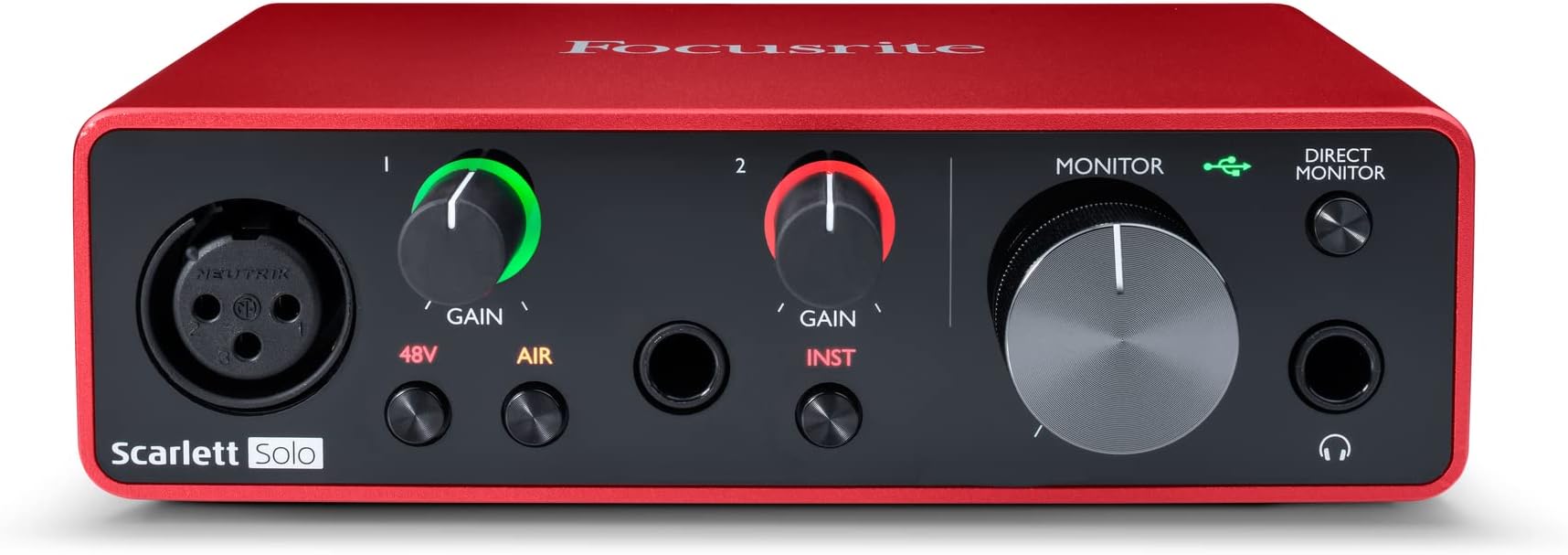
The Focusrite Scarlett Solo 3rd Gen USB-C Audio Interface offers professional-grade recording with its best-in-class mic preamps featuring Air mode, a high headroom instrument input for flawless guitar and bass capture, and ultra-high resolution 24-bit/192kHz converters. Designed for seamless compatibility across macOS, Windows, and iPadOS, it ensures low-noise monitoring through balanced outputs and a powerful headphone jack. Lightweight and compact, it’s perfect for creators seeking studio-quality sound on the go, backed by a 3-year warranty.


| Asin | B07QR6Z1JB |
| Audio Input | XLR, Instrument |
| Best Sellers Rank | 153 in Musical Instruments & DJ (See Top 100 in Musical Instruments & DJ) 3 in Computer Audio Interfaces |
| Brand Name | Focusrite |
| Compatible Devices | Computer, Digital Audio Workstation (DAW) |
| Connectivity Technology | USB |
| Country Of Origin | China |
| Customer Reviews | 4.7 4.7 out of 5 stars (29,077) 4.7 out of 5 stars |
| Eu Spare Part Availability Duration | 3 Years |
| Frequency Response | 192 KHz |
| Global Trade Identification Number | 00815301005179 |
| Item Dimensions D X W X H | 9.6D x 14.4W x 4.3H centimetres |
| Item Highlight | 1 XLR Mic Preamp, 1 Hi-Z Instrument Input, 24-Bit/192kHz, 56dB Gain Range, Air Mode, macOS/Windows/iPadOS Compatible |
| Item Type Name | Scarlett Solo 3rd Gen |
| Item Weight | 349 g |
| Manufacturer | Focusrite |
| Manufacturer Part Number | MOSC0024 |
| Maximum Sample Rate | 192 KHz |
| Model Number | AMS-SCARLETT-SOLO-3G |
| Number Of Channels | 2 |
| Number Of Items | 1 |
| Operating System | Linux, macOS |
| Product Warranty | 3 year warranty. |
| Supported Software | Ja |
| Upc | 815301005179 |
User
Brilliant first audio interface for guitar recording
Bought this in 2022 and it's been a great little audio interface. I mainly use it for guitar recording and it has been reliable and easy to use.The sound quality is excellent for the price, and it makes recording guitars, vocals or instruments much easier than trying to use a computer's built-in audio.Setup was straightforward and it has worked reliably over the years. The build quality feels solid and it has everything you need to start recording without spending a fortune.A great choice for anyone getting into home recording.
User
Does what it says on the box!
They say good things come in small packages, where the Scarlett Solo is concerned, they are not wrong.Up to now I've been recording by feeding output from my Xenyx mixer into the line in of my computer sound card and decided to risk buying a dedicated interface. I had seen a lot of the focusrite interfaces in use so, though not the cheapest interface by any means, I thought I'd opt for the Solo as I only really need a mic & gtr input.After putting it through it's paces over the last couple of days, I am very impressed, the noise floor is so much better than I have been used to and even without and adjustment in my DAW (Reaper), the latency was pretty good. Did a quick loop-back test and set the latency to 'reported' plus 16 samples and it is spot on for everything, operating at 48K samples and a 128K buffer.The direct monitoring is great, the build quality is rock solid and feels sturdy, the controls are smooth and feel "expensive". I now understand why these interfaces are so popular, you truly do get what you pay for.I wasn't sure at first about leaving it plugged in, having no on/off switch, but having done a quick search it seems many people leave it on permanently with their system and some have done so for quite literally, years. Though given your on-board soundcard are permanently "on", it's only logical that it would not be an issue. One thing to mention, the USB connector on the cable isn't very clearly 'flat' on one side, if the cable doesn't go in smoothly all the way, you have it the wrong way around. That said, it's USB, so the '3 tries' rule applies anyway! ;-)As regards setup, I'm not sure why people are having the issues described, it is super straight-forward and I was up and running in no time at all. Plug it in, it's seen as a 'drive', click on the URL mentioned in the quick start guide, follow the on-screen instructions. Once you have run the control software and your system is rebooted, it is seen in it's true form as an audio interface. Setup the required input/output in your DAW and job done.You can set it up as your default audio for your system as well, I did not initially, but I have done now as I like having the headphone volume control.Looking forward to more recording with this little beauty, very happy indeed.
User
Wonderful and Easy.
Two initial disclaimers before I go onto my review: Firstly, that I have nothing added additionally to the interface (such as a cloud lifter) other than the XLR cables which connect my Shure SM7B, to my interface and into my computer. Secondly, it should be know that although I do like to consider myself to be relatively 'tech savvy', this won't be the most technical review but more so my experience with the affordable interface and the little bits and bobs that could be beneficial to you having understood.Hardware:As expected, there is a rather niche amount of hardware within this product, especially when you're comparing it to the later editions such as the 4th gen. With this said, it still consists of everything that you need and expect to get started as a beginner using an XLR microphone!-XLR input (corresponding gain dial besides it)-phantom power and air mode on the XLR input-TRS input (corresponding gain dial besides it)-0.25 inch headphone jack (large corresponding gain dial besides it)-direct monitoring buttonAudio Quality:The headphone output within the Solo delivers a quite significant amount of power and allows for good recording capabilities; offering a flat frequency response and having an ultra-low noise from the mic preamp, along with the 'air mode' allowing for an easier high-frequency boost that could be beneficial to some people.Overall, the product is definitely on the more affordable side and although it does slightly show, the demographic being on the beginner end, the product is wonderfully fitting. The product offers a wide array of different technical features that are greatly beneficial to you as a user and, once used, it becomes really self-explanatory why this is used amongst many independent musicians and YouTube/Twitch live streamers to get the most out of their microphones.I hope this helps!
User
Pleased with my purchase
Works well but had an issue with drivers making the microphone level quiet. Not sure if it was something wrong with my side of things as my tech knowhow isn't great. Other than that it's been great so far!Setup was relatively easy as far as tech goes and I feel like it was worth the money. Overall I'm very pleased with it despite some issues
User
The best little audio interface out there
If you’re looking for a quality, no-nonsense audio interface then the Focusrite Scarlett absolutely has to be at the top of your list.This is a handy little audio interface that feels well built, has 48v phantom power for condenser microphones, an instrument input jack and a monitoring section to plug your headphones into. It’s bus powered, too, so you can just plug it straight into your laptop and get cracking.It’s best used with a Digital Audio Workstation like Pro Tools, Ableton or GarageBand (for Mac users) but it’s brilliant when used with video conferencing software like Zoom. As a guitar tutor I’ve had to move all of my lessons to an online format, and using this little Scarlett has been fantastic. I plug my Rode NT1A and guitar into their respective inputs and change the preferences on Zoom to utilise the Scarlett and the sound is perfect. It’s crystal clear for vocals and guitar, and allows my students to hear exactly what I’m trying to teach without Zoom’s noise suppression software drowning out the music.In this Solo form, it’s the perfect size for portability and life on the road, and doesn’t take up a lot of space on your desk or in your studio space. The controls are really easy to use and it’s easy to get plugged in and start using it right away; if you’re using it in your DAW, however, you’ll need to do a few extra things. These are detailed by Focusrite on their website and once it’s done, you’re set up for recording music with your interface.Focusrite have pioneered the home recording revolution over the last few years and have made it accessible to so many people, and as an industry professional I can highly recommend this Scarlett Solo. It’s a neat, tidy and intuitive little interface that opens up a whole world of recording possibilities and makes sure your instruments, vocals and equipment sound their best in whatever context you’re working in.
User
Decent starting interface for anyone starting out/traveling
This is a perfect interface for someone who needs something small and light, easy to use, and gets the job done, this is the perfect audio interface for them. Its on the cheaper side of interfaces, if you are on a tight budget this does the job but if you have a few quid more, I recommend buying a newer version.It has 48v (Phantom Power) for condenser microphones, one XLR input and one Jack input with 2 jack outputs on the back. There is a headphone jack input however can be a big difficult to use if you have monitors (speakers) plugged into the back as the volume is controlled by the same volume dial.The LEDs can be customised on the focusrite app on computer (if you actually care)Its very easy to set up - it comes with a USB c to USB A cable.It is a good starting interface for the price, but I would recommend spending a bit more to get a newer version as this has some cons (not suitable to use headphones and monitors at the same time) That function isn't built into your interface. You'll need to incorporate an external monitor controller that has I/O switching or a mute function, you can find passive ones for fairly cheap. Google passive monitor controller
User
Amazing
Best interface imo clean Audio
User
Quality always matters
Incredible device.Full practical functionality and professional recording studio results in your home!Monitor direct function essential and using a MacBook works seamlessly with GarageBand. It seems to be quite a lot of money to an amateur but it’s really worth every penny if you value the results which of course are what we are all after.Negligible if not non existent background noise or hum and if you want to get the best out of your dynamic microphone this is it. I haven’t got a condenser mic and frankly with this I don’t need one.It seems wellScrewed together and feels like it’s going to last.The only issue that could be improved is it could come with a hard case to protect it when not in use.Don’t buy cheap and be disappointed buy this and be happy!
User
Well made - easy to use and set up
Works well sending signals into a DAW using an ASIO driver. Good input volume control and the option to add gain. Overall a very useful product at a nice price.
User
Everything
Brilliant
User
Good for amateur Garageband recording
I’m just playing amateur music on mic, electric guitar and electric drums and wanted to record and mix on GarageBand (in 2022) on my iPad. The Scarlet Solo works really well for this but it takes a bit of time to work through the various settings. Connecting everything up was fine. I had to select the right input Channel (bottom left in GB) and output Monitor (bottom right in GB) to use the guitar effects and hear what I was playing on my headphones. For my electric drums, in GB I used Audio Recorder > Voice > Fun > Clean to just record what was coming out of the drum output. And don’t forget to set your Song Section length in GB to Automatic so it keeps recording and doesn’t cut you off mid-flow! Mic, guitar and drums all working well. Really pleased with this purchase.
User
Bon produit
Fidèle à la réputation
User
Sehr Zufrieden / Perfekt für Einsteiger
Ich bin mit dem Focusrite Scarlett Solo 3rd Gen sehr zufrieden. Das Interface macht einen hochwertigen Eindruck und eignet sich meiner Meinung nach perfekt für Musikaufnahmen zu Hause.Der Mikrofonvorverstärker liefert einen klaren und sauberen Klang und auch Instrumente lassen sich problemlos anschließen. Die Bedienung ist einfach und das Interface funktioniert bei mir zuverlässig.Besonders gefällt mir, dass man für relativ wenig Platz auf dem Schreibtisch trotzdem alles Wichtige für Aufnahmen zur Verfügung hat. Für Gesang, Instrumente und Homestudio-Aufnahmen ist es für mich eine sehr gute Lösung.Fazit: Sehr gutes und zuverlässiges Audio-Interface mit guter Klangqualität. Für ein kleines Musikstudio absolut empfehlenswert
Trustpilot
1 month ago
1 month ago