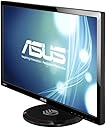
🎮 Elevate Your Game with ASUS VG278HE!
The ASUS VG278HE is a 27-inch Full HD gaming monitor that boasts a stunning 1920x1080 resolution, a lightning-fast 144Hz refresh rate, and a mere 2ms response time, making it the perfect choice for gamers seeking an immersive and responsive experience. With its ergonomic design and versatile connectivity options, this monitor is built for both performance and comfort.
| ASIN | B00906HM6K |
| Adaptive Sync | FreeSync |
| Additional Features | 3D, Height Adjustment |
| Aspect Ratio | 1.78:1 |
| Brand | ASUS |
| Connectivity Technology | HDMI, VGA, dvi-d |
| Contrast Ratio | 2000:1 |
| Customer Reviews | 4.4 out of 5 stars 292 Reviews |
| Display Resolution Maximum | 1920 x 1080 pixels |
| Display Technology | LED |
| Display Type | LED |
| Global Trade Identification Number | 00734911160804 |
| Hardware Connectivity | HDMI, VGA |
| Image Contrast Ratio | 2000:1 |
| Item Weight | 17.6 pounds |
| Manufacturer | ASUS Computer International Direct |
| Model Name | VG278HE |
| Model Number | VG278HE |
| Mounting Type | Wall Mount |
| Native Resolution | 1920x1080 |
| Picture Quality Enhancement Technology | NVIDIA 3D Vision |
| Refresh Rate | 144 hertz |
| Resolution | FHD 1080p |
| Response Time | 2 milliseconds |
| Screen Finish | Glossy |
| Screen Size | 27 inches |
| Screen Surface Description | Glossy |
| Specific Uses For Product | personal |
| Total Number of HDMI Ports | 1 |
| UPC | 734911160804 886227206193 |
| Warranty Type | 3 Years Manufacturer Warranty |
R**I
Couldn't be happier; Notebook user's perspective
So to put this review into perspective, here's a bit of background on me. Since my job requires me to move from place to place quite frequently, a desktop is out of the question for me, as I need to have access to a computer at a moments notice. The particular laptop I use is a rather large 17" desktop replacement, so while it's still rather large and heavy, I can take it with me wherever I need to go. Every time I do get settled in however, I find that the 17 inch screen just doesn't satisfy me, particularly for photo editing, gaming, and video. Enter this slick Asus monitor and my prayers are answered. Getting it to my next destination will simply take one trip to the post office and I'm good to go. This monitor is big, bright, and packs absolutely stellar image quality. After calibrating the display with a Spyder Studio, the color couldn't be more crisp and natural. As for response times? After being used to yhe screen on my notebook, which displayed noticeable screen tearing for some games(Starcraft 2, LoL), those same games run as smooth as butter on this monitor. 144 Hz is the truth, and consider me a believer. Being a 1080p display, I'd recommend sitting further from it than you're accustomed to with a notebook, but the picture is absolutely gorgeous regardless. If you're looking for more exacting color accuracy(after calibration it was roughly 80% of Adobe RGB), then you're better off looking for a WQHD display in a higher price bracket(NEC is a good start, although pricey), but I will say this much; I'm an avid photographer who uses Photoshop CS5 extensively, and after one look at images on this monitor, both RAW and JPEG, I was blown away. Highly recommended for any other high-end laptop users out there, and I wouldn't hesitate to hook this up to a desktop whenever I do settle in one place. As stated before, a higher end model would be ideal for photo editing, but personally, I'm satisfied enough with this display that I won't be looking to upgrade until 4K becomes commonplace at this screen size!
N**E
Best PC gaming experience I have ever had.
I recently built a new computer and it was built to match this gaming monitor. Outside of gaming this monitoring is a godsend, the 144hz refresh keeps my eyes from hurting while working on normal tasks. Text and basic office style tasks are smooth as butter. When it comes to gaming this is where it is really a great deal. Playing games over 60 frames is hard to come by when you consider the graphics but if you have a PC that can push your frames per second up to 120+ this monitor makes you lose yourself in the game. There is almost no blur, turn motion blur off in game setting if there is an option. In the end my new pc was altered to match this monitored. I went with more high powered graphics cards and am happy that it paid off. The games I recently have been playing at 120+ fps at max setting with this are CoD Black Ops 3, Rise of the Tomb Raider, The Evil Within and it is amazing having no blur in high motion scenes. You will feel a lot less eye strain all around and it feel like looking through a window instead of looking at a monitor. One minor gripe and it can be solved one of two ways. Brightness. This monitor is very bright, especially if your previous LCD monitor is 5 years old. You may have to manually turn it down or use something like Nvidia Lightspeed to use keybinds to turn up and down the brightness. That is kind of a good thing as this monitor should last a long time if you are not running it at max gamma or brightness.
B**D
Best monitor I've had, ever, period.
I've had this since December 2013 and love it. Pro: This monitor made a night and day difference to the other LED LCDs I've had. One was a Samsung model that was supposed to be made for gaming. After sitting the two side by side the color washout of the old Samsung was, well amazing. This monitor is so bright and the colors so vibrant, I've had to adjust it down a lot. And it out performs my other monitors. I also use this with the HDMI for my Playstation and DISH satellite and they work flawlessly on it. My computer specs are a G1.Sniper 5, 16 gig of G Skill 1866 ram, i7-4770K, EVGA GTX 780ti w/3gigs, Asus Xonar soundcard, a couple Samsung EVO SSD's for OS and games. i run the monitor in 144hz and have not had one issue with tearing or any funky stuff going on. Between the computer and the monitor everything I throw at it runs flawlessly. Con: If not adjusted properly for color and saturation it has caused a little eye strain in a darkened room. I ran the Disney color calibration blu ray and that helped. But I still had to do some minor adjustments with brightness and saturation. Some of the modes are useless if you use this primarily for gaming. There's a setting called "Smart View", it really washes out the color. ASCR which is like TVs with active contrast control is really bad in games where the environment goes dark to light very quickly. Like Metro games, where you're in a dark tunnel and you or the AI turns on a flashlight or nightvision. It's pretty horrible. Overall: All in all, I am buying another one next month, to replace the awful Samsung that has lost it's place on my desk.
M**G
Great 3D experience, 144Hz, ~6ms response time actual, 27" display...that's about it
I bought this not really doing my due-diligence with more researching first. I have owned multiple upon multiple ASUS hardware over the years and have grown to favor their products and expect nothing but quality. While I'm satisfied with this monitor I feel that for what you get out of it is not really worth $500 (after tax and shipping charges). The 3D viewing experience on this monitor is top notch! The 144Hz refresh rate is very satisfying and really a game-changer if you are coming over from a 60Hz display such as myself. However, IMHO I can not tell the difference between 120Hz and 144Hz when actually viewing fast-paced content or not. While that is obviously subjective I could have gone with the VG278H and been completely satisfied and saved money in the process. For the VG278H the IR emitter is built into the monitor and the 3D glasses comes with for ~$100 more than the VG278HE. Having gone the VG278HE route I had to pay ~$150 extra for the Nvidia 3D Vision 2 wireless kit which includes the IR emitter module and 1 pair of 3D glasses that brought my overall purchase to ~$660. This paragraph has to do more with the technical aspect of the tech than anything so that those who don't know any better can hopefully get an idea and understand what is being presented to them. Given that this is a TN panel the viewing angles are not as graceful as it is marketed as. Yes, you can still see the screen and make out what is happening at a 160 degree viewing angle BUT the image quality is ugly. While being directly in front of the monitor if you move your head literally inches in either direction this greatly changes the contrast and color (simply stating, you can look up why this change occurs if you are curious enough). If you do not use the dynamic contrast (ASCR - set via the OSD settings) functionality then forget the "50,000,000:1" contrast ratio, you are really looking at about 1000:1 actual. Also, don't fall for the GTG marketed response time as a monitor being "fast"; you need to examine the refresh rate and response time together to get an better picture. The lower the response time the less ghosting will appear and the higher the refresh rate the smoother the rendered content will appear. The actual average response time when GTG (gray-to-gray) number is provided is roughly 3x more and about 2x more for black-white-black - this is the rule of thumb. Fast-paced gaming/movies are more suitable (subjective) with actual response times at or below 8ms (12ms border-line acceptable) for no noticeable ghosting; some ghosting is tolerable but there is a fine line. A perfect example of this is some IPS panel displays being marketed at having a 5ms GTG response time but yet even with making tracer-free value adjustments in order to achieve minimal ghosting it comes with picture artifacts and tearing. If you apply the "rule of thumb" the 5ms GTG response time is really 15-16ms which is quite a lot IMHO. Hope this helps some. The pixel pitch is 0.311mm which is acceptable but anything more is not desirable - you want the lowest number here you can get so smaller images can be displayed and images will look crisp. I sit about 2' from the monitor and because of a pixel pitch of 0.311mm the display doesn't look as crisp unless I back up farther - just to give you an idea. Anyways, here is my summary. Pros: - 27" TN panel - 2ms (GTG) response time (~6ms average real-time) - No dead pixels - Up-to 144Hz refresh rate - experiencing content in at least 120Hz will make you NOT want to view content in anything less! - Watching/playing 3D content is amazing! - 300cd/m2 - quite bright - No/minimal ghosting - 0.311mm pixel pitch - acceptable but wish it was lower for a more crisp-looking display Cons: - Apparent light bleed on all sides - 1 HDMI, 1 DVI and 1 DisplayPort connectors for ~$500? I knew this when I bought it but I'm still wondering what makes this monitor $500 as I don't see it standing out amongst the rest? Hopefully the 144Hz isn't the answer? - OSD is quite flaky to work with - As mentioned, the pixel-pitch is not that high but acceptable - Doesn't come packaged with the 3D kit like the VG278H which is roughly $100 more Out of the box the display color is pretty bad. You can go to tftcentral (google it), choose articles then ICC profiles to get an ICC profile already done for you (nicely done in fact) if you want to 'calibrate' the monitor but don't want to do it yourself. I know it sounds like I'm being overly negative about this monitor but like I said before I am still very much satisfied with it but if I would have known then what I know now my decision would not have been the same; take it as you will.
C**E
Do not I Repeat DO Not buy this if you plan to use your PS3 for 3D
First of all this monitor is great for what it does 144hz refresh rate and 3D gaming on the PC. Absolutely AMAZING and I thought the PC gamers was just bluffing when they say " you can literally catch Two Face's coin when he tosses it in Arkham City " Ok ok, maybe we are not there yet but it's leaps and bound above the the current consoles. You will not be disappointed in this great monitor at all. You will however be disappointed if you didn't do hard enough research that you can't use the PS3 in 3D mode. Why because you will have to plug the 3D emitter sensor in a usb port and needs to be detected by the graphics card or some mumbo jumbo who really knows. Only the Asus VG278H which is almost the same thing except it has the 3D emitter built in and 120hz instead of 144hz can do 3D with the PS3. Guess you can't win all the time right? Ok so this monitor is great overall. You can adjust sharpness, brightness, and color saturation unlike most monitor where you can only do it from the gpu. Your PS3 will look great on this monitor in 2D and your PC games will look outstanding, especially in 3D. Asus has a winner here for sure but if you want the whole package minus like 24hz refresh rate, get the Asus VG278H. You will get more bang for your buck and the people that reviewed that monitor probably just doesn't know how to enable the emitter and make excuses that it malfunction easily.
B**T
Buy this monitor
I bought 3 of these to use as a triple disply set-up for gaming. One arrived on Friday and the other two arrived on Monday so I had the weekend to play around with a single monitor set-up. Just one of these giants (I was using a HP w2207h) is simply amazing, 3 of these together is beyond known words!!! Set-up was easy and picture is amazing, gaming with all game settings at max cannot blur the picture no matter how hard I try. The first monitor arrived and was nearly unviewable, I tried everything and couldn't get it working right, so I contacted (on friday night at about 10PM) Asus via their website. 4 hours later I got a response with instructions to try a few things to remedy the issue. One of the suggestions worked, thanks Asus for the surprisingly fast customer service and on a week-end no less. In case anyone wants to know I purchased this stand for the triple display, Ergotech Triple Horizontal LCD Monitor Arm Desk Stand (100-D16-B03),the stand is very sturdy, the monitors do fit on this stand, and there is minimal sag from the weight. The only problem is that the monitors barely fit when the arms are straight out so the side panels can only be offset by about 5-10 deg. so unless you plan on having a 75.75" display (in portrait mode this would be excellent as-is) that is straight across you will need to modify it. I made extensions for the brackets that mount on the arms to allow the side monitors to be at about 30 deg. which caused about an inch of sag on the ends so I also made a support arm for each of the side panels as well.
M**8
Great for gaming... Not so good for work
I have had this monitor for a few weeks and I only use this for one game, BF3, BF4... it works VERY WELL for that. For daily computer work, web surfing text reading... I find it is not good at all. Sitting at the computer everyday... (comparing it with my other 2 LA2405x monitors) I hate it. As others have stated, the 144hz makes gaming night and day verses a 60hz monitor, but the same can be said in reverse for non-gaming duties. If you only have one type of monitor, I suppose you will get used to it, but I find it is making things (text) looking weird. Tried changing themes and adjusting clear text but still is irritating. IMHO, the monitor adjustment menu is horrible... you will get it to be OK, after some tweaking. As a matter of fact, while typing this, I went to my Nvidia Control Panel and made some extra adjustments ... now I am happier.... it seems much better but we will see as time passes. I am not dissatisfied with it, just a little irritated.
O**N
You can't go wrong for the money...so far it would seem.
So, this is my first review of any product that I've ever bought off of Amazon and all I have to say is wow! Well, that's not all that I have to say of course but it doesn't get any more hyperbolic than that. Or maybe it does? Anyway, first things first, you're going to need a pretty powerful system to reap any of the benefits of this monitor; as in at least a i5 2500k form intel or its AMD equivalent, an nVidia 570 gtx/AMD equiv., and at least 8gb of ram. Chances are if you're looking at this piece of hardware you already have something of similar spec or greater than my setup which is the processor gpu and ram that I listed. With that bit out of the way, you might want to know what games I play on my rig and which ones give me problems, if i could call them problems. I can run Battlefield 3, Crysis 2 with the high resolution pack, Rage (so disappointed with that one), Batman: Arkham City, Metro 2033, Borderlands 2 and GTA 4 with iCEnhancer to the max without a hitch. The only game, and to my surprise, to chug at max was Sleeping Dogs(tm). Also, I just love that (tm). Oh and 3D is not for me. All of my college English teachers would kill me for ending a paper this way but; all in all, and in conclusion, and the point that I'm getting to is that this monitor by ASUS is amazing. Yes, it's really expensive. Yes, it's really bright out of the box and some of you may find that irritating. Yes, there are definitely better things to spend your hard earned money on like food and clothing. Yes, if you bring a woman over to your house she will be impressed by your magnificent machine (I swear I'm not making that up). And yes, you will totally enjoy gaming and general web surfing with this beast. Peace out homies. So now that the price has dropped down below $380, I say buy it now.
D**Y
Great Moniter
I will be buying another one as soon as i can. I would recommend this to others. NOT happy about being forced to write 20 words to rate it. I will be buying another one sais it all.
B**O
A bit pricey, but solid.
I bought this monitor for a gaming rig, and it hasn't disappointed yet. For a TN panel (vs IPS), it has decent colours with low response times. The menus aren't exactly user friendly, and navigating them with the buttons on the display is always a hassle. It would be much better if a remote was included. When I first got this monitor the colour profiles were a little off, but TFTCentral has colour profiles and recommended brightness, contrast and RGB settings that will get it to a much more desirable presentation. The built in speakers are a joke however. They sound awful. I get that this isn't an advertised feature and better sound will always come from dedicated speakers, but I would have gladly paid $20 more to have something to clear off a little desktop clutter. The stand will tilt and move up and down, but the mechanism to lock/unlock it is just a pin and I haven't been able to get it locked. The monitor is staying right where it is which is great, but I feel like eventually it may drop down with force. I could probably buy some speakers to put under it to keep it up!
く**ま
ゲーム用に調整された画質は素晴らしい。フライトシュミレーターにもお勧めします。
★数十万もするハイスペックPCでFSXのフレームレートが300を超えていると自慢しているあなた・・・、60Hzのモニターのままではフライトシュミレーター(FSX)の本当の機体の動きは体験できません。 60Hzのモニターではガタガタ振動していた機体の揺れが、144Hzでは波に揺られる船の揺れに変わります。144Hzに変えて初めて、本当に空気中に浮かんでいる感覚が得られました(WarThunder等でも同様に体験できます)。また大型機を狭い滑走路に着陸させる際も緻密な操縦が可能になって、滑走路のセンターラインの上にピタリと降ろすことも出来るようになります。今まで画質優先で設定していた項目が、フレームレート優先に変わるかもしれません。FSXに関して言えば500Hz位まで高くなっても、人の目でスムースさと判断できるようです。 高いリフレッシュレートと応答速度、更にコスパでTNパネルを選んでも、綺麗な画質でゲームを楽しみたい方にはぜひお勧めできる製品です。 但し、144HzはDVIのデュアルリンクケーブルでPCと繋いだ時だけ利用できます。HDMI接続では60Hzまでです。またHDMIケーブルは付属しませんのでご注意下さい。 ■以下は、このレビューの続きで、長い文章になります。 短いレビューでは物足りない人や、もっと詳しく知りたい人、時間に余裕のある人だけ読んで下さい。 ★この製品を選んだ理由 今回ゲーム用に27型のディスプレイを購入しようと思い、(144Hz / 1920×1080 / 1ms /フリッカーフリー )で探しました。最初、○○社の上記仕様の新製品を購入したのですが、ユーザー側でカラー調整を行うと色が滲む設計上の不具合があり、直ぐにアマゾンに返品しました。 144Hz / 1msは良かったのですが、画質は10年以上前に購入したTFT(TN)パネルで冷陰極管のものと比べて、特に綺麗でもなく、汚くもなく、進歩は感じられませんでした。ベゼルに付いたタッチセンサースイッチの感触も悪く、5回に1回はうまく反応しません。メーカーが設定した、動画やゲームなどの各シーンに合わせた画面モードに切り替えると、ユーザー側でカラー調整は行えずに明るさとコントラストの調整しかできませんでした。 次にアマゾンから購入したのがこの製品(144Hz / 1920×1080 / 2ms /フリッカーフリー無し )です。到着後直ぐに箱から出して動作確認を行うと、タッチセンサーの電源スイッチを押しても電源が入りません。唖然としました。使用説明書は入っておらず、各国語で書かれた小冊子の保証書が付属しているだけです。直ぐに通話料無料のASUSのサポートに電話しました(○○社は有料)。 担当者の対応は良く、修理等のサポートセンターも日本にあって良いのですが、電話では担当者が初期不良交換を判断できる権限がなく、サポートセンターに送られてからの手続きとなるそうです(配送はASUSが手配)。アマゾンに返品するか、メーカーに送るか自分で判断すると返事して、返品の準備をしようと本製品を下から持ち上げると、指に何かが触れて電源が入りました。 この製品の各スイッチはベゼル前面に付けられたタッチセンサー形式ではなくて、ベゼルの下に押しボタンスイッチ(おそらくタクトスイッチ)が付いています。事前にメーカーHPからダウンロードしていた取説を見ると、ちゃんとわかる様に書いてあるのですが、クイックガイドぐらいは同梱して欲しかった。電源も無事に入り、タッチセンサーの不安定さもなくて、操作も確実に行えます。 ★購入後に感じたこと、 ・画質について 画質を確認すると初期設定の画質はあまり綺麗ではなくて、少しがっかりさせられました(○○社の方が良かった)。発色が悪くて、くすんだ墨っぽい感じです。レビューではみんな画質は綺麗と書いていますので、期待して調整することにしました。 最初、メーカーが設定した画面モードの「標準」で調整しましたがどうやっても発色が悪く綺麗にはなりませんでした。「標準」では彩度や鮮明度が低めに固定されていて、発色が抑えられています。ドキュメント編集用に落ち着いた色調にしてあるようです。画面モードを切り替えて、「シーン」、「ゲーム」、「シアター」にすると初期設定でもすごく綺麗になるではありませんか。各モードでも○○社と違いユーザー側でカラー調整も可能で微調整も行えます。もちろん明るさ、コントラスト、彩度、鮮明度も個別に調整可能です。他には「夜景」や「sRGB」モードがあります。この辺はメーカーや画像エンジンの違いで製品によって異なりますので、購入時に注意が必要だと思います。 今まではメーカーが設定した画面モードを使うことは少なく、標準画面を自分好みに調整し直していましたが、この製品では、「標準」、「ゲーム」、「シーン」、「シアター」全てがそれぞれ特徴的で使いたくなります。各モードを自分好みに更に微調整するのが良いと思います。モード切替もダイレクトボタンがありますので、メニュー画面から入らずに素早くできます。 「ゲーム」モードでは白は白くとばず、黒は黒くつぶれずに良く見えて、上下のコントラストは低めですが中間はしっかりしてて発色も十分です。「シーン」、「シアター」では白はより白く感じ、黒も十分な黒さとなって画面にしまりも出ます。発色は申し分なく、映画を見る場合はまず間違いなく、「標準」モードから変えたくなるでしょう。でも「シーン」、「シアター」を標準画面として使うには発色が強くて違和感がありますし、細かな文字に色のにじみが出る場合もあります。 27型でフルHD(1920×1080)だと画素ピッチが大きくなって、通常は画面が粗く、または間延びした感じになりますが、○○社の製品では普通に荒くなっていましたが、こちらの製品はそれと比べてほとんど荒さは感じませんでした。 ・フリッカーフリーについて 私の環境は、仕事で7画面マルチディスプレイを1日8時間ほど使います。遊びやゲームも加えると1日12時間は液晶画面を見ますので、目が相当疲れていて目尻が痙攣することもあります。家にある旧製品は全て冷陰極管ですのでフリッカーは感じられず、今までフリッカーのある液晶ディスプレイを見たことはなかったので、フリッカーが心配で○○社の製品を選んだのですが、この製品ではLEDのPWM調光方式ですので、ビデオカメラのモニターで液晶画面を見たり、手の指を広げて素早く動かしただけでも、はっきりとフリッターがあるのが確認できます。特に明度下げて画面を暗くした場合は確認しやすくなるのですが、それでも通常は目がチラツキを感じることはなく、私に関してはそれで疲れを感じることはありませんでした。 むしろ画面が初期設定の様に必要以上に明るすぎる場合や、ゲームをやる時に画面モードを「標準」や「ゲーム」から、「シーン」や「シアター」に切り替えると、白い部分が明るく白くとんで目に眩しさを感じ、直ぐに目がチカチカして痛くなりました。 ・消費電力について メーカーHPのスペック表示では使用時65W以下と記載されていますが、取説では最大50W未満でエネルギースター37.25W未満と記載されています。私が使用時に計った実測は35W程度で、スピーカーの音量を変えても余り変わりはありませんでした。またスピーカーですが低音は殆ど出ませんが、高音は普通に良い音が出ます。ボリュームを一杯に上げても音は余り大きくもならず、音が割れることもありません。 ★少し残念な点 ○○社の製品ではユーザーが設定した画面設定を3つ保存できる機能があったのですが、こちらは別に保存できる機能はありません。高級機ではゲームタイトルに合わせて記録された画面設定を、自動で呼び出せるものもありますので、その点が少し残念です。 ★結論 返品後にこちらの製品を選んで大正解でした。最初は画質が良いと評判のこの製品に惹かれながら、購入するのをためらった理由は、少し前の製品でフリッカーフリーではないこととスペックに記載された消費電力の高さです。私の場合はフリッカーは特に問題ないようですし、実際の消費電力も十分低いものでした。後は、他のレビューでこちらの製品が画質が良いと教えて下さった方々にも感謝したいですね。
J**N
Five Stars
3D on it is insane.
M**3
お買い得でした。
BF1をプレイし始めてゲーミングモニタがどうしても欲しくなり購入しました。 ちょうどセールで30000円切り、144Hz対応の27インチとしては破格でしたのでモデルの古さには目をつむります。 遅延も2msと最新ゲーミングモニタには負けますが十分です。 遅延が大きいという方もいますが、60Hz設定だと遅延が(確か実測で20ms程度)と大きくなる仕様です。 CS機、低スペックPCだと導入するメリットはほぼありません。 ゲーミングPCで100Hz以上のFPSを確保できる方であれば価格次第で検討候補にしても良いと思います。
Trustpilot
5 days ago
1 day ago