⚡ Stay Charged, Stay Ahead — The Ultimate USB-C Power Trio
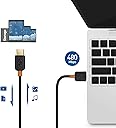
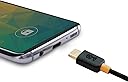
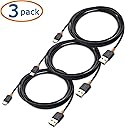
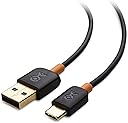
The Cable Matters 3-Pack USB to USB-C Charging Cables deliver fast 3A charging and reliable data transfer at 480 Mbps. Each 6.6 ft cable features a reversible USB-C connector for easy use and durable construction with molded strain relief for longevity. Compatible with the latest smartphones and tablets including iPhone 15 series, Samsung Galaxy S23, and Google Pixel 7a, this bundle offers versatile, high-performance charging solutions for professional multitaskers.


| Brand | Cable Matters |
| Connector Type | Usb Type a 2.0, Usb Type C 2.0 |
| Cable Type | USB |
| Compatible Devices | PC, Smartphone, Tablet |
| Special Feature | Fast Charging |
| Compatible Phone Models | nexus-5 |
| Color | Black |
| Connector Gender | Male-to-Male |
| Data Transfer Rate | 480 Megabits Per Second |
| Shape | Round |
| Number of Pins | 24 |
| AC Adapter Current | 3 Amps |
| Unit Count | 19.8 Feet |
| Item Weight | 0.1 Pounds |
| Model Name | B00S8GU544 |
| Specification Met | Yes |
| Indoor/Outdoor Usage | Indoor, Outdoor |
| Number of Items | 1 |
| Customer Package Type | Standard Packaging |
| Maximum Voltage | 5 Volts |
| Manufacturer | Cable Matters |
| UPC | 081159815028 |
| Global Trade Identification Number | 00081159815028 |
| Item model number | 201001-BLK-2mx3 |
| Item Weight | 1.6 ounces |
| Product Dimensions | 7 x 5.5 x 0.3 inches |
| Item Dimensions LxWxH | 7 x 5.5 x 0.3 inches |
| ASIN | B00S8GU544 |
| Is Discontinued By Manufacturer | No |
| Date First Available | June 7, 2015 |
I**E
Works for MacBook, but provides slower charging.
Great quality USB-C cable. I purchased this to use for an additional charger for my 12" MacBook. I looked for many reviews before purchasing, trying to find information about compatibility with the new MacBook. - This WILL charge the new MacBook, however it must be plugged into a HIGH CURRENT USB port, like the charging brick from an iPad (12W) or another charger that is capable of 2A or greater charging current. - The original charger for the MacBook is 29 watts, and it achieves this by using a high voltage pin available only in USB-C. This USB A to USB-C adapter cannot use that pin, and the maximum charging rate is 2.4 amps x 5 Volts or 12 watts. This means that the MacBook charges slower while using a USB-A to USB-C cable. - When turned on using the MacBook with this cable plugged into the iPad power brick (12W) my Macbook takes around 12 hours to fully charge. which is about 4 times the amount required to charge it on the original apple charger. This is because the Macbook uses about 10 watts while running, leaving only 2 remaining watts to charge the battery. I purchased this to keep plugged in at my desk at work. It allows my Macbook to stay running on my desk all day and slowly charges the battery. Since I already had a high current USB brick from an iPad, this was way less expensive than purchasing the Apple USB-C charger. Quality of the cable, strain relief, etc is excellent. connectors connect tightly.
J**.
Works well for charging Nexus 5X! Some notes on "fast charging", superb customer service!
***UPDATE - 12/7/15*** This is a late update, but I did get a chance to compare between the old and the new cables received couple weeks ago. They definitely fixed the problem as it was noticeable when I tested with a portable Anker battery and using a current measuring app on the phone (not the most accurate but I use it as to make reference measurements), the new cables did not pull max. current from the battery like the old cables did. This indicates that they did change the Rp resistor to a corrected value to ensure overcurrent conditions will not occur on the charger and cause any adverse effects, as commented in previous updates. Additionally, the same reviewer I mentioned who found non-compliant issues with a different Cable Matters cable also commented on this USB-C to USB-A cable and have also tested (with data) and confirmed that the newer cables have been corrected and fixed according to USB-C standards rev. 1.1. So for future buyers as of now who wants to charge their Nexus 5X, I highly recommend this cable! ***UPDATE - 11/19/15*** I contacted Cable Matters and have discussed the issues with the cables not being compliant to the USB-C 1.1 specification. They are aware of this issue and have since fixed the problem to meet and comply to the specification. In addition, they are sending me new replacement cables that are compliant to the specifications, all without charge! I give their customer service 5* for being prompt to fix an issue addressed, and for offering free replacement! I will definitely buy from them again! I will update again once I get the new replacement cables to test and compare with the old. ***UPDATE - 11/10/15*** I've been reading some newer reviews and I wanted to point out some precautions if you plan to purchase these cables for charging Nexus 5X or 6P. One reviewer (credited as a SW engineer on the Google Pixel team, review here: http://www.amazon.com/review/R3KIQ4LI5PC5JH/ref=cm_cr_rdp_perm) have pointed out that the USB3.1 Type C to Type A version of the cable by Cable Matters is not compliant to USB Type C release v1.1 and may cause damage to your charge sources (i.e. chargers, PC, hubs, etc..) Now, I don't know if this issue also effects the USB2.0 Type C to Type A version of the cable, but I would recommend taking precautions and understanding the problem first before making a purchase, which I will remark here. The issue that was pointed out is the fact that Cable Matters cable (USB3.1 Type C to A) did not use the correct pull-up resistor. Those of you interested in reading up the technical details, you can find the full specifications here: http://www.usb.org/developers/usbtypec/ under section 4.11. Cable Matters used 10kohm resistor, which is rated for 3.0A @ 5V, when they should really be using 56kohm for legacy connectors such as Type A or micro B (see Table 4-13 in the Type C specifications release 1.1 document). What this means is the cable will "allow" max. 3A draw from its sources. Since the other end of the cable is Type A--which is not rated for 3A--there may be potential problems if the charging sources are not also rated for 3A output (i.e. wall charger, car charger, PC USB port, USB hubs) and/or they do not have overcurrent or overcharge protection. Most, if not all, Type A chargers are rated anywhere between 500 mA to 2.4A. If the cable "allows" for 3A current to flow, it can damage the internal circuitry of those sources when connecting to a USB-C device that has the capability of sinking 3A (i.e. Chromebook Pixel, Nexus 5X,6P..etc.). Personally, I have been using Cable Matters USB 2.0 Type C to Type A cables for well over a week using Anker 40W desktop 5-port (2.4A max. rated per USB port) charger, Monoprice 2.1A/5V wall charger, and a Dell Optiplex PC USB port for charging my Nexus 5X. So far I have not seen any issues. The Anker does have PowerIQ and safety mechanisms built-in, so it might help prevent damage if too much current is drawn. I am not sure about the hardware circuits inside the Monoprice or my Dell PC. However, I would advise anyone buying these cables to beware what chargers you have and note that it may cause damage. ***Original review*** I bought a few of these cables (3ft) specifically for charging a Nexus 5X. They work just as expected for charging. I would like to emphasize that these cables that I bought are USB-C to USB-A (USB2.0 speed), not USB 3.0 or USB 3.1. That means, if you want to transfer data, it is still limited to max. USB2.0 speeds (480Mbits/s). Besides, the Nexus 5X currently does not support USB3.1 speeds for file transferring. These cables seem pretty well made. It's light weight and flexible. The white strain relief on both ends are made of hard plastic. The connectors on each end are not bulky. Here are a couple things I also want to point out since some reviewers and users have asked or talked about "fast charging". - In order to truly get the "fast charging" speed that's advertised by Google for Nexus 5X, you need to be using a USB-C to USB-C cable (Cable Matters also offer this as one of the options for about $1 more currently), not a USB-C to USB-A cable. The USB-C to USB-C cables are what support higher current exceeding beyond 2A. - Additionally, to get the fast charge, the charger (AC adapter) must be rated for higher current output (i.e. the included charger/adapter with Nexus 5X is rated 5V, 3A = 15W) - When charging the Nexus 5X, it will show "charging rapidly" in the lock screen when you have a high current charger, but this does not necessarily mean it's "fast charging". You can use a 2.1A charger and still see "charging rapidly" displayed on screen. But fast charging means the device can draw more current, beyond what normal USB-A buses are rated for. So, to clarify "fast charging" is with USB-C to USB-C cables, which means you must use a charger/adapter that either has a USB-C output connector or is integrated into the adapter with a USB-C cable end. The charger must also be rated for higher current output (i.e. 3A or higher). Now, this is not to say these cables can't charge the Nexus 5X quickly. In fact, if you have a higher current charger it can still charge very quickly, but will be a bit slower than if you used the USB-C charger that comes with the phone. I use these cables with the Anker 40W desktop charger rated for 2.4A max per USB port, see here: http://www.amazon.com/gp/product/B00GTGETFG?psc=1&redirect=true&ref_=oh_aui_detailpage_o07_s00 With this, I can charge from 30% to 100% within close to an hour. I would say that within 15 minutes I can get 15-18% charge approximately (based on phone's default battery capacity indicator, with screen off and some apps running in background while idle), which is still relatively fast, and almost as fast as if I used the included charger/adapter to charge. Overall I would highly recommend getting a couple of these cables for charging if you have a USB-C phone (i.e. Nexus 5X, Nexus 6P, Oneplus Two).
N**K
One of the best USB-C (A to C) Chargers I've had to date.
I've been searching for a solid cable for Android Auto. I've tried and researched several and while I always got 'ok' results from a few cables (Anker Powerline, amazon basics, a few others), they still had intermittent issues, especially when moving the cable (despite there not being any short). Anker Powerline is suppose to be the 'best' but I even had issues with it. Android Auto (and i believe some particular vehicles) is very picky about what they want. I drive a 2017 Subaru Impreza. This cable... has just worked. This cable has a good USB-C end. many come with a 'clamped' style, and you'll see the break in connection, and some come solid (like this one) where they are one piece. USB-C is quite a mess. There is a ton of variance. I couldn't find if these were if certified or not, but my goodness, these cables feel good, and I've not had any android auto issues since purchasing them.
R**0
Great flexability, but not robust.
The headline says it all. The cables work great and do what is required. They do not charge at full Type C charging rates because they meet the USB 2.1 spec due to the Type A connector on the other end. We have bought several of these and have found that they eventually begin to fail at the connector just behind the yellow band. There is no strain relief and they tend to pull or wiggle out from flexing. With careful use, it does not happen for quite a while. If a rugged cable is needed look for one that has a braided exterior and good strain relief. They will also be more expensive. Because of the price point I am giving these cables 4 stars. If they cost any more the rating would drop. I would and have bought again and would recommend them for the price and overall quality / performance.
M**D
If you get an old version, read my review.
I have a Nexus 5X, that has a rapid charging capability (non-standard). It has an indication on the screen that says "Charging" or "Charging Rapidly". It came with a 3A charger, and a cable with Type C at both ends. Nice, but doesn't work with my many previous chargers, plus it's hard to find chargers over 2.4A. So, I first tried some of the TechMatte adapters (http://smile.amazon.com/dp/B016PQH4BA), but some of my old micro USB cables are not good enough to charge very quickly. Still, they work. Then, I tried one of these cables (the 3 foot one). It displays "Charging rapidly" on all my chargers, from my LG G2's 1.8A charger, Samsung Galaxy Tab 3.0's 2A charger, my TechMatte 5 port 2.4A charger, my Amazon Basics PB10 Power Bank (2.4A, I believe), and my 3 car charger (Scosche, TopG, both 2.1A and a newer WAWO 2.5A). However, this may or may not be a good thing, depending on your understanding of the limitations of this combination. To me, I actually am glad it is non-compliant. Why am I glad, you may ask. Well, I'm glad you asked. The compliant cables are limited to 1.5A by a resistor. This is because the USB spec says that is the maximum, and the chargers usually can't handle higher currents, although many supply 2.1 - 2.4 amps. In theory, my Nexus phone could try for 3A, since the cable makes it think it can supply that much even if the supply can't. But I don't think the phone ever demands that much power, and most chargers would limit the current if it did. But, the phone will charge faster with this cable, assuming your charger can handle higher currents. So, if you use a charger that can supply 2.5A, or even 2.1 in most cases, you would probably be OK. If you used a different device that wanted more current, it might cause problems. I understand electricity very well, and so I'm not really worried about using this cable, and in fact, I'm glad I got one that is non-compliant. However, I learned that this was an accident, and the current crop are limited to 1.5A, and will not charge as rapidly. I received an email from them offering to send me a new cable, free of charge. after they saw my review, which I wrote before understanding the issues. I have now increased my rating, and would buy more if I could (but I can't, unfortunately). The cables seem well made, and are not too thick, which I like. Update: They sent a new cable, which displays as capable of only 1.5A. However, on my Nexus 5X, according to the app Ampere that displays capability and charge current, it was drawing more than 1.5A - I believe up to 2A or so at one time. I also thought it had switched from 1500 ma capability to 2100 at one point, but I have not seen that since, so far. I like the newer version of the cable. It seems to be well-made, and charges fairly quickly; if not at the maximum possible, it's close.
B**G
Cable Matters USB 2.0 USB-C to USB-A Cable in Black 3.3 Feet has correct 56kΩ termination!
Benson here again, continuing my reviews of USB Type-C legacy cables, adapters, and accessories. I reviewed a different but very similar Cable Matters cable a couple of weeks ago : Cable Matters? USB 2.0...
B**.
Works great for Android Auto
I've tried a total of five different USB-C cables to connect my Android phone (Galaxy S8) to my vehicle (2018 Nissan Murano) via Android Auto. This cable, by far, works the best. Two of the other cables don't connect at all, and a third connects but will disconnect with even the tiniest of bumps against the connector and the phone. Most of the blame for this difficulty lies with Nissan and their flaky infotainment system. Whatever the reason, the system is very sensitive to the type of cable being used. The Cable Matters USB works great. I can use my phone while it is connected without breaking the Android Auto link, and the type-c connector seems to just a little longer than others, making it work well with my phone's case. I don't get fast charging with the cable, but I do get "normal" charging, which is enough. For those that don't have Samsung phones, you essentially get three different charging notifications when connected. The normal charging and fast charging notifications show you an estimate of how long until your phone is fully charged. Normal charging takes about 4 hours from 20%, while fast charging is around half that. "Slow charging" occurs with older cables or low voltage adapters and takes six or seven hours. With slow charging, there isn't even a time estimate shown. The Cable Matters cable usually shows normal charging, and I've yet to find a cable that both fast charges my phone and has a stable Android Auto (data) connection.
T**V
Served perfectly for 4.5+ years. Buying again.
One of my best USB-C to USB-A cables. My USB ammeter attested that the cable allowed a full 2+ amp charge when my device and charger were capable and willing. It was one of the cables that fit my phone securely without being prone to falling out (as about half of my other cheap cables do). So, I’ve used and carried this cable heavily for the past 4.5-4.75 years (I think I must have lost one of them because I only remember having one, currently, after buying the 2-pack). Then, the other day, the outer insulation was broken and the cable had presumably shorted, inside, since it would no longer charge. It broke right at the end before the USB-A connector just as the user showed whose cable reportedly caught on fire. I think all of the AC adapters I use have short-circuit (over-amperage) protection, so they harmlessly shutdown all charging on all ports until the offending cable is removed. Since nearly any flexible cable is potentially susceptible to this after enough bends, I think I’ll intentionally make this a requirement for all of my AC adapters, in the future. And, thankfully, I carry more than one of these cables with me. So, my experience was merely the passing of a cable that had served me well and hard for the past 4.5-4.75 years. I am tempted to purchase it, again, but am undecided, at the moment. It wasn’t the only brand to fit my phone securely and carry full amperage faithfully, but it is one of the few that I’ve seen and currently the cheapest of the good ones I’ve purchased. Some (not all) of the AmazonBasics and Anker cables work as well, but I’ve been very pleased with Cable Matters’ Ethernet cables, as well, so I believe it’s not coincidence that they put out a quality product at a low price. Update: I ended up replacing this cable with an Anker cable, but it didn't stay in my phone well, so I'm coming back to buy this Cable Matters cable, again.
Trustpilot
2 months ago
2 weeks ago