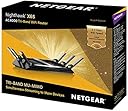
🚀 Elevate your WiFi game with the Nighthawk X6S — where speed meets smart living.
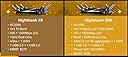
The NETGEAR Nighthawk X6S AC4000 is a tri-band WiFi router delivering up to 4000 Mbps combined speed, equipped with MU-MIMO technology for simultaneous multi-device streaming. Featuring dual gigabit Ethernet ports and voice control compatibility with Amazon Alexa, it offers a compact, durable design ideal for professional millennial households seeking reliable, high-performance networking.


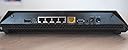
| Antenna Type | Internal |
| Asin | B01H53WZ20 |
| Brand Name | Netgear |
| Compatible Devices | Laptop, Personal Computer, Smart Television, Smartphone, Tablet |
| Connectivity Technology | Ethernet, Wi-Fi |
| Control Method | Voice |
| Customer Reviews | 4.2 4.2 out of 5 stars (4,057) 4.2 out of 5 stars |
| Data Transfer Rate | 4000 Megabits Per Second |
| Frequency | 1.8 GHz |
| Frequency Band Class | Tri-Band |
| Global Trade Identification Number | 00606449139624 |
| Item Weight Unit Of Measure | 2.43 Pounds |
| Manufacturer Part Number | R8000P-1AZNAS |
| Model Name | Netgear Nighthawk X6S |
| Model Number | R8000P-1AZNAS |
| Number Of Ports | 2 |
| Operating System | RouterOS |
| Other Special Features Of The Product | Access Point Mode |
| Upc | 606449139624 |
| Voltage | 120240 Volts |
| Wireless Compability | 802.11ac |
User
Router is not working
Have purchased netgear router on 21 st February. And from today I.e 3 rd March it stopped working . It’s switching off automatically. Can you please revert in this . Have purchased it for 32,000 and it’s stopped working . It hardly worked for one week.
User
Waste of money
Wifi gets discontinued even though internet works
User
HUGE improvement in download speeds and uptime reliability
Had an older Netgear router that couldn’t handle all the streaming traffic after I cut the cable cord. Decided to go with the Nighthawk X6S AC4000 based on all the reviews I read. The reviews weren’t wrong!! Without changing my internet service provider and only switching to this new router, my download speeds went from a typical 50-54Mbps download to 450-480Mbps download. Unbelievable performance. The old router also used to routinely drop the connection for my cameras as well due to the speeds but since installing this new router a week ago, nothing has dropped yet (fingers crossed).There are a few “quirks” that I’m not too happy about but can live with. First, the old Netgear app that supported my old router had a Network Map function which displayed how all currently connected devices were laid out; the new Nighthawk app doesn’t have this feature. Secondly, there’s a glitch between the Nighthawk app and the web based router setup. Through the Nighthawk app, each connected device can be edited to specify what each is based on pre-configured choices (tablet, smartphone, bridge, etc...). The web based router interface has different labels for all connected devices (iPhone, iPad, Windows Computer, etc...). If you specify on the Nighthawk app that a device is a “smartphone” and then log into the web based router interface, the device is listed as “unknown type”. If you specify a device as an “iPhone” in the web based router interface and then log into the Nighthawk app, the device is listed as “Unknown Type”. Would be VERY helpful if Netgear could sync both the Nighthawk app and the web based router interface to use the same terminology for devices so they are setup once and listed properly no matter which interface you use.Thirdly, there’s another glitch in the setup process (on both the Nighthawk app and the web based router interface) when enabling the remote access feature. If enabled on the web based router app, it fails a few times and then goes through fully enabling remote access. When trying to enable remote access on the Nighthawk app, it fails all the time and says it’s not enabled, even though the web based router interface shows remote access is enabled (and after successfully accessing router remotely through internet).Again, these are all minor glitches that hopefully Netgear will address in future app releases and firmware updates. But overall, just based on the significant improvement in download speeds and uptime reliability, this is the best router I’ve ever owned (and this is probably my 10th router in the past 20 years; having tried multiple Linksys, Netgear, and Belkin routers over the years).
User
Recomendable
Funciona bien.
User
Buy it and you will never regret spending money on this wonderful router.
NETGEAR Nighthawk X6S AC4000 Tri-Band WiFi Router (R8000P) is excellent gigabit router. I bought it brand new $179.49 in September 2019 and I fall in love with it at the moment of unboxing. Even though the user manual provides useful information on how to manage this router, however the users must have advanced knowledge to discover ton of its awesome features.I specifically like the stabilization of this router, the only router I've ever used that could run from day to day without overheating or connection drop. Auto firmware update will keep you free from security threads, you may "set and forget" to spend your time on your work, your life and your loved ones.Another awesome feature is Smart Connect - Let the router select the best WiFi band for our WiFi connections. With Smart Connect, we can use the same WiFi network name (SSID), security options, and password for all radios for which we enable Smart Connect. It is awesome to have only one Wireless Network Name (SSID) for 2.4G and both 5G radios.Another awesome feature is available on NETGEAR Nighthawk X6S AC4000 is ReadySHARE USB that lets you plug in even more capabilities and convenient features through your router’s USB port. These include USB storage you can wirelessly access at home, free software to easily backup your PC or Mac, wirelessly printing from any PC or Mac and the ability to play, view, listen to, and share your videos, photos, and music on DNLA connected TVs, game consoles, or media players.Last but not least, if you place your other banded router in your bedroom, your sleep may be bothered by the router led indicator. With NETGEAR Nighthawk X6S AC4000 Tri-Band WiFi Router you will never have that issue, there's a small switch in the back side of the router to turn off all the led lights except the power indicator.I have 36 devices connected to this router at home 24/7, both wired and wireless, some of them are high bandwidth usage like 4K TV and security cameras, I have no connection issue at all with NETGEAR Nighthawk X6S AC4000 Tri-Band WiFi Router. Buy it and you will never regret spending money on this wonderful router.
User
Simple to install!
UPDATE: I'm still using this router and I have to say I stand behind my 5 star rating. Great job Netgear!I gotta hand it to Netgear, they really designed this device to make it easy to install.WARNING: The antennas are delicate. They're plastic and won't withstand being accidentally hit so be sure you find a good place for the device that's out of the way but has good air flow before you install everything.I'd just upgraded my modem a few minutes before installing this device and I was holding my breath. The modem installation went so smoothly, I thought I was bound to encounter issues installing this device. Nothing ever went smoothly with previous internet gear upgrades in my past, but it's been about 6 years since I'd bought anything new. I was due.I unboxed everything and followed the instructions on the leaflet. Installation required a phone app which I'd already loaded since I own a Netgear wifi amp.The step by step instructions were so simple, an elementary school kid could follow them. No joke. My setup allowed me to follow it without fail.The setup of the router was done in well under 15 minutes and that includes unboxing and finding the wall outlet behind my file cabinet that was tricky to get to.I'm a huge fan of Netgear and always have been even when settings were relatively manual. I'm now a fan for life.
User
UPDATED REVIEW: Solid wireless router - Not good Customer Support
UPDATE 2: Chasing down the firmware problem described below, I sent an email to the Netgear Team. To their credit, they called me on the phone and began addressing my problem. But before we got to a solution, I was told that I would have to PAY FOR SUPPORT before Netgear could continue helping me. I said, "No". Then I sent an email to Netgear saying I was not going to "pay a ransom" to have Netgear help me with a defect in their router. Netgear support then contacted me, helped me trouble-shoot the problem and then decided to replace my router. The person I spoke to was professional, courteous, patient, and helpful. Netgear sent me a "new" router, but it was actually a certified refurbished router. I told Netgear that I paid full price for a new router and they replaced the defective one with a "used" router. I asked for some concessions, like, refund me the difference, or give me a credit toward a future Netgear purchase, but they refused. I noticed that the warranty on my router was still the warranty period for my old router and asked Netgear to reset the warranty to a full 1-year warranty on the refurb and to please give me 90 days of phone support like they do for a new purchase. Again, they said no. I think this is poor customer service. NOTE that, the Netgear warranty information basically says that, if you return a product to them to be repaired and they cannot repair it, that they can send you a refurb replacement. So, this policy is in writing and I "agreed" to it. So, I downgraded my rating to a 1-star. The people were nice, the product was below par, and the customer support needs improvement.UPDATED: I have down-graded my review to 2 stars. After using this router for several months, I decided to use the phone app to update the firmware. The app says the update was successful, but the firmware was not updated. I searched for and tried different methods to update the firmware and still was not able to update to the latest version. Then ... I got an email from Netgear that said, "Important Security Firmware Update from NETGEAR". I followed all the instructions to update the firmware and it did not work. There are many incidents/reports in the Netgear community forum reporting the same problem. I sent an email to Netgear Tech Support ([email protected]) and no reply/result. I consider it a serious problem when there are (1) known security vulnerabilities in a product, (2) known fixes for that vulnerability, and (3) known problems installing the fixes that the manufacturer does not address.I bought this Netgear Nighthawk R8000P to replace a TP-Link AC1750 wireless router. The Netgear router costs about $200 more than the TP-Link router, but the TP-Link router network speeds seemed to substantially drop off after getting not too far from the router. So I decided to spend the extra money to get the Netgear router. So far, I have not been disappointed. The Netgear router was reasonably easy to set up and the network speeds are better throughout the house than the TP-Link router. The only "trouble" I am having with the Netgear router isn't really with the router itself. When I bought the TP-Link router, I also bought a TP-Link range extender (RE305) in an attempt to solve the TP-Link range/network speed problems. The trouble I am having is in trying to get the TP-Link range extender to work with the Neatgear router (to get slightly better speed to an outdoor space). Note that I gave the Netgear Tech Support only 2 stars because I have not had the opportunity (or need ... yet) to contact their Tech Support, but my impression from the Netgear web site is that they do not make it easy to contact someone (chat/phone) and, unless I misunderstand it, you only get 90 of free tech support from Netgear. (I give TP-Link high marks for tech support because they were easy to contact and spent a lot of time with me working through a problem with their Mesh system.) But, bottom-line, I am satisfied with the Netgear Nighthawk R8000P wireless router.
Trustpilot
3 days ago
2 days ago