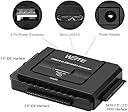
🚀 Unlock your storage potential with lightning-fast, hassle-free drive access!
The WEme USB 3.0 to SATA Converter Adapter transforms your 2.5" and 3.5" SATA HDDs and SSDs into high-speed external drives. Supporting up to 18TB capacity and transfer speeds up to 5Gbps with UASP acceleration, it offers plug-and-play convenience without driver installation. Included power adapter ensures compatibility with power-demanding 3.5" drives, making it an essential tool for data migration, backups, and expanding your storage arsenal.


| ASIN | B00MVRS38Q |
| Best Sellers Rank | #398 in Enclosures |
| Brand | WEme |
| Color | SATA & IDE |
| Compatible Devices | Desktop, Laptop |
| Connector Type | USB Type A |
| Current Rating | 2 Amps |
| Customer Reviews | 4.4 out of 5 stars 2,675 Reviews |
| Input Voltage | 12 Volts |
| Item Dimensions | 5.8 x 4.1 x 1.9 inches |
| Item Weight | 7.36 ounces |
| Item dimensions L x W x H | 5.8 x 4.1 x 1.9 inches |
| Manufacturer | WEme |
| Mfr Part Number | 5314602 |
| Model Number | SATA & IDE |
| Nominal Power | 24 Watts |
| Number of Items | 1 |
| Number of Ports | 3 |
| Package Quantity | 1 |
| Power Plug Type | Type A - 2 pin (North American) |
| Smart Home Compatibility | Not Smart Home Compatible |
| Specific Uses For Product | PC |
| Unit Count | 1 Count |
| Warranty Description | 30 day free return and refund |
| Warranty Type | Lifetime |
A**E
WEme USB 3.0 to SATA+IDE Adapter - A Lifesaver for Inaccessible Hard Drives!
I cannot overstate how grateful I am for the WEme USB 3.0 to SATA+IDE Adapter, which proved to be a true lifesaver for accessing hard drives that I previously thought were inaccessible. This adapter has earned its place as an essential tool in my tech toolkit. Recently, I encountered a situation where I needed to retrieve data from a couple of hard drives that I thought I had no way of accessing. Fortunately, the WEme USB 3.0 to SATA+IDE Adapter came to the rescue. Its compatibility with 2.5"/3.5" IDE/SATA hard drives and optical drives allowed me to connect these previously unreachable devices to my computer as external hard drives. It was a sigh of relief to find a solution that worked flawlessly. In addition to its successful data recovery capabilities, the WEme adapter offers several other commendable features. The plug-and-play functionality made the setup process a breeze. I simply connected the adapter to my computer via USB and plugged in the hard drives, and they were instantly recognized without the need for any additional drivers or complex configuration. The One Touch Backup (OTB) function provided a convenient way to back up data from my computer to a portable hard drive. The compact design of the WEme adapter, with dimensions of 5.8 x 4.1 x 2 inches, makes it easy to carry and store. I appreciate its portable nature, as it allows me to bring it along when working with different devices or when providing assistance to friends or family who may need data recovery support. The LED light indicators on the adapter are a helpful addition. They provide clear visual feedback on power and activity status, ensuring I can monitor the connection and data transfer process at a glance. The SuperSpeed USB 3.0 capability of the WEme adapter impressed me with its fast and efficient data transfer speeds, saving me valuable time during large file transfers. It is reassuring to know that the adapter is also backward compatible with USB 2.0 and USB 1.1 standards, ensuring compatibility with older devices. Overall, the WEme USB 3.0 to SATA+IDE Adapter has proven to be a valuable tool in my data recovery and storage endeavors. Its compatibility, ease of use, portable design, and impressive data transfer speeds make it a reliable and practical solution. If you find yourself needing to access or recover data from seemingly inaccessible hard drives, I highly recommend the WEme USB 3.0 to SATA+IDE Adapter as an indispensable tool to have on hand.
R**Y
Works great for older ATA discs
I have a stack of old ATA disks that I need to go through, and this is exactly what I needed. For everyone who says it doesn't work for them, that it didn't read their disk, did you configure the drive select pins? I discovered that if it's set as a primary or slave drive it doesn't work. But when I set the jumpers for CS (cable select) it works just fine. I suspect most computers used the CS setting by default, and that's what this device is designed for. Unfortunately, the instructions don't mention this at all. You may have to go online to see the jumper settings for your drive, every brand is different and they don't always put it on the label. It also helps to have a software tool like IM-Magic Partition Resizer. For example, I have a drive right here that has three valid partitions and none of them are formatted. Windows alone simply doesn't recognize the disk in File Manager. Windows Disk Management shows the three partitions, but doesn't explain that they are not formatted. This device is a hardware tool; coupled with a good software tool and a little knowledge it will do exactly what you need.
C**E
VERIFY it has the ports YOU need ...
Good device, useful but not exactly what I'd expected. I had the - mistaken (my mistake) - impression that there were 2 SATA ports and one IDE port. MY mistake, but the description wasn't clear, indicating one port as BOTH Ide/SATE (figured there would be an adapter or something) . The SATA port worked EXACTLY as expected, but use as an external drive-to-drive backup device is limited to NOT being an external drive-to-drive backup device, but it DOES function as a SINGLE IDE interface suitable for attaching a SINGLE external physical drive, even one that requires additional power (my application). As such, it worked PERFECTLY, and is in use that way right now - with good results, so far. Seems a reasonable buy for the price, and if upon CLOSE examination you determine that it WILL meet YOUR needs, I can recommend - so far - this device as a "buy" .
J**.
Excellent value, highly recommend
This little guy works VERY WELL. Excellent value for the money. As a 20+ year computer technician, I've used a number of similar solutions in the past with disappointing results. Either they just didn't work or the read bit rate was way too slow. This one had none of those issues. I had a computer motherboard fail and just needed some data from the HDD. Turned the internal drive into an external USB type device and was able to easily extract the data needed with absolutely no issues whatsoever on a Windows 10 computer. Highly recommend.
G**G
Easy to Use and Saved My Old Data
This hard disk converter was incredibly simple to use! I connected it to my old hard drive from a laptop that had a ton of important information and pictures I thought were lost forever. The setup was seamless, and I was able to retrieve everything without any issues. I’m so happy I made this purchase—it worked perfectly and brought back files I thought I’d never see again. Recommend if you need to recover data from an old drive
L**G
Works with SATA Blu Ray
Used this with a SATA Blu-Ray drive to rip discs for Plex server. Worked with no issues or drivers needed. MakeMKV worked with it and could eject the disc just as it could in the tower PC. No difference in rip speeds from when it was in the tower either. Not having to walk across the room to the tower PC was a huge time saver. I don't even think I'll put the drive back in the tower. I'd just as soon connect this to the tower by USB and use it as needed, keeping the drive mobile between my different systems. Much cheaper and more versatile than getting an external enclosure. Now I can go through all these HDDs from retired systems that are stacked up with who know what on them.
W**L
Quick shipping and exactly as described
Arrived quickly and allowed us to recover an extremely old harddrive.
D**E
Worked once, then dead.
I was very excited to get this and dig some data off some old drives I've been lugging around to transfer the files to cloud storage. The first drive worked fine. The drive spun up, Windows detected it, I got my data. The second one, the little blue light blinked instead of being solid. Then the third one was the same. And the fourth. And the 8th. Finally I thought not ALL of these drives could be bad, and sure enough, the first one I plugged in that HAD worked wasnt detected and the little blue light just blinks. No support site that I can find, but I managed to find one forum that listed the identical product (with a different brand name) that seemed to say that if the blue light was blinking, it was a bad power supply. So, kind of ticked that the power brick only worked for.... 20 minutes before failing? Nothing I do changes that. Plugged into a power strip, plugged into the wall, on the usb cable, off the usb cable, push the button, hold the button, push the button and flip the switch. All it is now is a blinking blue light.
A**R
Bonne récupération des donnés d'un vieux disque dur.
Bon prix et efficace
A**R
Works great!!! Easy to set up......
I thought I had lost my porn collection for ever. It was on a hard drive in a computer that just died on me. I saw this and thought I'd give it a try........WOW....it works perfect and I got ALL my favorite porn back!!!
G**O
Cumple con su función
El dispositivo llegó bien envuelto y protegido, ha sido muy fácil de utilizar y he podido conectar discos de 3.5 y 2.5 SATA sin mayor problema. No he probado con 2 discos al mismo tiempo, pero hasta ahora ha funcionado correctamente.
D**S
Works as intended
It works as intended, and attached properly for the most part. Occasionally, the case the hard drive was permanently attached to, made it a little bit more difficult plug in without a lot of excess work of removing the case. The only real concern is that the USB cord is too short so it was more difficult to place the hard drive on a flat surface, depending on the surface I worked on. Overall, it worked fine just not super spectacular.
A**R
Al rescate de los discos mecánicos
Muy útil para rescatar la información de equipos antiguos, puede leer discos duros IDE, ATA sin problemas, solo Conectar y usar
Trustpilot
1 month ago
2 days ago