Desertcart purchases this item on your behalf and handles shipping, customs, and support to Japan.
๐ Upgrade your storage game with blazing speed & rock-solid stability!
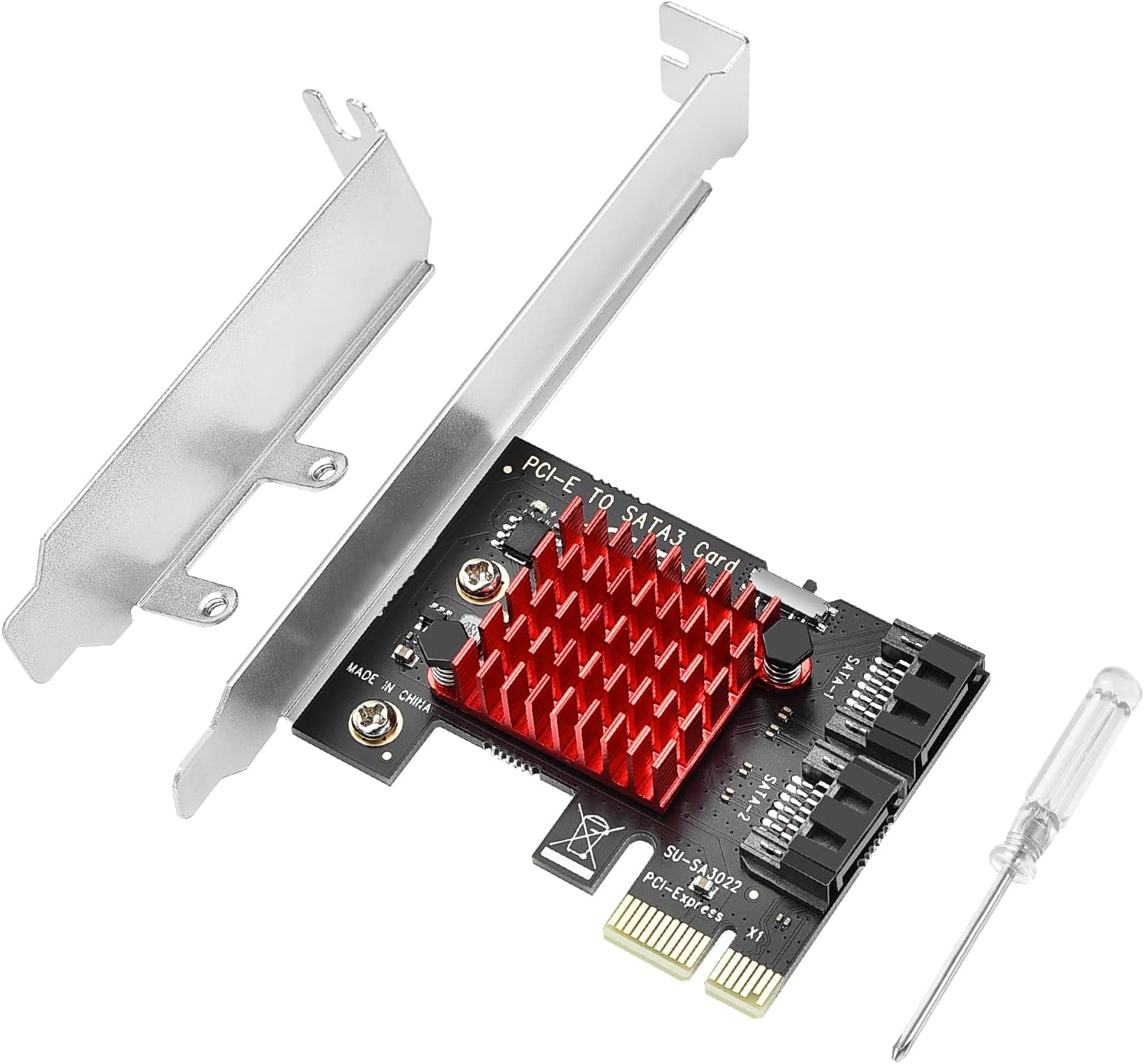
The ELUTENG PCIE SATA Expansion Card offers dual 6Gbps SATA 3.0 ports with advanced heat dissipation via an alloy heatsink, boosting HDD/SSD performance by up to 20%. Featuring 15U gold-plated connectors and a durable PCB, it ensures stable, high-speed data transfer. Compatible with major OS platforms and equipped with a low-profile bracket, itโs the perfect upgrade for expanding your desktop or NAS storage capabilities.


| ASIN | B07R9P2K8T |
| Best Sellers Rank | #70 in Network I/O Port Cards |
| Brand | ELUTENG |
| Compatible Devices | Desktop PC, NAS |
| Customer Reviews | 4.6 out of 5 stars 300 Reviews |
| Hardware Interface | IDE, PCI |
| Item Highlight | SATA 3.0 Controller PCI Express X1 Expansion Card with Low Profile Bracket for Desktop PC Support SSD HDD |
| Manufacturer | ELUTENG |
| Mfr Part Number | UA-ELT-PEC-SATA-6GB |
| Model Number | UA-ELT-PEC-SATA-6GB |
| Number of Items | 1 |
| Operating System | Windows 11, Windows 7 |
| Style | Classic |
| Style Name | Classic |
| Unit Count | 1 Count |
| Warranty Description | No |
C**E
What I needed the most.
Very good. Is working as intended. No problems at all. I really needed it for the sata ports due to most of the high end motherboards having only 4 sata ports. Installation is easy.
R**N
Works in HP T620 Plus thin client.
I'm getting ready to repurpose an HP T620 Plus thin client for use as a Home Assistant server. Instead of using the internal 16GB ssd I wanted to add a spare 120GB Sata drive that I have. I'm happy to say that after switching in the low profile bracket, it installed inside the T620 without issue. It's working great with my SSD now! Hard to beat for $12!
A**S
So many more SATA ports now!
Works normally. Came up as soon as I plugged it in and booted up.
S**E
Works but only from X16 connector
Works as advertised. However, bios did not recognize when plugged into X1 connector. Reddit user said same thing but switched to X16 connector and bios recognized so I tried same and it worked from that connector. No instructions from manufacturer to do that so other buyers should be aware.
R**.
Very Good Adapetr
Got this adapter to upgrade my PC by adding a additional drive and it was easy to install, plug and play and worked great. Highly recommend it.
R**7
It Just Works
Really not much to say. It's a solid feeling little card that added some much needed SATA ports to my motherboard and it was as plug-n-play of an operation as could be. Windows immediately detected the 2 new HDDs as part of my media storage pool and I was off and running. An elegant and satisfying solution. The odd thing that did happen was the connected HDDs showed as removable drives in Windows, and, if this happens, just Google, "How to fix Windows 10 Issue that displays internal SATA connected SSD/HDD as removable YouTube". This should be the top search result and is a great tutorial to fix the issue.
R**Y
It works well with Samsung 870 EVO SSD
I have a 10-yr. old PowerSpec {C, that only has 2 SATA connectors on the MB, and were both in use (1 HDD & 1 Optical Disc). I did have an open PCIE slot, so I bought this adapter, put it in the slot, bought a SATA cable, and connected it to my Samsung 870 EVO SATA SSD, installed in an open area (with an adapter). The BIOS couldn't see it, so I cloned my C: drive to it with Samsung's Data Migration tool, then unplugged the old HDD SATA cable, and plugged it into the SSD. That made the PC boot from the SSD, and install drivers. After shutting it down again, I plugged my old HDD into this adapter, in the PCIE slot. After2 more boots (to install drivers), everything works. The PC is faster now, and I have gained a lot of disc space. Good stuff!! I also have it and the HDD partitioned now, so I can keep my data on the SSD, too, and use the old HDD for off-line work and extra storage.
T**.
Great Linux compatibility, works flawlessly. For the price, it's a steal.
I had to buy external controller because the one on my mainboard started giving me errors. This little card just does its job flawlessly. Boot settings are done via physical switch - you can select ACPI, IDE or no-boot modes. Installs and boots Ubuntu in ACPI mode without any problems. The only one flaw I'm seeing is the length of its POST (it's a separate screen before mainboard POST). It adds several seconds to the boot process. Otherwise, it's great and BIOS correctly detects boot drives.
T**S
Works and it's plug and play, great product at a reasonable price.
Does the job, plug and play and no issues whatsoever with my 4 drives hooked up on it.
R**N
Works fine
Works as expected. It does support booting windows from the controller - contrary to someone elseโs experience. I got this as the onboard sata was acting funny in my very old system. Does not come with sata cables (power or data)
Trustpilot
1 month ago
2 weeks ago