Buy anything from 5,000+ international stores. One checkout price. No surprise fees. Join 2M+ shoppers on Desertcart.
Desertcart purchases this item on your behalf and handles shipping, customs, and support to Japan.
⌨️ Elevate your Surface Go game—type, swipe, and conquer with style!
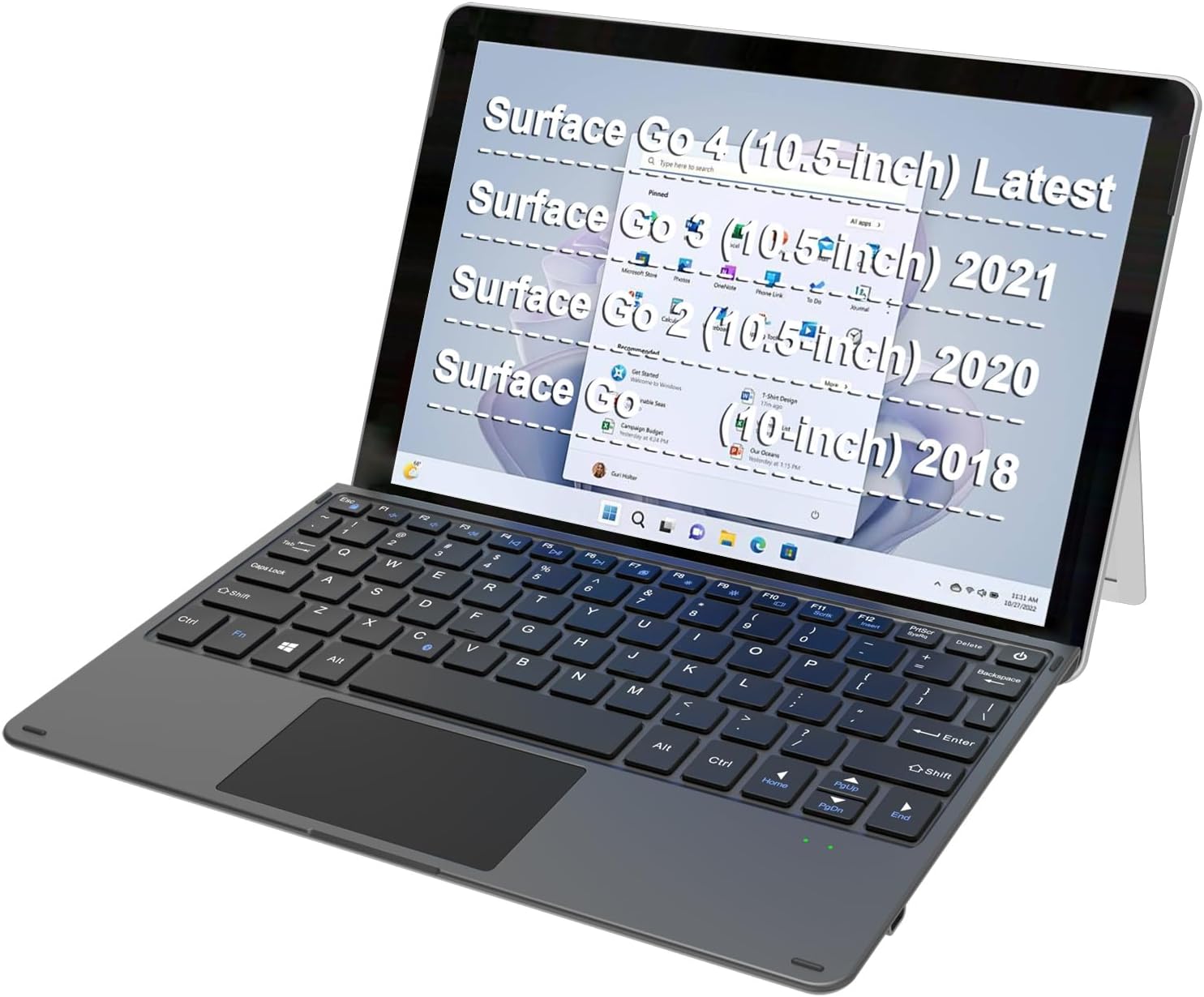
The Arteck Microsoft Surface Go Type Cover is an ultra-slim, Bluetooth wireless keyboard with a built-in rechargeable battery offering up to 50 hours of use. Designed for the latest Surface Go models (2, 3, 4), it magnetically attaches for a laptop-like experience, featuring mechanical keys, a large precision touchpad, and functional media keys. Perfect for professionals seeking portability without sacrificing productivity.


| ASIN | B07P211Q4R |
| Additional Features | Trackpad |
| Antenna Location | Business, Education, Everyday Use, Office, Personal, Student |
| Best Sellers Rank | #25 in Tablet Keyboards |
| Brand | Arteck |
| Built-In Media | USB Cable |
| Button Quantity | 78 |
| Color | Black |
| Compatible Devices | Latest Surface Go 4, Surface Go, Surface Go 2, Surface Go 3 |
| Compatible Operating System Family | Windows |
| Compatible Tablet Computer Models | Microsoft Surface Go, Microsoft Surface Go 2, Microsoft Surface Go 3, Microsoft Surface Go 4 |
| Connectivity Technology | Bluetooth |
| Customer Reviews | 4.2 out of 5 stars 5,839 Reviews |
| Enclosure Material | Plastic |
| External Testing Certification | Não aplicável |
| Hand Orientation | Ambidextrous |
| Keyboard Description | Surface Go Type Cover |
| Keyboard Layout | QWERTY |
| Manufacturer | Arteck |
| Mfr Part Number | HB216 |
| Minimum Required Operating System Version | Windows 10 |
| Model Number | HB216 |
| Number of Keys | 80 |
| Number of Sections | 1 |
| Power Source | Battery Powered |
| Recommended Uses For Product | Business, Education, Everyday Use, Office, Personal, Student |
| Special Feature | Trackpad |
| Style Name | Classic |
| Switch Type | Mechanical |
| Theme | Microsoft Surface Go |
| Unit Count | 1 Count |
| Water Resistance Level | Not Water Resistant |
A**N
Surprised!
I am a recent former teacher and am currently teaching online English classes for Chinese students. When looking for a computer I was drawn to a 2-in-1 unit similar to the iPad that my former district had provided for me. I wanted a small attachable keyboard to make working on a small tablet-like computer easier and more user friendly. NGL, this keyboard surprised me mostly because I didn't do much research into it prior to purchasing and purchased it making assumptions based on my previous experience with an iPad keyboard. This keyboard is so much better! First of all, it is attachable via magnetic connection to the bottom of the Surface Go 2; however, unlike the iPad keyboard I was used to, this keyboard is bluetooth! I can detach it from the unit so the unit can be far enough away for the camera to capture me well while the keyboard is closer to me for more comfortable typing and use! This is awesome and completely unexpected (I had imagined it would connect and draw power from the unit itself). I have used the keyboard for 5-6 hour teaching sessions without having to re-charge it and have only done so out of caution and because it can charge easily while still being used. The battery life is great! The other great bonus is that this keyboard has a very functional trackpad on it! This makes the bluetooth feature even better! I don't have to touch the screen to use it and can comfortably sit back and teach! It's great! The only issue I have had is sometimes the keyboard seems slow to re-connect if the computer has been off for a short period of time. Turning the keyboard on and off again quickly though reconnects it and it's back and working quickly! For the price, it is a great product! My only concern is how well it will hold up over time with daily usage in the 5-8 hour range.... but honestly for this price, I wouldn't mind buying the product again if I just simply over use the keyboard and wear it out. Great product for the $$$ and I would highly recommend to make your computer use more functional!
R**E
Cheap, Affordable & Reliable!
*For reference, I purchased this keyboard 12/2019. 4.5/5: Not sure what else you would be looking for in a third-party product that's 1/3 of the price (even less if you go used/refurb). The only complaint I have is occasionally the BT connection doesn't automatically link when you first open up your Go. Easy fix: disconnect & reconnect (as easy as 2 buttons: Fn + C). I appreciate the little things, like the Fn-lock. :) It's still rocking and rolling after periods of heavy use (the Go ended up replacing my laptop towards the end of my 3rd year of my doctorate program). I've charged it enough times to only count on ONE hand. I've only had it die completely once (after weeks of neglect) AND it charges up super fast (advert. 1 hr charge/50 hr use). *It has a pretty basic battery indicator (blinking red: charge). There IS also a 24 month warranty and I've had one pleasant encounter with the Arteck service team. tl;dr- good enough for me to come back to review 1.5 yrs+ post-purchase (also, procrastination is a *****). :' )
A**N
Functional, Basic Keyboard for Surface Go
Have had the keyboard for less than a week, so I can't address long term durability/functionality. The product seems built well enough that my expectation is that, with proper care and moderate usage, it should last as long as the Surface Go itself. If that changes, this review will be updated. This keyboard fits Surface Go Gen 1 perfectly, so should do likewise for Surface 2 and 3. Anyone who has used the official keyboard for Surface Go will not confuse this keyboard for that. The Arteck is made from a lower grade, lightweight but relatively sturdy plastic. Let's say it feels cheap-ish but not like trash. Instead of fabric on the back, this keyboard has texturized the same light duty plastic to give it a hint of the original's feel. A similar but more granular feel is applied to the plastic on the palmrest. The trackpad is smaller, the keys are laid out differently and have more play/less spring than the original - though the alpha-numeric keys are right where you expect/need them to be. The keys themselves are the same hard plastic instead of the soft rubberized feel of the original. The overall typing experience is adequate on a flat surface. If using as a laptop, the keyboard has a little too much flex. It works, but overall it is subpar. On the plus side, there were no errant mouse moves as a result of this flex - something that other cheap/poorly designed portfolio-style keyboards have been known to do. It is worth reiterating that while this keyboard is magnetized and fits similar to the original, it does not have a direct electronic connection to the Surface Go. Instead, it relies on Bluetooth to connect. Overall, this works very well and there is no (or not much) noticeable lag in typing. Of course, this means that the keyboard will need to be charged from time to time, but in my limited time with the device, power management was superior and I never saw the charge dip much below 100% with light duty use. In other words, it has minimal battery discharge when not being used. I expect the charge to last a long time with moderate use. As you would expect, it comes with a short charging cable with USB-A and USB-C. Since the charging port on the laptop is USB-C, you'll need a USB-A plug to charge it. Surface chargers often have a USB-A port for power on them. However, using the supplied cable with a USB-C adapter on the USB-A plug (or, alternately, using a third party USB-C to USB-C cable), you can charge the keyboard while you charge the laptop by using the Surface Go's USB-C port. Nice. One other note: because this keyboard is not directly connected electronically, Windows will stay in tablet mode and not change to laptop mode. This may mean some unexpected behavior, like the taskbar autohiding. But, in general, this likely would not be an issue. While used original keyboards are often available around the same cost as this one, if you are looking to save a few dollars as well as have a brand new keyboard - or to just quickly get a keyboard in hand without a lot of shopping, this product should fit the overall need. Personally, the original has a much higher quality and durable feel, so if you're okay with the cost of new or are okay with buying used to get a lower cost, that might be a preferred way to go.
A**R
Works Perfectly
No issue with this one at all. It works great, it is lightweight and slim and can easily attach to my surface pro. Had no issues with connectivity and charging is quick. Only complaint is that it was completely dead when I got it.
T**T
great product
The Arteck Microsoft Surface Go Type Cover has truly exceeded my expectations! Immediately out of the box, the build quality was evident, matching the premium feel I'd hope for with a Surface accessory. Pairing it via Bluetooth was a breeze, and the connection has remained consistently stable, ensuring a smooth typing experience. Its ultra-slim design not only makes it extremely portable but also adds a touch of elegance to my Surface Go setup. The keys have a tactile and responsive feel, which has notably increased my typing speed and accuracy. The battery life has been impressive, requiring infrequent charges even with heavy daily use. This keyboard has genuinely transformed my Surface Go into a versatile machine for both work and play. An essential accessory for any Surface Go owner, I wholeheartedly give it five stars!
F**T
Garbage (see update)
Edit: 3/11/2020. Seller has refunded the order for my purchase. I guess customer service does exist after all. Thanks! ----------------- (Original review below) Ergonomically this device isn't bad. It fits the Surface Go well. Unfortunately it loses all it's points on terrible functionality. Pairing the first time seemed to work without much fuss. But then it went downhill from there. When I go to use the tablet, nothing happens when I press keys. Is it asleep? Is it completely powered off? Has the keyboard "forgotten" its pairing with the tablet? There's no way to tell. Press the power button once...nothing happens. Press and hold...green lights blink. Is it on? Is it trying to pair? Are those lights just telling me that it has battery charge? I've owned this for a month and the most frustrating part is that there seems to be no consistency with the behavior. Sometimes the keyboard just works. Sometimes I have to press the buttons a bunch of times and eventually, with no apparent logic or reason, the keyboard will begin working. And other times it doesn't work at all, despite having a full charge. Manufacturer doesn't even have a website. I'd go there for troubleshooting tips before writing such a terrible review...if the website existed. What does it even cost to host a website these days? Practically nothing. I'd return it and demand a refund except that I naively chucked the box after I set it up and saw it working the first time. $40 in the toilet.
M**K
excellent replacement keyboard for Surface
I was a bit skeptical when I a bought this but my original keyboard failed after many years of service. This keyboard is quite sturdy and does clip well to the surface. It's battery is much better than expected and will last a longtime. There is a little issue with the bluetooth connectivity when waking up the machine, but there is a little trick for this. Just press the on/off button briefly. It should not switch off but establishes the connection. There is a certain time window in which the keyboard responds faster, so when you open up the keyboard it instantly connects. Overall very happy and impressed after 4 weeks of use.
D**Y
Nice keyboard with a fatal flaw
I have the official Type Cover, but I use my Surface Go 2 on planes a lot and the kickstand has the strong desire to fall off the back of the trays all the time. I wanted to be able to put the tablet on the seatback holder and use the keyboard on the tray, but the official Type Cover isn't wireless, and Microsoft doesn't sell a wireless version for some unknown reason. So I wanted a keyboard that was wireless but was at least close to the quality of the official Type Cover. Overall it's a very nicely made keyboard, not quite as nice as the official type cover but very good for this price point and bluetooth functionality. Unfortunately it has a fatal flaw that makes it pretty much useless. This keyboard has no way to tell the Surface that the lid is closed and that it should be asleep--the Surface will lock itself but not turn the screen off when you close the keyboard onto the screen. Not a big deal, you might think--you can put it to sleep manually by pressing the power button after you close it. The problem is, this lack of ability to communicate that the cover is closed causes the Surface to wake from sleep randomly about 10-20 mins after being put to sleep, and then it stays on, draining the entire battery and overheating inside your bag. The official Surface cover has two magnets that stick to the top edge of the screen--the right one seems to be the most important in telling the Surface that the cover is closed--and the Arteck only has one on the left side. I got a different keyboard (more below) that does correctly put it to sleep, but only when the keyboard is turned on, so this might be slightly more complicated than just a missing magnet, but other troubleshooting has led me to the conclusion that this has to be the issue. I otherwise like the keyboard, so I even tried turning on the option for the Surface not to wake on lid open, and this did help a little but I still had to quadruple check the screen was off without opening it too much before putting it away and it still occasionally caused the Surface to wake anyway. I don't know why no one else is reporting this issue in reviews--Windows machines do tend to have funky issues so maybe it's just me, but regardless, this is a pretty major oversight for what would be a very easy fix in the design. I wish I could recommend this keyboard, but the constant paranoia about whether it's gonna wake my Surface up and drain its entire battery so I can't use it without an outlet isn't worth it. The other keyboard I got that has not had this issues is the upgraded Inateck keyboard, so I will be returning this one. I recommend getting the Inateck keyboard and saving yourself the headache!
A**T
A "must-buy" if your surface Go doesn't have a keyboard!
Finally decided to buy a keyboard for my Surface Go, and I was not disappointed! Stunning, professional colour and style, and very easy to setup. The recharging is amazing in my opinion, and so far the battery life has been awesome! Arrived over 10 days early too!
A**M
Quality of product and shipment
Good and nice
A**R
Great Keyboard at a great price
I bought a used Surface go tablet, but there was no keyboard. I checked on the price of a Microsoft keyboard, and it was way more money than I paid for the tablet. I saw the Arteck keyboard at a great price and watched a YouTube review. Decided to grab it and It has been great. It connects easily and the feel of the key was better than expected. The trackpad works well too. It's a bit small, but it's the same size as the Microsoft keyboard, and I suspect it works as well as the OEM trackpad. I'm very happy with the purchase.
U**1
ممتازة
الكيبورد وصلت و قبل وصولها كان هناك اهتمام بالغ من البائع لمعرفة موديل التابلت و إحضار أنسب شىء له تغليف ممتاز شكل رائع اداء جيد ، تعمل بالبلوتوث سرعة فى التوصيل شكرا جزيلاً
S**S
Trackpad never worked
Bad product, track pad didn't work. Seller never bothered to contact about return request
Trustpilot
1 month ago
4 days ago