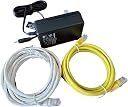
Desertcart purchases this item on your behalf and handles shipping, customs, and support to Japan.
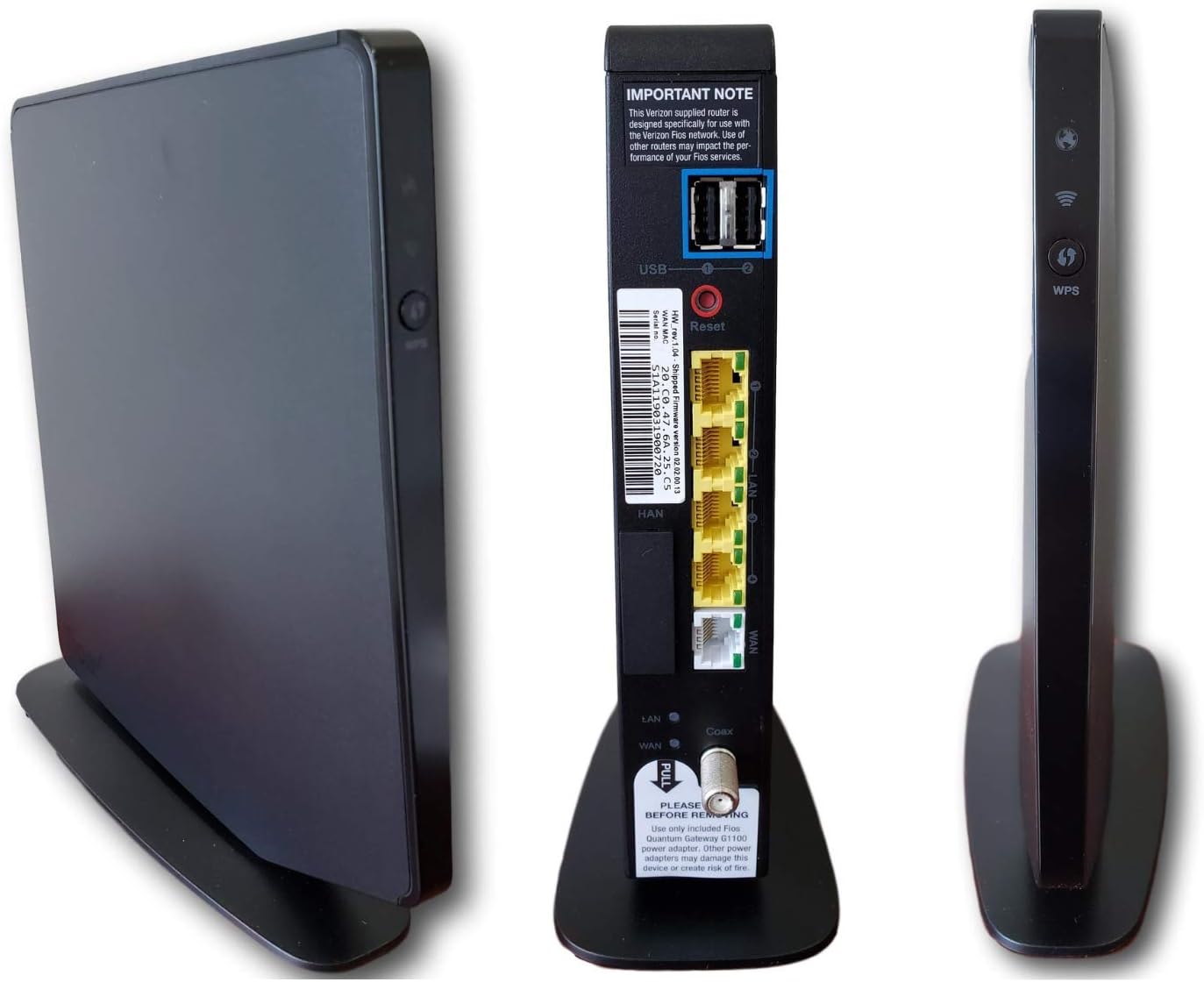
The Verizon Fios G1100 Quantum Gateway Router (2019 Updated Version) delivers AC1750 dual-band WiFi for seamless internet coverage across your home. Engineered for Verizon Fios Internet plans, it provides fast speeds, reliable connections, and advanced security features. With six available ports, internal antennas, and an easy-to-use app interface, the G1100 is perfect for powering multiple devices, streaming, gaming, and working from home. Review: Easy to install, up and running in 5-10 minutes - I purchased this from Cyber_Geek was sent Priority Mail from NYC. This router/gateway was used to replace an Verizon Actiontec router that was working fine but is only an 2.4 GHz band wireless router. This used router had very minor scuffs and a missing HAN cover from the back of the router. This does not effect the operation of the router but is a cosmetic flaw. It had a tag saying "Tested and Functional" on it. After releasing the Broadband/Coax IP address in the Actiontec (you need to log into the Actiontec to do this) I unplugged the power from the Actiontec so it would not renew the IP Address before I connected this Verizon G1100. I then connected the cables to the G1100 and powered it up. After 5-10 minutes, I was able to log into the G1100 from the connected PC without an issue. I was able to use the Verizon My FiOS app to log into the router remotely, which you can not do with the Actiontec router. This used router is being used in a business location, not for home use. It is running digital phones and wireless building thermostats, cams, printer, PC, STB. I have used it for more than a week and there are NO issues with this router/gateway so far. I am getting more speed than what the Actiontec was getting, I measured 5-6 meg more. The wireless coverage is the same with this router. I have seen no improvement as it has to cover two buildings and the walls are quite thick. The 2.4 GHZ band is used more here because of the distance the signal has to travel. I would make sure if you buy a used router and going to use it with Verizon service, you stick with Verizon firmware installed on the router already. I know how to overcome tech problems, but I would not advise starting with the wrong brand firmware to begin with. Also you will see all the old devices that the router was connected to in its past life. To remove them you need to assign a static ip to each one and THEN remove them. There is no easy way to remove them in the router GUI, but leaving them will cause no harm to the router operation anyway. Update: The new firmware that Verizon now has allows you to remove old devices much easily now. The router still works without a problem. Feb 2021 Review: My fears were unfounded - I've had this for about 3 weeks. I was very worried I would lose TV features with this after upgrading from my older, defective, Verizon supplied router. It has worked perfectly and I lost NO features with my FIOS TV, landline phone, and internet service. Also, installation was simple... unplug the coax from my old FIOS router (Actiontec I think), and plug it into this one. Did not need to call Verizon. I turned it on, waited a couple minutes, and the new SSID appeared under "available wifi connections" on all my devices. I just had to enter the new password (listed on the router) to connect each of my devices. This upgrade from my old FIOS router has provided much better coverage throughout my house, and a minimal increase in speed. (Speed was not an issue - my old router was fast enough, it had just started dropping connections a lot). Verizon wanted to supply me one of their new routers for $15 per month rent, or one-time charge of $300. This was $39, and the seller provided fast delivery through desertcart. If you've got FIOS TV, internet, and phone... don't worry... you can easily replace your old FIOS router with this - as long as your old router has a coax connection only - no ethernet.
| ASIN | B07QM33Y51 |
| Antenna Location | Home |
| Antenna Type | Internal |
| Best Sellers Rank | #33,495 in Computers & Accessories ( See Top 100 in Computers & Accessories ) #872 in Computer Routers |
| Brand | Verizon |
| Built-In Media | Power adapter, Ethernet cable |
| Color | Black |
| Compatible Devices | Personal Computer |
| Connectivity Protocol | Wi-Fi |
| Connectivity Technology | Wi-Fi |
| Control Method | App |
| Controller Type | App Control |
| Coverage | Whole Home |
| Customer Reviews | 4.4 out of 5 stars 626 Reviews |
| Data Transfer Rate | 800 megabits_per_second |
| Frequency | 5 GHz |
| Frequency Band Class | Dual-Band |
| Manufacturer | Fios |
| Maximum Upstream Data Transfer Rate | 1750 megabits_per_second |
| Model Name | AC1750 |
| Model Number | AC1750 |
| Number of Items | 2 |
| Number of Ports | 6 |
| Operating System | Proprietary (Verizon) |
| Other Special Features of the Product | WPS |
| Router Firewall Security Level | Basic |
| Router Network Type | Fiber Optic |
| Security Protocol | WPA2-PSK |
| Special Feature | WPS |
| UPC | 609311253305 |
| Unit Count | 1 Count |
| Wi-Fi Generation | Wi-Fi 5 |
| Wireless Communication Standard | 802.11bgn |
| Wireless Compability | 802.11bgn |
R**P
Easy to install, up and running in 5-10 minutes
I purchased this from Cyber_Geek was sent Priority Mail from NYC. This router/gateway was used to replace an Verizon Actiontec router that was working fine but is only an 2.4 GHz band wireless router. This used router had very minor scuffs and a missing HAN cover from the back of the router. This does not effect the operation of the router but is a cosmetic flaw. It had a tag saying "Tested and Functional" on it. After releasing the Broadband/Coax IP address in the Actiontec (you need to log into the Actiontec to do this) I unplugged the power from the Actiontec so it would not renew the IP Address before I connected this Verizon G1100. I then connected the cables to the G1100 and powered it up. After 5-10 minutes, I was able to log into the G1100 from the connected PC without an issue. I was able to use the Verizon My FiOS app to log into the router remotely, which you can not do with the Actiontec router. This used router is being used in a business location, not for home use. It is running digital phones and wireless building thermostats, cams, printer, PC, STB. I have used it for more than a week and there are NO issues with this router/gateway so far. I am getting more speed than what the Actiontec was getting, I measured 5-6 meg more. The wireless coverage is the same with this router. I have seen no improvement as it has to cover two buildings and the walls are quite thick. The 2.4 GHZ band is used more here because of the distance the signal has to travel. I would make sure if you buy a used router and going to use it with Verizon service, you stick with Verizon firmware installed on the router already. I know how to overcome tech problems, but I would not advise starting with the wrong brand firmware to begin with. Also you will see all the old devices that the router was connected to in its past life. To remove them you need to assign a static ip to each one and THEN remove them. There is no easy way to remove them in the router GUI, but leaving them will cause no harm to the router operation anyway. Update: The new firmware that Verizon now has allows you to remove old devices much easily now. The router still works without a problem. Feb 2021
D**M
My fears were unfounded
I've had this for about 3 weeks. I was very worried I would lose TV features with this after upgrading from my older, defective, Verizon supplied router. It has worked perfectly and I lost NO features with my FIOS TV, landline phone, and internet service. Also, installation was simple... unplug the coax from my old FIOS router (Actiontec I think), and plug it into this one. Did not need to call Verizon. I turned it on, waited a couple minutes, and the new SSID appeared under "available wifi connections" on all my devices. I just had to enter the new password (listed on the router) to connect each of my devices. This upgrade from my old FIOS router has provided much better coverage throughout my house, and a minimal increase in speed. (Speed was not an issue - my old router was fast enough, it had just started dropping connections a lot). Verizon wanted to supply me one of their new routers for $15 per month rent, or one-time charge of $300. This was $39, and the seller provided fast delivery through Amazon. If you've got FIOS TV, internet, and phone... don't worry... you can easily replace your old FIOS router with this - as long as your old router has a coax connection only - no ethernet.
C**O
The best wi-fi router I've ever had
I've gone through quite a few. Providing good wi-fi coverage in my house has always been a challenge since it has 3 levels and many walls. I got the Quantum Gateway to extend my MoCA network. Since this router appeared more modern and hopefully more secure than the old Actiontec MI424WR, I decided to switch them so that the QG becomes the one connected to the fiber terminal outside. They are actually very similar in features and web admin interface, so I guess they share the firmware. (The QG just uses somewhat different UI layout and style.) Setup was straightforward. The MoCA bridging with two Actiontec routers works flawlessly. What I did not expect is the amazing wi-fi coverage. With the most challenging test I did: router in the basement, Google phone in my work den on the 2nd floor, I get 50-70 Mbps download and 50+ Mbps upload speed as measured by speedtest.net. Ping time only 2-3 ms! (Yeah, Ziply Fiber rocks!) The best previous router could variably eek out 10-15 Mbps in this setup and often drop the connection. The strange thing is that the QG does not appear to use higher radio power. My phone and laptop detect the signal strength as 'Poor' from the 2nd floor. But they get solid, relatively fast connection.
K**W
Easy swap
Easy swap with old coax router for VERIZON Fios Used eithernet to access settings via laptop Able to keep old name and not rename all my devices...which is great !!!
M**N
Works great!!
Updated my Fios so had to update router. They no longer use or sell this router. $42.00 outright is a lot better than $12.00 per month forever. Works fine, easy setup, good price.
M**N
Frontier yes, but worked without a hitch
I'm a fios customer, fed up with being ripped off by Verizon with a router rental fee. The ROI on this is a measly 6 months, so easy call financially. Also didn't want to reinvent the wheel, so bought the same router I was renting. Yes, it had Frontier firmware on it, whatever that means. When I logged into the router at 192.168.1.1 the settings page was branded Frontier. I'm in NY so i have no idea who that is. The router itself is physically identical to the one i was replacing. I unplugged the power, coax, verizon ethernet, and my ethernet cables, switched routers, plugged everything back in where it was, and voila, everything worked. TV, internet, phone as before. I was worried about the Frontier thing, so much so that I called Verizon beforehand. They were like, just swap it out, so that was a wasted call. My return kit is on the way from Verizon. Can't wait to get that fee off my bill, which is too damn high anyway. Reading the reviews, I can see that some people had bad experiences. With a techy thing like a router I'm not surprised. I guess I got lucky and hope that you will too. Peace.
R**R
Very easy, no phonecall required
Didn't actually expect replacing my internet hardware to be so simple. I purchased the refurbished gateway and wifi extender (https://www.amazon.com/gp/product/B087YVXJ6Z/ref=ppx_yo_dt_b_asin_title_o06_s00?ie=UTF8&psc=1) in an effort to rid my household of rental fees and cast off the yoke of our reptilian overlords. 1. Take a picture of the gateway and extender information on the respective units. 2. Swap over all cables just as they were to the new hardware. I had both coax and LAN cables, and this makes everything much, much easier. 3. Wait 15 minutes for them to recognize their new purpose in life. 4. Via computer, connect to one of your new networks using the info in the picture you took. 5. Point your browser to 192.168.1.1 (very optional!) 6. Change the password to something you'll actually remember (I used the previous password as that has been burned into my long term memory). Rinse and repeat for your other new networks. Note: this and the previous steps are completely optional and should probably only be used by advanced users. Turns out I could have accomplished my task with a MoCA and any highspeed wireless router. The MoCA/coax connection bit is evidently only for Fios TV .. Buying refurbished, however, saved us quite a few ducats at, perhaps, some cost of speed. YMMV, of course.
Y**C
Not working properly
I really wanted it to work because the price was good. But sadly it did not work. The internet was slow and we keep having to sign back in. We had to return it and ended up renting with Verizon. At least we will not have to worry about it not working. After we installed the rented router we were very sure the one we got from Amazon was not working properly.
Trustpilot
1 month ago
2 weeks ago