🔄 Master your multi-computer domain with effortless switching!
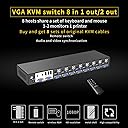
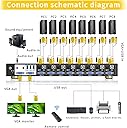
The eKL VGA KVM Switch 8 Port 2 Out is a professional-grade manual and remote-controlled switcher designed for managing up to 8 VGA-enabled computers with a single keyboard, mouse, and USB 2.0 device set. Supporting resolutions up to 1920x1440 and compatible with multiple operating systems, it features a rack-mount design and includes all necessary cables for quick installation, making it ideal for data centers, control rooms, and multi-system workstations.


| ASIN | B07PQP4P2F |
| Actuator Type | Push Button |
| Best Sellers Rank | #1,037 in KVM Switches |
| Brand | eKL |
| Circuit Type | 1-way |
| Color | 8 Port VGA KVM Manual Switch |
| Compatible Devices | VGA devices, standard USB keyboards and mice, devices running Windows 9x, NT, 2000, XP, 7, Linux, Novell operating systems |
| Connectivity Protocol | Vga |
| Connector Type | Usb 2.0 |
| Contact Material | Copper |
| Contact Type | Normally Open |
| Control Method | Remote |
| Control Type | Manual and Remote |
| Controller Type | Manual |
| Current Rating | 1 Amps |
| Customer Reviews | 3.6 3.6 out of 5 stars (107) |
| Date First Available | March 13, 2019 |
| International Protection Rating | IP54 |
| Item Weight | 6.91 pounds |
| Item model number | eKL-81UA |
| Manufacturer | xudongtai |
| Mounting Type | Rack Mount |
| Number of Items | 1 |
| Number of Positions | 8 |
| Operating System | linux, windows 2000, windows 7, windows xp |
| Operating Voltage | 12 Volts |
| Operation Mode | Manual |
| Package Dimensions | 21.77 x 9.25 x 4.9 inches |
| Terminal | Button |
| Unit Count | 1.0 Count |
| Wattage | 12 watts |
G**N
Great KVM for Windows machines!
This KVM is great for Windows Machines - _excellent_ Value for Money. More importantly, unlike KVMs from well-known vendors, it has all the cables included. But that is only if you have standard Windows 1024 x 768 @ 60 Hz. Generally, do not expect anything above 60 Hz to work. Unfortunately, that is not my case. Unix machines tend to have 70 Hz. And most of my other machines are like that. Even more, older Unix machines tend to require 75 Hz display clock, which is also my case. Otherwise great stuff, delivers fast and no problems.
C**T
Machines constantly lose keyboard and mouse connection at random.
I liked the simple design with standard USB and VGA connectors on the KVM eliminating stupid and unnecessary proprietary cables. It also has audio switching which is not common or necessary but appreciated. The price was low which indicated it was likely of very low quality but the port design was what I wanted so I decided to try it. It doesn't work properly at all. I have it hooked to a mix of Dell and Supermicro servers in a test rack. When switching between machines you are almost guaranteed to lose the mouse and/or keyboard after you switch. That or the mouse and keyboard just don't work at all. You then have to unplug the mouse and keyboard from the KVM or power cycle the KVM. Completely useless. The build quality is lacking as the cables feel flimsy, the connectors are loose, and it barely functions. Going to pack this up and return it.
D**N
Cheap but works great
At first I was convinced this was gonna be a low quality kvm switch.. so I plugged it all up, even used two hdmi to vga cords with matching usb cords, since my tower servers are hdmi/dp only. Get it all plugged in, and switch channels and everything works, I was even amazed it worked with my wireless keyboard/mouse combo, they work flawlessly, but I noticed in dmesg of Debian it does throw warnings but it still works and only throws warnings when you switch, claiming it can’t reclaim the usb. I have to say for 89 bucks it’s worth it.. I can’t speak for long term but right off I was impressed, very impressed..
D**D
Good Price, but...
Although the price was good and it did include cables for all 8 ports, I was a bit unimpressed with the overall function of the KVM. First, all cables are only about 5-6 feet long meaning that it will only work with the very closest computers, second, The switch was VERY slow to recognize the input from the computer and the computer would not detect that it had a keyboard and mouse connected. Finally, after getting all ports recognized by restarting the computers multiple times, I found that the switch was VERY slow moving from one port to another - taking way too long to switch. I was maybe too generous on the THREE stars, TWO would have been more accurate, but the price is still not bad for an eight port if you don't mind the sluggishness of the switch.
U**N
Good Value!
This worked for me just fine and absolutely serves it's purpose using wired keyboard & mouse, Supermicro 826-12, HPe DL380 G9, DVR, and a bunch of Raspberry Pi 4's. I do agree with others about the latency switching; However, it isn't THAT bad. While it is a lot slower than what I'm used to in my data centers, for my own personal use at home it's A LOT less expensive than the alternative enterprise solutions out there. In summary, it's bearable and well worth the price in my opinion. Also, I don't know what others are talking about. If a person can read, then that person can easily disable both the beep and the scan, it's clearly labeled on the front of the device. I knocked off one star due to the latency in switching, for sure. Another odd thing, I believe, I'm not really sure, it could just be in my head, but I swear the image is slightly darker on the monitor. I mean, it's barely noticeable, and I may just be imagining it or nitpicking.
J**M
Perfect
This works well in my little computer closet. It does make sounds when you switch it or when a computer reboot it flips over, but that is something a don’t have to worry about since I remote into the other computers and only need this to access the console when it’s something major to fix. I’m very pleased with the unit I got.
D**O
HELP??? Wireless not working??
So.. I purchased this device. Wireless USB mouse works..keyboard does not. I was upgrading from a 4 port so I know that all devices on my end worked previously. This did not come with any instructions/drivers etc. ..I wasn't too worried afterall its a switch..pretty straight forward. But now I'm not so sure. The packaging was ...horrible and the box half opened. Maybe it was damaged? I kinda need this working ASAP... so I will attempt to figure something out on my end..but really could use some help. I'm willing to overlook a LOT as long as the device works like advertised. I will upgrade my review once I can get this device working like its supposed to... provided that it does. EKL? any thoughts???
P**N
2 monitor kvm
I bought this because I thought I could use 2 monitors with my computers. I didn't read the whole description. After I got the KVM and set it up, that's when I realized you can not extend the monitors. Only clone them. If you have ever used 2 monitors on a system, NOBODY clones the 2nd monitor. I went back to read the description and it clearly stated the KVM will not extend the monitors. The only thing this KVM is good for basically is to have one keyboard, mouse, and monitor.
Z**F
++ It comes with a full set of cables, which is great. It also has conventional video + USB connections (as opposed to some others that have a proprietary USB-over-VGA cable which are difficult to find, and expensive). All in all a great package of hardware for the price. + The IR remote control works well, and it's useful to have an extension IR reciever if the KVM is out of direct IR range. - The lights on the front are recessed and are only visible from straight on which makes a quick visible check of selected host difficult. --- However, I was noticing frequent, apparently random, device disconnects and reconnects across all host computers, which meant that the mouse would freeze momentarily - a serious hassle when trying to do something significant like scripting or programming. --- Turns out that if ANY of the hosts turns the screen off or goes into standby, this will cause a disconnect/reconnect of the USB connection to ALL of the other hosts. I had not realised this because the first thing I did was to turn off the selection beep. If you have the beep on, this process becomes very irritatingly obvious! -- The only way I have found to stop this happening is to set ALL host devices to never go into sleep/standby or turn the screen off. This means that all of the hosts have to be running all of the time. Fine for servers that need to be running 24/7, but not so great for situations where hosts do not need to be on full power all of the time. For me, this is not acceptable, and I am looking for an alternative device that does not do this.
D**D
Decent 8-port KVM switch. Comes with 8 pairs of VGA and USB cables, rackmountable ears, power supply, receiver for the remote, and a remote (more on the remote later). I’m very happy to have found this KVM switch because it was the cheapest 8-port rackmountable VGA and USB KVM switch that I could find on Amazon or eBay. The feet on this are made of plastic and are removable. The rackmount ears are very simple to install. The KVM itself isn’t very deep, so it’s very simple to install. All ports worked right out of the box, no software required. You can disable the audible beep by holding down the “1” button, and you can disable the auto-scan feature by holding the “8” button. I noticed there’s an audible whine when the device is powered off and connected to a host over VGA. Not sure why this is the case, but there are very few reasons to turn the device off anyway. Now the remote, the receiver is simple to plug in. However the remote I got in the box must have not been packaged very well and was eviscerated in shipping, so I cannot comment on how well the remote functions. This is a rather minor inconvenience because I was planning on using the physical buttons on the front of the KVM regardless. I had ordered multiple items from amazon alongside this item and they all came in the same box, however the amazon box was not filled with very much packing material. I believe that the remote control breaking was a shipping issue, out of the control of the seller. Like I said before, I’m not bothered by the broken remote, this is just my experience with the product. I’m very happy with this KVM regardless. My only wish is that maybe there could be a 16-port option, however I know that this request might not be as affordable as this 8-port device.
く**パ
電源投入時やPC切り替え時にかなり大きなブザー音が鳴ります。 複数の人間がいる静かな環境で使うPC切り替え器としては失格です。 ブザーを止める方法がネットで調べても判らなかったので、 おそらく保証が効かなくなることを承知の上でケースを開けると、 アクティブ電子ブザーのTMB12A05が切り替え用のスイッチが 複数搭載された基板の裏についていました。これが鳴っていることが 明白だったので除去したら、静かに動くようになりました。 もちろん、機器の改造は自己責任でお願いします。 KVM切り替え器になんでブザー音が必要なのか私には理解できません。
L**D
This KVM was extremely difficult to get all of the ports to work properly. I have 7 computers connected to the KVM and initially, I could only connect to 3 of them. After checking all of the cables and re-cycling the KVM, some of the others would be connected. Eventually, I was able to connect to all seven, but that only lasted for a few days. Today, I could not connect to any of them. This is the worst KVM I have ever owned, I am giving it one star only because it works sometimes. Update: Ports work intermittently. Some days 3 ports will work, the next day maybe 6, and so on. It is so frustrating. This is going in the garbage!
M**D
You get a lot for your money here. Equivelent units from others are twice the price. Poor USB support. Seems to be troublesome. You need to reboot the KVM or the connected PC to get it to work again. I have resulte din using a wireless keyboard and mouse that I hot swap betwen each computer now. Excellent quality kit however. Remote control is a noce touch.
Trustpilot
1 week ago
3 weeks ago