Desertcart purchases this item on your behalf and handles shipping, customs, and support to Japan.
☎️ Upgrade your home phone game—smart, sleek, and seriously connected.
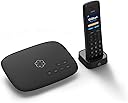
Ooma Telo is a top-rated VoIP home phone system delivering unlimited nationwide calling with HD voice quality. It includes the Ooma HD3 cordless handset featuring a 2” color display and full-duplex speakerphone. The system integrates seamlessly with a free mobile app for calls on the go and offers advanced robocall blocking. Easy to set up with any high-speed internet, Ooma Telo replaces traditional landlines with affordable, crystal-clear calling backed by Pure Voice technology.


| ASIN | B07PW4T3LT |
| Answering System Type | Digital |
| Best Sellers Rank | #33,912 in Office Products ( See Top 100 in Office Products ) #8 in VoIP Phones |
| Brand | ooma |
| Built-In Media | Ooma Telo Device, Power Adapter for Telo, Ethernet Cable, Black HD3 Handset, Charging Cradle for HD3, Power Adapter for HD3, AAA Batteries (2), Telo Quick Start Guide, HD3 Quick Start Guide |
| Color | Includes an Ooma HD3 Handset |
| Compatible Devices | High-speed Internet, Regular Home Phones, VoIP Services, Ooma Office Phone Service |
| Customer Reviews | 3.9 out of 5 stars 867 Reviews |
| Dialer Type | Single Keypad |
| Enclosure Material | Plastic |
| Global Trade Identification Number | 00811008022655 |
| Item Dimensions | 10.5 x 8.3 x 3 inches |
| Item Weight | 1.6 pounds |
| Manufacturer | Ooma, Inc. |
| Material | Plastic |
| Mfr Part Number | TELO1HD3 |
| Model Number | TELO1HD3 |
| Multiline Operation | Single-Line Operation |
| Number of Batteries | 2 AAA batteries required. (included) |
| Number of Items | 2 |
| Phone Standby Time | 150 hours |
| Phone Talk Time | 150 hours |
| Power Source | Corded Electric |
| Recording Capacity | 17 minutes |
| Telephone Type | Cordless |
| UPC | 811008022655 |
| Unit Count | 1 Count |
| Warranty Description | 1 Year Limited |
M**S
Works where we have no cell service
This Ooma Telo device exceeded my expectations. We live where cell phone service is in nonexistent. We also don't have a landline. Our iPhones used over Internet have lags and gaps in the conversation coverage. The Ooma somehow does not have the same gaps. The base station is easy to install. You just plug it into the back of your router to start with, and if that works, you can proceed to plug it into the back of the modem. We just left it in the router because that works well. The handset is an added, plus, because it gives you all of the buttons that you might need to use menu systems and various companies. We also installed the app on our iPhones and can make calls easily when we're connected to the Internet. I have yet to receive a call to see if the notifications work as advertised, but see no reason why they will not. This is a very big improvement to our house. I wished I had purchased this years ago. I recommend it.
M**1
Great product.
Easy to set up to your Internet and service is super cheap.
M**.
Do not recommend - terrible product and customer service.
Paid almost $100 for this device, and then subscription is on top of this PLUS you have to add credits to call internationally (the whole reason we bought this phone). The phone never gave crisp audio, always had issues with it. Tried to resolve with Ooma and the only resolution was to cancel the subscription and eat the cost of the device. I should mention too when you first sign up, they add you to the premium membership and then after the trial they automatically start charging you a higher price without signing off on it. All subscription and cancellation is done via phone (no online support available for this), and phone calls take at least 10-20 minutes with all the prompting and customer service. I would not recommend this service to anyone looking for a home phone.
T**O
nothing
it works very well
T**D
The Problem is Not With Ooma
First of all I have had the Ooma Telo and four handsets for several months and they all work very well. I did have one issue and contacted tech support and they responded quickly and explained what I needed to do and it worked. Many features, but the one I like the most is call forwarding. I set it up so if someone calls my Ooma number, it rings. But if I don't answer it right away, it also rings my cell phone, so I don't miss any calls if I am away from home. If I am home I can answer with either the Ooma handset or the cell phone. But. There is a real problem. And it is not with Ooma. The problem is that some "organizations" like some banks, my apartment complex, etc., consider any VPN phone number to be invalid. That is just STUPID. It is valid. They may not like it, but it is valid. It works, and works very well.
P**E
This Thing is Great
So, I had to change my ISP because the service was awful. I was pretty happy with my POTS which also came from the same provider as my ISP. In the process they decided that POTS without internet would actually cost me MORE than POTS plus internet. So, I said goodby to a perfectly good POTS. My choices were then Ooma or my new ISP. Cost - My new ISP wanted to charge me pretty much the same for phone plus internet as my old one. I think the service would have been fine. However, to purchase a cable modem with phone capability would have been major $$$. Renting a cable modem with phone wasn't too bad but the payback for buying a modem and this Ooma is less than a year. Ooma charges only taxes for their basic service. In my case that is under ten dollars a month. If everything keeps working for 2-3 years I'm good. By then all the hardware will be obsolete anyway. Function - It works a little bit different than a traditional phone. You have to wait a second before it works using a handset. If you use the handset that comes from Ooma it doesn't seem to work for touch tone menus when you call places with automated systems. (I just use a standard handset when that is what I am doing. ) It also doesn't work with other phones as extensions. I have even used it to send FAXs. Now, here is the great part ... you can set up your cell phone so that it rings the same time as your Ooma. So, when I am on the road I still get calls just like I am home. I haven't tried it but I can place them too. However, you have to pay a little more each month for this service. Installation - Basically plug it into your modem and that's it. The handset requires you to push a button to link it to the base unit. You do have to create an account blah blah blah. Super easy. The absolute hardest part is unhooking your POTS from the line outside your house. If you do this and plug your Ooma into any outlet everything works just like it did before. You WILL need a UPS to keep things running in power outages. Ooma sell a battery but you will need to keep your modem going too. I just bought a big UPS and plugged both into it. I think it will last a few hours but I had a real hard time finding information about how long. What's Missing - SMS messaging. I know it isn't necessary but that would really make my day. Any place to get information on power requirements to use in selecting the right UPS.
S**.
Poor Support for Existing Customers
The Telo device and dirt-cheap phone service have both been great, except for the two times it stopped working. The only troubleshooting help they offer is over the phone, which really doesn't help you at all when you can't make a phone call. If you use Ooma as your home or office phone, you will also need to have a cell phone available as a backup. If you can't make cell phone calls in your home or office, you may not be able to get any help. In three years of use, I had one problem with nobody being able to hear my voice on the other end when I make a call. I had to go stand outside and call a support number on my cell phone just to have their operator submit a troubleshooting request that I should have been able to submit online. I recently had to replace my original Ooma Telo unit due to a broken speaker and had to call Ooma's support number on my cell phone to activate the new one. They only offer online activation for new customers. Then they told me I may need to wait 24 hours before my new Telo device is activated and start using my phone again. Ooma has been a good, cheap alternative to local phone companies for home phone service most of the time, but it may not be a good choice if your home or office phone is one you really need to depend on.
A**X
The Best VoIP Phone Available
I bought this one for my Cousins who were fed up with their phone company. I have had Ooma for about 12 years, and used it at first as an extra phone, but the last 6 years I have used it as my main home phone. Ooma is not perfect but it is very good and very inexpensive. It is better on both accounts than Vonage and on cost with any landline phone company. The sound quality is great using a Panasonic cordless phone system with it, and good on their latest Ooma Phone. I use ONE Ooma Phone to access some features that I would need to go online for. But Ooma works best with phones plugged into it. Other Advice: plug your Ooma device directly into your router with a CAT-5e (or better) cable, a short shielded CAT-6 cable works best. And, don't waste your money on the Wifi version of the Ooma Telo, Ooma does not do Wifi very well yet. If they ever come out with a Wifi 5 (ac) or Wifi 6 version, that might do well.
C**N
No sirve para México
Para poder activar este teléfono se requiere una dirección y un teléfono de contacto de los EEUU. No pude activarlo por esa razón.
Trustpilot
3 weeks ago
2 weeks ago