
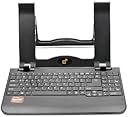


Laptop/Notebook stand with Full-Size Keyboard More Viewing Comfort and Less Fatigue for HP DELL Acer Toshiba Lenovo Sony Asus
Product ID: 12618144
📏Adjustable height
🖥️Full-size USB keyboard
🖱️Integrated palm rest
💼 Elevate Your Game: Comfort Meets Productivity!
This versatile laptop stand features an integrated palm rest for wrist support, a full-size USB keyboard for efficient typing, and an adjustable height to promote better posture. Compatible with a wide range of laptops, it’s designed for professionals seeking comfort and productivity in their workspace.
| Asin | B00HVT9GZI |
| Customer Reviews | 3.3 3.3 out of 5 stars (65) 3.3 out of 5 stars |
| Date First Available | January 16, 2014 |
| Is Discontinued By Manufacturer | No |
| Item Model Number | JK51UA |
| Item Weight | 2.15 pounds |
| Manufacturer | E2E |
| Manufacturer Part Number | JK51UA |
| Package Dimensions | 14.6 x 9.3 x 2 inches |
K**G
Perfect for small working areas!
This product is very well made and works perfectly for our needs. We have a very small desk, so no room for a large monitor, docking station, etc. This product fixes the space issue and the fact that you can lift your laptop screen high enough to be almost like a large monitor is great for what we need. Your laptop just plugs in via USB cord. This provides no power to the laptop, so you still need to use your power cord, but all in all, a great find!
G**Y
Great for posture, cheap keyboard
Stand is decent quality, holds laptop up at a great height! Integrated keyboard is a great idea but it's pretty cheap. Some keys are very small (backspace button) and others are oddly placed (numpad period). Keys are very mushy to push and don't always register hits. Function key doesn't always work the same as the function key on the laptop. I don't expect the keyboard to last very long - if it breaks, there doesn't appear to be an easy way to remove from the stand itself.
C**H
Helps alleviate my neck strain
Well...I had very high hopes for this keyboard. Actually, the keyboard part rocks. I have very few connectivity issues. (Sometimes my cat rubs on my laptop and that seems to make it jinky for a second, but overall the computer responds perfectly to the keyboard.) In fact, I love the included number pad to the side. The keyboard on my computer did not come with that. I guess I felt this thing could work as more of a stand to hold my computer up at eye level. Which it does, but you have to prop your computer in it and when I do that it doesn't fit in the pull out part of my desk. I have to put it on top of the desk and then that screws up my seating and arm placement and causes pain in a different part of my neck and shoulders. (This caught my eye because I was looking for some way to raise my screen and alleviate neck strain.) However, I solved the problem by setting my laptop on some books. I can keep the keyboard part in my desk's pull out tray and keep my chair at the right height...It doesn't look the greatest but it's working to keep me productive and pain free so all is well. Probably could've just bought a different keyboard and made this same set up, but hindsight is 20/20 and I'm perfectly fine with how I've rigged this one to my needs.
R**0
Waste of money
Great price but Poor Quality...don't buy this
M**E
This is a great concept, if it worked well
This is a great concept, if it worked well. I ordered my first one and the USB cord that came with the device didn't work at all. Amazon promptly allowed me to return the stand and sent me a new one, which appeared to work fine. However, the little piece that plugs into the keyboard gets bent easily, and when it's moved slightly not only does the keyboard stop working completely, but it causes all my other USB ports to stop working. I have to restart the computer to get the USB ports working again. I work from home and rely on the keyboard, wireless mouse, and headset to work, and have had to restart my computer in the middle of virtual meetings because of this issue. If you are very gentle and don't move it much, it seems to work, but it's caused too much interruption in my day for me to continue using it. Also, the number pad takes a little getting used to. Fortunately, it's not a huge investment and if it worked well, would be an amazing deal.
M**W
Really a great thing to have for your laptop.
This is without a doubt one of the best purchases I've ever made. I have to work off my laptop at home quite often, and I get tired of scrunching down to see the screen (15"). This configuration allows me to sit upright and see the screen much more easily. I connected my laptop to the keyboard without any problem, and I actually find it easier to type off of than the one on the laptop. I automatically grab this now every time I need to fire up my laptop at home. I guess they changed the way it is packed now....I didn't experience the possible "piece missing" issue some others have mentioned...it was all there and complete when I took it out of the box. Don't forget to use the metal rod to hold the stand in place, otherwise it will slip down flat. Great deal, especially for the price. Now if E2E can just find a way to design this with a cooling fan incorporated, it would be even better!
A**R
Great value for the money.
Great value for the price i paid $10. Compact and sturdy. The only reason it isn't 5 stars is due to there bit being dedicated end &home keys, and the period on the number pad is in an odd spot.
K**.
Not ideal for people who were trained to type from the home keys
I'm using this stand for a laptop/tablet combo PC, so my machine is smaller than a standard laptop and the screen doesn't flip open to 180 degrees (it's the ASUS Taichi and it's had a lot of issues--think twice before getting a tablet/laptop PC). So because of my laptop's limitations, I have to spread open the laptop stand pretty far. It takes up so much space that it doesn't fit on my desk unless I lay a big board over it. Also, being spread out so far, the monitor doesn't come up that high, so I'm still bending over to look at the screen. Those are problems more specific to my situation. What anyone may find annoying is that the Enter key is not immediately to the right of the quotation mark key, like on any other keyboard. For some reason, there's yet another key (the backslash key) between the quotes key and Enter. So, every time I go to press Enter while I type, I type a backslash instead. It's slowing me down quite a bit. Now I'm trying to retrain myself to stretch my pinky finger extra far to start a new paragraph. STILL, typing on this keyboard is better than typing on my laptop, where I'm constantly brushing the touchpad by accident and making stuff happen that I don't want to happen. That was making me bonkers. And it's better to have the monitor a little bit higher. I'd probably be a lot happier all around if I was using this with a standard laptop. Except for the stupid backslash key.
Trustpilot
1 month ago
2 months ago