Desertcart purchases this item on your behalf and handles shipping, customs, and support to Japan.
🎨 Unlock your creative edge anytime, anywhere with precision and speed!
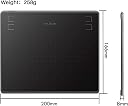
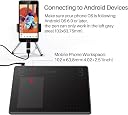
The HUION HS64 is a sleek, portable drawing tablet featuring a 6.3x4 inch active area, 8192 levels of pen pressure sensitivity, and a rapid 266 PPS report rate. Compatible with Windows, macOS, Linux, and Android 6.0+ devices, it supports seamless mobile creativity via OTG connection. Equipped with 4 customizable shortcut keys and a battery-free PW100 pen, it offers professional-grade precision and responsiveness for artists, designers, and remote workers on the move.


| Active Surface Area | 6 inches x 4 inches |
| Asin | B07NY457J4 |
| Best Sellers Rank | 10,616 in Computers & Accessories (See Top 100 in Computers & Accessories) 31 in Graphic Tablets |
| Box Contents | Quick Start Guide |
| Brand Name | HUION |
| Colour | Black |
| Compatible Devices | Desktop, Laptop, Android Smartphone |
| Country Of Origin | China |
| Customer Reviews | 4.3 4.3 out of 5 stars (1,662) 4.3 out of 5 stars |
| Display Type | LCD |
| Item Weight | 258 Grams |
| Manufacturer | HUION |
| Manufacturer Part Number | Huion |
| Model Name | HS64 |
| Model Number | Huion |
| Native Resolution | 5080 LPI |
| Network Connectivity Technology | USB |
| Number Of Items | 8 |
| Number Of Packs | 1 |
| Operating System | Windows 7 or later macOS 10.12 or later Android 6.0 or later Linux |
| Pressure Sensitivity | 8192 Levels |
| Product Features | Lightweight, portable |
| Screen Size | 6.3 Inches |
| Specific Uses For Product | Drawing, design, electronic signature, 3D modeling, animation, gaming, online education, remote work |
| Target Audience | Students, Teachers |
| Unit Count | 1.0 count |
User
EASY TO USE, GREAT VALUE FOR MONEY AND GREAT RESULTS
This is the first time that I've used a digital drawing pad so I have no benchmark. However, I cannot find fault with this Huion HS64. It's easy to use and works superbly. I'm up against a tight deadline to illustrate a children's book for a friend and with 146 illustrations in total there's a lot of work. I started working with pens, Indian ink and brushes but this was terribly slow and so I bought the HS64 to speed things up; it's not only done that hugely but has also improved the quality. the key to success is being able to exploit whatever graphics program one is using; in my case, that's Photoshop Elements 5.0. All aspects of the interface work. The best recommendation that I can give is to say that I wouldn't hesitate to buy the HS64 again, as a replacement or as a present.
User
A good tablet
Is a nice size, easy to set up and looks to be good quality. The pens is light and good to use, accurate and does not need a battery. the tablet is not wireless but that was not an issue for me. I just keep a cable plugged in to my desk computer and connect as and when required. I like the scroll bar on the side as opposed to a disc to rotate or buttons. This may be personal preference.
User
Good for everyday use, though occasional responsiveness issues
This drawing tablet works well for general use such as note-taking and basic digital writing. The pen is comfortable and battery-free, which is convenient for everyday use.However, I noticed that the pen occasionally becomes slightly less responsive, especially during faster writing or more detailed input. It is not a major issue for casual use, but it can feel a bit frustrating when trying to write quickly or during more demanding tasks.Overall, it is a good entry-level tablet, suitable for study and light creative work, but not ideal for fast or professional-level input.
User
Great tablet for quick and accessible drawing and digital work
I've already had a few Huion products that have - in the general - excelled for my needs. I needed something more compact for quick tasks like masking and colouring in and this has been perfect.The pencil is pretty standard but very comfortable to use, even for long hours. The tablet is very reactive (I use on a Mac but be sure to install the Huion tablet app) and the fact that it only needs 1x USB-C for power and connectivity is really helpful.Wouldn't hesitate to recommend and even quite like the green tone!
User
Can't fault this tablet. It's excellent.
I have to say that I am more than impressed by this tablet. It works right out of the box with the standard driver's that are already built into Windows. However, if you download and install the software, it gets even better. Everything from buttons and scroll wheel on the tablet, to the two buttons on the stylus are all configurable. What's even better is that you can set up different configurations for different software. This makes it so easy to swap between, for example, Blender and Photoshop.In the past I have thrown away 3 different Wacom tablets because none of them could handle multiple monitors properly. This Huion just takes all that in its stride. It doesn't mess up your mouse settings, either, which other tablets sometimes do.In use, the tablet is accurate, with no jitter, and very responsive. The pen is cordless and needs no batteries or charging. It is pressure-sensitive, which takes sketching in paint programs to a different level.If you've ever tried to draw accurately, or write with a mouse, you'll now how difficult that is. This tablet opens up a whole new world of graphical input, and it's not expensive.
User
Worked fine until I started using it with a new laptop
Overall pretty okay. I've been using it for over a year. Rating 3 stars though because I recently got a new laptop and for whatever reason I started experiencing lag when using it with any art programme I tried on the new laptop. Product didn't have issues with old laptop and I don't know why it's bugging out with the new one. I tried restarting my laptop. I tried uninstalling and reinstalling the required driver. I even tried it without the driver because a support thread suggested that it might help (it didn't). I am at a loss for what to do because now it feels extremely frustrating whenever I want to sit down and get a piece done and the lag issue presents itself again. Yesterday I thought I fixed it because I finally figured out how to replace the nib in the pen and it was going smoothly the rest of the day. Fast forward to today and the issue is still there and I'm just so done.TL:DR ; Product is good, but is extremely temperamental and frustrating with my new laptop and I don't know how to fix the issue.
User
Great purchase
I bought this as drawing pad but it's so superior to a touchpad that I use it for all functions. It makes using the laptop such a breeze.I chose one which had excellent reviews in regards to its accuracy, and tbh it hasn't let me down
User
Solid little tablet
First tablet I've owned works pretty good.Not going to be the best judge but feels good to me. Bought it to practice Japanese writing, OSU, and learning to draw.Only real thing i don't like is the nib has maybe 1mm of side wobble and looking at the pen design it feels like it will wear more as its used. I bought the felt nibs which are maybe a little tighter and have just got used to it, its more noticeable if you draw at a low angle (on the side of the nib).Works well on Linux, was easy to install with native support from Huion which is nice to see, however couple bugs in the program.Link to report bugs is bugged which is fairly annoyingAction buttons flip when rotating 90deg, right is left and left is right, bit confusing when assigning buttonsKrita and OSU worked out of the box, no complaints.The nib aside it looks/feels very sleek and comfortable. You'll want a glove to stop your hand sticking.
User
Bien
Ça va bien mais poir petite utilisation vu le prix
User
Super rapport qualité prix
Super rapport qualité prix, je suis satisfait du produit.
User
It has errors
It is not much usefull for documents and pdfs. Microsofr whiteboard app is not compatible. It also creates random scratches on screen time to time
User
Rapporto qualit
Tavoletta abbastanza buona per il prezzo molto basso. Prima di usarla, bisogna installarla sul proprio pc. L'installazione è stata abbastanza veloce. L'ho testata con Photoshop e Autodesk, e onestamente, i risultati non sono stati male. Purtroppo bisogna fare un po' di pratica prima che ci si abitui all'utilizzo, dato che non è come disegnare su un foglio di carta, ma finora sono soddisfatta di cosa può fare. Nella confezione, a parte tavoletta con cavo USB e penna, anche due adattatori micro USB (uno per iPhone e uno per Android) per connettere la tavoletta allo smartphone o tablet e delle punte per la penna di ricambio. Ho da ridire solo su due cose:1) il prodotto arriva nella sua scatola. Voglio dire, Amazon non lo ha messo in un box come fa di solito, ha semplicemente stampato il mio nome e indirizzo sulla confezione del tablet. Non è che mi importi, visto che la scatola del prodotto è abbastanza rigida, però non ho capito come mai questa scelta di non usare una scatola con il logo di Amazon. Vabbè.2) Purtroppo, tristemente, l'adattatore micro USB funziona solo se si possiede un cellulare Samsung. L'entrata non è compatibile con il mio Huawei, anche se l'entrata è molto simile. Non l'ho testato su altri Android, ma se intendete usarlo con lo smartphone, vi consiglio di chiedere la compatibilità di questo adattatore. Credo che questa incompatibilità dell'adattatore potrebbe essere ovviata con un altro adattatore per Huawei (nel mio caso), ma non ho ancora visto se esiste. Credo che l'adattatore per iPhone funzioni su qualsiasi dispositivo micro USB. Pazienza, almeno sul PC non dà nessun problema di compatibilità.Consiglio questo prodotto a chi cerca qualcosa ad un basso costo ma che funzioni come si deve. Io lo uso ogni tanto per divertimento, non per lavoro, quindi non saprei dirvi se potrebbe essere buono anche per qualcuno che dovrebbe usarlo assiduamente.
User
Makkelijke install op Win11, mooi, maar een ROT pen-punt!!!
Wat jammer dat er zulke nare install-ervaringen zitten bij voorgaande reviews! Op Windows 11 is de installatie 'n makkie! Volg de manual goed op en dan kun je zó aan de slag. Het oud-roze kleurtje van echt alle onderdelen vind ik 'n streling voor het oog. Ik ben al die zwarte, droefgeestige apparaten zat. Ik had een 10-x-6 inch tablet van XP uit 2022 en die is nu helaas ter ziele gegaan. Beetje snel, naar mijn mening. Ik hoop dat deze kleine krachtpatser het langer uithoudt. Wat ik echt 'n kadootje vind: de penhouder die je ook kunt gebruiken om de versleten penkopjes eruit te halen. Er staan in dat dopje ook 'n cirkeltje reservepenkopjes klaar. Superhandig én snoezig.Maar wat ik 'n groot minpunt vind: de pentip is erg groot (en zit niet echt vast) waardoor ik dikke rotlijnen krijg! Ik voel m'n eigen handschrift niet meer, de pen fladdert nogal uit zichzelf wat rond. Echt rot voor 'n tekenaar die al meer dan 'n halve eeuw meegaat!
Trustpilot
2 weeks ago
2 months ago