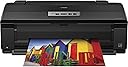
🖼️ Elevate your workspace with Epson Artisan 1430 — where wireless meets wide-format brilliance!
The Epson Artisan 1430 is a wireless wide-format inkjet printer designed for professionals and creatives who demand gallery-quality prints up to 13" x 19". Featuring a 6-color Claria Hi-Definition ink system, it produces vibrant, durable photos that resist smudges and fading. With Wi-Fi connectivity, it supports seamless printing from smartphones, tablets, and computers, including CD/DVD printing capabilities. Its advanced color correction and large-format support make it a top choice for high-resolution photo and creative projects.


| ASIN | B006WAPTVM |
| Additional Printer functions | Scan |
| Best Sellers Rank | #412,444 in Office Products ( See Top 100 in Office Products ) #246 in Ink Tank Printers |
| Compatible Devices | Laptops, PC, Smartphones |
| Control Method | App |
| Controller Type | iOS |
| Customer Reviews | 4.4 4.4 out of 5 stars (879) |
| Date First Available | January 11, 2012 |
| Dual-sided printing | Yes |
| Duplex | No |
| Global Trade Identification Number | 00010343882379 |
| Hardware Interface | USB |
| Included Components | 6 Claria Hi-Definition High capacity ink cartridges: one 79 Black ink cartridge, Artisan 1430 wide-format color inkjet printer, CD-ROM containing software and drivers (Windows and Mac), CD/DVD tray, five 79 color ink cartridges: Cyan, Magenta, Yellow, Light Cyan, Light Magenta, power cord, setup and instruction manuals |
| Ink Color | Cyan, Magenta, Yellow, Light Cyan, Light Magenta |
| Is Discontinued By Manufacturer | No |
| Item Weight | 35.3 pounds |
| Item model number | C11CB53201 |
| Manufacturer | Epson |
| Max Copy Speed (Black & White) | 2.8 ppm |
| Max Input Sheet Capacity | 50 |
| Max copy resolution black-white | 2.8 pages per minute |
| Max copy resolution color | 5760 x 1440 optimized dpi |
| Maximum Black and White Print Resolution | 5760 x 1440 dpi |
| Maximum Color Print Resolution | 5760 x 1440 optimized dpi |
| Maximum Media Size | 13 x 19 inch |
| Memory Storage Capacity | 64 MB |
| Model Series | Artisan |
| Number of Trays | 1 |
| Number of USB 2 Ports | 1 |
| Print media | Paper (plain) |
| Printer Ink Type | Inkjet Ink |
| Product Dimensions | 17.3"D x 27.8"W x 12.5"H |
| Scanner Type | Flatbed |
| Sheet Size | 13 inch x 19 Inches |
| Total USB Ports | 1 |
| UPC | 778890617102 778887923483 010343882379 |
| Warranty Type | limited warranty |
| Wattage | 18 watts |
K**R
Best Printer I Ever Owned, No Doubt
I have had more fun with this printer than ought to be allowed. Prints look much better than anything on the computer monitor. Works flawlessly printing on disks. The 13"x19" prints are just amazing. If this printer quit today, I'd get another one. My only complaint is the ridiculous amount of money Epson wants for Epson ink cartridges ($83) - but, the Chinese-made cartridges ($17) have worked fine, for me. 3/3/2016 Addendum - Epson Artisan 1430 First of all, if this printer died this morning, I’d order another one this afternoon. I love it. I love the 13”x19” paper size, and being able to print on disks. I love the 6 colors of inks – though it sure does seem to go through Light Magenta and Light Cyan a lot. (They can be ordered separately, thank goodness....) Second, Epson wants $78 for a set of six ink cartridges, while a double set of “remanufactured” cartridges costs $25.95 – two of each cartridge. Of the dozens of remanufactured cartridges I’ve already used in the 1430, maybe two of them were unusable – and all of them are very close to being out of ink when the 1430 no longer recognizes them. (The remanufactured cartridges are often a very tight fit as well, but that hasn’t been a big problem.) If I had to name two things I don’t like, the 1430 will continue printing a whole page even if a print head is stopped up for whatever reason (requires an easy self-cleaning process) and, there seems to be no print buffer built into the 1430 at all – it often doesn’t even release the computer until after the paper ejects – but, this hasn’t been a problem for me. The prints are simply marvelous, unless using lower grades of Matte paper. The printer itself has a large footprint – 24”x13” just sitting there – and a little more if the two trays are open/extended for larger prints.
Y**N
Great printer with some minor glitches.
After using this printer for a couple of years, I am upgrading my rating from three to five stars. The problems I initially complained about have abated; the paper feeding has been quite reliable. But the great thing (for me, at least), is that it duplicates the colors I see on the screen almost exactly, as long as I use the "Epson Vivid" profile. I realize that I probably just lucked out with the monitor I have (an Acer), but knowing that a picture will print correctly on the first try saves me much time, paper, and toner, and makes any other complaints insignificant. Originally I wrote: I have some major complaints about this printer: 1. It occasionally feeds more than one sheet at once. That is normally a minor nuisance, unless you are printing on the second sides of a bunch of pages; in this case it becomes a major disaster as the two sides go out of sync. The only solution I can think of is to hover over the printer and immediately remove all the paper from the feeder as soon as you see that a multiple feed has occurred, which forces the printer to stop. I must note that my previous two Epson printers, the 1280 and 1400, also had paper feed problems. The 1400, though, did it gracefully by simply ejecting any misfeed without printing on it, and then pausing. 2. When I first tried the printer, it printed everything in color much too faintly, When I called Epson tech support, neither one of two separate techies couldn't figure out the cause, and finally they decided to send me a replacement printer. When the new printer arrived, it behaved in exactly the same way. I finally, through trial and error, discovered that by changing the Color Profile setting (under the Advanced tab) to "Epson vivid," I got it to print accurately. I can't understand why the techies didn't know to suggest that. It seems to me that if the initial software settings were wrong for me they should have been wrong for everyone else as well. Once I had the settings right, and as long as the paper feeds OK, the prints are of high quality. 3. It is not as easy to print wirelessly from an IPAD as it is on some other printers. I had to install special software, and then it does all right printing files or web pages, but I still haven't figured out how to print emails.
N**O
Compre la primera e imprime muy bonito, pero cuando cambias la tinta ya no lee los cartuchos, compre una segunda pues me gusto mucho pero la segunda fue peor, nunca leyó los cartuchos y la tuve que regresar.
V**M
I haven't emptied my ink cartridges yet, as I don't produce that many prints. I just wanted the wide carriage option so I can print CAD drawings in addition to my photographs. Pros: * photo prints are stunning, just like the real thing * epson inks that last a long time * wider carriage allowing to produce larger prints (especially if you do CAD, or low volume posters) * bundled Photoshop Elements software (yay!) * very nice printer control panel / print dialog allows granular control of all the printer's features and output * the WiFi connection is so convenient, works flawlessly and was easy to set up. * acceptable speed: very fast printing regular documents, acceptably ok printing pictures Cons: * it's rather slow printing at high res photo. I don't see this printer being used in a production environment. * the printer control software doesn't remember the last settings, and goes back to defaults. this is OK with you move between printing text, photos, CAD drawings... but when you're more frequently doing photos, for example, it would be nice for it to remember what your last settings were and allow you to set that as the default settings. Conclusion: if you're like me, a home user, not in a hurry, with a low volume (watching out for your ink consumption and all), this printer is for you. you get bundled software you need anyways (and if you own, an extra license doesn't hurt), the image quality stands up to the very best. at it's price point, this is the very best value wide carriage printer I could find, and the output doesn't disappoint. A big thumbs up! My experience with amazon customer service: this printer was missing the promised photo paper that was supposed to be included. It had the package alright, but only the very small papers were left, the larger ones missing. I think it was at the factory, because the original epson tape closing the box was intact. amazon quickly offered me a 20% refund as compensation, which I was very happy about.
M**A
I bought this printer to print 11" x 17" design drawings, graphics and mapping for my business. It has performed as advertised, and has proven to be good value for money. Though the printer itself is awesome, the ink cartridges are expensive. This is nothing new. To keep the printer affordable in the long run, I hooked it up to a Continuous Ink System with dye ink at the very beginning. The setup works very well. So far, I've just been printing on large format inkjet paper, not yet on photographic paper. I have yet to experiment with pigment ink or photo paper, but hope to do so within the next few months during a quiet time - as the selling point of the product is high quality photographic printing. I plan to update this review once I've substituted the dye ink CIS for a pigment CIS and try printing on photo paper. Had Epson produced an Ecotank version (with a built in set of large ink tanks), I would have been very tempted to go that route, as I really like Epson printers. Note: The printer is remarkably heavy and bulky. Plan ahead for this if you decide to buy.
Y**E
Is it just my bad luck? I got this, it worked for 1 year + 10 days and then the head seized up. Epson told me they would do a one time extension of the 1 year warranty (for the ten days, very generous) and send me a reconditioned machine. I begged for a new machine but to no avail. I put ink in and could only get two flashing amber lights out of it. Called support and was told it needs servicing. AT MY EXPENSE because it was off warranty. Not cool epson. After 20 years of owning Epson I think I will move on to another manufacturer. UPDATE: I thought If I can get the printer working, It would be worth the $80 so I did take it in for service ("refurbished" unit straight out of the box). The service man said the "purge unit" was acting up and if it did it again, it would have to be replaced. I got home and printed a few test pages and seemed fine until I cleaned the heads and it made some uncharacteristic loud sounds three times. I called the service guy and he listened over the phone, the noise only happened once that time. We decided I would try cleaning it again over the next couple next days, see if it settled in. I would bring it in if the noise persisted. I cleaned it today, made too much noise and I got the two flashing lights again. Turned it off and on, it loudly squawked and two flashing lights again. I expect the service guy is going to tell me it needs a new purge unit. So The fact of the matter is, Epson's refurbished unit was not in working order when it was sent to me. I reported this to Epson and they simply confirmed it was now off warranty. Part of my response was this: "Is there anyone there who has the discretion to make this right and not have my (soon to go viral) video of my brand new refurbished printer being destroyed? I’m thinking of packing it with fireworks and telling the World why this was done to a perfectly good, brand new, “refurbished” Epson Artisan 1430." No reply.
N**I
Great quality prints! Saves me a whole lot of time since I would have to wait in line for 30-45minutes at my University's print shop towards the end of the semester. One draw back is that it's best to feed one sheet at a time if you're printing with thicker paper as the printer tends to grab more than one at a time. And always set the paper type so the printer can adjust the platen gap or else you'll start seeing streaks. Otherwise, I love it.
Trustpilot
1 week ago
1 month ago