
DOWNLOAD THE APP


Customer Services
Copyright © 2025 Desertcart Holdings Limited
DOWNLOAD THE APP


🔗 Connect smarter, stream sharper — never miss a pixel!
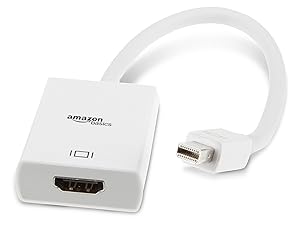
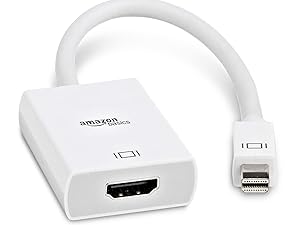
The Amazon Basics Mini DisplayPort to HDMI Adapter offers a hassle-free, plug-and-play solution to connect Mini DisplayPort devices to HDMI displays, supporting up to 1920x1200 resolution. Its compact white design is travel-friendly and compatible with a broad range of HDMI-enabled devices, making it an essential accessory for professionals seeking reliable, high-quality video output.




| ASIN | B00NH13K8S |
| Best Sellers Rank | #8,257 in Our Brands ( See Top 100 in Our Brands ) #6,880 in Audio & Video Connectors & Adapters |
| Brand | Amazon Basics |
| Color | White |
| Compatible Devices | Blu-ray players, Fire TV, PS4, PS3, XBox one, Xbox 360, computers, A/V receivers |
| Connector Type | HDMI |
| Current Rating | 1 Amps |
| Customer Reviews | 4.5 out of 5 stars 34,943 Reviews |
| Finish | Hdmi |
| Item Dimensions | 9.25 x 1.46 x 0.59 inches |
| Item Weight | 1.12 ounces |
| Item dimensions L x W x H | 9.25 x 1.46 x 0.59 inches |
| Manufacturer | Amazon |
| Model Number | L51G |
| Number of Items | 1 |
| Number of Ports | 1 |
| Package Quantity | 1 |
| Power Plug Type | No Plug |
| Specific Uses For Product | PC |
| UPC | 848719055641 |
| Unit Count | 1.0 Count |
| Warranty Type | Limited |
D**N
Seamless Display Connection with Amazon Basics Mini DisplayPort to HDMI Adapter
Rating: ⭐⭐⭐⭐⭐ The Amazon Basics Mini DisplayPort to HDMI Adapter is a compact and efficient solution for connecting your devices to external displays. Pros: 1. Effortless Connectivity: This adapter provides a seamless connection from a Mini DisplayPort-equipped device (such as a laptop or desktop) to an HDMI-equipped display, such as a monitor or TV. 2. Full HD Support: It supports Full HD (1080p) video and audio, ensuring a high-quality display of your content on your monitor or TV. 3. Compact Design: The compact and lightweight design of the adapter makes it highly portable. It easily fits into your laptop bag or pocket for on-the-go use. 4. Plug-and-Play: There’s no need for additional drivers or software installation. It’s a simple plug-and-play solution, making it user-friendly. 5. Amazon Basics Quality: Amazon Basics products are known for their reliability and value for money. This adapter is no exception. Cons: 1. Single Direction: It’s essential to note that this adapter works in one direction, from Mini DisplayPort to HDMI. It doesn’t support HDMI to Mini DisplayPort connections. In summary, the Amazon Basics Mini DisplayPort to HDMI Adapter is a practical and cost-effective solution for connecting your Mini DisplayPort-enabled devices to HDMI displays. Its compact design and plug-and-play functionality make it an excellent accessory for those who need to connect their devices to external monitors or TVs regularly. While it’s a one-way adapter, it excels at what it’s designed to do, and it’s an excellent addition to your collection of tech accessories. Highly recommended for its ease of use and reliable performance.
M**E
Great Adapter at an Affordable Price!
The Amazon Basics Mini DisplayPort to HDMI Adapter is a simple yet effective solution for connecting my MacBook to an HDMI-enabled TV or monitor. It works seamlessly and provides excellent picture quality with no issues. The white design looks clean and fits well with my setup. It's compact and easy to carry around, making it perfect for travel or home use. A reliable adapter at a great price—highly recommend!
A**L
Works *Perfectly*! I'm Using it with a Macbook Air to a Vizio Television/Monitor
I recently got a new Roku television, which meant that I needed to figure out what to do with my 'old' television (a Vizio TV/monitor) and my original stand-alone Roku (this one right here: Roku 3 ). I mean, there was no way that I was going to get rid of that setup just because I had replaced it! :-) Geek that I am, I immediately thought "giant monitor!", and with the added bonus of being able to watch Netflix, etc., on that monitor (because, Roku). At the time I was using my newest laptop, a Macbook Pro, which has an HDMI port, as my primary computer, and so I just plugged my Vizio into the HDMI port of the MBP. But for reasons which I won't go into right now, I decided that I wanted to go back to my old Macbook Air as my primary computer. Once I had it all set up, right by my Vizio monitor/tv, I realized "Uh oh, the Macbook Air doesn't have an HDMI port!" {Talk about yer first-world problems, eh?) So I jumped on Amazon, and searched for a Thunderbolt -> HDMI connector, and found this one. (By the way, am I the only one who can never hear the term 'Thunderbolt' without thinking of that 70s movie, Thunderbolt and Lightfoot ?) Anyways, this Thunderbolt (no Lightfoot) to HDMI cable works *perfectly*! Straight out of the box, I plugged the Thunderbolt end into my Macbook Air, and the Vizio's HDMI cable into the HDMI end, and..voila! A perfect, and gigantic, second screen for my Macbook Air! [Note: For those of you trying this at home, remember that there are two different ways that your Mac can handle a second screen - it can either be a *true* second screen, to which you can move program/app windows from your primary screen, *or* it can be a "mirror", meaning that it will simply display whatever is on your primary screen. You can play with these (and a few other display) settings under Preferences -> Display.]
K**T
It works great. It just won't last forever
I am an illustrator and designer who uses a Cintiq with a Mac. Because of this, it is very important that I have an HDMI converter. I gave this four (really 3.5) stars because it barely made it to a year before giving out altogether, with about two additional months of it being finicky. I would compare my issues to a pair of headphones that is going out. If you move the cord one way, it works, and the other way does not. Eventually it stopped working. HOWEVER. The Apple converter is around $43 because they're a bunch of greedy crooks. I'm positive their product is of the same quality, and will last about as long. If I pay $9 once a year, it would take me more than four years to pay the same amount for a snooty brand product that gets to hike up the price because of the logo. This is definitely worth getting. It works great. It just won't last forever. It's the frugal, rational choice. You're not getting anything additional by going with the Apple branded HDMI converter.
A**O
Reliable and Affordable Mini DisplayPort to HDMI Adapter
The Amazon Basics Mini DisplayPort to HDMI Adapter is a dependable and cost-effective solution for connecting devices with a Mini DisplayPort to HDMI-equipped displays. The adapter is compact and lightweight, making it easy to carry and use in various setups. The connection is stable, with no signal loss or degradation, providing clear and crisp video output. The white finish blends well with most setups and adds a touch of simplicity. For anyone needing a straightforward adapter to bridge Mini DisplayPort and HDMI connections, this Amazon Basics option delivers excellent performance at a great price.
D**D
"Effortless Connectivity with Amazon Basics Mini DisplayPort to HDMI Adapter!"
"The Amazon Basics Mini DisplayPort to HDMI Adapter is a simple yet essential tool for connecting your devices seamlessly. Whether you're giving presentations, streaming media, or extending your display, this adapter ensures reliable and high-quality video and audio transmission. Its compact and lightweight design makes it perfect for on-the-go use, while its durable construction ensures long-lasting performance. Compatible with a wide range of devices, including laptops, desktops, and tablets, this adapter is the perfect solution for all your HDMI connectivity needs. Experience hassle-free connectivity with the Amazon Basics Mini DisplayPort to HDMI Adapter."
S**S
Works Great With Surface Pro 4 (Easy Fix To No Sound Driver Issue)
Amazon Basic products always amaze me in their quality and functionality! Works really nice with my Surface Pro 4. Initially I had sound issues with this adapter, but there is a very easy fix! Credit goes to Auburn Scott (see comments to this review) on the fix. It appears the driver for the port needs reset after one of the large updates (Anniversary Update in case you aren't one for updating, you might be in good shape) happened a while back. Go to device manager/ Sound, Video, Game Controllers/ Intel(R) Display Audio. Disable the driver and then reenable it. You should have sound now and at least from my experience, it appears to last after unplugging and plugging the adapter back in. Either way, the Pro 4's sound is so good you honestly can just use the built in speakers. I had a hard time telling the difference from a television to the speakers prior to this fix as it would occasionally, albeit seldom send audio through the television.
P**M
Stopped working for older Macbook Air 2013
Adaptor worked well (even though a little finicky with the connection) for a month. After a month, stopped working -- my monitor kept going in "power save mode". My device: "MacBook Air (13-inch, Mid 2013)" if you go to "About this Mac" --- although I think I got in 2015 or 2016. Amazon did give me a refund (even though it was after refund window). Update: It did work the next day (after not working)....but will still return for a more reliable adaptor --- It was very finicky // felt like it didn't fit right causing connection issues
Trustpilot
1 day ago
1 month ago