🎙️ Elevate your meetings anywhere, anytime—because your voice deserves the spotlight.
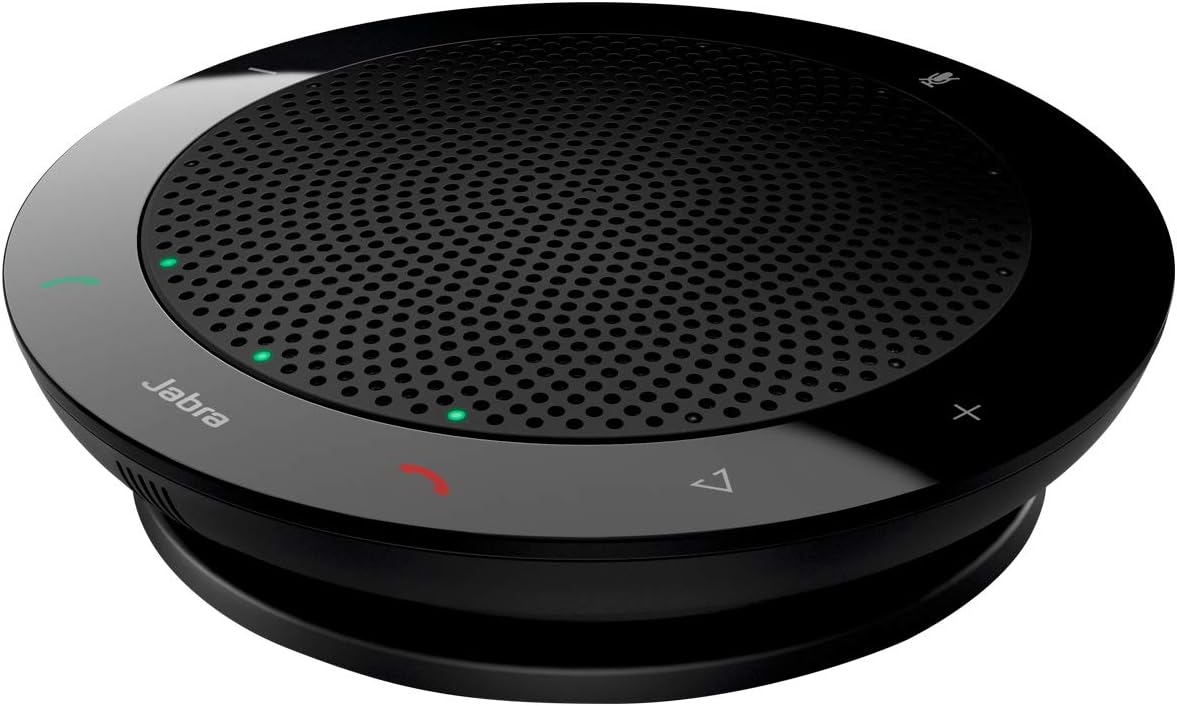
The Jabra Speak 410 is a portable, USB-powered speakerphone designed for professional audio conferencing. Featuring 360-degree microphone pickup, HD Voice technology, and a compact design with integrated cable management, it delivers crystal-clear sound for up to four participants. Compatible with all major unified communication platforms, it offers plug-and-play simplicity and a travel case for on-the-go productivity.


| ASIN | B007SHJIO2 |
| Additional Features | Built In Microphone |
| Antenna Location | For Smartphones or Tablets |
| Audio Driver Type | Dynamic Driver |
| Audio Output Mode | Wideband|Hifi |
| Best Sellers Rank | #27,491 in Office Products ( See Top 100 in Office Products ) #12 in Telephone Audio Conferencing Products |
| Brand | Jabra |
| Built-In Media | Jabra Speak 410 |
| Color | Black |
| Compatible Devices | Desktop, Laptop |
| Connectivity Protocol | USB |
| Connectivity Technology | Wired |
| Control Method | Touch |
| Controller Type | Button |
| Customer Package Type | Standard Packaging |
| Customer Reviews | 4.6 out of 5 stars 2,770 Reviews |
| Enclosure Material | Plastic |
| Frequency Response | 20 MHz |
| Global Trade Identification Number | 00615822002523 |
| Is Waterproof | False |
| Item Dimensions D x W x H | 5.27"D x 7.24"W x 2.24"H |
| Item Weight | 6.08 ounces |
| MP3 player | No |
| Manufacturer | Jabra |
| Manufacturer Contact Information | > |
| Model Name | Speak 410 UC Optimized |
| Model Number | 100-43000000-02 |
| Mounting Type | Tabletop Mount |
| Number of Audio Channels | 2.0 |
| Number of Batteries | 1 C batteries required. |
| Number of Items | 1 |
| Power Source | Corded Electric |
| Series Number | 410 |
| Speaker Maximum Output Power | 410 Watts |
| Speaker Size | 4 Inches |
| Speaker Type | Portable |
| Specific Uses For Product | personal |
| Total USB 2.0 Ports | 1 |
| UPC | 100728411758 071020467401 086509077293 615822002523 013269003187 601000864229 |
| Warranty Description | Jabra manufacturer's warranty |
| Warranty Type | Limited |
| Wireless Technology | Bluetooth |
| Woofer Diameter | 4.72 Inches |
G**R
With the Jabra, I am Better than You
I have used the Jabra Speak 410 almost daily since 2018 and have owned five of them, and even though two eventually died after a few years, I keep buying them because they are loud, travel-tough, and have a great mic with instant plug and play. All in all, the Jabra Speak 410 is reliable in the ways that matter: loud, clear, great mic, and truly plug and play. It is one of those tools that quietly makes work easier. Also, it definitely makes me a better employee than all you people trying to run meetings on tinny laptop speakers. If you live on calls and want something portable that just works, I recommend it. I have a long history with the Jabra Speak 410. Since 2018, I have used one almost every workday for softphone calls and meetings, and over time I have gone through five units. To be completely transparent, two of them did die after a few years of use. But I still bought replacements, which probably tells you everything about how well these work when they are working. The best part is how easy and consistent they are. Plug it in via USB and it is basically instant. No driver drama, no “can you hear me now” ritual, no searching through sound settings like you are defusing a bomb. It just shows up and works. Audio performance is the reason I stick with these. The speaker is loud enough that I am not leaning into my laptop like I am trying to hear a whisper through a wall. The microphone is excellent, and people can actually understand me without asking if I am calling from inside a dishwasher. For calls, it is a noticeable upgrade over most built-in laptop audio. Durability is another big plus. These can take a beating. Mine have survived travel, being tossed into bags, and the occasional drop that would make a lesser device start writing its will. That said, they are not immortal, and my experience is that heavy daily use can eventually kill one. Still, getting a few years out of something that is used constantly is reasonable, and the replacements have been worth it for me.
A**N
Fantastic Speakerphone
Perfect. Doesn't get much easier. Plug and Play, literally no setup. Works great, looks great, and quality is great.
P**A
Great speaker/mic combo for my hybrid D&D sessions
Used for almost 2 years and still working. The mic picks up from about 15-20ft away clearly against other voices and even picks up on typically soft spoken people. The sound comes through the speaker clearly as well. Paired with a device like an iPad running two-way Discord video and you can make it feel like your remote player is actually there in the room. Make sure you find the right adapter to make the USB-A cable work with more modern USB-C devices.
D**.
An amazing product
I spend way too much time on conference calls, Zoom meetings and the like, and until now it has often been a problem hearing clearly what other people were saying, an issue not helped because I am hearing impaired. Jabra Speak has changed all that. I can now hear people very clearly because Jabra cuts out background noises and focuses on whoever is speaking. Even if someone has a poor mic, Jabra manages to deliver clear, crisp sound. People also tell me that they can hear me much more clearly. On top of that, Jabra is literally plug and play (with nothing else to do). It is small enough to be very portable and the volume is great considering its size. Only wish I had bought this a long time ago.
A**R
Easy and convenient with decent sound quality
This speakerphone is really easy to setup and use, pretty much plug-and-play. I can go to a PC I've never used this with before and be fairly confident that it will work just fine. Noise canceling seems to work great, I haven't had any issues with audio when briefly talking over other people. I also really like the volume control, easy to use and works like a charm. The audio quality is fine, although the microphone sound quality seems like it's not as good as it could be -- everybody tells me they can hear me fine, and I haven't had any communication mishaps because of it. But when I test the audio in Zoom myself, it definitely doesn't seem quite as good as a proper headset microphone. That's also in part because there's a good amount of reverb/echo in my room though, so it might be even better in a more damped environment. However, for the convenience and ease of use, the minor drop in audio quality isn't that big of a price to pay. I might prefer using a headset with a better microphone in 1:1 meetings where I want to give off the best impression I can, but in general I think it's great to have around for most other situations when you want to avoid headset fatigue.
M**N
High quality speak for office use
This set is a must buy for office use. It has a great sound quality and noise filtering. You can increase or low the volume and mute easily. It comes in with the USB charger conveniently. I cannot work without it. Highly recommend!
P**O
I love it - I really do !
This and the newer model Jabra Speak510 (which I use at work) made a world of a difference for business communication via Lync to South America and India, notoriously bad with regular phone lines. The 410 and 510 models have a very effective sound processor built in that filters human voice with perfect clarity, provided your internet connection is fine, and your partner abroad uses the same or a similar device. Even calling via Lync to regular telephone numbers changes the call from a strained, hole-riddled conversation to a decent communication. I rarely rave about a product, but this is way better than even the Jabra Headset I have at work, which allegedly has a sound processor as well. I could no longer imagine my weekly TCONs without it (had the 510 for more than 1 year now). Both models have mute button, volume control, accept and hang-up buttons. The mute function triggers a ring of many red LED dots along the outer edge so you can not mistakenly believe to be off air while blabbering obscenities (if so disposed) . Three green LEDs on one side of the device indicate that the microphone is live. Both models have a 3.5mm, 3-channel headset jack. The speaker is perfect for TCON with 6 people in the room, fine for 8-10, and just enough for even more. I have used it with a team of 15 and the other side checked only occasionally to repeat a comment. The only difference between the two models is that the 510 is able to connect via bluetooth. If you are planning to use it exclusively with your laptop, connected via the USB cable, you can easily use the 410. I would expect this to be as useful for Skype connections. If mine broke, I would buy it again in a flash. I have traveled a lot with my 510, and always carry it in the front pocket of my backpack. I have not used it very gently and it now has a dent in the speaker grille, but works just fine. The device comes with a soft pouch, the USB cable snugly rolls into the groove between upper and lower edge of the UFO shaped loudspeaker. Overall someone has done a fantastic job of thinking first and developing after.
E**N
Terrific for conferences. Seems to balance microphone sensitivity and noise reduction perfectly.
Of the items that I have bought from Amazon and have given 5 stars, this is one of the easy ones. We are using this speaker/mic for remote training sessions over GoToMeeting. It works well on both ends. The speaker handles high volumes without distortion. Though I would not use it for music, the sound quality is noticeably better than speakerphone. Going the other way, the microphone picks up voices well. Our group is approximately 25 people in a room that is 20 x 30 feet. The presenter at the other end can hear all of us, and has heard people whisper asides, to our embarrassment (yikes!). So, for meetings, the quality of transmission is perfect; clarity has never been the weak link. The Speak410 is USB plug and play, so if you have technical problems, check that the mic is not muted (conversely, you may want to make sure that it is!). Also, go into your control panel to make sure that you have the Speak410 set as an audio output device. The first time we used it, the presenter could hear us, but we couldn't hear her until we set audio preferences in Windows. We have found that OpenBroadcast works well for recording our sessions. The setup can be a bit finicky, but OpenBroadcast shows microphone levels and will record a video of the desktop. Again, though, make sure that you stop recording and/or mute the microphone at the end of the session so you don't inadvertently record post-meeting banter.
Trustpilot
2 months ago
1 month ago