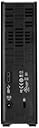
💼 Secure your digital empire with speed and style!
The WD 3TB My Book Desktop External Hard Drive combines massive 3TB storage with USB 3.0 high-speed data transfer, enhanced by built-in WD Backup software and hardware encryption for secure, effortless backups. Its compact design and compatibility with Windows and Mac (with reformatting) make it the go-to solution for professionals seeking reliable, fast, and secure external storage.


| ASIN | B00E3RH63A |
| Additional Features | Compact |
| Best Sellers Rank | #995 in External Hard Drives |
| Brand | Western Digital |
| Built-In Media | WD Backup software |
| Cache Memory Installed Size | 3 |
| Color | Black |
| Compatible Devices | Apple Time Machine |
| Connectivity Technology | USB |
| Customer Reviews | 4.4 out of 5 stars 1,392 Reviews |
| Data Transfer Rate | 5000 Megabits Per Second |
| Digital Storage Capacity | 3000 GB |
| Enclosure Material | Aluminum or Plastic |
| Form Factor | 3.5-inch |
| Global Trade Identification Number | 00718037812359 |
| Hard Disk Description | Mechanical Hard Disk |
| Hard Disk Form Factor | 3.5 Inches |
| Hard Disk Interface | USB 3.0 |
| Hard-Drive Size | 3 TB |
| Hardware Connectivity | USB 3.0 |
| Hardware Platform | PC |
| Installation Type | External Hard Drive |
| Item Weight | 2.23 Pounds |
| Manufacturer | Western Digital |
| Media Speed | 120 MB/s |
| Mfr Part Number | WDBFJK0030HBK-NESN |
| Model Name | My Book |
| Model Number | WDBFJK0030HBK-NESN |
| Number of Items | 1 |
| Special Feature | Compact |
| Specific Uses For Product | Personal |
| UPC | 803982835222 718037812359 |
B**R
Nice Drives no problems thus far
I now have two of the 3 TB drives and one of the 4 TB drives (I've had the 4 TB drive for a little over a year now). I have not had any issues with any of them. I have an external drive that is a bit faster, but for the price point these are good drives and hard to beat. I can generally maintain 105+ MB/sec write speed over the USB 3.0. For approximately $50 more I could have gotten an external drive that is significantly faster, but for writing once then reading as necessary these drive fit what I need them to do without my feeling that the writing time is excessive even when transferring fairly large files. Note: If you are using Windows, then you must go to the device manager and apply the setting for this drive to where it is set for better performance in order to get maximum Write speeds. There is also an option to turn off the power saver mode to keep it from constantly having to start back up between writes if there is going to be significant time between writes, and if you are more interested in speed than power consumption and possible drive wear. If you don't do those things, then you will not get the best write/read performance due to the drive powering up at the start of the read/write and/or Windows treating the drive as a USB quick release drive. Both of these settings change how quickly files will be written to the drive but for different reasons. As always, how you choose to apply these settings are up to you as the user. Personally, I attach these drives to one computer and rarely move them afterwards. So, I have no need of being able to unplug them from the system without using the windows disconnect USB device option first. I'll take that extra step on the odd occasion when I might need to move one of the drives for the added speed the rest of the time. I turn off the energy saver because I don't like waiting 10 sec or more for the drive to start writing after I try to move something there. I don't worry as much about extra wear from it being on as I get tired of the wait. That is how I like to use them. You should do what works best for you.
S**G
Great product
I love this hard drive. It is quiet and sits next to my pc. I did not buy this to be a portable hdd, however it is just that. Very small and compact. However, what I use it for is as a repository for all of my media. I have all of my pictures, movies, music on it. I then run mezzemo (just upgraded from tversity it is so much better) as a media server. I can watch all of my movies througout the house via xbox 360, ps3, blueray devices, smart tvs. It works great. I would recommend to anyone. I also can back up my entire computer to this hdd if I want too. The best part is that if I want to take the drive with me on vacation or whatever. I can bring my whole movie, music, picture library with me. When I do, I can that watch all of this via my lap or on a tv through my laptop via a hdmi out. So that is why I chose this particular model.
M**G
Does the job, minor issue with it.
A really solid buy that hooked up with no issue, and has been working as a back up drive very well. The only thing I can mark against it is, it's way way too light. It's so light if the cable is pushed against it, the device will easily topple over which is not a good thing for HDD's. For some this may be fine but I've had to put it somewhere where other cables aren't touching to make sure this thing doesn't get knocked over constantly. Can't really say too much about the device, it's fast, it does it's job well and I've had no errors of any kind. 3TB is an incredible amount of storage for someone not looking to store media such as videos and stuff. It's simply a back up device for my pics, art, music and whatever else needs backing up. I'm around the 500GB mark so while this was overkill, the price difference between this and the lower models was 20 bucks at the time.
L**R
Good System, Good Value
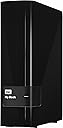
My Setup: HP Pavillion 17t, 6th Gen Skylake Core i5, 7200 RPM HDD, 16GB RAM, USB 3.0, Win 10. My Review: I’ve been using a 3TB Western Digital MyBook for about two weeks now and feel like I have a pretty good handle on it. Bottom line is that I like both the hardware and software. First the trivial: It’s really pretty; all glossy black with rounded corners and a blue power/activity LED that perfectly matches my backlit keyboard. Second: It works pretty well. Plug in the power supply and USB cable, then set it next to your PC. Cooling is by convection, so it’s quiet if not completely silent. Software is already on the drive and configuration is straightforward. I’m a believer in WD storage so that’s all good, and there are two well designed apps to run things. Things like diagnostics, a sleep timer and an erase disk feature. WD Smartware lets you define the source and target (you can backup to non-WD internal/external drives and the cloud as well), plus an advanced setting for geeks. There is a file backup option, and you can define the save frequency from continuous to monthly, plus enable or disable your plan. Retrieve lets you choose to restore to the original location or a designated folder. Software can be updated either automatically or manually. My initial backup was about 115GB and took just under 40 minutes. With all the space available, I also use File Explorer to drag and drop folders like Pictures, Documents, etc. I’ve even tried working from it directly, in effect using it as my primary drive, without delays or other issues. BTW: It’s smart enough to sleep when my PC sleeps and shuts down with Hibernate or Power Off. The website is extensive, and as it turned out, really useful. After a few days of smooth sailing, I killed the unit by trying to partition it into separate volumes. From dead in the water, I downloaded what I needed to wipe the disk (no, not with a cloth), reinstall the software, and got up and running within a few hours. All in all, this is a very satisfying package that I confidently recommend… especially since I don’t fully trust either iDrive or OneDrive.
R**.
Great Value
It's fast, cheap and it has proven reliable thus far. It uses USB 3.0 for a direct connection to your machine. The 5400 rpm drive runs nice and cool. It comes formatted as NTFS, as opposed to the "Mac Version" which comes pre-formatted as HFS. Anyway, it isn't writable out-of-the-box if you're using Mac OS X. WD does offer downloadable applications to reformat the drive, but it's easier just to use Mac's Disk Utility to format it as HFS+. It takes just a few minutes to reformat it. If you're using it to expand your machine's storage, then this is a great choice. I also have a 128 GB Transcend Jet Drive which is a more sleek, and portable option, but it's about the same price, much less storage space and the write speeds for 1+ GB files isn't noticeable. I recommend partitioning the drive in a different formats if you plan on using it for more than just desktop storage. I bought this to double as a media storage device that I could connect to my TV via USB. For most modern TV's, you no longer need an external media server to deliver your digital movies. Instead, you can just use the TV's USB interface. However, Roku players and most TV's don't support HFS. Even Roku actually claims to support it, but it doesn't in my experience. So long story short, consider creating a partition pm the drive formatted as NTFS or ExFAT before you load all of your files onto it. It requires its own power supply (as opposed to bus power), but it's lightweight and portable. The plastic casing is on the cheap/flimsy side, but the product looks decent. It's quiet and well-ventilated.
P**L
Performs well
This gets used as both a primary storage drive for videos and photos, and as a backup device for other files. The backup software is easy to use and it is also easy to verify that the backup files are present and usable. USB 3.0 is, of course, clearly an improvement over 2.0. The drive has a small footprint and runs cool and quietly. One of the two identical units did fail within the warranty period and Western Digital was very good about replacing it. The downside was that when it did fail, there was no warning and I'd have been in considerable trouble if I hadn't had the files on a second (physical) drive. WD could probably improve their marketing of these, and other, drives by doing a better job of explaining the ins and outs of these drives versus portable drives versus their cloud drives.
T**D
When the "Cloud" falls...
I have used Western-Digital HD's (Hard-Drives) since the days of DOS and found them to be well-made, reliable and always dependable. So, the addition to my computer of a pair of “My Book” 3-TERABYTE external drives was a no-brainer. The problem with today's “cloud” computing are: (1) it cost the user fees to use; (2) the user will be out-of-luck if their PRIMARY connection device (computer, notebook, tablet or phone) FAILS and they cannot get to "the cloud"; (3) the “cloud-based” server MIGHT get hacked or hijacked by outsiders (remember it happened to the FEDERAL government, several retailers and banks, etc.) and the user’s data might be lost or tied up for an unknown period. I choose to keep all of my images, scanned-in documents and other needed digital information on a couple of these “books”. In case of fire or emergency, I grab 3 things: the “Colored Bag” (with my vitals – VIP ID docs, insurance, $$$ & weap) and these two HD drives (simply unplug the USB and power cords from the back) and I’m gone!!! The proprietary WD software can be used for password protection and security or the drives can be used as simply another listed drive to the operating system. Files can be moved, copied or deleted just as on any other drive connected to the system. Even if one does use cloud computing, these drives make EXCELLENT LOCAL BACK-UP units. The plastic shipping-box bottom (that holds the drive in the packaging box) makes an excellent desktop “stand” with a small footprint next to your primary device. Lightweight and compact, it comes with AC power adapter and a USB cable. Compatible with Windows NTFS format for Windows VISTA, Windows 7 / 8 or higher. (Must be reformatted for Mac OS X.) The drive has a 2-yr limited warranty, but I’ve still got WD drives from the 1990’s working reliably and without failure despite being remounted in several computer upgrades throughout the years. I’ve installed and used Maxtor, Seagate, Sony, Toshiba, and Conner hard drives in the past. I’ll go with the Western Digital brand anytime.
T**6
What's not to like?
Super Quiet. Very Fast. Runs way cooler than I expected. In the past 22 years of computing, I've had just about every brand of drive available. I can honestly say that most drive brands are pretty reliable but WD still tops my list of the most reliable drives. I've only had one WD quit and even that was after four years of service. In the past 6-7-8 years or so, I have had several back up drives in service, most of them Seagates. The choice to go with Seagate was nothing other than price at the time that I needed another drive. However, even though the Seagate drives have been reliable so far ( I did have two quit though) they seem to not run as smooth as the WD drives. I can hear the Seagate drives spinning and I can feel my desk (ever so slightly) vibrate. I have a 27" iMac that makes no noise and does not have even the slightest bit of "machine" vibration emitting from it. So this week when I decided it was time for another drive, I decided even before checking prices that I was going to go with a WD drive this time. I was pleasantly surprised to find not only this drive, but at the price Amazon had it for. I really wanted the 4TB just for future expansion but decided that the price difference was too great so I opted for the 3TB. I got it yesterday. As soon as I plugged it in I had to check to see that it was running. Dead silence and zero spin vibration. AWESOME! I reformatted it to work with my Macs and transferred 1.3 GB of back up data in no time. I verified the backup and the data was correctly transferred error free. I obviously can't tell you how reliable this drive is but hopefully, as with all of my other WD drives, internal and external, I expect it to be working years from now as well. I will give this a month and see if I still feel this way about it. I suspect I will.
J**Z
Excelente producto, mucha capacidad por un bajo precio.
Lo uso para instalar juegos en mi Xbox One y funciona perfectamente y sin demasiadas complicaciones. Es tan sencillo como sólo conectarlo a la consola y a la corriente eléctrica. El único pequeño problema es que los juegos se cargan mas lento cuando se está instalando algo de fondo.
B**N
Western Digital means fast dependable external storage. Big fan of these drives... No signature collisions found.
This is my forth My Book. The reason that I have four is because they are solid drives at an outstanding price. They are not the fastest out there they spin @ 5400 rpm vs a faster drive at 7200 rpm but they turn in a respectable transfer rate of 150 mb/sec. I am not a causual user. Two of my drives run as expanded memory on Bell Expressvu receivers and have been performing that job flawlessly and reliably for 3 years. They take a fair amount of abuse. The receivers recognize and work with the My Book beautifully. My third drive was given the unenviable task as serving as my animation drive for my work producing animation, this thing reads and writes huge quantities of data A LOT and the thing is just a solid performer and drive metrics show that no matter how hard it works, it stays cool. This latest one is simply serving as a backup. One of my internals was starting to worry me and at this price and capacity, there was no hesitation to get another one to safe guard my important data. I am more than willing to make the safe bet that a fifth is in my future at some point. I have recommended these drives to friends and those that have bought them - love them. You will too...
K**A
Great harddisk
I am using this for my xbox one and it is totally awesome. the inbuilt harddisk of xbox os 5400rpm and this is 7200rpm. so the games that will be booted from this harddisk will be faster in terms of loading times. This is the best harddisk for xbox one
A**S
Seems perfect!
Amazingly silent, works perfectly with TimeMachine on my Mac despite not being advertised as working with it (had to do some research to make extra sure, though I knew most drives work on Mac with just a little formatting to do). It's quite silent (though, to be honest, I only have a My Passport drive except for this one, so I can't really compare just how silent it is) and it looks very stylish. It flashes a little when used, but the light is tiny, you can easily cover it with some tape if it really annoys you. Other than that, I've only received it today but it seems to work perfectly for me!
T**W
Great storage option
Another great product by WD. The product delivers good read/write speeds with USB 3.0 , good build and backup software is a plus. Wish it was somewhere near 8000 and i'd have bought 4 of these. Good storage option for heavy users, recommended.
Trustpilot
1 month ago
2 weeks ago