


📶 Upgrade your connection, upgrade your game.
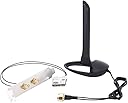
The Gigabyte GC-CI22M_A CNVi WiFi Wireless-AC Upgrade Kit features Intel’s CNVi Wi-Fi 9560 module, delivering blazing 1733 Mbps wireless speeds and Bluetooth 5 support. Tailored for Gigabyte’s Intel CNVi-compatible motherboards, it offers a sleek M.2 installation that keeps your PC build clean while providing rock-solid, high-speed wireless connectivity that rivals wired Ethernet.


| ASIN | B07MGXDC7F |
| Best Sellers Rank | #3,366 in Internal Computer Networking Cards |
| Brand | GIGABYTE |
| Color | black |
| Customer Reviews | 4.4 4.4 out of 5 stars (405) |
| Date First Available | December 14, 2018 |
| Item Dimensions LxWxH | 10.31 x 5.9 x 1.18 inches |
| Item Weight | 0.01 ounces |
| Item model number | GC-CI22M_A |
| Manufacturer | Gigabyte |
| Product Dimensions | 10.31 x 5.9 x 1.18 inches |
M**N
Added excellent WiFi to my new Desktop
I recently built a new editing workstation based on an Intel Z390 chipset. My old WiFi PCI card barely supports 5ghz, and I had heard good things about the new CNVi wireless chips combined with a 9th gen Intel CPU. I have to say, I'm thoroughly pleased by how well this performs. My connection is rock solid to my router, easily maintaining the max speed of my internet service. In fact, I'd have to say it seems to be on par with a wired connection to my router, which I'm thankful to NOT need to deal with (drilling holes and running cables, etc). I like that this came with the cables and external antenna all ready to go! The base of the antenna is magnetic and sticks nicely to my case for a good looking and extremely effective connection. I also really REALLY like how this keeps my PC relatively uncluttered inside. This build has a glass window, so the lack of additional PCI cards combined with my NVMe hdd in the other M.2 slot of my motherboard makes a very clean looking install.
G**L
Works Great with my Gigabyte Z-390M Gaming Motherboard
The title sums it up: I have a machine with a Gigabyte Z-390M Gaming motherboard, and this adaptor works great with it. I may never use it again because I usually use wired Ethernet; but I wanted it so I can use my phone's hotspot for backup Internet if the local ISP goes down. Now that I have the adapter installed, I expect to never have a wired Internet outage again. Installation was what one would expect when installing an M.2 device: Pop it in, screw it down, install the bracket, and connect the antennas. The system detected the card and installed the drivers automatically. One thing to be ready for is that the machine rebooted itself a couple of times on first boot after install, before loading the OS. There was no setting in BIOS to enable the CVNi slot before installing it; so I guess it had to do some magical stuff once it found the adapter. That magical stuff involved a couple of reboots. Another tip: When working with M.2 networking stuff, you should unplug the power supply (or turn it off if it has a switch), not just shut down the computer. Many times the computer will start itself when you insert the adapter. Because I had to remove the GPU to get to the CVNi slot, that would have been a bother. So make sure there's no power to the machine when installing this or any other M.2 network adapter. Speed, signal strength, stability, and so forth were all fine. This was using the hotspot on an iPhone 13 Pro Max. I assume it would work as well with any recent access point. In a nutshell, I'm a happy guy.
J**N
Everything went seamless and smooth.
Works great. No fuss. Worth noting it DOES NOT include the screw to hold the card down. Just a note in case you don't have the screw. The only kind of non-gripe I have is the length of the cables from the card to the back plate. When I took it out of the box, I wasn't sure it would reach! Turns out its more then a few inches then enough. Which makes cable management really easy, or non existent! The antenna seems like a "McDonald's toy". But it works. Has two connectors. I am considering hooking up 2 huge ALFA antennas to this since I have one already. I assume each antenna is for its respective band. (2.4 or 5). But I am not sure. The included antenna has been working great regardless of the fact that it is far from heavy duty. This kit works great and is work the money for the chipset. Its an AIO solution and adds BT 5 to boot. I'm happy with it.
T**4
Great upgrade for PC
My Dell Optiplex slim form SFF didnt have any wireless capability. During my search for a wireless card I discovered my PC uses an M2 type card and purchased a Gigabyte GC-CI22M wireless adapter. First the negatives: There is no M2 set screw included and there should be, since it is required for installation. Second, the only expansion slot plate they give you is for standard size PCs. It is too tall for a slim form PC. I cut the bigger plate to fit the slot on the back of the computer case. These 2 negatives cost a star. On to the performance. My ISP is wireless and maxes out around 20 mps so Im not able to give an opinion on max speeds. I did pull around 25 mps when I ran a speed test. Not bad considering that the wireless tower is approx 500 yards away and throttled by the ISP. I was able to connect quickly on both 2.4 ghz & 5. Bluetoth worked immediately to. The installation CD updated my win 10 quick access settings and features correctly too. No 3rd part software here. Screen mirroring connects flawlessly, the stream is clear without any buffering. Im very happy with the performance of the Intel M2 card. The Intel Wireless-AC 9560, M.2 2230, 2X2 Ac+Bt, Gigabit, is a very fast capable card that has Mimo technology which is required for serious streaming. You wont be disappointed with the performance thats for sure.
J**R
5 minute installation to my gigabyte z390m
Fantastic upgrade to the Gigabyte Z390 m gaming board. I primarily got this because I was having tough luck with USB dongles for Bluetooth. I noticed a substantial improvement on the smoothness and accuracy of my WMR BT controllers, they used to jitter and jump around on the USB dongles. Something nice was a much more reliable pairing and quicker connection time when powering on paired controllers. Make sure to double check your chipset/mobo/processor is equipped with & support integrated wifi/bluetooth. Otherwise, I'm not sure this particular chip will work. I have a fairly new Z390m and Intel 9600K so I'm good there. Lastly, I normally game wired LAN, but the couple tests on Steam using Rocket League over the weekend had no dropouts or noticeable lag when using the WiFi. Ping times to server were pretty much the same as when wired. My home is running an enterprise grade MU-MIMO AC1750 setup with managed switches so YMMV if you're using standard off the shelf stuff.
M**.
La compre el 2 de junio y decía que iba a llegar el 12, pero llego el 8 de junio 2020, no entiendo por que en otros lados como mercado libre esta arriba de 1300 y aquí siempre ha estado alrededor de los 600 con envió. Nada en contra, funciona perfectamente, yo la use con una H370 Aorus gaming 3 El cable de la antena se me hace un poco corto, pero fácilmente se puede poner arriba de cualquier gabinete, tiene imán en la parte de abajo para no moverse ya que es muy liviana, de manera que puedes ponerla en la parte de arriba o en un lado del gabinete, la quería principalmente para el wifi, trabajo de turno nocturno en soporte y no puedo quedarme sin internet, entonces si por alguna razón falla, le puedo pasar datos de mi tablet del trabajo Igual tiene bluetooth 5.0 que funciona perfecto con el control de xbox one, solo lo probé con 2 dispositivos a la vez, mi teléfono y el control
K**N
I was looking for a WiFi upgrade kit to use with my ASRock Z490 motherboard; and this one fit the bill just fine. The product received was a genuine Gigabyte product and the WiFi module was installed effortlessly. In case you have trouble, there are specific guides on the internet on how to install modules like this with ASRock motherboards. Thanks to the seller for shipping it.
J**Y
Firstly, this card is designed for special NVME-like ports on your motherboard, search you motherboard's manual for "CNVi" to see if you have it. I have two of these cards on a Gigabyte Aorus and a MSI motherboard. The card has two thin wires connecting to a plate for your case's rear IO, along side the graphics card etc. That plate connects to the antenna with two screw in connectors. If you don't like clutter those internal wires can actually connect to close-by WiFi adapters, no antenna. The antenna has a magnetised base, and it can actually sit flush on the side of your case as long as you fold the antenna down. Performance is excellent, it was able to saturate my broadband at 20/0.8 Mbps down/up. I'm sure it can do more. A word of warning, the thin internal cables can be easily yanked off the card, and the socket size is about 1mm, so it's really fiddly to reconnect. I managed to get these wire snagged on a non-rotating fan on my GPU while working on my PC. I thought the wifi card was dead in the water but apparently they are designed to be detached. Just make sure you have tiny hands!
J**A
I bought this because I was tired of using horrible USB-based Wifi Adapters. They're slow, and they're unreliable, and they don't offer Bluetooth, let alone v5.0. In the world filled with these adapters, this adapter is a blessing. I have specifics uses for both the Bluetooth and Miracast to use my wireless displays - the wifi part is only as a backup otherwise. For what you're getting, the price is good too. The installation was straightforward requiring little instruction; though persons brand new to PCs may be a little intimidated. It's worth noting that the antenna connections (2 of them) that connect directly to the chip CAN come off, but they're like buttons and can be pushed back in without any issues. The advertised speeds is correct; 1733Mbps translates to about 216MBps. With this adapter, I am getting a download speed of between 275-300 MBps; faster than the rated speed, and 200-250 MBps upload. This is on a Gigabit internet connection. Of course no where near the speed of the ethernet connection, but still faster than you'll need in 2020 for most usages. The parts can be considered fragile, with the antenna also the basic plastic you'd find with most consumer products. However once you install this I don't expect you'll be touching it often. The antenna piece is magnetic at the bottom, which allows me to stick it on my PC case pretty much anywhere. All in all, very happy with this purchase.
X**Z
Excelente opción si tu motherboard es compactible con adaptadores CNVI. tiene buenas velocidades de conexión y muy estable. Contra: es algo difícil de instalar, ya que puede que la computadora no la reconozca o solo reconozca el bluetooth, En caso de que te pase, hay que borrar todo lo relacionado con la tarjeta (drivers, aplicaciones, etc), apagar la compu y desmontar la tarjeta, posteriormente reinstalar los drivers (con la tarjeta desmontada) y finalmente volver a montar la tarjeta (apagar la compu antes).
Trustpilot
1 month ago
1 month ago